Don’t want to be a “taal natie” , but noticed a typo in dutch with v3.4.0, the “kWh dDeze dag” should be with only 1 d, I believe.
Noticed you also changed some global tokens, not sure if that would break any already existing flows?
myself only used the “previous” global tokens (which stayed the same) so can’t really tell without having to flipflop between versions.
Now for the next feature to add I am thinking of showing the peak usage. I understand this is important to know in Norway. Any Norwegians that can explain what is needed?
What would be interesting to have: peak of the this hour, the this day, this month or this year? Or just any peak untill you reset it via a flow?
Will be testing/setting up today, thank you @Gruijter , will let you know how it goes.
Btw, Power by the hour with Advanced Scheduler App for Homey | Homey seems to be nice combo for those of us having high/low tariffs + different schedule over weekends and holidays (just if someone will face the same challenge)
@Gruijter so far so good, active tariff via flow is being changed as per my schedule using the app I mentioned. When consumption changes, it uses correct tariff for calculation. I will keep watching it mainly when tariff get changed during given hour (eg. 18:15) , if that’s calculated correctly as well but I believe it will be fine and if not, the differences will be minimal anyway.
Also it’s great that current calculated values can be edited / corrected. Insights data works as well so now let’s see what the result will be. Anyway, awesome and working great so far, thank you !
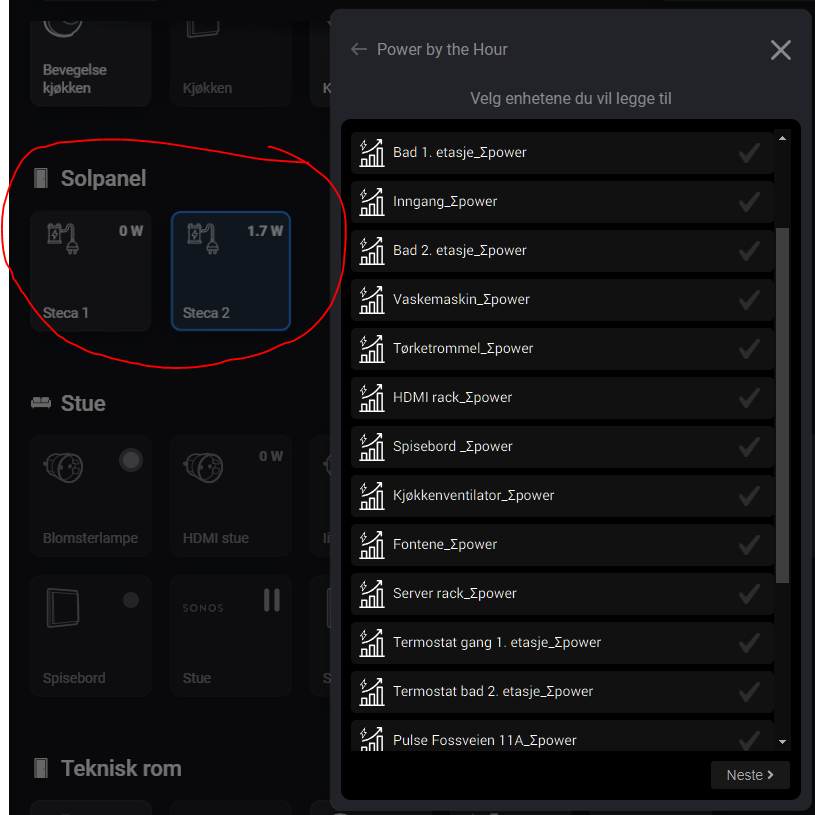
I have had some help making a integration to Homey from StecaGrid Coolcept inverters via Better Logic, HTTP request flow cards and Virtual Devices App for Homey | Homey.
It works like this:
Measure_power is a property from a device that accepts Watts as value. Its a virtual device rather than a Solar panel app.
In short the HTTP get JSONpath does the XML grab. the string goes to the tree xml and grabs array number [2] which is your watt value and inserts that in to variable in Better Logic.
Then the flow at when variable changed (better logic) it will update the measure_power attribute of steca 1 or 2 to that number
However, I am not able to get Power By The Hour to find the buttons.
@Gruijter Thanks for your reply. We are not able to get the kWh from the inverter only the Watts. Do you know if there is something else I can use to sum the Watt to kWh?
One day I might add support for Watt meters. But it is a pain in the because when for any reason the powermeter is interrupted (wifi failure, homey reboot, app restart, etc etc), or the Watt changes are not immediately reported, the kWh meter will be wrong. And that error will grow everytime an interruption takes place.
@Gruijter thank you for last update, your app is again even more powerful
I have a question re min/max values and I’m not sure if it’s related to my clamps / device or it might be general :
I see minimum value 0 but in the insights it actually never go to 0 - BUT, one timestamp is with value “NULL” (don’t ask me why ) - do you count also with such cases ?
maximum do not correspond to the real maximum as per insights… as per data export on example below, the max is 9794,603
Since PBTH is not working with Watts from the source device, but with kWh, I am deriving the Watts from the changes in kWh. This is compatible with all source devices, even when it doesn’t have a Watts meter.
To calculate Watts from kWh I am averaging over a period of at least 2 minutes. Short burst of high Watts will be flattened out. I am assuming that the energy companies that charge based on peak power also do averaging. But I have not received any feedback from users on how this is actually done.
Concerning the 0 lowest value I am not sure why that happened with you. Maybe a left over from the version 3.5.0 that I briefly had as testversion yesterday.
In my own test this morning I get to see the real (averaged) minimum showing me how much energy all devices are using that are always on. This is very helpful in reducing yearly cost, because every 10W I can reduce there will save me 20 Euro per year. And actually I already have saved a lot there because it used to be 250 watts some years ago (measured with help of a cloud energy manager Enelogic.nl)
In my case the peak was there for 4-5min but let’s see how it will behave.
I didn’t know about the recalculation but makes sense.
I did have test version yesterday but it got updated already yesterday to 3.5.1.
Btw, I changed reset values to hourly to clear values out and I got maximum value reset but minimal value stays at 0W (with time stamp as on the picture, the max got timestamp updated) … actually after reset it would be maybe better to be N/A until really calculated. (even for troubleshooting purposes…)
Let’s see what others tests/experience will show. Thank you again.
Yes, that is exactly what I changed in v3.5.1 I set the min/max values both to null, showing as a - in the device tile. Guess I have to look into that behaviour some more. Thx 4 testing and all the feedback!
I love the new function (v 3.4.1) to set actual price and get “Money this Hour/Day/Month/Year”, but in Insights it would be more useful with “Money prev. Hour/Day/Month/Year” like kWh.
I am using Homey app “Heating Controller” to pick timely energy tariff and update Power by the Hour.
How would you want to use these insights? Is it to later be able to compare with your energy bill? Would removing the current Money Hour/Day/Month/Year from Insights be ok then?
For example I will use Insights for Money to evaluate if time-based or flat-rate energy priceplan is the cheapest.
The problem with Money in Insights for the moment is that it looks like a “sawtooth” curve.
Agreed. I will remove the sawtooth Money insights. But be aware that the new money Insights will only be produced AFTER the period is over (just like with the kWh insights)
 , but noticed a typo in dutch with v3.4.0, the “kWh dDeze dag” should be with only 1

 because when for any reason the powermeter is interrupted (wifi failure, homey reboot, app restart, etc etc), or the Watt changes are not immediately reported, the kWh meter will be wrong. And that error will grow everytime an interruption takes place.


