Yes, fingers crossed it will not crash the app… 
Well, thank god I’m working tonight, so I can keep my eye on it 
If it goes bananas I’ll just deactivate it
Looks like it stayed on the last known price point. In my case normal. Should have switched to dirt cheap according to my settings. I changed the settings from automatic to flow, and set up flows for now. Assuming this will be back to normal in 24 hours?
Mine stayed at cheap… I hope it will resolve even before 24 hours.
Entsoe fetches new prices around 14:00 so I would expect the situation to resolve no later than 15:00, but hopefully, someone from Entsoe will notice and get it updated as soon as they go to work tomorrow. (PB checks for new prices every new hour if it has less than 12 hours of future prices)
Allright. Anyway, thanks for the notice 
I took the following actions to improve on this in the future:
It’s now available in the latest test version
Unfortunately, it is not possible to push this to stable before Athom has reviewed it so everyone on stable has to live with this issue meanwhile. (well, of course, you have to live with the issue after the fix too, just more deterministic as the missing prices are not on my table, just lets hope Entsoe fixes the missing prices early tomorrow morning.)
WORKAROUND: meanwhile, you can choose the prices from external app and use the “Strømregning” app to provide the prices, as this app seem to be fetching the prices from NordPool directly. (apparently, it is ok as long as NordPool have given consent in the first place, so if I get permission tomorrow I will add this as a failsafe for situations like this)
The situation seem to have been resolved now, Entsoe price data is once again available
Something odd has happenened. After the upgrade to version 0.18.23, Sparegris operates with available power (Tilgjengelig effekt) at 0w for most of the time. Although I have a limit of 5kWh, I end up at less than 2kwh all hours, I presume due to the 0 availability of power during most of the hour.
Is the limit hard-coded to 2kwh now?
Are you sure it didn’t happen for version 0.18.21, I had to push out version 0.18.23 to fix such an issue? Thus I find it strange if you did not experience an issue earlier and that it was not fixed for you in 0.18.23.
The problem in question was that if you were using EMERGENCY_OFF then your device would be always off. With the update in 0.18.23 then EMERGENCY_OFF will only turn off if it’s an emergency. (however, if the device was already turned off in 0.18.21 then of course it would still be off in 0.18.23. Is this what you have been seeing?)
How have you configured devices?
with “Change temperature”, “Turn on”, “Turn off” or “Emergency off” ?
No, but I made it configurable a little while back. Can you confirm that it is still 5 kWh in the settings?
Do you get any reports of unreliable devices in the settings?
One thing that the 0.18.23 change did affect is that in case the temperature setting is detected as not being set properly then it is tried once again. It might be that if the device does not respond to all the commands it will be overwhelmed with new change requests and as such go into some kind of hang situation where they stop responding to temperature changes. Could this be something you’re observing?
regards, Frode
I’m quite certain it was a result of 0.18.23. That happened around 0300 yesterday and from that point on, I have never had more than 2 kwh as houerly power usage.
I have tried changing the limit from 5 to 10, no change in behaviour.
I don’t use any emergency off. I just turn zones on or off as a function of windows or price.
I don’t get any reports of unreliable devices that I can see.
I don’t use temperature settings in Sparegris that I am aware of (apart from “frostsikring”)
The innsikt looks like this. I use “egendefinert” mode just to try to disable most of the sparegris control to be able to have hot water etc at home wheile we have this problem.
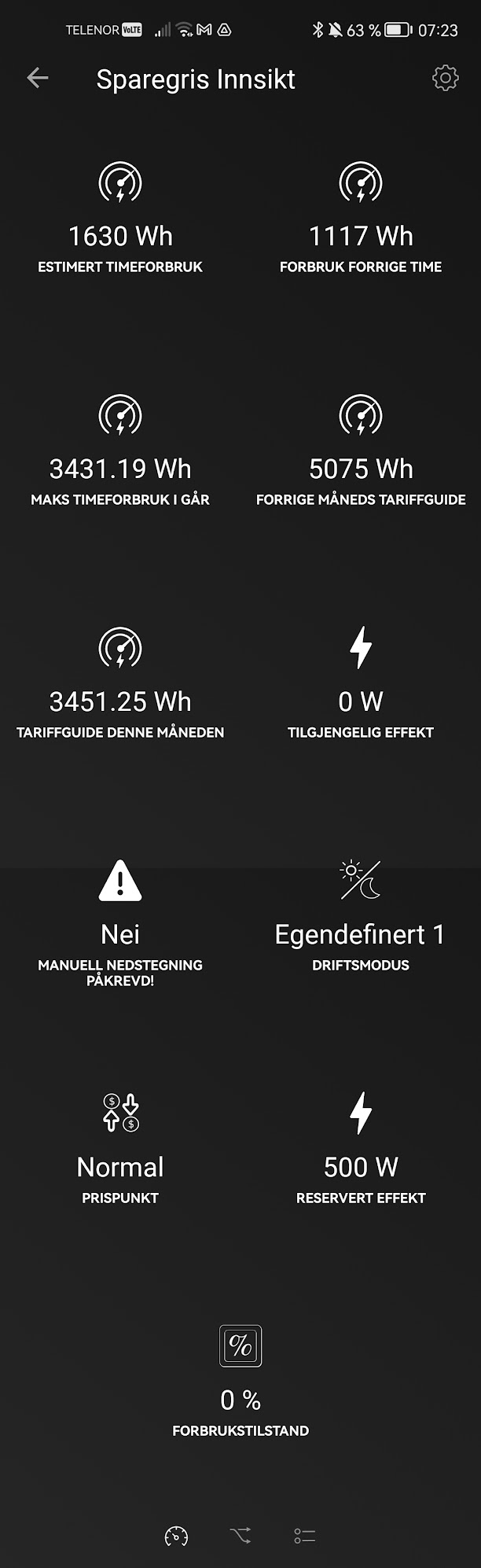
Can you enter the settings page and visit the “Avansert / Overstyring” tab and look if the zones you use are listed as off?
It could happen that whilst the new version was being updated some of the signals from the flows were lost?
yes, some zones are turned off, others are not. That seems to be correct according to how my flows works (turning on/off as a function of Tibber price).
E.g. my hot water boiler is now turned off due to high price. It will be turned on in a couple of hours, I believe. If it then starts heating, Sparegris will soon turn it off due to the 0W available power it has computed. Right now, we are 22 minutes into the hour. I have set the limit to 10Kwh (to test) and the estimated power consumption is 1739 Wh. Available power is 0Wh. The algorithm seems to use a far too low limit.
Followed up in private thread.

Currently you can only start a charging cycle by using flow actions. I will add a button on the page you showed as well, but it is not possible to start it from there currently.
Also, I see you have selected the second algorithm. Please note that the second algorithm is VERY experimental and has been observed to put the charger in a state where it is charging even if the Easee app claims that it is off… Which would result in a situation where SG could miss the power tariff as it cannot turn the charger off. I would recommend using the first, default method at least for the time being even though it has some weaknesses it is much safer. When the second method is corrected it will replace the first one.
Thanks for your quick answer:slightly_smiling_face: will change to first algoritme and start it via flow. Thanks again.

Did you add the Easee charger as controllable?
I did add a warning about it on the main screen, but I will make it clearer on this screen as well.
The threshold tells how much available power there must be in the power budget before charging is started. It is to prevent excessive on/off in the start of the hour and ensures that the charging is done in at most a single batch per hour.
The remaining energy is a known artefact in the display when you started charging based on number of hours instead of amount of energy. I will have to fix this.
If you mean easee charger in locked mode, then yes i did.
Ok, makes sense, will try a bit more

