Might be just a one time incident. Haven’t noticed it happening again. I just reacted when my main heat pump suddenly turned off, as it is highest on the priority list. Should only happen if the power usage in the house is abnormally high. And I was doing nothing at the time 
There is also the case where homey is overloaded. In such cases it will start returning incomplete device objects when being queried and as such the following will be written in the log:
Device cannot be fetched. (+some_other_error_info)
If you experience it again, please enter the log-page (where the device reporting is) and look for this feedback.
I could add code to get around this (have an infinite loop to retry fetching the device), however since the original problem is that Homey is overloaded I figured that being nice and stop trying would be the proper action. Besides the devices will be retried on/off again later anyway so the situation eventually resolves when homey is not overloaded again.
It does however also count toward the device reliability counter, I might have to reconsider if that is the best course of action though as the problem is homey and not the device…
Actually, you did not encounter just ONE new bug but TWO at the same time.
- First of all, there was the excessive on/off switching
- Then there was a critical issue that wouldn’t let you use new power ever if restarting a few minutes before the new hour
The last one is so critical that I need to push the fix to stable immediately. Otherwise, a few users might experience that PB does not allow any devices to turn on. (although, maybe, in the end, they would be happy that they saved the power anyway  )
)
Having some more issues today.
Price point is off.

This hour is 19 øre below today’s average price. Just under 10%, so my price point should be normal.
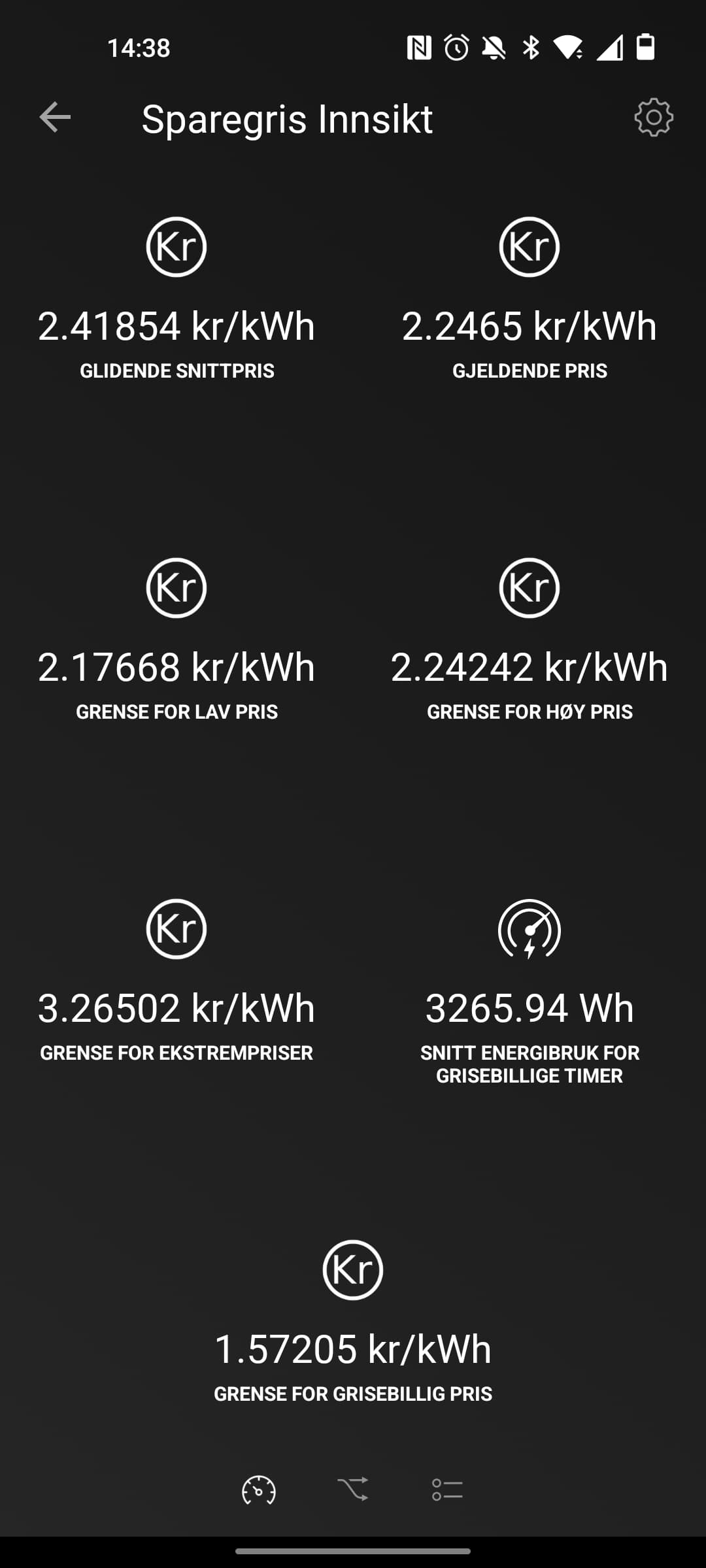
However, limit for high price is for some reason set lower than the average price.
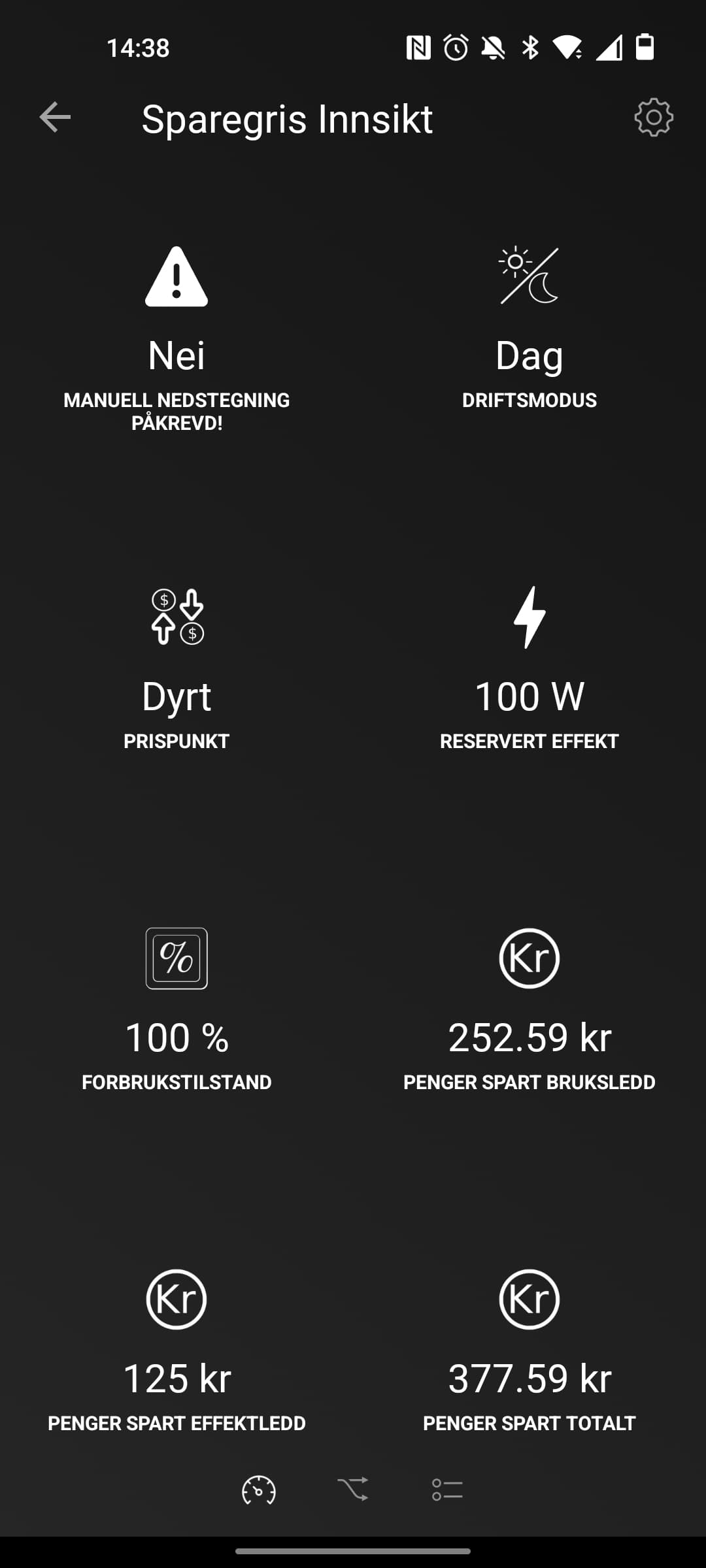
And price point is set to expensive.
Bug in the price fetching, or the calculation?
Edit:
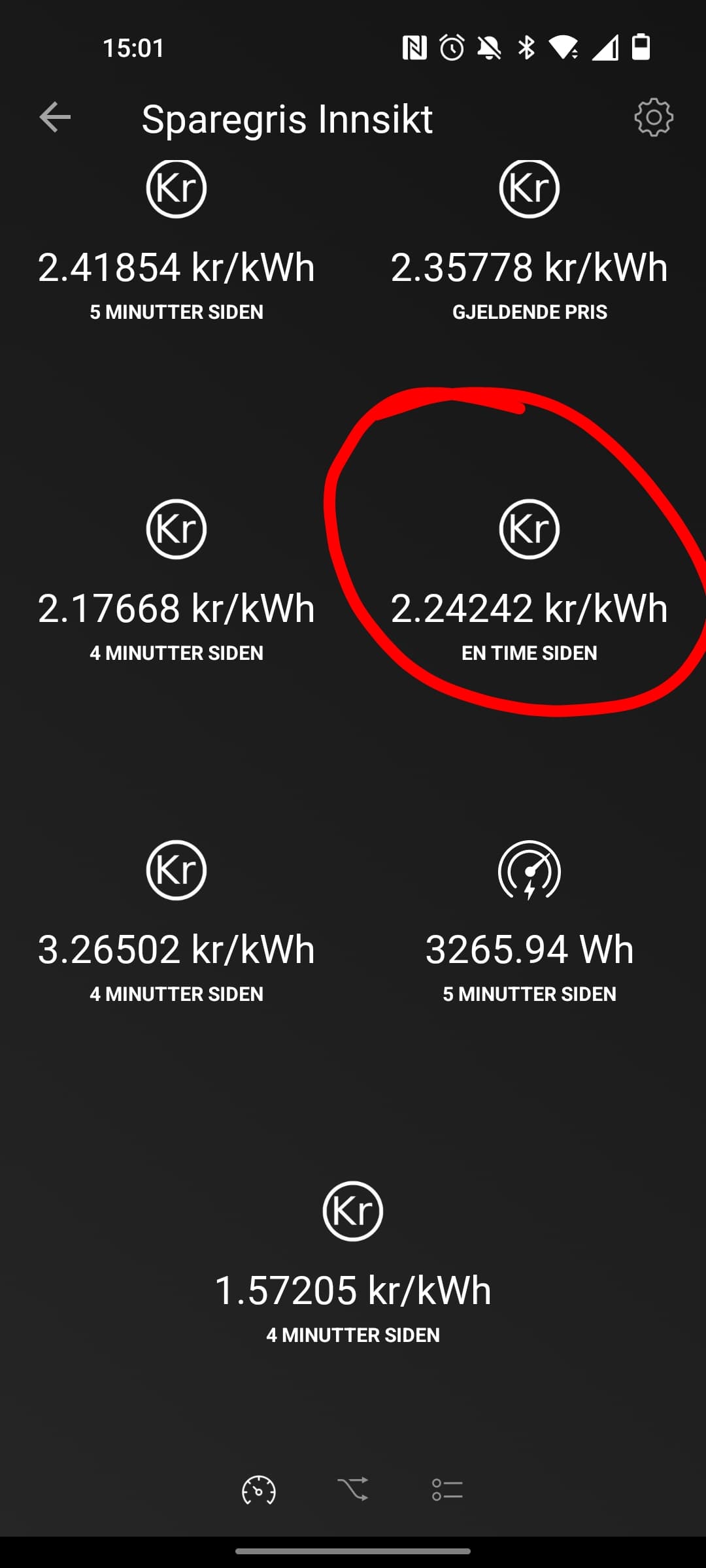
Rebooted Homey. All other price limits was refetched, but the limit for high prices seems stuck.
You are being hit by the case “minimum number of expensive hours per day”
You can adjust this limit in the settings if you’re not happy with it 
Intended behaviour.
But how is that possible? I have set a minimum of 4 expensive hours. The hour between 2 and 3 pm today was the 7th cheapest hour of the day. There are 17 hours more expensive then that one.
Just ran into a somewhat annoying problem, cleaning the filters on my air-air heating pump(s) 
Sensibo warned me that it was time for some filter cleaning (on both pumps🤦♂️), so i didn’t think much about it and used the OEM remotes to turn them off and ripped out the filters.
I guess you can see where this is going by now, but for those who don’t: halfway into the cleaning of the second units filters i hear a “beep” from the living room followed by the pump ramping off  Hood up, filters out, it couldn’t care less what i was trying to do. So I ran into the living room and unplugged the Sensibo and turned the pump off again.
Hadn’t more than gotten out to the kitchen, and it happened again. Now in it’s the second floor unit going off
So uhm, now both Sensibo’s are without power, and the pumps turned off.
I bet you have higher priority stuff to do, but I have a feature request to remedy this issue:
-
Making a new component for Sparegris called “Override( or something like that )”. When adding this device we get prompted the list off units controlled by Sparegris. We choice one (or maybe several, if posible)
-
Then with the component added when we access it we have a list much like how the Sensibo app is setup. In that list we choose what unit we want to override. Then get the option to “turn off” or “turn on”, this then overrides the other Sparegris settings for the selected unit and toggles the unit to “off” when turned selected to do so. And when told to go “on” again, it returns to normal operation.
This will give us the oppurtunity to change/clean filters. And even gives us the possibility to rather easily turn off an given unit if it needs some sort of maintenance.
I also cleaned my filters the other day.
There already is a solution for this. Just enter the app settings and select always off, for the device(s) you are servicing.
When you’re done, switch it back.
Yeah i know that’s the “correct” way to do it as of now. But having a easier way to turn the devices off for servicing would be ha huge QOL improvement in my opinion.
Everything that has to be done more than once a year should be done as easy as possible, if the circumstances allow for it (in general). Which i firmly believe is the case for this 
Guess I just didn’t see the need for it. Requires manual steps either way.
But hey, why not 
I have no idea, this need to be investigated future. You can track this issue here: High prices are reported not to work properly · Issue #29 · frodeheg/no.sparegris · GitHub any further info you might have or statistics / logs / graph would be greatly appreciated if you put it into that issue.
Haven’t seen it happen again though. To me it seems like the high price limit was calculated wrong for that day.
I guess the morale of the story is that I don’t clean the filters on my AC often enough when I have not had the same issue myself 
Well, anyway when I started making the app I thought ideally that I would only have to support a single mode: “keep the devices in the state they are in”. So if they are originally on, then turn off when needed but then back on again later. When off already, don’t turn on.
However… as it turns out… there was something annoying called unreliable devices, or lossy protocols … So the app could try to turn a device off but fail… then later when it check again it sees that it is on… which would be registered as a manually turn on since the app didn’t do it. Which led to the current options.
I too see the convenience with having a single service button. You can follow the progress on this here: Service button for AC devices · Issue #30 · frodeheg/no.sparegris · GitHub (and add comments if you have more input)
Nah, there is no correct (read: intended) way of doing it right now, I consider it more like a workaround
I have now high price and low price equal. So seems to be something wrong with high price. The price is cheap now, but since high has same value as cheap it is set to expensive.
Is it possible to have diiferent pricepoint settings linked to diffent mode? Ex. Turn heater on when cheap when day, and normal when night
So, I can confirm something was wrong, and it has been fixed here: High prices are reported not to work properly · Issue #29 · frodeheg/no.sparegris · GitHub
Apart from that having a high and low price limits equal is not strange in itself as it would happen when you have to clamp the price limits to observe a minimum number of cheap/expensive hours for a day.
However, as many people get confused by this I wonder if I should add a minimum amount of normal price hours to set them apart. Should I do this to ease any confusion?
No. Do you need it? …more importantly, will it make you happy if I add it? 
I added a poll, please cast your vote.
I’m missing the ability to assign equal priority to some devices in certain modes.
E.g. I’m heating 2 independent rooms, but only have capacity for one heating device.
Currently, only the top priority room will be warm, while the other will be freeze guarded. (Right?)
If the heaters were assigned equal priority, and capacity dictates that only one can run, PB could round-robin between them.
The number of active devices in a priority group shouldn’t be restricted to 1. If capacity is available, 2 out of a 3-device group could be active and round-robin’ed.
The rotation interval should probably be configurable, but 10-20 minutes (3-6 intervals per hour) sounds reasonable.
While it sounds like a nice addition, In one way this sounds like over-designing it, because if you don’t have enough power to keep both rooms at the temperature you want then none of them will be warm even with a rotation interval. All you will get is 2 colder rooms instead of one warm and one colder. Of course, it will make the temperature curves more similar between the rooms when there is a power shortage but it will not make both rooms warm. In normal situations, where power is abundant, I’m not sure it will make that much of a difference. Remember that the heating sources have their own thermostat anyway so they will turn on/off independently of when PB allows them to turn on/off. This means that PB may only be trying to avoid both of the rooms to heat at the same time, not to prevent one over the other to perform heating.
Have you experienced many differences between the two rooms you have already, is this a real problem?
Good answer! I agree it makes less sense with thermostats (which was the scenario I had in mind).
A minor request: Could we have an “And…” flow card to check a zone enabled state?
Some of my flows maintain their own yes/no variables, which feels kind of superfluous.
Heads up folks:
Piggy bank will NOT be able to control the price point tomorrow. (unless you use the option to fetch prices from the external app “Strømregning”)
- Allthough Nordpool has posted the prices for tomorrow
- They have not made it into the Entsoe transparency platform
This means that Sparegris will not know what the prices are tomorrow.
Although I’m not entirely sure how this will play out I suspect that
- Some of you will get a constant high price tomorrow while others may get
- a constant low price or
- whatever price category you ended up in last
- Or maybe just PB will start behaving odd some other way
In either case this is an unacceptable situation so I would like to know your input about what to do so we get a deterministic situation:
- Note that I cannot fetch the prices directly from the Nordpool web pages as this is illegal as they clearly state from their web page. (NB: I have sent Nordpool an e-mail trying to clarify if I can use their page as a backup in case entsoe fails (like now), I assume this will be ok as the app Strømregning already does this. Fingers crossed)
So my options are:
- Stay on the last known price until new price data is known (price point depending on your personal reference)
- Set the price point to static “normal” until we got prices
- Or perhaps I can create a “default” price setting that is selectable on the settings page.
- Maybe create a flow trigger command “future prices are not available” which would trigger every new hour that prices are not available. Then you can take your own actions depending on that (?)
- Any other suggestions?
Static normal, and future prices not available trigger
This will be the case from midnight? 20 minutes from now?
