I have the latest now 1.1.16, but same error.
How do I get app log? I cant find that.
(Edit: I think I found it, I have sent you all at GitHub)
I have the latest now 1.1.16, but same error.
How do I get app log? I cant find that.
(Edit: I think I found it, I have sent you all at GitHub)
@Robert_Schmidt thank you for the app.
Is it possible you add the app (and future updates) in het new community store?
Probably - I’ll need to test it out a bit.
Edit: I’ve published the latest version (1.1.18) now, but it is entirely untested via HCS. (Personally, I’ll wait till I have my replacement Panasonic wifi-module.)
(I will not answer questions about how to use HCS.)
I have 1.1.19, and still get the same error.
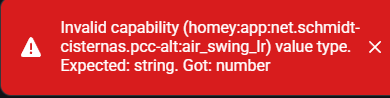
Anyone else having troubles with these error messages?
025-09-01T06:41:59.350Z [log] [ManagerDrivers] [Driver:aircon] [Device:35434015-3b21-4364-875f-1139de3002a2] setCapabilityValue(measure_temperature_inside, 18)
unhandledRejection:
Error: Invalid Capability: operation_mode
at Remote Process
at HomeyClient.emit (/node_modules/@athombv/homey-apps-sdk-v3/lib/HomeyClient.js:44:23)
at Object.emit (/node_modules/@athombv/homey-apps-sdk-v3/manager/drivers.js:78:54)
at Object.emit (/node_modules/@athombv/homey-apps-sdk-v3/lib/Driver.js:126:50)
at MyDevice.addCapability (/node_modules/@athombv/homey-apps-sdk-v3/lib/Device.js:460:25)
at MyDevice.setCap (/app/drivers/aircon/device.js:27:18)
at MyDevice.fetchFromService (/app/drivers/aircon/device.js:130:24)
at process.processTicksAndRejections (node:internal/process/task_queues:95:5)
at async /app/drivers/aircon/device.js:149:13
2025-09-01T06:41:59.369Z [log] [ManagerDrivers] [Driver:aircon] [Device:35434015-3b21-4364-875f-1139de3002a2] device action cards have been initialized
2025-09-01T06:41:59.371Z [log] [ManagerDrivers] [Driver:aircon] [Device:35434015-3b21-4364-875f-1139de3002a2] Device ‘CS-TZ20WKEW+4756834677’ has been initialized
2025-09-01T06:42:00.378Z [log] [ManagerDrivers] [Driver:aircon] [Device:af94b681-6560-4c6a-b867-05ac02d8e24a] setCapabilityValue(measure_temperature_inside, 19)
unhandledRejection:
Error: Invalid Capability: operation_mode
at Remote Process
at HomeyClient.emit (/node_modules/@athombv/homey-apps-sdk-v3/lib/HomeyClient.js:44:23)
at Object.emit (/node_modules/@athombv/homey-apps-sdk-v3/manager/drivers.js:78:54)
at Object.emit (/node_modules/@athombv/homey-apps-sdk-v3/lib/Driver.js:126:50)
at MyDevice.addCapability (/node_modules/@athombv/homey-apps-sdk-v3/lib/Device.js:460:25)
at MyDevice.setCap (/app/drivers/aircon/device.js:27:18)
at MyDevice.fetchFromService (/app/drivers/aircon/device.js:130:24)
at process.processTicksAndRejections (node:internal/process/task_queues:95:5)
at async /app/drivers/aircon/device.js:149:13
2025-09-01T06:42:00.394Z [log] [ManagerDrivers] [Driver:aircon] [Device:af94b681-6560-4c6a-b867-05ac02d8e24a] Device ‘CS-TZ20WKEW+4756834685’ has been initialized
Not sure what’s causing it, I just updated, when I open the device in homey web app I also get:
Getting a lots of errors, using v1.1.20. But most commands gets thrue anyway.
unhandledRejection:
Error: Invalid Capability: operation_mode
at Remote Process
at HomeyClient.emit (/node_modules/@athombv/homey-apps-sdk-v3/lib/HomeyClient.js:44:23)
at Object.emit (/node_modules/@athombv/homey-apps-sdk-v3/manager/drivers.js:78:54)
at Object.emit (/node_modules/@athombv/homey-apps-sdk-v3/lib/Driver.js:126:50)
at MyDevice.addCapability (/node_modules/@athombv/homey-apps-sdk-v3/lib/Device.js:459:25)
at MyDevice.setCap (/app/drivers/aircon/device.js:28:24)
at MyDevice.updateEnergyConsumption (/app/drivers/aircon/device.js:95:18)
at MyDevice.fetchPowerConsumption (/app/drivers/aircon/device.js:64:20)
at process.processTicksAndRejections (node:internal/process/task_queues:95:5)
at async /app/drivers/aircon/device.js:108:17
at async MyDriver.invokeClient (/app/drivers/aircon/driver.js:90:24)
2025-10-02T09:29:29.307Z [log] [ManagerDrivers] [Driver:aircon] [Device:99236813-5a6e-405b-8b31-d25d8d0787b2] setCapabilityValue(measure_temperature, 17)
unhandledRejection:
Error: Invalid Capability: operation_mode
at Remote Process
at HomeyClient.emit (/node_modules/@athombv/homey-apps-sdk-v3/lib/HomeyClient.js:44:23)
at Object.emit (/node_modules/@athombv/homey-apps-sdk-v3/manager/drivers.js:78:54)
at Object.emit (/node_modules/@athombv/homey-apps-sdk-v3/lib/Driver.js:126:50)
at MyDevice.addCapability (/node_modules/@athombv/homey-apps-sdk-v3/lib/Device.js:459:25)
at MyDevice.setCap (/app/drivers/aircon/device.js:28:24)
at MyDevice.fetchPowerConsumption (/app/drivers/aircon/device.js:69:18)
at process.processTicksAndRejections (node:internal/process/task_queues:95:5)
at async /app/drivers/aircon/device.js:108:17
at async MyDriver.invokeClient (/app/drivers/aircon/driver.js:90:24)
at async MyDevice.fetchFromService (/app/drivers/aircon/device.js:105:22)
2025-10-02T09:29:29.347Z [log] [ManagerDrivers] [Driver:aircon] [Device:99236813-5a6e-405b-8b31-d25d8d0787b2] device action cards have been initialized
2025-10-02T09:29:29.350Z [log] [ManagerDrivers] [Driver:aircon] [Device:99236813-5a6e-405b-8b31-d25d8d0787b2] Device ‘CS-NZ35VKE+4971211991’ has been initialized
2025-10-02T09:30:28.080Z [log] [ManagerDrivers] [Driver:aircon] [Device:99236813-5a6e-405b-8b31-d25d8d0787b2] postToService: { thermostat_mode: ‘Heat’ }
2025-10-02T09:30:28.087Z [log] [ManagerDrivers] [Driver:aircon] [Device:99236813-5a6e-405b-8b31-d25d8d0787b2] postToService: { fan_speed: ‘Auto’ }
2025-10-02T09:30:31.120Z [log] [ManagerDrivers] [Driver:aircon] [Device:99236813-5a6e-405b-8b31-d25d8d0787b2] postToService: { onoff: true, target_temperature: 21 }
For the most part, PCC Alternative works well for me. Using v1.1.20. It’s when I build flows that I can’t quite get automatic airswing. If this can be resolved, I would be very grateful. The control is in the app behind “Fan auto mode”, but is not available via flow.
Thank you, @Robert_Schmidt !
I just installed this app, following your instructions (easy and quick), and it_just_works. I am running a NZ25 dual split model, and both heads are picked up correctly. Havent tried out all features yet, but even getting this far is fantastic.
Lets hope Panasonic gets their sh*t together and opens up their API for official integrations, some time in the future, so personal projects like this (even though greatly appreciated) are not necessary.
Thanks again!
I’ll get the message “Authentication failed, edit credentials in app settings”.
If i update the credentials, the messages stays the same.
It has workt till today
How can i fix this?
Panasonic server which the Homey app communicates with was impacted by the world-wide Azure issues yesterday evening. It started working again late yesterday. A simple restart of the Homey app should fix the issue.
Ahh….you’re the best.
Thanxs!
Sadly, the latest version seems to be incompatible. Used to work just fine but even after a restart of the app and homey it remains broken.

Inside the app I get a better bug trace:
TypeError: Cannot read property ‘decimals’ of undefined
in DeviceThermostatControl
in Connect(DeviceThermostatControl)
in RCTView
in Unkown
I see the same error with v1.1.20 on my new Homey Pro 2023 which I just set up and installed this APP on. The error pops up when trying opening the device dashboard. App (slightly modified from master) is running without issues on my old Homey (which has been restarted multiple times).
Currently debugging the changes between master (failing) and my branch to find the cause.


