You had a very interesting case in which two datapoints (the two ventilations systems) got the same name. I personally think MyUplink should not have let this happen, but - they did, so we need to handle it. I assume it happens due to the fact you have external systems for ventilation, and therefore they were provided with the same name
I therefore added a small fix to the app which handles name collisions on datapoint names, and now you can control and monitor your fans.
Here’s the instructions on what needs to be done:
- Make sure you got the latest version updated: version 2.0.15
- Remove the heatpump you added on previous version, and add it again (so the names will be refreshed). Your device has more than 850 datapoints, so it takes some time

- Once the device is added, click on the device-settings gear icon:

- Take all the content of the “Datapoint Names” textarea, and copy it to a text editor you you can see the names clearly:


On the text editor, find the “Ventilation Mode” datapoint. You will see there are two:
Ventilation mode and Ventilation mode (1) - this is my fix (in previous version, there was only one)
- Go back to the device settings, and copy “Ventilation mode” and “Ventilation mode (1)” from the text editor to two of your datapoints (any two will be good):

click the “Save” button
-
You can now see the status of the two ventilation systems on the capability pane:
-
You can now add “Set Datapoint Value” flowcards (THEN flowcards) in order to set the ventilation mode of the two sub-devices:
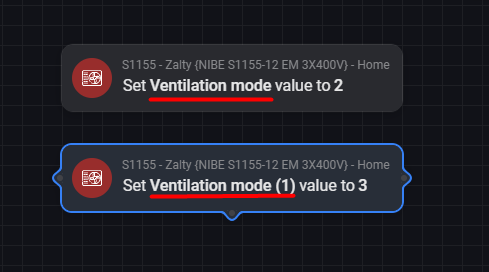

Once you set the values of the ventilation systems, it will take the capability pane of the app up to 1 minute to refresh.
I hope this solves the problem, let me know if any issue arise.
