Check that Homey’s IP address hasn’t changed. If it has then reconfigure the settings in the gateway.
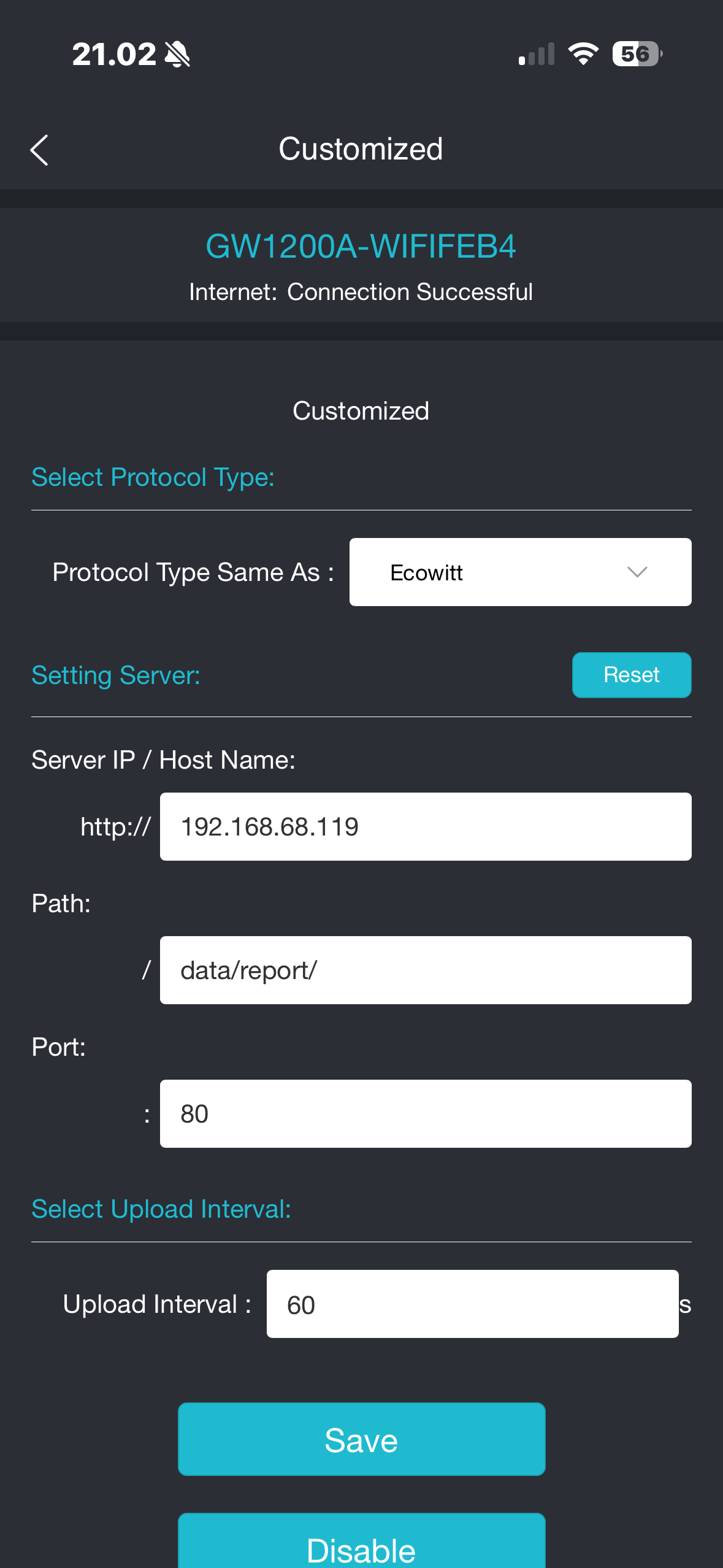
I don’t think port 80 will work as Homey already uses that. Any reason you change the default value of 7777?
That was the reason! Now everything is working just fine.
I guess software update or something else messed the port.
Thank you!
1 Like
Thank you for the detailed information. The MQTT sounds very interesting, because I’m looking to make everything Internet-in-depending. What exactly is this and does it require increased knowledge?
The Misol and Ecowitt app is not dependent on the Internet and is pretty much plug and play.
To use MQTT, you would need to host a MQTT broker somewhere, which could be Homey, plus setup a MQTT client and configure a lot more information. All that for no benefits.
This app is much easier, faster and consumes far less memory on Homey.
1 Like
Okay, thank you so much 
How do I bring in my Ecowitt GW1100 Wi-Fi Gateway and Ecowitt Multi-channel Soil moisture sensor into Homey Pro. I downloaded the misol and ecowitt app, but it does not find the ecowitt gateway. I must be missing a step in between.
Appreciate all your help. Thanks.
Did you find the instuctions in post 1 of the app topic?
I tried that but didn’t work. The Ecowitt GW 1100 shows up in the Ecowitt app but it is on the 915 Mhz frequency, but I’m wondering if that is the reason it is not showing up on the Homey App via misol and ecowitt, as I’m not sure if it needs to be on 433 Mhz. Any idea if I can bring in the GW 1100 with a 915 Mhz (North American frequency) into the Homey app?
I don’t think that WiFi devices communicate directly to each other, but always via the WiFi router. So using different WiFi frequencies could not be the problem in my opinion.
In the manual in the app topic I linked to, it’s also explained how to manually add the gateway to Homey.
The frequencies of the sensor(s) and the gateway should match, these are unrelated to the wifi connection between Homey & gateway.
1 Like
I have a feature request. I am running an Ecowitt WS3900A with an Ecowitt WS85. Recently the firmware of the WS3900A was updated to version 1.4.1 and two new measurements were added that were also added to the EcoWitt dashboard.
- A 10 minute average for wind direction (API measurement name “winddir_avg10m”)
- Last 24 hour rainfall (API measurement name “last24hrain_piezo”)
Would it be possible to add these measurements to the ones read by the Homey app in a future update?
I will add it my list of things to do. Give me a nudge in a few days if it hasn’t happened as my memory is getting terrible and I keep forgetting where I put the list 
1 Like
It’s just a “nice to have”. No rush. 
Hi Adrian, I just successfully connected a brand new WFC02 ball valve to my GW2000 gateway. Do you think it could be possible to add support of this device to your app? Let me know if sending you a diagnostic report can help.
Thanks and regards
Hi Adrian, have you got the chance to look at the WFC02 support? Thx
Sorry, not yet. Mother-in-law is terminally ill so spend lots of time at the hospital.
Thx for your reply. No worry for my request, it can wait. Priority has to be to our relatives particularly in such a situation. I completely understand.
1 Like
Just a question.
The moment the outside temperature wil go under 0 Cº the dew point jumps to the same temperature as the outside temperature. I don’t understand the logic of that especialy because the humidity is not above 90%
Is it a mistake in the app ore do i not understand the logic?
Thans for explaning.
To show what i mean see the graph.

