Tried to restart the web server?
Sure, several times. Also tried on PC and tabet and mobile.
That’s a bit strange. I am not aware of any changes.
I will try looking into that. It is just that I am still down with sickness. So it might take a while still. Sorry.
No hurry, take your time to recover, thanks for reacting.
Hi @Peter_Kawa , can you please try if FTP still works to find out if it’s my local problem or a system/app problem? Thanks in advance.
When I open the App settings, HTTP and FTP Servers are both running, is this standard?
Yes, still works fine on my Pro 19’s, Jan.
I use the ‘normal’ ipv4 IP address, like 192.168.2.x:5081, not the homey-62xxxxxxxxxxxx:5081 address like mentioned in the app settings.
And it doesn’t work with ftp client setting “passive mode”, maybe you have it enabled?
You can disable auto launch for the FTP service, Jan:
Only the description above it needs a little update

Thanks Peter, this means it is my local problem.
Tried all this but still no result, the connection is established but the LIST command does not work.
There are several sound files on it and they can be played, so the LIST command should have to show these files.
In active mode it takes a few seconds before the response message and the error is displayed.
Any other suggestions that I can try?
@robertklep Any idea?
Apparently, the Micro Web Server app doesn’t support passive mode:
14:56:32	Command:	PASV
14:56:32	Response:	502 Command not supported
14:56:32	Command:	PORT 192,168,2,11,197,4
14:56:32	Response:	200 The requested action has been successfully completed
14:56:32	Command:	LIST
14:56:37	Response:	425 No connection established
That means that the FTP server needs to be able to make a network connection with your PC (on IP address 192.168.2.11), and it looks like that’s being blocked, probably by a firewall.
The annoying thing about this is that the port number to which the server connects will be different every time (that’s why active mode sucks and FTP servers should support passive mode) so all you can do is somehow whitelist your Homey to allow access to all ports on your PC.
Thanks Robert, apparently I added the passive-mode logging, here is a logging in active-mode:
12:48:43	Status:	Connecting to 192.168.2.22:5081...
12:48:43	Status:	Connection established, waiting for welcome message...
12:48:43	Status:	Insecure server, it does not support FTP over TLS.
12:48:44	Status:	Logged in
12:48:44	Status:	Retrieving directory listing...
12:48:44	Command:	PWD
12:48:44	Response:	257 "/"
12:48:44	Command:	TYPE I
12:48:44	Response:	200 Switch to "binary" transfer mode.
12:48:44	Command:	PORT 192,168,2,11,20,240
12:48:44	Response:	200 The requested action has been successfully completed
12:48:44	Command:	LIST
12:48:49	Response:	425 No connection established
12:48:49	Error:	Failed to retrieve directory listing
13:00:43	Status:	Disconnected from server
Does this give a better view on the problem? (disconnected manual @13:00:43)
Still the same issue: the server wants to connect to your PC, and it doesn’t work (“425 No connection established”)
Thanks @robertklep and @Peter_Kawa Found the problem,
the Windows Defender Firewall was blocking it.
Merry Christmas, everyone.
I am receiving an error when trying to connect via FTP, and I am also unable to access the site through Google Chrome.
[12:16:53] [L] Connecting to Homey → DNS=homey-XXXXXXXXXXX IP=192.168.1.39 PORT=5081
[12:16:53] [L] Connected to Homey
[12:16:53] [L] 220-Micro Web Server v2.2.0
[12:16:53] [L] 220 Features: a .
[12:16:53] [L] USER anonymous
[12:16:53] [L] 230 User logged in, proceed
[12:16:53] [L] SYST
[12:16:53] [L] 215 UNIX Type: L8
[12:16:53] [L] FEAT
[12:16:53] [L] 211-Extensions supported
[12:16:53] [L] AUTH TLS
[12:16:53] [L] MDTM
[12:16:53] [L] PBSZ
[12:16:53] [L] PROT
[12:16:53] [L] SIZE
[12:16:53] [L] TYPE A,I,L
[12:16:53] [L] UTF8
[12:16:53] [L] 211 End
[12:16:53] [L] OPTS UTF8 ON
[12:16:53] [L] 200 UTF8 encoding on
[12:16:53] [L] PWD
[12:16:53] [L] 257 “/”
[12:16:53] [L] PASV
[12:16:53] [L] 502 Command not supported
[12:16:54] [L] List Error
[12:16:54] [L] PASV mode failed, trying PORT mode.
[12:16:54] [L] Listening on PORT: 49390, Waiting for connection.
[12:16:54] [L] PORT 192,168,1,17,192,238
[12:16:54] [L] 200 The requested action has been successfully completed
[12:16:54] [L] LIST -al
[12:16:54] [L] 451 ENOENT: no such file or directory, stat ‘/userdata/files/-al’
[12:16:54] [L] LIST
[12:16:54] [L] 451 No connector setup, send PASV or PORT
[12:16:55] [L] List Error
If I ignore the error and upload my files,
they will be uploaded, but I cannot see them in the FTP or Web client.
But I can access them via local URL
http://192.168.1.39:5080/Burgler_Alarm_15m.mp3
Edit:
Tried to use filezilla instead of Flash FXP
Here I can see my files.

So? problem solved?
This uses port 5080
Yes problem solved by using Filezilla
Hello,
I’m trying to create an HTML file in HomeyScript, that then can be hosted by Micro Webserver.
I am having trouble storing the file. Does anyone know how to do this?
Thanks.
You have to create such a file with a simple text editor, and save it as .html
With Micro Web Server, you can FTP that file to the folder it should sit in.
Make sure the Micro Web Server’s FTP server is running

Now, with an FTP program like FileZilla you can send it to the right Micro Web Server folder
ftp://homeys.ip.address:5081/name/of/folder/
Example
Define the FTP connection
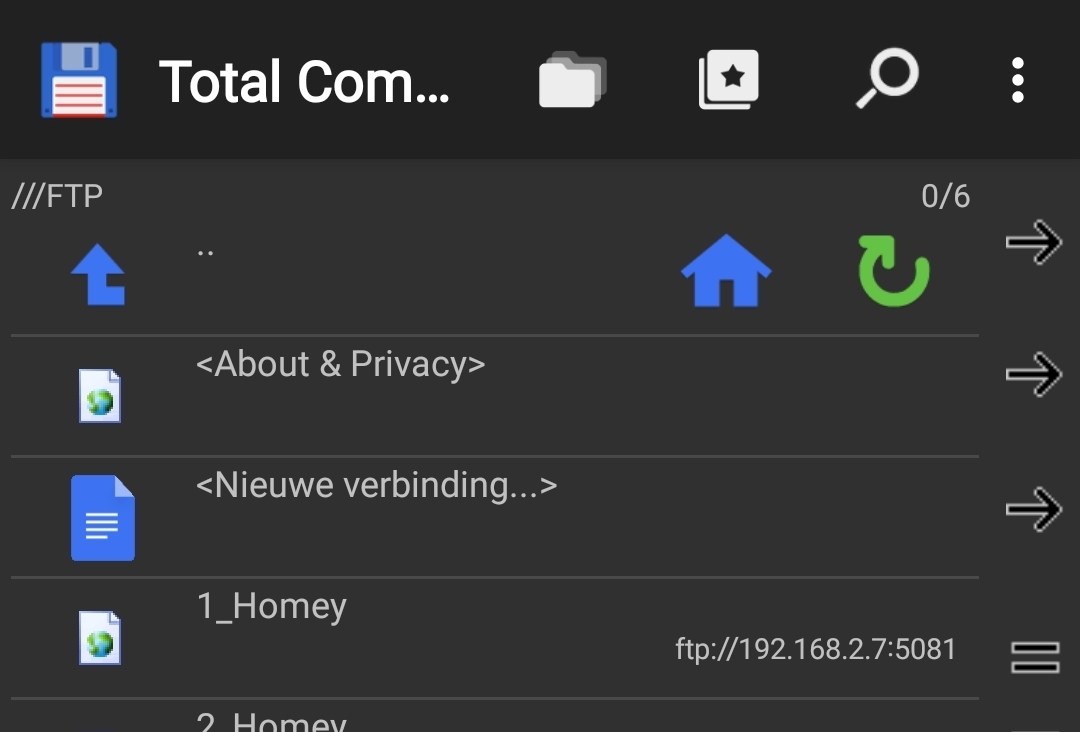
When connection is established, you can copy the .html file from the local storage folder to the FTP / web server folder

Thanks Peter,
But I want to write the file from HomeyScript. It is constantly changing (regenerated).
I see.
It should be possible by using adv. flow with Homeyscript “Run code […]” card, and save the result as file, by using a yet to be created and requested flow card of the FTP Client app
Thanks Peter,
So there’s no way to write directly to the folder that Micro Web Server is using. I have the HomeyScript function ready for creating the html file.
Is it also not possible to FTP from HomeyScript?
Otherwise I guess I have to write it to an external web server using an API.
