The diagnostics report (d68e6aad-a69d-4829-903e-3e6c8f90257d) shows that a lot of retries are needed before the battery accepts the mode changes commands. Since the local API does not like multiple apps at the same time, it might be that a P1 meter or other device is intefering with the commands. This is an common issue with the Marstek UDP stack and driving a lot of users (including me) crazy. It seems they are unable to get it to respond in a reliable fashion.
I will see if I can add these (again) to the settings page. I’ve implemented the Homey App so that DHCP ip changes are detected (due to UDP broadcast) so that devices continue working. The IP address is stored in the Homey App, but not displayed in the settings. I will check if this is possible!
The API also reports mac addresses, but I noticed that this was of the WiFi AP, not of the battery itself. I chose not to store this.
Hi. The app seems to be reporting a factor 10 higher stored energy level. E.g. 48.5 kWh in stead of 4.85 kWh.
Hello,
I’ve noticed that after the recent firmware update, I now have the option to control the battery discharge level (30–88%), which wasn’t available previously.
Regarding my setup, I have stopped using the P1 meter because it frequently lost its connection, requiring a manual reset every few days. I have since switched to the Shelly 3EM as an external solution. Additionally, I’ve adjusted the polling intervals in the Homey battery app to 45 and 60 seconds to reduce overlapping data requests.
Diagnostic Report: d439959a-c6f7-4256-a0df-8c03bed8dfbe
Thanks, now I could set my 2 marstek to a static IP adres
Hi Erwin, you can correct the factors in the settings of the Homey device. Please let me know what settings you have changed and what hardware type and firmware you have so I can set this in the default correctly.


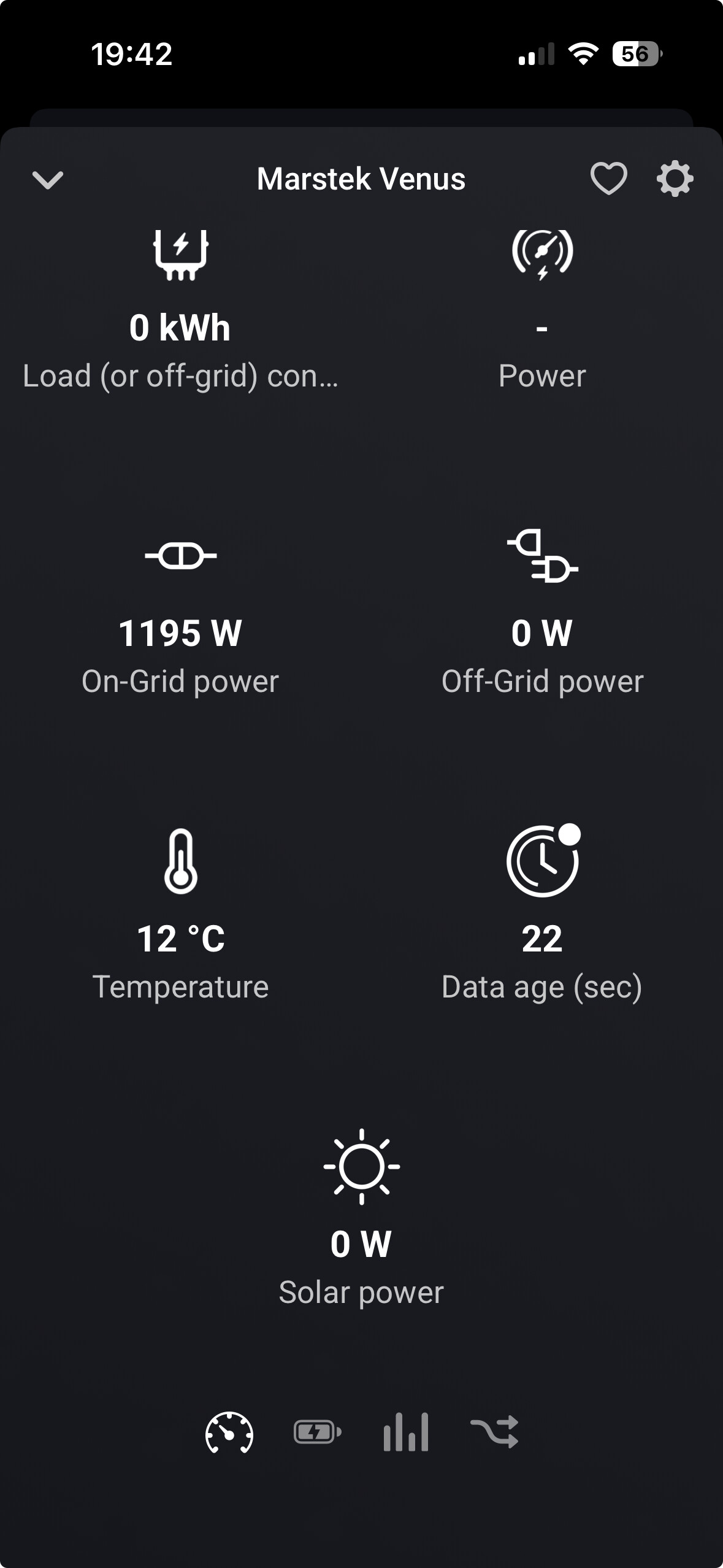

Unfortunately the Venus V3 with firmware 146 does not seem to communicate the values for ‘power’ anymore. Since the API is not sending this value, there is nothing I can do. If enough people contact Marstek about the missing ‘bat_power’ property from the ‘ES.GetStatus’ API call, perhaps they are able to fix this?
Please install the latest TEST version of the app. With that version you can fine-tune the shown factors; these can be different per Marstek hardware and firmware version.
P1 meter troubles are here the same; it is not reliable.
I’ve not noticed any changes in the API documentation (yet), so not sure how to support the new discharge level property. Perhaps if you contact Marstek (again) and ask them if there is new documentation?
I seem to be encouraging more people to contact Marstek, since I do not get any replies from them, and others have more luck.
Does that also apply to Battery Charging State, Load, and Solar Power? Then I can report this to Marstek.
The ‘Battery Charging State’ is an Homey capability that is derived from the same Marstek API value; so no need to report it. If ‘bat_power’ is in the API repsones; both will work.
The ‘Solar Power’ is derived from the ‘pv_power’ property in the same ‘ES.GetStatus’ API response. This property still seems to be present in the response, so if there is a value, it will be shown in the Homey App. I don’t have solar connected, so can’t verify if the response values are valid. The API documentation describes this as ‘Solar charging power’, and I guess this is applicable for hardware that has dedicated PV input.
Hi Edward, I reinstalled the APP in Homey and added the battery. I’m using the latest firmware version (V146) and APP version 0.8.11. In Node-Red, I’m listening on PORT 30000, and I noticed that the APP still periodically produces a series of the same command (about 5 times each time). By the way, the reported temperature is now the actual temperature and no longer needs to be divided by 10.
Thanks, I also saw the battery’s LAN IP address in the app. Apparently, the battery has the strange name “CH395”" in my list of IP addresses generated by the router.
Thank you for the feedback! Can you please generate a diagnostics report in the Homey interface so I can take a look at the series of commands you reported?
Hi Edward, see link: 42c81990-b87a-475e-b63d-18a3b0653671
According to the logs; messages are prepared and transmitted at expected interval (id is incrementing as expected). But… I don’t see any response from your battery though…
Yesterday I executed a repair of the APP. After this the APP did not update anymore. Now I am struggling to install the APP. During the installation the APP does not identify the Marstek Battery anymore. Re-installing the APP does not work. Up till now without any success.
The app seems to be functioning; but it is the battery that is not responding. Check the instruction in the start of this topic on how to reset your battery using the BLE tool. Until now, that always seems to kick-start the communication module, so that discovery is possible again.
