I have now tryed a new z-wave chip, but same result.
I mooved my Homey to be stationed 1 m from the door. Not 8 m like it was. Now it works fine. Seems to me there is a bug when ID lock is talking via other devices. The only thing thats different now is that homey has direct link to the door.
Mabye this obesrvation helps in furture trubleshooting.
Hi @TedTolboom! Thanks for developing this app! I’ve successfully managed to install my z-wave module and can use the basic functions of locking/unlocking from the app, etc. Just a quick question: Will you add the option to control and manage pin codes from within the app? It seems that I can add pin codes under “Configure app” --> “Code/Tag Mappings” --> “Add Code”. However, none of the codes that I have set through the lock itself appear here. It would be good to be able to control all the codes from the app, give them names (of the users), in order to get a notification when a certain code is used (e.g. when the kids are home from school, or a time-limited service code has been used to unlock the door).
Looking forward to your reply! Keep up the good work!
Im wondering the same as previus writer and in wondering if you would also write in support for the away function. I would love that along with flow cards for it.
First of all, thank you so much @TedTolboom for developing the ID Lock app for Homey!! I installed the lock today and almost everything works like a charm.
I wonder if anyone can help me out with one thing that doesn’t work. I don’t succeed to get a flow started with “Someone unlocked the door”.
Flows that start with “A lock just unlocked” work fine, though. But I want to know what child unlocked the door…
There is one master pin and five user pins registered in the lock (locally) and they all work fine to unlock the door. I’ve also tried to add the corresponding five users with the same index numbers in the app.
I attach a few print screens to show you what I’ve tried.
I use a ID Lock 150 with firmware 1.5.2 and app version 1.2.2. Don’t know how to check the firmware of the Z-Wave module.
Again, thank you so much in advance for any help and please let me know if you need any more info from me.
Try to remove all entries and redo it. I remember that helped me a long time ago.
If you get it to work, please report back if it is reliable. For me, often it doesn’t register who unlocked.
I also bought an Aeotec USB Z-Wave Controller and the current firmware version of the lock’s Z-Wave Controller was 1.6 (says 1.06). I installed the prior version of 1.5 (says 1.05) and added it back to Homey and reconfigured it, but same result. “Someone unlocked the door” doesn’t work :(, but all the rest does.
Would be so thankful to anyone who helps me succeed with this!
That sounds like the change that idlock introduced in one of their later firmwares where they did a change to how the id’s is reported. Where the app cant handle it in the proper way anymore How you surcomvent that is by detecting on the “who” variable with something like “Unknown [tag:18]” as a example. If you dump the who tag down to simple log you will find out what key or tag is what id.
Thanks for helping out, Ted! Please take a look at the print screen above of my flow. I’ve tried to make Better Logic write the content of the who tag. But I think the flow isn’t started at all, nothing is added to my Simple Log either.
Is there another way for me to catch the who content?
Seems pretty much the same as my previous flow. Tried yours too, no success. Am I right that the flow should start with the trigger “Someone unlocked the door” in When, without any condition in And? Also without anything registered in the user index section of the app?
Do you know what firmware you are using on the lock, on its Z-Wave module and the Homey ID Lock app version?
Firmware version 1.5.3
ID lock app version 1.2.2
Zwave module 1.6
How mine works is that first in the when section that is all you need the card have a who tag tied to it…
The and section is just to check the who tag and if it is exact the text i have in the condition it goes onward.
If the app would have worked properly with the tag translation function that you have in the settings it would have just been the name of the tag you put in the list that you could have used for detecting. But sins it can not return the id translation atm. It just return a unknown text entry with the id in it. A way for you to test what you should put in the logic card as a exact match you should just dump the who tag in a simpel log or timeline dump entry and then set the text in your condiotion logic card.
I’m not sure exactly what made it work, maybe it was when I activated the Someone opened the door-trigger for the button as well.
Suddenly the lock reported the “who” for index 1 as Master, and Service for index 2 (disregarding that I had associated those index numbers with other user names). For the rest of the users it reported them similar to what you have written.
So by conditioning the flows with the locks reported who-content in the And section I have now succeeded to construct functioning flows for each user, like you proposed.
Y the funny thing i have here is when i use the first user keycode on my lock it actualy claim it to be the master code and when i actualy use the master code it repott it as id 50. The first user tag start at 17.
Y they did this change already in 1.5.0 and then done varius minor things in the minor releases after. Dont know if the dev for the app will do a fix for this. Would have been nice. Would also love having flow cards for handeling away function. I would have loved to use that to arm the alarm.
Hi and thank you for this awesome app, been using it for quite some time now. Recently a new idea has come to mind, I would love to change the Doorlock mode from a flow action (Manual/Automatic). For example, when I’m present on the wifi I would love to automate that my door switches to manual locking in the afternoons. Have you tried to accomplish this before? Is it possible?


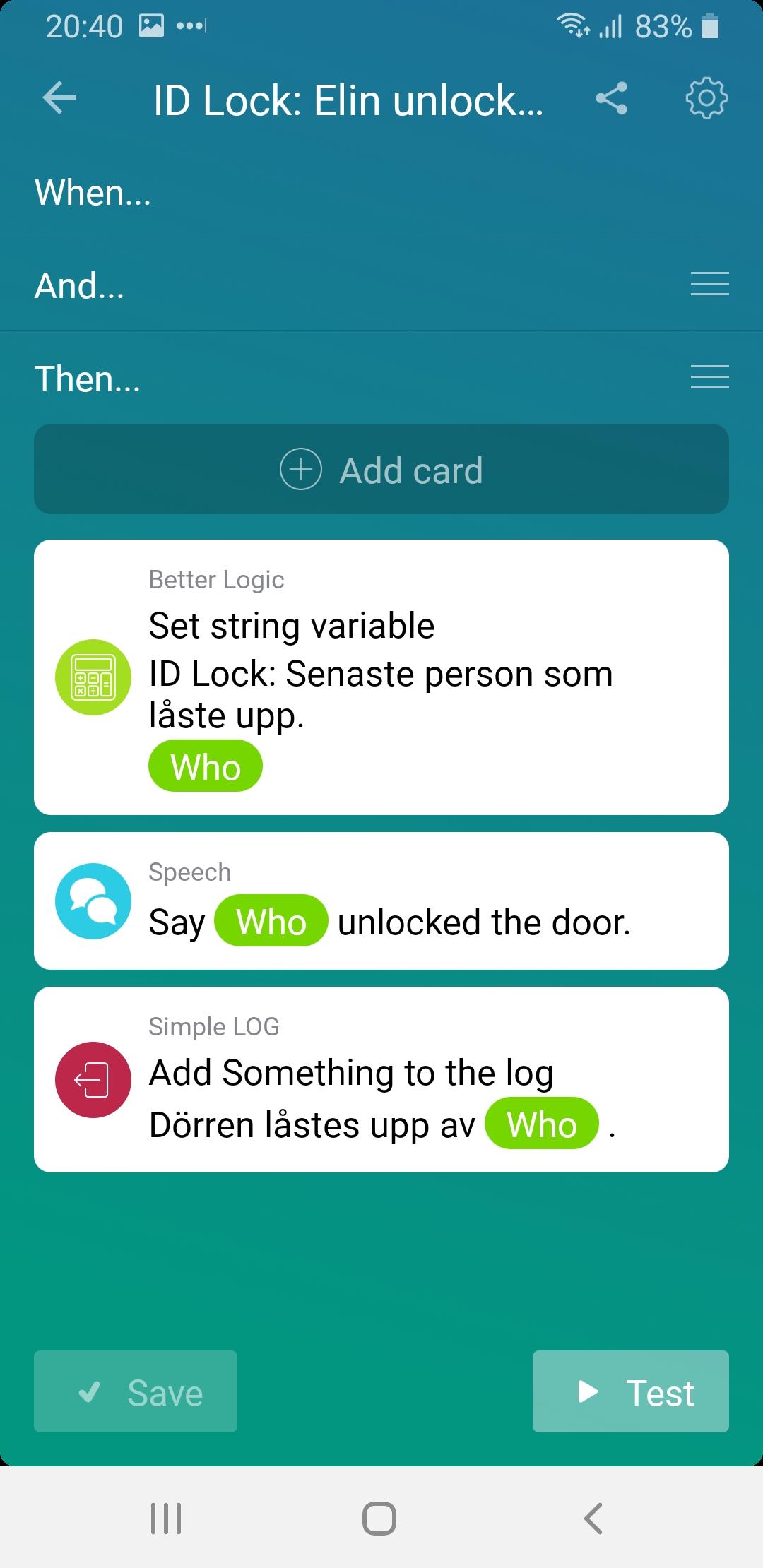
 How you surcomvent that is by detecting on the “who” variable with something like “Unknown [tag:18]” as a example. If you dump the who tag down to simple log you will find out what key or tag is what id.
