Unfortunately , but controlling my car in this way isn’t possible (only reading the status). However, through Home Assistant, I also have the option to control my car via a dashboard.


You can also add buttons, switches or sliders to your Homey device. That means. you can also control/change your HA device from Homey.
But you won’t get this nice widget.
Such an integration incl. widget makes only sense as a real Homey app.
But using HA community app, you can import all entities into a device and use it in AdvancedFlow (trigger and actions).

Yes, this way you can import necessary entities.
If you have a dropdown in HA, this can also be imported as a mode selection. So all basic entity types are possible (number, string, number range, dropdown, button, switch).
You can also import a HA entity using a Homey capability. If the values don’t mach (e.g. charging state), you can use the converter to modify the value.
Like this
I’m having a problem using Tuya wifi lights that are set up in HA and brought into Homey with this app. All the functions work individually in Homey, but it doesn’t seem to send a “turn_on” command when selecting a new colour. You can see in the log below, the extra “turn_off” command are actually from me selecting a colour while the device is off. In the second section of log, you can see the results when I ask for a similar change right in Home Assistant. Is there a setting I need to change to make the lights turn on when colour changes are made?
Using Homey: Turn off light, select a blue colour(nothing happens), turn on light, select a blue colour, select a bright white.
[log] 2025-05-03 12:53:35 [Device:Movie Light] Entity state changed: Entity: light.movie_skyshade State: on Attributes:{"min_color_temp_kelvin":2000,"max_color_temp_kelvin":6500,"min_mireds":153,"max_mireds":500,"supported_color_modes":["color_temp","hs"],"color_mode":"color_temp","brightness":239,"color_temp_kelvin":5776,"color_temp":173,"hs_color":[29.065,9.611],"rgb_color":[255,242,230],"xy_color":[0.346,0.34],"friendly_name":"Movie Skyshade","supported_features":0}
[log] 2025-05-03 12:53:35 [APP] Event: state_changed Entity: light.movie_skyshade Data: on
[log] 2025-05-03 12:53:35 [APP] Event: call_service Entity:  Data: {"domain":"light","service":"turn_on","service_data":{"entity_id":"light.movie_skyshade","brightness":239,"color_temp":173.82}}
[log] 2025-05-03 12:53:35 [APP] updateLight: true {"entity_id":"light.movie_skyshade","brightness":239,"color_temp":173.82}
[log] 2025-05-03 12:53:33 [APP] Event: call_service Entity:  Data: {"domain":"light","service":"turn_on","service_data":{"entity_id":"light.movie_skyshade","brightness":239}}
[log] 2025-05-03 12:53:33 [APP] updateLight: true {"entity_id":"light.movie_skyshade","brightness":239}
[log] 2025-05-03 12:53:30 [Device:Movie Light] Entity state changed: Entity: light.movie_skyshade State: on Attributes:{"min_color_temp_kelvin":2000,"max_color_temp_kelvin":6500,"min_mireds":153,"max_mireds":500,"supported_color_modes":["color_temp","hs"],"color_mode":"hs","brightness":239,"color_temp_kelvin":null,"color_temp":null,"hs_color":[238,85],"rgb_color":[38,45,255],"xy_color":[0.145,0.057],"friendly_name":"Movie Skyshade","supported_features":0}
[log] 2025-05-03 12:53:30 [APP] Event: state_changed Entity: light.movie_skyshade Data: on
[log] 2025-05-03 12:53:30 [Device:Movie Light] Entity state changed: Entity: light.movie_skyshade State: on Attributes:{"min_color_temp_kelvin":2000,"max_color_temp_kelvin":6500,"min_mireds":153,"max_mireds":500,"supported_color_modes":["color_temp","hs"],"color_mode":"hs","brightness":239,"color_temp_kelvin":null,"color_temp":null,"hs_color":[234,87],"rgb_color":[33,55,255],"xy_color":[0.143,0.062],"friendly_name":"Movie Skyshade","supported_features":0}
[log] 2025-05-03 12:53:30 [APP] Event: state_changed Entity: light.movie_skyshade Data: on
[log] 2025-05-03 12:53:30 [APP] Event: call_service Entity:  Data: {"domain":"light","service":"turn_on","service_data":{"entity_id":"light.movie_skyshade","brightness":239,"hs_color":[237.60000000000002,85]}}
[log] 2025-05-03 12:53:30 [APP] updateLight: true {"entity_id":"light.movie_skyshade","brightness":239,"hs_color":[237.60000000000002,85]}
[log] 2025-05-03 12:53:25 [Device:Movie Light] Entity state changed: Entity: light.movie_skyshade State: on Attributes:{"min_color_temp_kelvin":2000,"max_color_temp_kelvin":6500,"min_mireds":153,"max_mireds":500,"supported_color_modes":["color_temp","hs"],"color_mode":"color_temp","brightness":239,"color_temp_kelvin":5553,"color_temp":180,"hs_color":[28.098,12.209],"rgb_color":[255,238,224],"xy_color":[0.352,0.342],"friendly_name":"Movie Skyshade","supported_features":0}
[log] 2025-05-03 12:53:25 [APP] Event: state_changed Entity: light.movie_skyshade Data: on
[log] 2025-05-03 12:53:25 [APP] Event: state_changed Entity: sun.sun Data: above_horizon
[log] 2025-05-03 12:53:24 [APP] Event: call_service Entity:  Data: {"domain":"light","service":"turn_on","service_data":{"entity_id":"light.movie_skyshade","brightness":239}}
[log] 2025-05-03 12:53:24 [APP] updateLight: true {"entity_id":"light.movie_skyshade","brightness":239}
[log] 2025-05-03 12:53:19 [APP] Event: call_service Entity:  Data: {"domain":"light","service":"turn_off","service_data":{"entity_id":"light.movie_skyshade"}}
[log] 2025-05-03 12:53:19 [APP] updateLight: false {"entity_id":"light.movie_skyshade"}
[log] 2025-05-03 12:53:16 [APP] Event: call_service Entity:  Data: {"domain":"light","service":"turn_off","service_data":{"entity_id":"light.movie_skyshade"}}
[log] 2025-05-03 12:53:16 [APP] updateLight: false {"entity_id":"light.movie_skyshade"}
[log] 2025-05-03 12:53:12 [Device:Movie Light] Entity state changed: Entity: light.movie_skyshade State: off Attributes:{"min_color_temp_kelvin":2000,"max_color_temp_kelvin":6500,"min_mireds":153,"max_mireds":500,"supported_color_modes":["color_temp","hs"],"color_mode":null,"brightness":null,"color_temp_kelvin":null,"color_temp":null,"hs_color":null,"rgb_color":null,"xy_color":null,"friendly_name":"Movie Skyshade","supported_features":0}
[log] 2025-05-03 12:53:12 [APP] Event: state_changed Entity: light.movie_skyshade Data: off
[log] 2025-05-03 12:53:12 [APP] Event: call_service Entity:  Data: {"domain":"light","service":"turn_off","service_data":{"entity_id":"light.movie_skyshade"}}
[log] 2025-05-03 12:53:12 [APP] updateLight: false {"entity_id":"light.movie_skyshade"}
Using Home Assistant: Turn off light, select a blue colour (automatically turns on and is blue), select a bright white.
[log] 2025-05-03 12:04:38 [Device:Movie Light] Entity state changed: Entity: light.movie_skyshade State: on Attributes:{"min_color_temp_kelvin":2000,"max_color_temp_kelvin":6500,"min_mireds":153,"max_mireds":500,"supported_color_modes":["color_temp","hs"],"color_mode":"color_temp","brightness":239,"color_temp_kelvin":6405,"color_temp":156,"hs_color":[40.836,2.891],"rgb_color":[255,253,248],"xy_color":[0.328,0.334],"friendly_name":"Movie Skyshade","supported_features":0}
[log] 2025-05-03 12:04:38 [APP] Event: state_changed Entity: light.movie_skyshade Data: on
[log] 2025-05-03 12:04:38 [APP] Event: call_service Entity:  Data: {"domain":"light","service":"turn_on","service_data":{"entity_id":"light.movie_skyshade","color_temp_kelvin":6388}}
[log] 2025-05-03 12:04:33 [Device:Movie Light] Entity state changed: Entity: light.movie_skyshade State: on Attributes:{"min_color_temp_kelvin":2000,"max_color_temp_kelvin":6500,"min_mireds":153,"max_mireds":500,"supported_color_modes":["color_temp","hs"],"color_mode":"hs","brightness":239,"color_temp_kelvin":null,"color_temp":null,"hs_color":[239,98],"rgb_color":[5,9,255],"xy_color":[0.136,0.042],"friendly_name":"Movie Skyshade","supported_features":0}
[log] 2025-05-03 12:04:33 [APP] Event: state_changed Entity: light.movie_skyshade Data: on
[log] 2025-05-03 12:04:33 [Device:Movie Light] Entity state changed: Entity: light.movie_skyshade State: on Attributes:{"min_color_temp_kelvin":2000,"max_color_temp_kelvin":6500,"min_mireds":153,"max_mireds":500,"supported_color_modes":["color_temp","hs"],"color_mode":"color_temp","brightness":239,"color_temp_kelvin":6362,"color_temp":157,"hs_color":[38.595,3.325],"rgb_color":[255,252,247],"xy_color":[0.329,0.334],"friendly_name":"Movie Skyshade","supported_features":0}
[log] 2025-05-03 12:04:33 [APP] Event: state_changed Entity: light.movie_skyshade Data: on
[log] 2025-05-03 12:04:33 [APP] Event: call_service Entity:  Data: {"domain":"light","service":"turn_on","service_data":{"entity_id":"light.movie_skyshade","hs_color":[239,98]}}
[log] 2025-05-03 12:04:28 [Device:Movie Light] Entity state changed: Entity: light.movie_skyshade State: off Attributes:{"min_color_temp_kelvin":2000,"max_color_temp_kelvin":6500,"min_mireds":153,"max_mireds":500,"supported_color_modes":["color_temp","hs"],"color_mode":null,"brightness":null,"color_temp_kelvin":null,"color_temp":null,"hs_color":null,"rgb_color":null,"xy_color":null,"friendly_name":"Movie Skyshade","supported_features":0}
[log] 2025-05-03 12:04:28 [APP] Event: state_changed Entity: light.movie_skyshade Data: off
[log] 2025-05-03 12:04:28 [APP] Event: call_service Entity:  Data: {"domain":"light","service":"turn_off","service_data":{"entity_id":"light.movie_skyshade"}}
This is by design.
turn_on is only sent if the device in Homey is turned on - independent of other settings.
This way you can adjust the color and brightness and then turn on.
If HA is turni g on the light on any change, then it makes it hard to adjust a light via flow. Setting a color would turn on before you are able to dim.
The HA app just sends the Homey state 1:1
Hi there, 
I have ismartgate with a sliding gate and a garage door, I’ve tried to follow the instructions, but I cannot seem to get this happening.
I’m not the most technical, but can follow instructions.
any help would be much appreciated
@RonnyW I noticed that some of the capability icons in the app don’t really fit with the current native capability icons, so I gave them an update.
You can view a comparison on my website:
Not sure if you actually want to implement them in the app, but in case that you do; here are the .svg files (zip).

Hi,
Have anybody been able to add devices from HA that will show up as a water meter en the Homey energy dashboard?
I have a Ecowitt smart water valve that registers total consumption [L] + real time flow [l/min]
What device class do I need to use?
I have tried water valve and sprinkler but nothing appears.
How can I get HP energy dash to show a water meter?
I will also soon get a https://www.myaquaro.com/ smart water meter that connects to HA I would like to display on HP so answers are much appreciated:)


Well, it depends… on how the HA entity is defined 
Easiest way:
- add a custom device
- open repair view
- add your entity
- select meter_water as capability (as default, a subcapability is set to keep it unique)
- then open device settings and select ‘cumulative’ option.
you champ! I learned something new and it worked! . Do you know it it matters if i combine both the entity for flow and total flow in the same device? both should work or does it f*eeck up the cumulative setting on the device? @RonnyW
I think you can add measure_water and meter_water to one device. HomeyEnergy only uses the meter data for the chart if I remember right.
..
and if not, you can easily remove the capabilities.
Hi guys, noticed that some of the devices that I transmit with mqtt to home assistant can not get proper commands from HA back to homey. An example is Aqara curtains robots - they appear nicely in HA but when I want to move them to a position I can only close them, I can not open them nor set to a position let’s say 50%… (I can control these with Homey with no issues). This does not happen to other devices like thermostats, bulbs etc. This is what mqtt explorer shows:
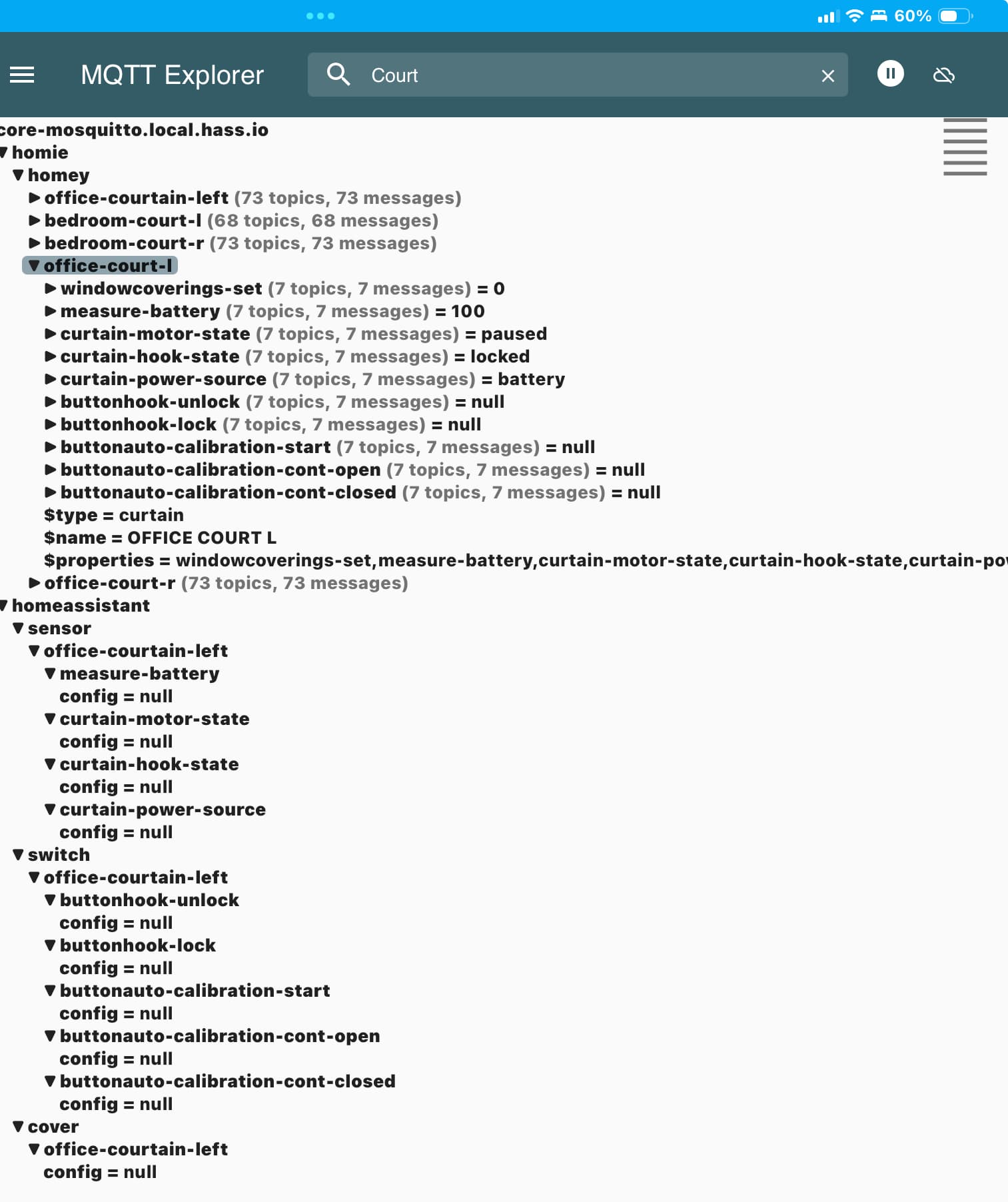
Any hint how to handle this pls? Thx.
Sounds like a MQTT Hub setting;
When I use these custom settings, the issues you describe disappeared:
(follow link to see all of the picture)
Hi Peter,
many thanks for your kind reply - as always… unfortunately this solution did not take any effect, after changing the matt hub settings to custom the behaviour of these aquaria curtains is exactly the same - I can close them but can not open them at all… 
Frankly speaking I am out of ideas…
J.
@RonnyW I saw that you added support for the charged/discharged home battery capabilities in the MQTT Hub app ( meterPowerImportedCapability and meterPowerExportedCapability)
Is it possible to add them to the Home Assistant app too?

Awesome, that’s exactly what I was looking for! 
Be careful with the Update to 12.4.8 RC3
Seems that HA community (1.10.3) is now crashing all the time
(Rebooted both HA and Homey several times, still crashing)
No problems here…
