Thanks a lot, @RonnyW .
I installed version 1.4.22 and tested heating, cooling and off.
On / Off status now shows correctly.
Perfect! 
Thanks a lot, @RonnyW .
I installed version 1.4.22 and tested heating, cooling and off.
On / Off status now shows correctly.
Perfect!
Hi Ronny,
can you take a look into the on/off behavior of media devices, too ?
If I restart HA or the connection to HA is shortly not available (simulated by restart of your Homey Home Assistant app) a running Apple TV will be stopped and “Apple TV Homey off-flows” will be started despite the AppleTV was running fine and nobody wanted to stop it.
Would be great if you can take a look into it, too. The Media Device (Apple TV) should have its former state before HA or the connection was lost.
Thanks a lot
New test version 1.2.23:
@owuerker I added check for some “unavailable” states of HA entity. I hope the devices doesn’t switch off anymore in such cases.
Thanks a lot for your quick work.
It’s working
Hi @RonnyW
Thanks again for your great job!
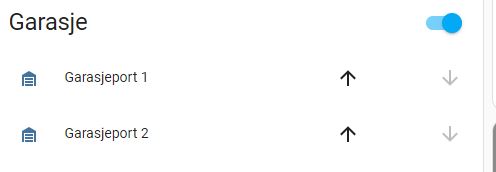
My iSmartGate GarageDoor devices are added to Homey as Windows covering. They work fine, but the Homey devices have an unwanted on/off button and does not really show if the door is open or closed in the tile.
Would it be a better fit to register the device in Homey as GarageDoor class (with open/closed functionality)?
Hi, the HA cover entity is generic. That means it can be used for all stuff that can be openes or closes. Dependent on the physical device, the entity has a “feature” attribute (binary value) that defines which controls are supported (on/off, slider etc.)
Can you please screenshot the entity in HAs developer page (state and attributes)?
If your HA device has a button to open/close, please check if the button is represented by another entity (switch?).
The “supported_features=3” means: on+off function available
The uo/stop/down ist the right element for covers, that only allow up/down action without possibility to set a % value. This can be used to open/close the cover.
The tile itself acts like a “readonly” switch showing the cover state. The tile is defined without quickaction to prevent open/close by mistake.
Does this mean that the Homey tile will look the same regardless of registering the device as Homey deviceclass Window Coverings or GarageDoor?
Yes, it only depends on the HA domain “cover” and its features.
The reason behind: You can change the device class in HA. But if the Homey device would be based on device class instead of generic features, you would miss HA features the Homey device/capability does not support.
What are you missing for your garage door that is not available now?
Only the garage door switch tile? I think that would not fit to the HA cover domain, because it’s just a switch (on/off), not a cover with different states (open, closed, …) and actions (up, down, stop).
You can consider adding a virtual device ‘in place’, which can show the door status, and optionally a on/off switch for close/open:
@JOR1 Just another question: Ist a switch shown when you click on this icon?
And another one… Do you want to control the garage door directly with a quick action on the tile (like a light switch)?
In this case I can check if it’s possible to allow/prevent quick actions in device settings. This way the tile could be interactive if allowed in settings. But I’m not a fan of allowing quick actions for such devices. One click instead of a swipe in mobile app and your door is crashing your car.
Hi Peter, there is also the possibility to add a helper switch to HA and add it as capability to the garage device. Then use the trigger of this switch in a flow to change the cover state.
@JOR1 Just as idea for now…
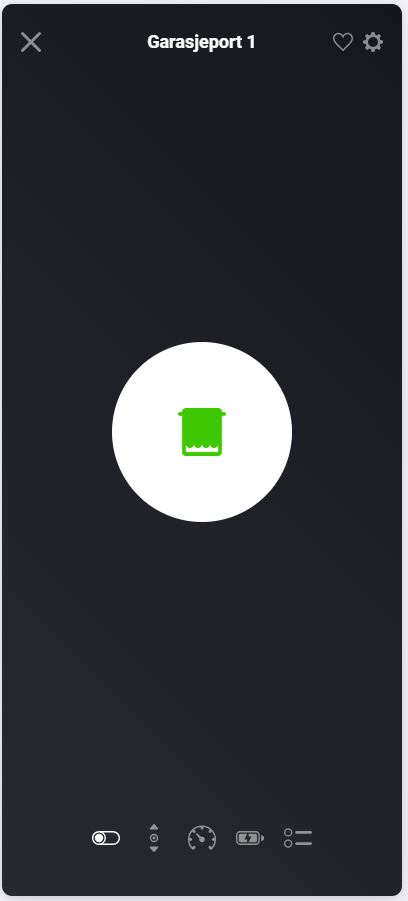
Yes, there is an on/off button there:
If I press the button, the door opens / closes and the tile gets grayed out:
By using the Up og Down arrows, the tile does not get grayd out.
The log icon for the tile also shows opposite status of the door. It shows open when the door is closed and vice versa.
Also there is a status for Windows Coverings on the tile. It shows Not Active for closed door.
The tile does not have a quick action and I do not want that.
Ah, I forgot. The switch is generated by the cover capability. So you can use the switch or the up/down buttons.
The tile itself is a “hidden switch” to show the state in the device list.
The switch is “on” if the cover is closed. Thet’s Homey standard. You can see it in your screenshot. I can’t change that. That’s why I inverted the tile state to show up active for “open” and inactive for “closed”. That’s more intuitive in my eyes.
But I’ll check if other states are wrong.
Does the door open/close pressing the up/down buttons (in HA and in reality)? Is the state of the HA entity changing?
A small correction: The status for Windows coverings on the tile shows not active when door is open or closed, Up when door opens and Down when door closes, so I think this is correct.
Yes. Up, Down buttons changes status in HA and open / closes the door. HA entity status changes.
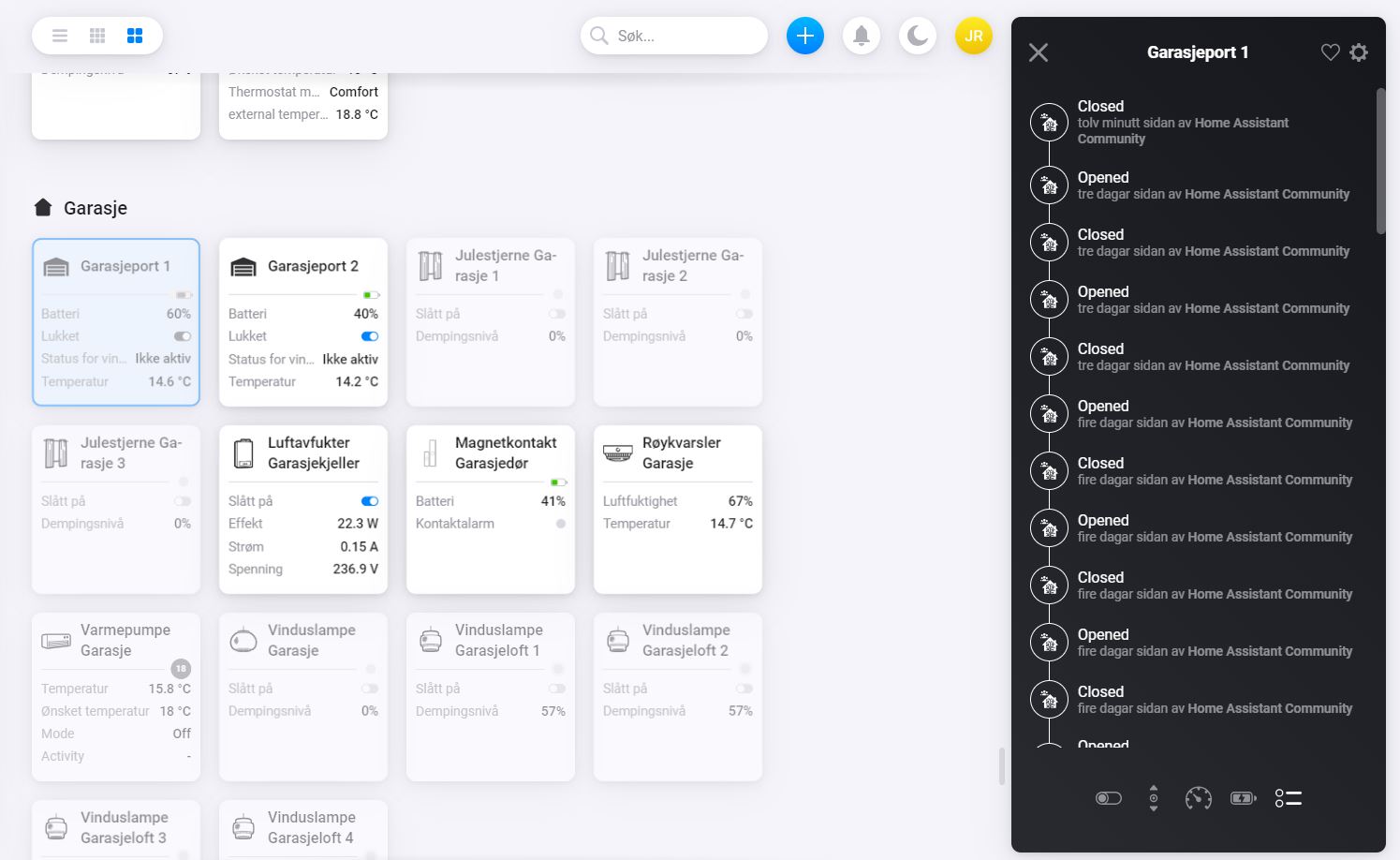
I get a bit confused by the on/off switch. If i press the on/off button the tile changes from grayed out to not grayed out and and vice versa, but does not necessarily show actual status. The last picture shows Garagedoor 1 grayed out and Garagedoor 2 as not grayed out. Both doors are closed. If I press Up or down arrows the tile gets grayed out, but changes back to normal / on again after a while regardless of actual state is open or closed. This is why I wonder if Homey deviceclass GarageDoor is a better match. I.e. showng closed as grayed out and open as normal/on.
I tested with a virtual device. And I tried to make a video, but I can’t upload it…so lets play with screenshots 
Cover closed:
entity state: closed
devie tile: inactive
“closed” switch: on (can’t say why Athom uses a switched on button for state closed)
Cover opened:
entity state: open
device tile: active
“closed” switch: off
device state:
first “closed”, then “opened”

In my test scenario all works fine and as expected.
Is your HA device using other states than “closed” or “open” in some cases?
Yes, HA is using states closing and opening as well. This is only the case if door is opened/closed from HA or Homey. I guess those states are set by HA while waiting for tiltsensor response. If I open/close door from iSmartGate android app or just press the remote, the opening or closing states does not show in HA. I guess HA does not know about that until the tiltsensor changes to open/close.