Hi.
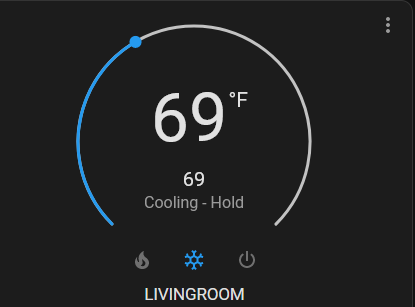
When adding battery level capability to a imported HA device and setting Battery as status indicator, the battery indicator shows fine in my.homey.app, but not in Homey App for Android. (Android to the right)
Does the Android app require a spesific name for the battery entity to show Battery status indicator correctly? If I add battery entity to a compound device, it shows correctly in my.homey.app and in Android app.
Can you please check if you added the capability as main capability (measure_battery) or subcapability (the default for adding in repair view).
It’s possible that WebApp just checks the main capability name and mobile app checks exactly on ‘measure_battety’.
You can activate the ‘add as main capability’ checkbox while adding the entity in repair view - or select measure_battery directly in capability field.
The app itself is fine, but it get suspended because of high CPU usage.
Log message: CPU Warning Limit Reached
Can you please check the app memory/CPU usage chart in insights and make a screenshot?
I have a lot of test devices on a HP19, but only a few on a HP23.
How many devices do you have? I can’t imagine that the app is really using so much CPU. Perhaps Athom has a too strict limit on HP23. With your screenshot I can ask Athom if it’s as desired.
Yes, memory and CPU chart from HA community app. If possible from the hour the crash happened.
And perhaps from system, too - perhaps it’s somehow related.
Thanks
@Ronni This is a fantastic app and I am thrilled I found this. it has allowed me to start using HA again which I gave up “for good” because of having X number of systems.
Thank you so so much for the work you have done!
One question though; is it possible to change the temp type from Celsius to Fahrenheit for my thermostat? ( i know I saw a post for this but can not find it )
Hi,
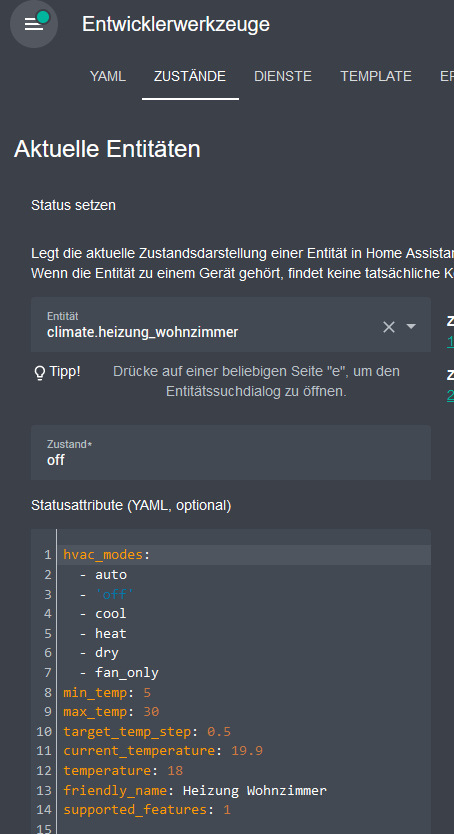
the HA app imports most settings from the HA thermostat (min/max/steps).
But the unit is missing. I think the value is imported as °F and Homey supposes it’s °C (default) and convertes again to °F.
Can you please check if you climate entity has a unit defined in HA? Please go to “developer tool” in dashboard menu and select the entity:
Hi @djesko
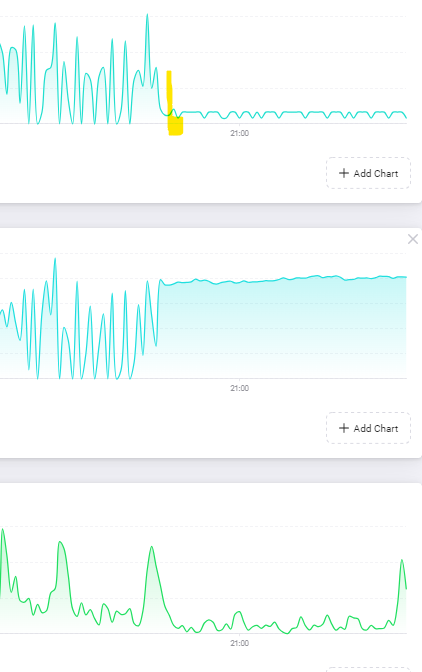
the cpu insights for all apps are jumping between 0% and 10% - nothing between.
For me it seems as HP23 is counting every small CPU usage directly as 10%. And 10% is checked as limit (some checks in a period).
I asked Athom via SLack to check the CPU insights. So I have only a suspect but no solution yet.
@djesko
Can you please check if SmartThings app is causing a lot of device changes or traffic to HA that is perhaps causing a lot of messages from HA back to Homey? Especially add/remove of entities or change the state of a wide range of entities at once?
When SmartThings app was installed the HA devices did get red error and then back to normal for sometime , then red error. Uninstall Smart app and all good ,




 )
)