Just got done with updating to your latest docker image and it does indeed seem a lot smoother (cheers!). But as of right now the “changing URL” problem is still present.
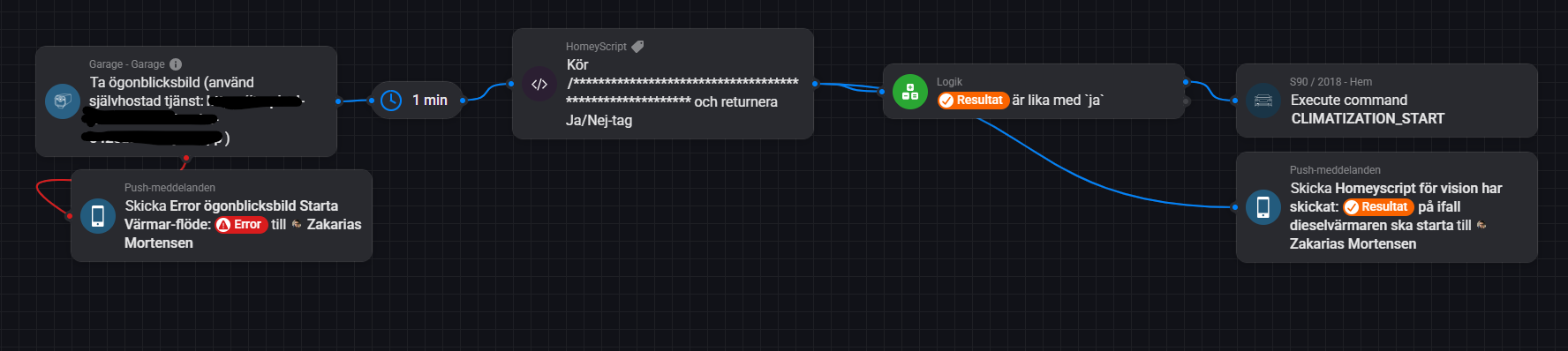
I’ve tried to use Homey script to dynamically get the image URL, but no luck yet. I’ve tried homey.images.getImage(), but seems lite it is still not working correctly (source). And to try to pass the snapshot tag from flow does not work either as the scripts flow card only support number and string afaik. So the only way seems to be via fetch, but i’m not entirely sure how that works, does anyone have a script/flow example of their snapshot setups?
I am trying to get a flow going which will unlock my door when my Eufy-cam detects a known face. How do I get this logic tag? Do i create it myself? It doesn’t show up.
The problem here is that with a Homey script, there is no way to grab the snapshot image tag. If i try the Homeyscript tag which includes an argument it does not accept images (so I’ve not figured out any other way to grab the snapshot other than getting the URL).
Here is my script if that is of interest (sorry for the Swedish):
/********************************************************
 * SkickaBildTillOpenAIVision_ReturnTag.js

// 1. OpenAI-nyckel
const apiKey = 'secret';

// 2. Ange URL
const imageUrl = 'image-URL to Eufy-cam snapshot';

// 3. Bygg upp request-body med en prompt
const requestBody = {
  model: 'gpt-4o',
  messages: [
    {
      role: 'user',
      content: [
        {
          type: 'text',
          text: "Kan du baserat på den gråa Volvo-bilen på bilden avgöra om jag behöver starta dieselvärmaren? Det är viktigt att du kontrollerar om det verkar som att det finns is, frost eller snö på rutorna, svara med endast ja om dieselvärmaren skall starta och annars endast med nej."
        },
        {
          type: 'image_url',
          image_url: {
            url: imageUrl,
          },
        },
      ],
    },
  ],
  store: false,
};

// 4. Ange endpoint för OpenAI
const endpoint = 'https://api.openai.com/v1/chat/completions';

// 5. Anropa OpenAI-API med fetch
let apiResponse;
try {
  apiResponse = await fetch(endpoint, {
    method: 'POST',
    headers: {
      'Authorization': `Bearer ${apiKey}`,
      'Content-Type': 'application/json',
    },
    body: JSON.stringify(requestBody),
  });
} catch (error) {
  console.error('Kunde inte kontakta OpenAI API:', error);
  return false; // Returnera false om något fel inträffar
}

// 6. Kontrollera svar från API
if (!apiResponse.ok) {
  console.error('OpenAI API svarade med fel:', apiResponse.status, await apiResponse.text());
  return false; // Returnerar nej-tag (false)
}

// 7. Tolka JSON-svaret
let jsonResponse;
try {
  jsonResponse = await apiResponse.json();
} catch (error) {
  console.error('Kunde inte tolka JSON-svaret:', error);
  return false; // Returnerar nej-tag (false)
}

// 8. Hämta GPT-svaret (textinnehåll)
const gptReply = jsonResponse.choices[0]?.message?.content.trim().toLowerCase();

// Logga GPT-svaret för debugging
console.log('GPT-svar:', gptReply);

// 8. Returnera sant/falskt (boolean), vilket ger Homey en ja/nej-tag
return gptReply.trim().toLowerCase() === 'ja';
Here, the flow car “Known Person Is Martijn” It is an “and” flow card. But How did you choose your name? Did you create a variable and named it your own name that matches one of the person that you have in the Eufy App?`:)
 LIVE: 3.33.1):


 TEST:
TEST: