This worked, but i discovered that ‘Retrieve the insights…’-cards (without tag) were not updated through this script. (I use these a lot).
By the way, these retrieve insights cards are also not updated via import AVD with flows: the flows are copied correctly, but the retrieve insights cards refer to the old device. Is this fixable?
I already started to use the Retrieve insights card with tags, so I only have to update the ID’s on one place when copying AVD’s with flows. But the card without tag is much easier to use.
Thanks! I didn’t know that option and it works surprisingly well and very easily. I immediately cleaned up a lot of insights, also from all kinds of other devices (especially a lot of empty energy consumption insights), it cleans up very nicely.
I don’t know why I didn’t find this solution earlier, in my search I only came across much more complex solutions with scripts.
Only the problem of the retrieve insights cards in combination with replacing device scripts (not only AVDs) and copying AVDs with flows remains. But I don’t know if that can be solved.
For now I use the ‘workaround’ to only use the retrieve insights with tags card, but that is often less clean (extra steps/cards needed).
would you like to take another look at the trigger watch. There was a time when you could see the user who turned it on via the app or Google, for example. but unfortunately there comes a -. thank you in advance
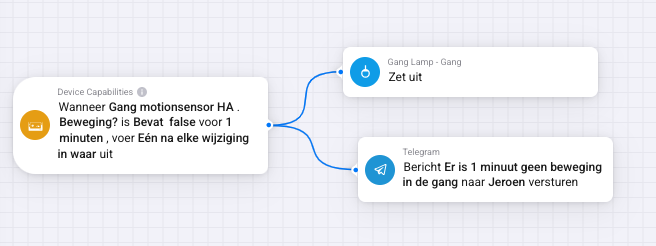
this should be pretty straight forward, but i have never received any text so it doesn’t trigger (obviously the hallway motion sensor is triggered multiple times today)
i used your little script to check for the capabilities:
I mean the tags “Gebruiker” and “Client” that used to be set by the “Luister (watch) van X naar Y” flow card. See also the screenshot posted above by Erikje. The tags still exist but their value is not set anymore.
@Arie_J_Godschalk these tags used to work fine for me on my Homey2019. To be honest I am not sure if they have worked on my Homey2023 (as I migrated a couple of weeks ago and never actually paid attention yet to these tags). As the DC app itself has not been updated a long time I suppose something broke due to a Homey firmware upgrade. Unfortunately I have no idea since which firmware version they stopped working, but I am pretty sure they still worked on 11.0.0.0.
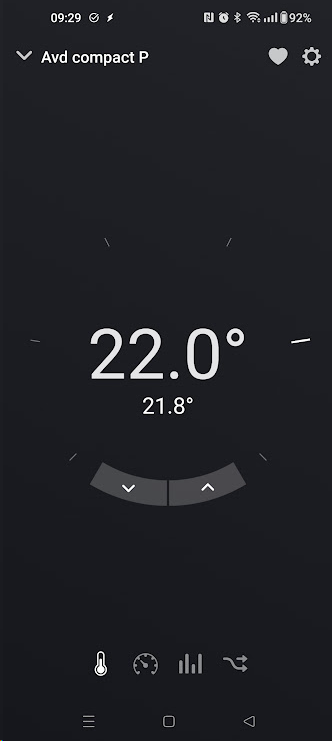
Indoor setpoint is the wanted room temperature. I found that I can set this to “temperature (target)” which gives me a “dial” to set the number
However, if I do that it seems to take Extract Air T3 as the measured temperature. In this case, it’s not exactly wrong, but I’m wondering why and how this is done. I would prefer being able to choose a specific value as the measured temperature
I’m also losing the Supply air T2 altogether (just by setting Indoor setpoint as a “temperature (target)”, it’s not available anymore. I now have only Indoor Setpoint, Extract Air and Fan speed.
Anyone got AVD working with new energy visualisation? I am reading info from my solar inverter using the Modbus TCP app and I am putting this information in a AVD using Device Capabilities app. The device class is set to “Solar Panels” and the power is show as “Power(sensor)”. The energy screen does show the PV device but power and energy remain - . I also wanted to add my EV charger but I dont think the right device class is available to show this in the energy visualisation.