[APP][Pro] Device Capabilities - Enhance the capabilities of devices

Hello @Petclaud ,

In general, I notice you mistake “it doesn’t work” for “empty result” (= no matching flows found).
When it actually would not work, the flow card would error, or return no data at all.

You should know the flow card uses the contents of a tag, not it’s name.
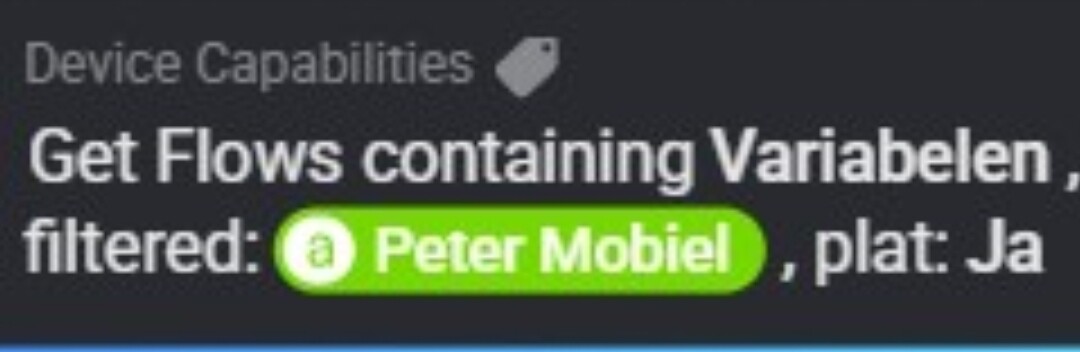
So, if the contents of [Peter Mobiel]


does not match any variable name, the card returns no matching flows, only [] .

.

Same answer, probably no variable name matches exactly with the number value of variable [Solar Opwekking].


The line is blue (OK), not red (ERROR), and the result is “no flows found” by showing only [] .

.

Here it also doesn’t find any flows using my BLL variables;
Apparently it only searches for Homey variables?

Nonetheless, I’d like to show a search mistake here:
When it’s named Sol ...
you shouldn’t filter on sol...
(you used S and s randomly)

The (partly) names should match with your filter.
When not sure about the first character, filter using a wildcard, like *olar ....

.

Just run the card twice, with flat or not flat option, and view the difference? :man_shrugging:

1 Like

Hi @Peter_Kawa,

Thank you for your elaborate answer, much appreciated.

Ah, you are right: ‘does not work’ can be read as ‘does not return the expected result’, hence I wrote twice ‘I don’t understand’ and I cannot figure it out :grinning:

OK, so now I learned that the card looks for the content of a tag, not it’s name. That is already very helpful, thank you.

For the S, s, or wildcard suggestion; they all return no result

That makes sense, as you commented that it looks for the content and not the name. I also learned from your feedback that the search is case sensitive. This is good to stipulate, as the search functions in Homey are not case sensitive.

Yet still then I don’t fully grasp it. While trying to search for the content of a variable, I tried the following:

  • I have various flows using the status of one of my Heat Pumps.
  • At the moment of the search, the status was Heat
  • Using the card, it did not return any flows

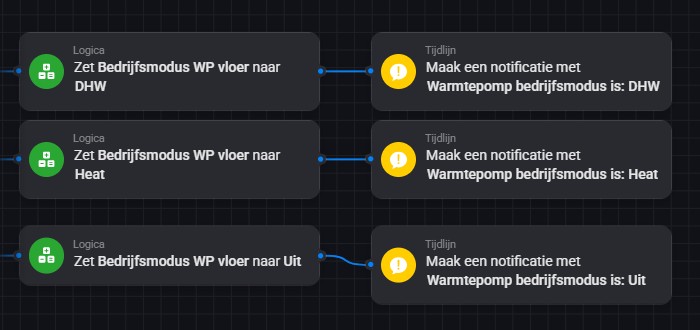
Snapshot of a part of a flow using this variable:

And yes, I had tried to look for different outcomes with ‘Plat’ on or off, but I could not distinguish any different outcomes.

I am just trying to find out what flow is using a certain variable name, not its content. Maybe I was off on the wrong foot, as I read that this card was developed based on a script "where are my variables used’ - which I inferred as a tool to search based on the name.

1 Like

YW, @Petclaud!

This card searches for variable names, it does not “see”, and thus doesn’t search the variable’s values.

And about Flat Y/N, here the flattened result shows less additional info.

1 Like

And again. My first issue was from devices of app “Virtual Devices” and I changed them to Homey native virtual devices (Experiments section in settings). The change didn’t help; sama issue appears with them too.

It has to be Pro 23 firmware related. 3 different apps don’t suddenly return the same error.

Can someone perhaps explain to me how to use this card ’ receive the insight value’? I can’t find it anywhere on the forum.

I can select a device, but never a capability. Typing ’ onoff’ is not accepted and no dropdown menu becomes available.

image

1 Like

Same thing with me. Can select a device but the card does neither have a drop down nor does it accept the correct name of an/the available insight

Hey,

Also for @SingKT .
The device you are selecting, do they have insights?
If you open the device f.i. in the Honey app, does it show on/off info on the insight tab?

Somewhat similar situation for the tags-version of this card: I can manually input the name of a device (like my Netatmo weather station) and select a capability in the list of tags (temperature token), but it does not retrieve any values / change timestamps. I only returns a 0 value.

Okay, could you create a ticket for this?
Ill pick it up as soon as the current testversion is working correct.

1 Like

Submitted #105.

Yes they have.

Maby you can look at it at the same time witch Sunbeech’s ticket :slight_smile:

I included both your and mine observation in the ticket :grinning:.

1 Like

Yours might be a bit easier.
Would you:

  • Restart the DC app (to clear any diagnostics)
  • try to fill the flowcard (select device and then try to select the capability).
  • send me an DC app diagnostic.

Perhaps i can see an obvious message in the diagnostic.

Done!

ad0af4f8-911a-4205-a9be-9546ec008ebe

@iBosvelt
Thanks.
But sorry, i dont see the obvious reason for the list not to show-up.
However, you do have an error in reflection with a device.
Somewhere you are reflecting something of Lamp-Badkamer. Perhaps an old device or timeouts?

I tried several devices. Maybe it was because of a specific device that didn’t work. But it does not appear to work with any device.

I have the homey pro '23 and latest firmware. 12.3.0 off the top of my head.
I don’t know if other users are experiencing the same thing or if I am the only one. Maby @SunBeech?
Same here for me. Identical Homey and firmware as yours.

Yes, I checked there are insights or rather one, Temperature. Am using version 2.15.4 on Homey pro 2023 version 12.2.1.

I have some unused (double) insights due to changing capability settings and found this post from 2 years ago to remove those insights: [APP][Pro] Device Capabilities - Enhance the capabilities of devices - #882 by Arie_J_Godschalk

But the script doesn’t work any more. Can this script be fixed (I have no idea how to fix it)? Or is there a better way?

I have also used the import-export AVD (without flows) method before and then use this script: [HOW-TO][Pro][Cloud] - Tool to FIX (advanced) flows after removing and re-adding devices.

This worked, but i discovered that ‘Retrieve the insights…’-cards (without tag) were not updated through this script. (I use these a lot).

By the way, these retrieve insights cards are also not updated via import AVD with flows: the flows are copied correctly, but the retrieve insights cards refer to the old device. Is this fixable?

I already started to use the Retrieve insights card with tags, so I only have to update the ID’s on one place when copying AVD’s with flows. But the card without tag is much easier to use.

1 Like