[APP][Pro] Device Capabilities - Enhance the capabilities of devices

Did not edit anything, but it was unresponsive almost right away.
(With unresponsive I mean ‘frozen for 10s or more’.)

Some graphs, the high loads are from starting up (twice), it seems not load related to me. (EDIT: ofcourse not, while the webapp isn’t unresponsive.)

And like I wrote earlier, when I go straight to Apps > DC app, I can edit the devices with quite normal response.

Oh, in advanced settings, only the long fields list freezes a few times when scrolling down, it takes long long waits before I can scroll further down again.

1 Like

Ill continue with it tomorrow.
I think it might have nothing to do with the AVD, but with the DC watchers.
Do you use any watcher flow cards?

I’m sorry no, I don’t use any watcher card…
Just a few “App x started” trigger cards.

I don’t hear others about it as well…
Maybe completely removing the app helps.
Or a factory reset & restore a backup.
Then all apps get freshly downloaded, and my AVD’s keep existing (not crucial).

1 Like

Thats really neat!
Now we can set a limit to the max. amount of used memory used by apps.
And even automatically disable or restart ‘hungry’ apps.

1 Like

Please dont, you’ll removing testing capability.
Working on it today.

1 Like

Okay, today i’ll be testing, debuging and finalizing the AVD.
I’ll report the findings in this post.

First of:
I have 30 devices, 5 off them fully loaded with (double) capabilities.
This has been running all night.
I allready had a couple of watcher for apps and device-capabilities.

I had it running in non-debugmode:


It stays at a pretty level 23-24MB memory usage.

EDIT 1


It does not matter how many devices you have or how many capabilities they have, you can have many hundreds of total capabilities, and performance does not go down and memory usage does not go noticable up.

However, i did find the issue @Peter_Kawa reported on:
Complete unresponsiveness of the Homey Mobile App.

This is caused by the Set Status (text) card.
Setting/changing the text on the Device Tile (units to a number) is to hard for the Mobile App.

I have executed the next flow.

This flows changes the Status Text as fast as possible (without setting it unavailable/available again, so Mobile is not even updated).
When i run this, within about 10-20 seconds, Web is done (Chrome, FireFox, Edge, al the same time and values changes at the same time as debuging says it happends.
However: When Web is done, Mobile is not! In the above example, when Web is at the 3th Test5, Mobile is still at the 2nd Test5.

If i run the same flow, but with the true setting of the text within a setUnavailable and then a setAvailable, you see Mobile flashing way after all Web’s are done.

1 Like

@Caseda
In a upcoming update, still before live release:

  • Set boolean, number and button has an optional “execute flowcards (When) =Yes/No”.
    This will, as the names gives away, execute flowcards (set/changed) when set to Yes.
  • When Set boolean, number and button has an optional mode: Set or Changed.
    When set to Changed, will only trigger the flow when the value has changed, not when it is set.
2 Likes

Also, Set text and when text has set/changed.
And better descriptions for flowcards.

And added the last Sensor options to Numberfields:

’ {“id”:“measure_co”, “label”:“CO (Sensor)”}, '+
’ {“id”:“measure_co2”, “label”:“CO2 (Sensor)”}, '+
’ {“id”:“measure_pm25”, “label”:“PM2.5 (Sensor)”}, '+
’ {“id”:“measure_humidity”, “label”:“Humidity (Sensor)”}, '+
’ {“id”:“measure_pressure”, “label”:“Pressure (Sensor)”}, '+
’ {“id”:“measure_noise”, “label”:“Noise (Sensor)”}, '+
’ {“id”:“measure_rain”, “label”:“Rain (Sensor)”}, '+
’ {“id”:“measure_wind_strength”, “label”:“Wind strength (Sensor)”}, '+
’ {“id”:“measure_wind_angle”, “label”:“Wind angle (Sensor)”}, '+
’ {“id”:"measure_gust_strength ", “label”:“Gust strength (Sensor)”}, '+
’ {“id”:“measure_gust_angle”, “label”:“Gust angle (Sensor)”}, '+
’ {“id”:“measure_power”, “label”:“Power (Sensor)”}, '+
’ {“id”:“measure_voltage”, “label”:“Voltage (Sensor)”}, '+
’ {“id”:“measure_current”, “label”:“Current (Sensor)”}, '+
’ {“id”:“measure_luminance”, “label”:“Luminance (Sensor)”}, '+
’ {“id”:“measure_ultraviolet”, “label”:“Ultraviolet (Sensor)”}, '+
’ {“id”:“measure_water”, “label”:“Water flow (Sensor)”}, '+
’ {“id”:“meter_power”, “label”:“Energy (Sensor)”}, '+
’ {“id”:“meter_water”, “label”:“Water meter (Sensor)”}, '+
’ {“id”:“meter_gas”, “label”:“Gas meter (Sensor)”}, '+
’ {“id”:"meter_rain ", “label”:“Rain meter (Sensor)”} '+

EDIT


Meaning, you can now for instance set it to Humidity and Create Flowcards to true:
image

And then you will also get the (Default Homey) Humidity has changed card:
image

Also, apps like < group > can “see” this device with Humidity.

Any option available to Homey should be available.

2 Likes

Update to Test right now.

It might recreate so capabilities, bacause i now have the option to create separate capabilities for each field. And for most, by default off, only numbers and buttons have it by default On, but it will only be put to On when you also select to have insights or a tag. And this is when it is needed, so that is fine.

Status by default has no insights or tag, and does not create an separate capabily anymore.
Else when setting the status text, Mobile takes twice as long to finishes.
You can turn it on tho if you like.
When its turned off, changing an icon makes you need to reset the Status Indicator.

Meaning, you would need to do that yourself.

1 Like

All my test seems fine, translations seems done and custom_icons are all filled by default.
All/most of the request here have been added or resolved, as fas as i know.

I think its time to upload version 2.0 and request a review.

2 Likes

Review has been requested and a list of “bugs” and other findings have been submitted as ticket to Athom.

1 Like

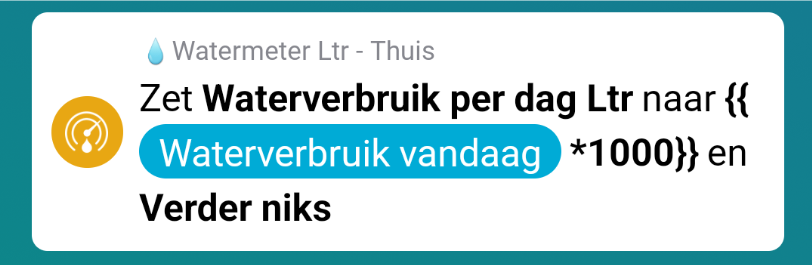
Water meter is broken down after the update. For the update it worked fine I do not see what is broken?
Versie 2.0.1

https://homey.app/f/EuoJjc

I like this way of implementation! does take some extra work, but it works :smiley:
still found an issue for you though :stuck_out_tongue:
If you set the THEN flow cards (back) to “further nothing” (verder niks) it will give me an “invalid argument” error

And it kind of looks like the tag isn’t created (text capability) without the extra capability, but that might be a migration issue too.

enable the “create tag” (Creëer tag) setting, you probably need to re-select it in your flow(s) too.

No matter what I turn it on or off it won’t update. When I press test I get a green check in the flow

1 Like

Hey, i cannot see which TAG you are missing, what is the questionmark.
Just make sure to put the Create Tag On for the field you wanted to use the tag from.
If that still does not recover the questionmark-tag, put create Separate capabilities on yes for that same field.

Do you use Set Expression?
Because it has a bug, been solved, publishing now.

New Test version now in test:
the Set [field] to [expression] card was bugged.
It has now been resolved.

1 Like

Oke maybe its the expression card.
Tag from watermeter.


1 Like