[APP][Pro] Device Capabilities - Enhance the capabilities of devices

Hey Cactus,

Sorry about that: in The app has a script that removes Capabilities that don’t exists anymore, after a version update. This will remain while in Test. It should have rebuild missing fields/capabilities, but some settings have changed and would need to be reset. And yes, flow cards could be gonna, but should be setable now how you would like. Thus, you can make sure this would be the last time :slight_smile:

This App started off as request to have a Text Status Indicator, but has grown very fast into much more.
And while developing, you find out what works good, and what not.

There is no way for me to use the internal Homey icons as pickable icons.
I included those myself, and it works the same way as custom icons: for each possible icon, there are a lott(!) of capabilities and settings created (icons are in every field in settings): thus greatly increasing the size of the App (very noticable during a App installation/update/developing).

I would say, about 90 icons (custom or “default”) is the max. for a clean enough install (its gonna grow allready if language’s are included(!)).

And while i like the Homey icons (and that it would be the same as other devices), other people might not. But they would be limited to those few icons.

Now, currently, numberfields only have Custom Sensor, OR a setable default UI component (like temperature or sliders: no icons.
I intend to include ALL Default Sensor types, which would include ALL icons that i used (that is where i got most of them).
This would not require any custom capabilities at all, only one option in the Show As for numberfields per Default Sensor Type.

When my App started off, this was not how i planned it and it was not possible back than. But it is now and will be included.

I assume that you know that all icons are still available through App Settings? You can customize them out off the big list off “default” icons?

I also intend to extend the custom list from 60 to 90, but first wanna see how people like it and the categories.

N.b. F.Y.I.: The App.json is allready about 35k lines, and only EN, NL and DE are included.
Fortunately, including new icons, like thousends of them, does not increase the size off app.json any more.
So if anyone has .svg icon packs for the App, please share it :wink:

2 Likes

O, and btw, i just to have 48 icons included.
No you have 60 customs with i believe 50ish om them filled. So you start off with more icons that before.
But before final release to production, i’ll probably make it 90 icons, and at the least make sure that all 60 custom slots are default filled with a icon.

While I like the not breaking of flows.
Not sure how high the overhead is on such a device either, if you have a lot of capabilities in use on 1 device, you double that suddenly, say 18 capabilities (my current highest count) that would make a device with 36 capabilities, even with just 50% with that extra capability makes it 24 capabilities, that can’t be good speed nor memory wise.
Also don’t think Athom has the line “Note: this is an expensive method so use it only when needed.” without a reason (source)

Besides this question I’m missing something while building flows:
Homey doesn’t automatically build the “has changed” cards for (number) capabilities, only has the “gets lower/higher then…” cards, but I really do would like to use the “has changed” card of course.
At first thought it was "Number ** ingesteld" (which looks a little bit like a translation error :stuck_out_tongue:) but that doesn’t trigger on change of said capability.
Or did I miss something?

Running v1.9.9951 (almost 10.000 :tada:)
I see now you reverted back to a lower number :stuck_out_tongue: (thanks @Peter_Kawa) explains the stopping of the auto updates

1 Like

v1.9.9951
Your app is auto-update enabled
After manual install (just now) it’s changed to v1.9.997

1 Like

Fyi h.o.o.p. v1.4.4 still installs fine

1 Like

Hey Caseda,

I will look into the Flow Cards for Number is set, this should trigger indeed.
About the double capabilities: I allready made it all settings in the newest version 1.9.997 (not 1.9.9951), so you can choice yourself how you want it. If you have a device with 30 capabilities and never gonna change them, just de-select the option for it. Want for one button to know who pushed it, disable it.
Want to change the icon to sensor every day (or future-feature by flow), enable the create separate capabilities option.

I don’t think having to many capabilities is a big issue the way Athom wrote Homey. Also my testing gave me that idea.
However, the changing of capabilities is heavy: if you rebuild 10 devices at once, i start to get memory warnings of Homey. But capabilities are only edited when saving Settings.
After that, its “just a normal device” (i dont ever wanna hear anyone else say that about a DeviceCapabilities Virtual Device :wink: :stuck_out_tongue: )

Just don’t build 10 buttons and 10 yes/no-as-buttons, put them all one double/hidden capabilities, and then change the icon for Button 1. It will rebuild ALL buttons after that, to be sure button one and thus the device tile button.

I just took 1.9.997 out of review, its now “just” in test. I Wonder if you’ll recieve the update now.
Monday i’ll recheck my test flows and the translation.

Hey Caseda, how did you change the value?
Through a flowcard? In that case, this flowcard is not triggered (just like default Homey behaviour as far as i know).
I suppose if you change it yourself through flows, you also would need to trigger this one.

If you set it through the UI or through another App (i have a SmartWatch app which uses the WebApi and a Homey App), the flowcard number/etc ** has set/changed will execute.

I could add a optional checkbox in the flowcards that set values/status, if you want to trigger value-has-changed-flowcard?

How are you else supposed to change sensor numbers?
Those are by default “not changeable by the user” :stuck_out_tongue:
In my example, I want to calculate several average values or the delta off (IE: Temperature), and then have flows trigger on that capability changing (so not on every calculation activation).

And 2nd example, want to retrieve several (might be rate limited) values from a service (GET request, IE: space X API (not rate limited), openUV (rate limited)), and still able to see them easily in a device :stuck_out_tongue: that’s where your app is super useful.

1 Like

Hey, didn’t see anything about Sensor Number in your post?
Thats why i asked, because if you put it on temperature (target) or Dim/Hue/Color/Anything-else-then-sensor-or-Measure, then you get a UI interface with what you can change the value :wink:

I will add an option to trigger cards when settings values through flowcards.

And i made some statements that are not correct:
Numbers (and Status) will always create a second hidden capability (when Tag or Insights is enabled). I did this so we don’t have yet another extra setting-per-number-field. And since for numbers the Who is not registered, only the number, there was no point in not creating a hidden capabilty for it, except the overhead. But the tag and insights never change or lose there connection.

Also for text, when Tag is enabled, a separate capabilty is created. So the tag never changes.

Except for booleans (buttons or yes/no) you might want to know who pushed it, which you can only know when you use the real capability, so the can be set.

But, do you think it should also be optional for numbers, status and/or text to not create a hidden capability?

EDIT:

Please keep in mind (while using the App and answering the above question), that the hidden capabilities are only created (or removed) when you create (or remove) a field, not when you make other changes (to fields or anything).
And there are non-setable (less resources), non-functional (less resources) and hidden from UI (less resources).
Also, the original capabilities, when the have hidden companions, don’t create insights or a tag anymore (less resources).
So, personally (and with a lott of performance testing with re-creating test devices filled with capabilities), i think that the overhead is not much.

woops :blush: i’ll send a clairvoyance ball along with it next time.

1 Like

Still thinking about eather one of two jokes:

  • No thanks, no need , i allready have Homey
    OR
  • No thanks, i allready have enough junk

It’s just… the don’t go together :slight_smile:

No idea why you are not getting the new Test version through, very straings. Have not seen this before.
Maybe i update to fast after each other.

In any case, i just updated a last few German translations and updated it number, so you all get the newest version.

Good evening ya’ll

Hey Lecactus, reading this post again, just wanted to let you know: you dont need the on/off capability to get an light/dark device tile.
The first boolean (yes/no) capability, is , as far as i know, always the button and/or indicator (light/dark).
The onoff is nothing more the a predifined capability of boolean with uiComponent Toggle. (Okay, you also get some Flowcards for onoff that you don’t get with custom boolean capability.

But, just fyi.

1 Like

Im starting to like the name The Advanced Device.
What do you guys think?

4 Likes

I have v1.9.998 in use.

The information for insight is not correct. There is still some Englisch text.

Inzichten

1 Like

“Advanced Devices” is maybe also an option.

AVD, Advanced Virtual Devices

1 Like

Edit a Homey soft restart seems a fix for now.


Hi Arie,

v1.9.998

Just FYI:
Not sure what’s the cause, but the mobile app is too unresponsive to work with.
It doesn’t matter what I do, select a zone, select a flow folder, edit a flow, switch from device to flow tab… it seems frozen for 15s or more.

I’ve 21 DC app devices running (they get data via flows).

When I disable the app, everything is back to normal (slow, but workable).

When you need anything for me to test, just ask.

Hey Arie,

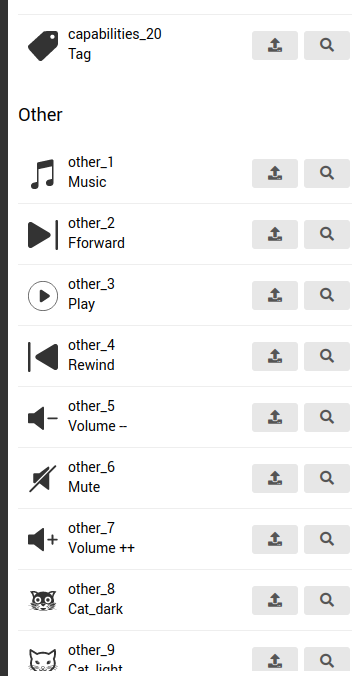
FYI, I added icon descriptions, and added some “Other” category icons as well.
But the “Customized Icon Names” list (of the Device Settings) stays empty (both web and mobile app). App was restarted and Homey as well.

Screenshot from 2022-09-04 21-04-58

Custom icons list:

1 Like

In the web app:
If i change the settings of a “nummerveld” and i remove the -1 from the min or max field and i don’t fill in annything then there is still the -1 but it is slightly lighter, as requested.
But when i save the settings there still stands -1.
Then i close the setting page, i open it again and then the -1 has changed to a 0.

If i do the same in the Homey app and i remove the -1, i close the page and open the setting page again, then for min or max field the -1 is back.

Is this a Homey web thing that with an empty settingfield at min or max it changed to a 0?

1 Like

Hey Mike,

Indeed, numbers in Homey must be filled, and the default itself of a number is 0 (zero).
Thats why i have -1 as default in the settings. But if you clear them, you will get the default 0.
Not much i can do about that.

But i am gonna look into the issue reported by Peter todo…