No I’m not a coder.
Maybe you’d like to share what you have in mind?
You cannot change it, it has to do with how Homey works. Setable would mean it’s setable through the UI in the Homey App. Which it isn’t.
That’s why there is an api to set those values.
I was making a few small scripts for AMS reader http call, Instead of a large Flow like in this pictures
Script Monthplot
//Monthplot
//SETUP:
//device ID of the device you want to update: const device_ID_imp = 'ba8d3afb-6b68-4701-b32f-7939270ef664'
//device ID of the device you want to update: const device_ID_exp = '9b226587-0ed2-49db-86b7-7e5f05d539fe'
//args here are AMS_IP: example //args = variable AMS_IP //log(args) <--- IPadress: 192.167.30.82 example const url = 'http://'+ args + '/monthplot.json'; //log(url)
//log("\n-------------------------------------------------------------------------\n");
// Create the request const res = await fetch(url); if (!res.ok) { throw new Error(res.statusText); }
var body = await res.json(); //log("body: ",body);
//log("\n-------------------------------------------------------------------------\n");
///import app to Update value of device let dcapp = await Homey.apps.getApp({id: 'nl.qluster-it.DeviceCapabilities'});
//log("\n-------------------------------------------------------------------------\n");
//get json of device const device_imp = await Homey.devices.getDevice({ id: device_ID_imp }); //log("Device:",device.capabilities)
///Remove any string/value not starting with "number. from this array" const device_imp_capabilities_filtered = device_imp.capabilities.filter(item => item.startsWith("Number.")); //log(device_imp_capabilities_filtered);
///Remove any string/value not starting with "i" from this object const body_imp = Object.fromEntries( Object.entries(body) .filter(([key]) => key.startsWith("i")) ); //log("body_imp: ",body_imp);
//log("\n-------------------------------------------------------------------------\n");
//get json of device const device_exp = await Homey.devices.getDevice({ id: device_ID_exp }); ////log("Device:",device.capabilities)
///Remove any string/value not starting with "number. from this array" const device_exp_capabilities_filtered = device_exp.capabilities.filter(item => item.startsWith("Number.")); //log(device_exp_capabilities_filtered);
///Remove any string/value not starting with "e" from this object const body_exp = Object.fromEntries( Object.entries(body) .filter(([key]) => key.startsWith("e")) ); ////log("body_exp: ",body_exp);
//log("\n-------------------------------------------------------------------------\n");
let row_nr_imp = -1
`//for loop to update values of the table
for (const [key, val] of Object.entries(body_imp)) {
//log("LOG: " + key + " → " + val);
if (val !== 0){
//log(“LOG: " + key + " -->” + val);
if (device_imp_capabilities_filtered[row_nr_imp] !== undefined){
//log("device_imp_capabilities_filtered: ", device_imp_capabilities_filtered[row_nr_imp])
await dcapp.post({
path: ‘setvalue’,
body: {
device: device_ID_imp, //string
field: device_imp_capabilities_filtered[row_nr_imp], ///string
value: val, //number/bool/string(value)
    },
  })

}
}
row_nr_imp = row_nr_imp + 1;
//log(row_nr_imp);
//log(key, val);
}`
//log("\n-------------------------------------------------------------------------\n");
let row_nr_exp = -1
//for loop to update values of the table for (const [key, val] of Object.entries(body_exp)) { if (val !== 0){ //log("LOG: " + key + " -->" + val); if (device_exp_capabilities_filtered[row_nr_exp] !== undefined){ //log("device_exp_capabilities_filtered: ", device_exp_capabilities_filtered[row_nr_exp]) await dcapp.post({ path: 'setvalue', body: { device: device_ID_exp, field: device_exp_capabilities_filtered[row_nr_exp], value: val, }, }) } } row_nr_exp = row_nr_exp + 1 //log(row_nr_exp); //log(key, val); }
//log("\n-------------------------------------------------------------------------\n");
This script instead of all this flow cards (only half of them in this pic)
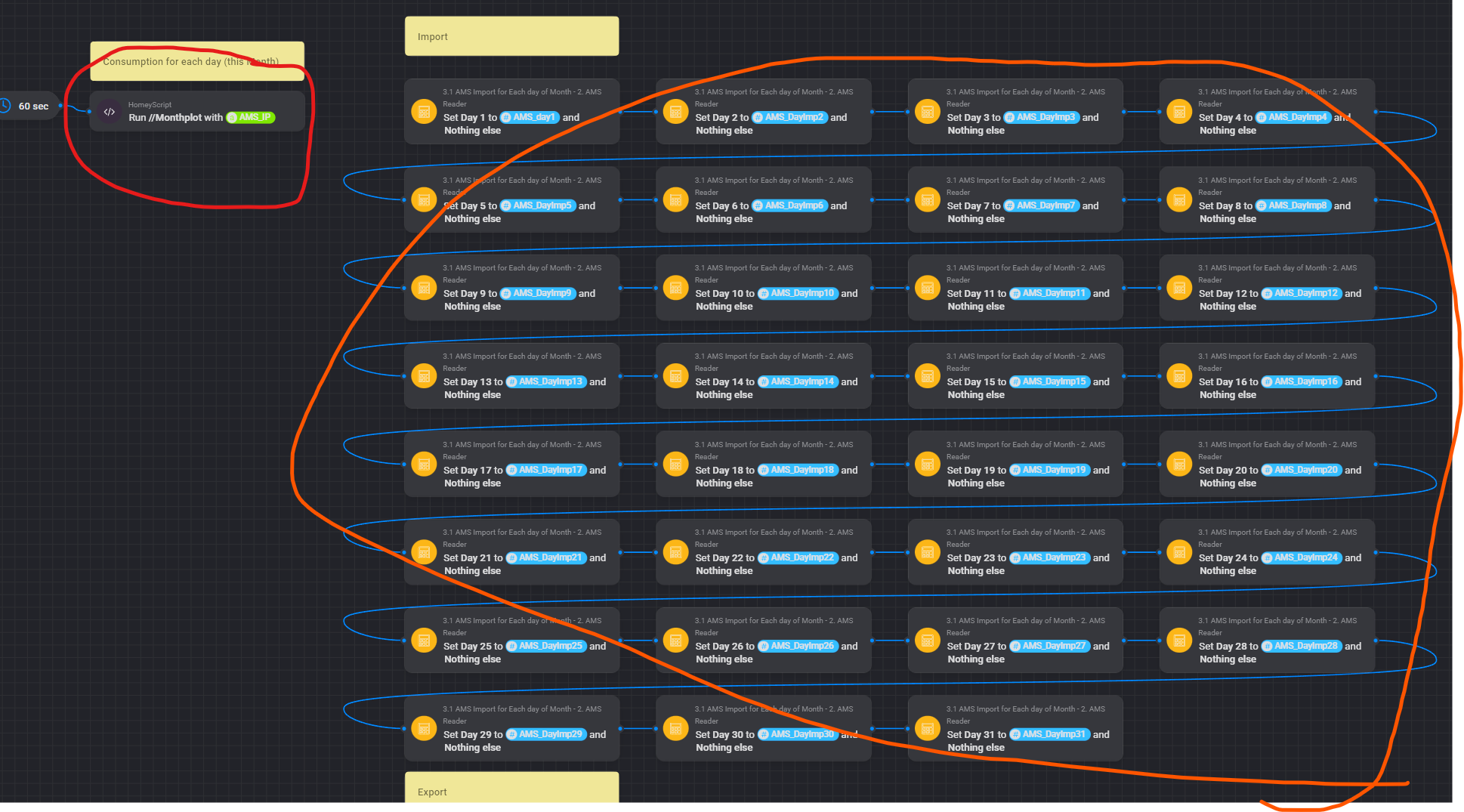
6 small scripts and this device-capabilites 


Very nice app, but half of my flows fails with this, when trying to click on Update Text to get a API code created
PayloadTooLargeError: request entity too large
at readStream (/app/node_modules/raw-body/index.js:163:17)
at getRawBody (/app/node_modules/raw-body/index.js:116:12)


Yeah,
It replaced the single quotes in the time command.
Make sure you have the correct single quotes '
Copy/paste this one and it works! Thanks


Found it! Thanks.
Any idea how I could plot this in a graph similar to regular Insights?
Just a guess, but I suspect there is no graph because the field is a Yes/No field.
Maybe you could create a numerical field that is set to 0 or 1 by a flow when the value of the Yes/No field changes?
I would like to send a time to my flows, is there any way to do that with the virtual devices?
Like a time input on number variable?
Can’t you just use the time and date from the homey self?
Timey app accepts manual entered time;
Example of a flow that needs user input to enter a preferred start time
I have a heater to my car, I have made flow with depending on how cold it is, it will run the heater after a formula but for that to work I need to set the departure time.
Its not only me how is using this function.
I have a tablet in my kitchen where I and my wife use homey to control stuff.
I previously used home assistant and there you had helpers that could be configured as time and date.


What about the combination with the iCalCalender app? You can put your departure time in your agenda (or maybe it is already there) and use that as departure time?
And/or add google maps route calculation in between your home location and destination, maybe even based on the location field in the appointment of an iCal agenda?
