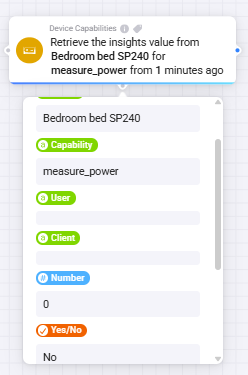
I actually see the same behavior with my INNR SP240 plugs. The capability exists:

I also tried the alternative retrieve insights card from Device Capabilities, but that returns 0 instead of the actual value in Watts:
Same here Peter_Kawa
I also used the alternative retrieve insights with measure_power or Power capability but it’s not giving a result, other capabilities like meter_power / Energy do.
measure_power:
meter_power:
Are you sure it’s since the Homey update, and not the DC update? I have updated the DC app 3 weeks ago.
Do you have the HP2023 or older model?
Ok, I’m gonna need some help here. This App’s features seem to be endless…
I have 2 AVD’s:
1 For my heating, it reads Opentherm values,variables to steer heating with Opentherm
2 A AVD with counter and button to boost heating a couple of degrees.
I would like to put these together, but without loosing the way no1 works. Meaning I will get the ‘overview’ when clicked/pressed :
Is it possible to add a button to this screen ? I might just add an On/Off (Button Tab) but it will still acitvate the tile (lightened or Gray) is there a way to prevent that ?
I don’t want to accidently activate the Boost when I just want to open the overview…
Yes, but you need to create 2 buttons.
Create a button set it to Indicator Only.
This first button you can set through reflection or flowcards.
But, you cannot click it in the homey app as tile and it is not visible on the button-tab.
now, create a second button which you can click, and use that to active whatever you want, and also, update the first button, so the Device tile represents its value (on or off).
@Arie_J_Godschalk : Ok that works, but I still end up in the button Tab, not the overview tab when I click the Tile.
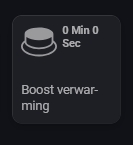
The Device tile doesn’t need to show on/off, I want to put a ‘Boost xx Min and xx sec’ in the status (got that allready working for the Boost AVD so I can just copy that)
Ah yes, as soon as you have a button that is shown (in this case the second button), your device will open in the button tab.
And sorry, but as developer I have no control over how the homey app behaves.
And the Sensor tab is always the last tab.
So, as soon as you add pickers or buttons, it will open in that tab, instead of the Sensor tab. There is no way around that afaik.
It started the 16th of October.
I have a flow that checks a lot of devices at 20:00 every day.
No issue was seen the 15th at 20:00.
After the upgrade to 12.8.0 the 15th of October at 15:30 Homey showed that a new version for some apps existed so I upgraded them. One of them was indeed DC.
I have Homey 2023 Pro.
@Arie_J_Godschalk any clues?
I have the same issues with displaying the devices on the energy tab. Let me know if you get it to work.
@Arie_J_Godschalk is this a bug in DC or changes in Homey making it in-compatible?
I am not sure.
I cannot simmulate the issue on my HP2023 (12.6.0).
Could you run the flow and show me the tags (Changed On and Duration till now)?
@Arie_J_Godschalk Will you have time to test with v12.8.0 soon, as the problem started after the upgrade?
With v12.8.2 it works fine again. 
DC v2.16.2 HP2023 12.9.0
FYI
When selecting Export flows, I get Error: [object Object]
Where?
Can you show screenshots?
Hi Arie_J_Godschalk, are there any updates on this one?
You don’t actually need to use tags, you can also enter it as text 
i know but measure_power is not giving back a value