@Theo_de_Koning,
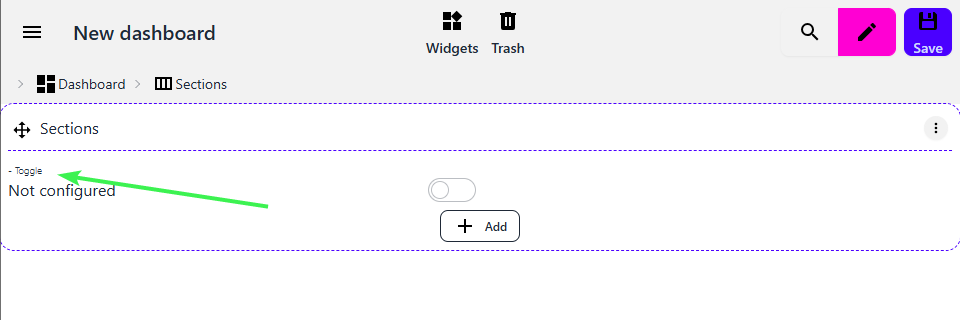
from your screenshot, you have to hit the ‘+ Add’ button in the middle.
Then add for example a ‘toggle’.
Now you will see that toggle in the sections, and probably with blue lines around it.
You will also see in the breadcrumb trail the following, >Dashboard >Sections >Toggle.
Now hit the >Toggle in the breadcrumb, and you can configure that particular Toggle.
And I use this opprtunity to write some “change requests / wishes” (@skogsaas hope you do not mind - but so slowly I find in promising and appreciate the latest changes!)
for insights: deletion of multiple graphs with trashbin does not work
for insights: reordering of multiple graphs is not possible
independent styling (color, background color, size, style (bold/italic)) of icon, label, value - for each item where applicable (use case: via Switch widget: show capability in different colors based on some state of (even other) values, e.g. show battery percentage red if <15%)
mark widget “read-only”, e.g. only show a switch/slider state, but prevent the changing of values - this could be also useful for Dialogs (show values read-only, and allow changes only by opening the dialog)
configuration (on dashboard overview level) to hide burger menu in dashboard itself and/or to set dashboard read-only (thus possible to pass dashboard URL to e.g. family members without giving them the chance to “easily” edit the dashboard)
list of dashboards cannot be reordered
Text widget: converted dashboard contains Text widgets, but new dashboards don’t allow to add Text widgets - do I miss anything?
Dialog widget: allow to close them with Esc key
Dashboard widget: allow to choose alignment (left, center, right) - center is not always a good option
quirky behaviour when still in Edit Mode: when switching dashboard via menu, nothing happens (although it seems to register the change, because after F5 the newly selected dashboard loads)
Fixed, I think Just released 1.2.1 into production.
Wow! I must say, that’s what I call a proper list of feedback!
What’s your day job, developer?
I have a todo-list locally, just copied everything you just listed into it
I will work towards making everything simpler, but right now I do agree with you; the learning curve is probably way to high
@skogsaas
yes … in software engineering since ages … mostly developer all the time, but also more and more into project management since 5 years … so yes, familiar with many things here somehow (although my focus is on backend side)
@skogsaas
Something does not really work with the switches. I try to setup a separate section, that only show alert conditions (told you about that already ):
if some capability has a certain value (e.g. door locked = false)
show dialog widget with sensor widget within (dialog in order to open a dialog later to change some setting later, e.g. lock the door by toggle)
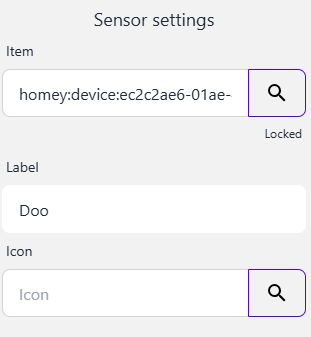
Select the dashboard device you want to store you dashboard on.
That should be it.
Now you can edit your dashboard like you want.
Clicking an item, the breadcrumb path will change, and using the breadcrumb item you can configure it.
So if you click on the Toggle on the dashboard, the breadcrumb path will show >Dashboard > Sections > Toggle, you can now configure one of the three, from the breadcrumb path.
Or using Dialog Widgets to edit settings (e.g. in normal dashboard only shown a sensor value, but not editable, by clicking on the item, dialog opens to modify values):
And of course @skogsaas I provide you with some more observations
add new widget “Separator line”
colors with color stops: colors not always right (hard to say why, but it already was a problem in the old version too) - see image below
freeze the editing elements (icons and hierarchy path) when scrolling the dashboard while editing. otherwise it get’s difficult to edit elements that are too far down on the page/screen … or add an “Edit” context menu to each element, so that one can open the properties directly from the element instead of having to select the item on the hierarchy path on top
no way to cancel edit mode. one can switch between view (read/only) or edit mode, or save - but not cancel.
white space around modal dialog widget windows is too big in my view (maybe make it configurable in the dialog widget propertied)
and as mentioned in my previous post: the thing with the switched really caused me troubles
color stop at 0 °C (base color is blue, threshold at 0 °C with red color) … so negative temperatures should be blue, positive temperatures red … this works well in the main dashboard (see first image in this post), but same logic does not work at another place … very strange
Keep on with this good work !!! (really spent many hours with it now … basically it seems stable now, but still has some usability glitches … see above).
After releasing v1.0.0 I asked Athom to make the app public for the first time. So it now lists if you search for it, and it typically is listed on the front-page under “newly updated apps” (or whatever that section is called)
You are awesome!
I love to see what you’re managing to create!
It looks way better than my main dashboard
And as always, I’ll make a copy of your list of observations!
Added new widget pushing the concept of “readonly widgets” further. The new widget Secured under the “Logics” category allows users to lock child widgets, requiring a password to unlock the child widgets. The password is SHA256 hashed, and it more or less non-“decryptable”. NSA might disagree, but your children/spouse wont manage to retrieve the password
secured: the user only needs to open test “Edit dashboard” menu and set a new password
this all basically makes only sense if the menu itself can be secured or hidden on dashboard level in my view.
regarding some widgets: I did not find any systematic approach, why some widgets only supports a single child, while other multipe children … e.g. list or section support multiple, while dialog, readonly support only single … wouldn’t it be easier if all of them support multiple? (at least for the user) … happened a few times, that I got stuck, and had to introduce a list inbetween. from UI point of view I see no reason for that.
and still not 100% sure if I like the readonly concept … it actually fits pretty well to the hierarchical widget concept (so from this angle a good idea) … but I guess it would be much easier for the user to have some widget properties (for every widget) to set, like
font style/color/size (for icon, text, value)
read only
secured by PIN
etc.
that gets inherited to all children (so I can still choose to set it for an entire set of children, or just for one single widget without the need to introduce some additional intermediate layer)
imagine now you make a “styling” widget (he he … what an idea) … but if you want something styled an read only, you would need to nest 2 additional widgets in order to achieve it.
PS: some more thoughts for the “secure” widget
isn’t read-only just another form of securing? so why not move this to the secure widget anyway (haha … as long as it does not break my current dashboard of course!!!)
maybe instead of the unlock button (ugly … sorry), just open the dialog when clicking on the item (like for dialogs) - at least for cases other than “hidden” , or to make it less “ugly” just a partly transparent lock icon or such …


 - but so slowly I find in promising and appreciate the latest changes!)