Then I need some explaining, I’m barely able to create one working graph, but then editing it is so horribly difficult (the drag/drop) that I’m left with something unreadable and unrepairable (as far as my abilities go). It seems so unintuitive to me 
is it in the plana to create tutorials how to use this renewed app ?
if not , i will delete it with pain in my heart 
the dashboards were amazing but i am afraid its totally unusable for me now
just another suggestion: would it be an option to release the old version publically as source code, so that we meanwhile maybe can host it ourselves somewhere, until the new version gets more stable …
For now I have spent some time to get the Homey mobile app on my tablet with the basics what I have from the old one here.
Some data to somewhere else too.
For the new one here it’s what @zakraket wrote about the editing.

After working some weeks with the new dashboard i get used to it. After installing the new 1.1.0 version (in test) it looks like a little faster to load the dashboards. But it could also that it is faster because i don’t use the dashboard widget anymore. Instead of the dashboard widget i switch dashboards using the buildin menu. It looks like that is a lot faster.
I do have one question about an error when loading the dashboard:

I’m not sure, but it looks like it is caused by a non-existing icon (name). If a sensor or a capabilty has an icon, i overwrite the icon field by a non- existing (file) name. Is it possible to disable/enable to show such icon in the dashboard, preventing such error messages?
Maybe you have an idea? on my wallpad I either see the ‘login’ page (where you provide your homey account, but the button is unresponsive so I can get out of it), the progressbar (the infinity-symbol) or the ‘dashboard’ (one graph I managed to create, I should say that I can put very little time in my dashboard currently..)
I have Fully Kiosk Browser default page set to my dashboard address, but it’s switching between the login, progressbar and dashboard, and each can be ‘active’ for hours.
I can’t seem to have Fully just display the dashboard.
My experience is pointing to an URL including one of the ‘old’ dashboards ID’s is not working. Use the basic URL (https://homeyboard.github.io) or the URL pointing to a dashboard created with the new version. Loading can take some time indeed, but never more than a minute or so. I use the fully browser too, but not to create the dashboards.
Its just too bad that you automatically force the old dashboard (which was working fine for me) to be updated to the new dashboard type , which in my case resulted in empty screens, and no way to display the old dashboard pages again..
i have tried to create new ones , but it is a total disaster , i had some options only to see it removed again after a save.
will delete this app with pain in my heart
sometimes a change is not what the people want/need
1 Like
The biggest issue imho is that @skogsaas is not able to respond regularly (and maybe even does not have time to read the messages?), which is understandable given the situation he is in (work/privatewise) but it would be a lot better if we can get a bit more feedback on what’s going on. Let alone an update - or info about - to fix some pressing issues.
So please please please? I’m still a big fan of this project, but at the moment I have no dashboard and not a clear picture of what to expect from this app. It’s just because I don’t have the time to look into a different solution and because I still think this will be the best dashboard by far compared to other solutions I have not moved on.
Just to clearify: I really appreciate all the effort that has been going in to this, but a little more insight on the progress would be nice
fully agree … all the effort is very appreciated - really great project!
but also still very disappointed that we are left now with no working version since weeks/months:
- the old version (which worked pretty well for most of us) no longer exists
- and the new version is basically unusable in its current state
I stopped trying the new version, because it happend too regularly that I invest time to setup a dashboard (frustrating enough with all the jumping elements), and then, by some bug, the dashboard renders useless, not even accesible anymore for editing or whatsoever.
I still would propose to make the old version available somehow, so that we have at least something we can use in “productive” environments.
(ideally 1 app allows the co-existence of both dashbaord types old+new - I guess everyone would be happy with this approach)
Here we go!
v1.2.0 released
I’ve just released version 1.2.0 into production. It’s been in test for some days, and haven’t introduced any new issues I know of.
This release focused on addressing some of the main pain-points people have pointed out; editing by dragging elements.
So first of all, there’s now less “noise” while editing, reducing borders to a minimum when the widget is not selected:

And when an widget is selected:

When selected, the type of widget is shown on top, and a context-menu is displayed on the right side. The menu can be opened by clicking on the vertical dots:

It is now possible cut, copy and delete any widget. To cut and paste a widget, first select Cut on the widget you want to move. Then select any widget that is able to contain one or more child widgets by clicking on it, in this case a section widget. The Paste button will be displayed if there are any widget previously selected for Cut or Copy.:

The Add button allows you to add any widget as a child to the currently selected widget. By clicking Add, a dialog opens with the same widgets as in the left sidebar you can drag&drop from:

Currently you still have to drag elements in order to reorder them, but that might change later.
Hopefully these are some changes that will make it easier for people to create dashboards.
Comments
Almost spot-on 
I’ve been thinking about how this could be done. I would have to embed the old version somehow. There are so many changes between the old and new version, that simply having both of them in the same web-app wouldn’t work. But hosting them side by side could work. I first have to update the installable Homey app to allow for both old and new dashboard settings. I’ll look into it 
Priorities forward
- Refactor the login
- Dual hosting both old and new version
- Refactor dashboard settings as
/userdatafiles
very happy to read that … first attempt looks promising … the “+Add” button was the game changer!
still a bit lacking intuitive approach … e.g. for editing properties you cannot do this directly from the item, but have to click on the item in the hierarchy tree … but that’s minor.
I still tried to replicate my problem I already reported in last version about adding color stops to insights, and problem still persists. As soon as this happens, nothing works anymore.
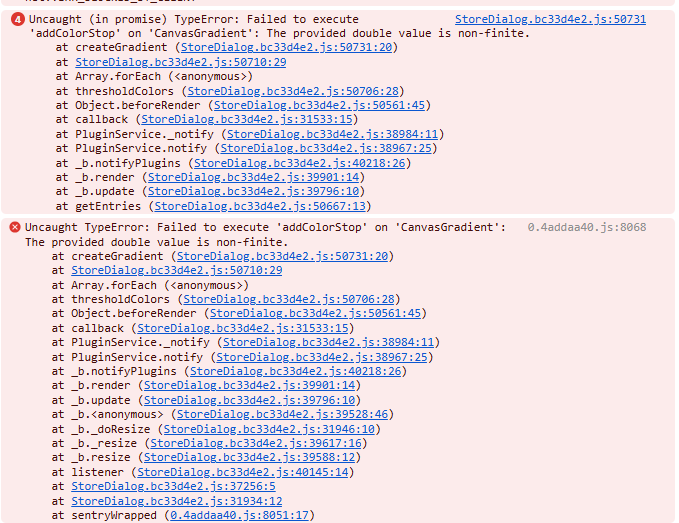
one more observation with the insight: when you define multiple data lines in 1 insight, you cannot delete them later with tre trashbin icon
and one little wish: ability to close the dialogs with the Esc button … I like the dialog: e.g. have some dashboard card that only shows data r/o, and open the dialog to set values (e.g. like target temperature), so that you cannot modify values that easily by wrongly touching something
and one more thing, what I also suggested in the old version already: to have conditional formatting of items … conditions are now possiblw with the switch widget, but each item should have formatting options for icon, text and value … then e.h. warning like this would be possible (just some random example):

this would really add much value to the entire dashboard!
Great, much appreciated! I tested quickly and looks promising.
One thing: when I’m in a dashboard and select another dashboard, the page becomes unresponsive. I then need to refresh/reload the page which takes at least a few minutes (!) with the infinity symbol
Deleted all dashboards and created (simple) new one, and now that seems fixed.
I’ll try the other options, but it’s a lot easier now, mucho tnx!
