Scaling of “card” size is not correct when adding capabilities after adding insight graph (and moving this capabilities to the top of the card.)
As you can see the bottom part of the graph is cut off.
I personally think you brought a gigantic leap forward in the way of thinking about Dashboards with the ability to have different Card and View. This is so unbelievable simple in concept, yet so powerfull. You might think that all other dashboard solutions would have thought of the same concept. Yet this is the first time I see it. Absolutely WOW!!
I might have missed it, but where can I sponsor a cup of coffee for you. (or a whole tray of coffees)
I don’t know if this is by design of a bug but when i toggle a light on or off it shows me the pop-up / view.
But i do not want the view card just turn on a device.
I think I found another broken egg.
When adding a dashboard to the View, you can later only remove the dashboard. It is not possible to edit the settings. Not a major one. But unsuspected.
(Use case; I have 1 card, with ON/OFF on all 8 ceiling lights, and the Dim Capabilities on the view, directly under the Dim capabilities I have a link to the Ceiling Lights dashboard, with the seperate cards with all capabilities per light)
Is this the temperature of the actual toilet seat? Because that would be a funny place to have a temperature sensor
And Dutch it really a funny language when you don’t know it!
I’m guessing that this is the word for kitchen?
Because when you pronounce it, it sounds like a common word for male genital in Norwegian
It’s on the same level as curing cancer?
I’m sorry you guys, long day, monday, and two kids keeping me up all night after publishing the latest app version
I’ll test some more and see if I can reproduce it!
I’m guessing some kind of slow network or something. I’ll add #60 Loading to the list to do something about progress bars and feedback to users
Nah, this came pre-broken and I knew about it. Just didn’t take the time to fix everything
The pandemic made me buy all kinds of coffee brewing stuff. Which also made me drink way too much coffee
You haven’t missed anything, I did do a post about it at some point:
I noticed too this morning and made a note of it at the bottom of the update-post
You have a dirty mind Marcus hehehe. It’s something boring: the temperature sensor of the presence sensor behind the mirror
It is indeed hehe. Yes keuken is kitchen
Same here, I have to wait and reload for quite some time (as in several minutes) until a new dashboard page actually shows my dashboards (Pro 2019 with 2 installed dashboard devices).
I’m sure it’s not my network (yea everyone says that ) because nothing else loads slow-ish, even my.homey.app loads pretty fast.
Hi! I am trying your dashboard… I am using a HP 2023 and installed the app. But I am not able to add insights. When I am trying to do so and click on insight, I am not able to click anything else anymore and have to refresh the browser. Any idea?
Looking through your list of work on Github, I didn’t spot the ‘copy/move’ cards from dashboard to dashboard ‘enhancement’. Is that missing? Or did I not look correctly?
Failed to load resource: the server responded with a status of 404 ()
/api/icon/26f6a591-ba97-497a-8a87-30c842ca58e5:1


       Failed to load resource: the server responded with a status of 404 ()
/api/icon/26f6a591-ba97-497a-8a87-30c842ca58e5:1


       Failed to load resource: the server responded with a status of 404 ()
3.eaee0529.js:109223 Uncaught (in promise) TypeError: Cannot read properties of undefined (reading 'name')
    at getOwnerName (3.eaee0529.js:109223:27)
    at 3.eaee0529.js:109255:27
    at Array.map (<anonymous>)
    at $$self.$$.update (3.eaee0529.js:109254:45)
    at init (index.6d45844e.js:494:6)
    at new InsightPicker (3.eaee0529.js:109298:5)
    at create_fragment$d (3.eaee0529.js:116710:19)
    at init (index.6d45844e.js:497:35)
    at new InsightEditor (3.eaee0529.js:116967:5)
    at construct_svelte_component (scheduler.a4b1dbd5.js:653:10)
    at Object.p (3.eaee0529.js:122734:29)
    at Object.p (3.eaee0529.js:121924:20)
    at Object.p (3.eaee0529.js:122806:20)
    at update_slot_base (scheduler.a4b1dbd5.js:93:10)
    at Object.p (index.2f65b186.js:124:11)
    at Object.p (index.2f65b186.js:268:20)
    at update (scheduler.a4b1dbd5.js:774:32)
    at flush (scheduler.a4b1dbd5.js:740:9)

Im getting this...
 )
) (or bite in your ass…)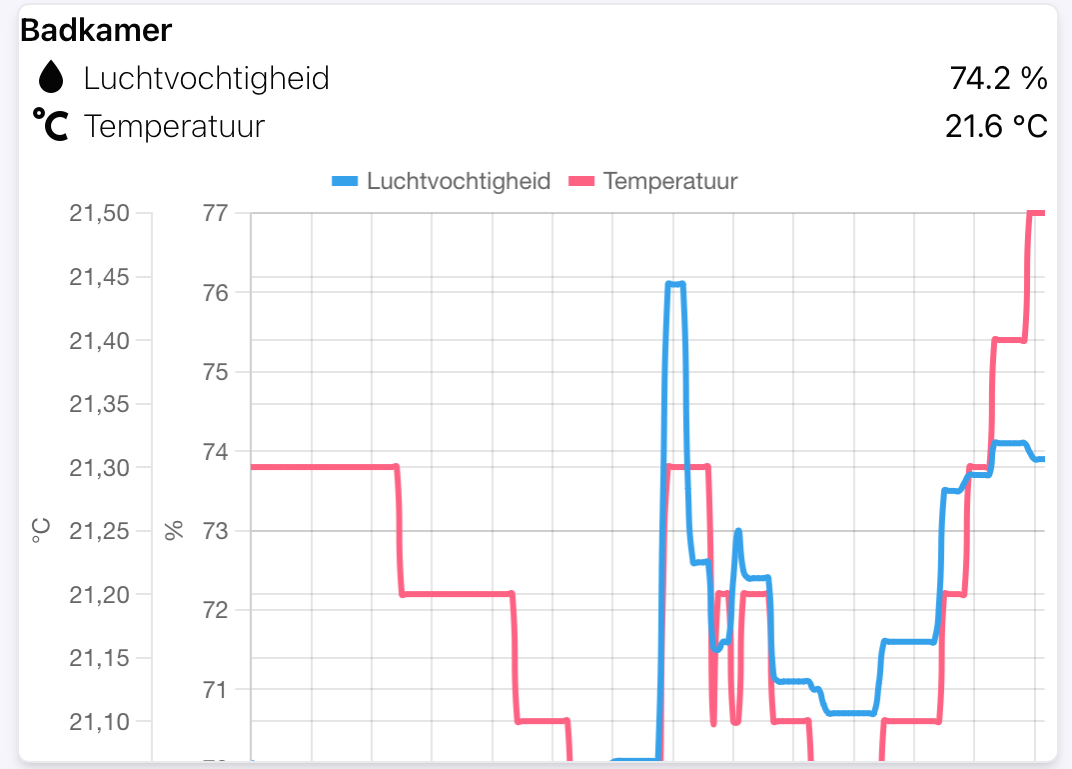


 ) because nothing else loads slow-ish, even my.homey.app loads pretty fast.


 and it’s just a mmwave sensor not a cam?


