I don’t know of any widgets…it is not mine so I can’t support it.
Same for the temperature “clock” you mention.
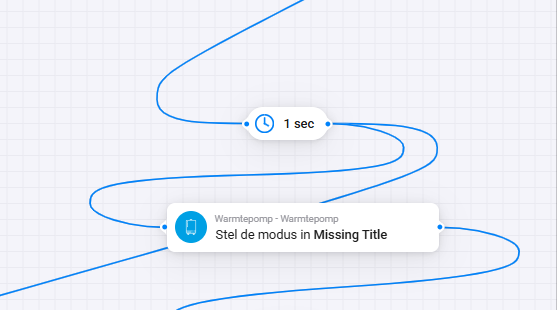
If I simply Create a flow with ON, Cooling and 21 degree and fire this flow it works here.
I don’t know of any widgets…it is not mine so I can’t support it.
Same for the temperature “clock” you mention.
If I simply Create a flow with ON, Cooling and 21 degree and fire this flow it works here.
Not by me, but then i will check further. thanks!
Hello Mickel,
As reported yesterday, after the restart of the Daikin app, in the action flowcard for the heatpump could be chosen between heating-cooling-auto.
Unfortunately, this worked only for a couple of hours.
After a 2nd restart of the Daikin app it worked again and I could modify my advanced flow successful.
Today, same story, the choice for cooling and auto are gone.
The following is a screenshot from the action flowcard in the advanced flow
How can this problem be tackled?
Best Regards,
Theo Nijssen.
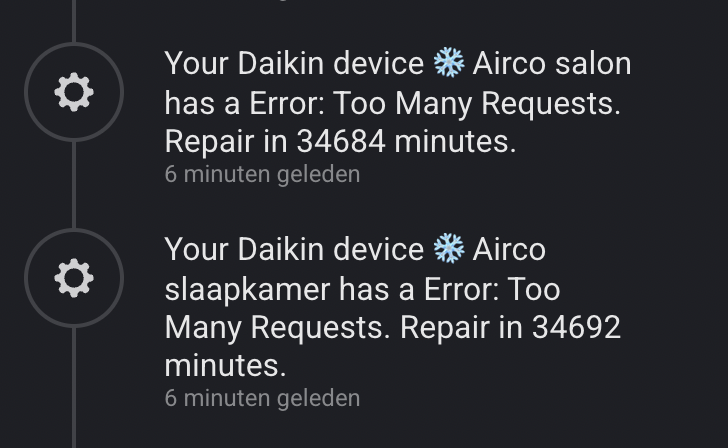
I hope someone can help me with my Daikin Onecta issue. I realized I was sending too many requests per minute, which caused the app to disconnect both of my air conditioners.
I tried to “repair” the connection, but that didn’t work. So, I removed the air conditioners from the system. Since then, the Daikin Onecta app on my Homey Pro Early 2023 can no longer detect my air conditioners.
I have reinstalled all related apps and even removed the integration completely at one point, but unfortunately, none of these steps resolved the issue.
The Onecta app also asks me to log in and grant permission, but after that, it says no air conditioners are available.
before this problem it worked just fine for weeks/months.
Turn the homey Daikin app off for 24 hours.
The ratelimiting is still active even when pairing.
After 24 hours try again.
And please read/open the device card in the future then you see the message your ratelimited.
Also in the future don’t delete your devices if your ratelimited a repair should be enough but after the timeout(also seen on the device card)
Thank you, i will turn off the app for 24 hours.
Ive changed a lot now so the limit is no issue in the future.
I myself would start to set the cooling modus only once per day, for example when the outside temperature is >21. This does not need to be set every time. (in a separate flow)
Once you have set the ‘daikin temp’ (even if the airco is off) turning it on will cool to that temp.
If possible I would use another temp sensor to turn on or off the airco and not use the internal sensor.
(this is more or less the way I have set it up, so separate flows to set stuff like modus, speed, flow etc. and another flow to start or stop the airco based on another temp sensor)
Hi,
I know I’m a total n00b for asking this, but I’ve had a bit of an “accident” with perhaps a not so very smartly designed flow that actually worked very well for a good while but then suddenly went a bit crazy overnight and caused this (completely insane 25 days?) rate limit:
What are my options here?
I’m guessing this is account + Homey limited? Or can I just reinstall the app and re-add the devices (and potentially destroy my flows)? Or can I for example use the Home Assistant integration instead, or would that also not work now due to this rate limit? Can I try Daikin support or is that a lost cause?
I’d rather not have uncontrollable airconditioning for 25 days during the hottest period of the year if I can help it, but here we are. And to think I had local polling on my older airconditioning firmware. I understand why rate limiting exists for cloud stuff but 25 days seems just completely insane to me. 
Thanks for the help!
Maybe it should be 34939 seconds, which is about 10 hours. This amount of hours is more likely.
Ok yeah that sounds slightly more reasonable. I’ll just wait it out for a bit in that case. Thanks for the feedback!
On the other hand, if it was seconds you’d think it would be counting down faster. This is right now, the difference comes down to around 4 hours since the last time I posted:
So I’m probably out of luck, seems like it’s actual freakin’ minutes and thus a completely absurd 25 days waiting time, yay  .
.
Any clue how I can get around this?
It’s minutes, and you should turn the Daikin ONECTA app off in homey for a minimum of given time.(Advice 24H)
Aan long the app runs with the rate limit it will only increase because of the 1/2 hour sync that’s also will be rate limited.
After the time start the app and repair your devices
And btw this is the rate limited of the Daikin platform
On this site https://www.npmjs.com/package/daikin-controller-cloud there are several best practices.
One of these is: DO NOT generate more requests while being rate limited because else the unblock time increases! Use the retryAfter property of the RateLimitError to determine how long to wait for the next request.
The limit is 200 request per day. Normally you will blocked for the rest of the day, unless… (see above).
Thank you for the help!
Yeah I’ve turned off the app because I figured the same thing. Just turned it on to check the time again. 
Love what you’re doing with this app and I know this is not your fault, sorry if I came across as overly hostile. My displeasure is mostly aimed at Daikin and cloud services in general, I meant no offense towards you. 
So what you are saying is: if I wait 24h (as in leave the app off completely), the amount of minutes I’m seeing will reset when I repair my devices after that time? So I probably don’t have to wait the actual minutes that the error gives me?
Yeah the funny thing is that I know this. It’s just that I build a fallback into my flows that restarted the app because I sometimes (very rarely) got an error, and an app restart fixed it immediately. For some reason last night it kept failing, I was stupid enough to program the flow where it would just keep trying every minute if it failed (very dumb, I know), and I only saw this when it was morning. I’ll wait it out for a day and see what happens. But if the limit stays like this I really need to look at alternatives (if there even are any?). I get that I need to be “punished” for this, but 25 days is really absurdly and needlessly long. But I should probably be saying this to Daikin, not you. Thanks anyway for the help!
From Daikin cloud documentation.
This rate limit configuration allows you to send a maximum of 200 requests per 24 hour window to the ONECTA Cloud API. Furthermore, per minute, a maximum of 20 requests can be sent. This rate limitation gives you the possibility to query the state of your devices periodically while keeping the flexibility to perform sufficient actions on your devices.
For example, if your application would fetch the state of your devices every 10 minutes, this would take up 144 API requests over a window of 24 hours. Note that you can request the state from all devices with only one API request. You then still have 56 requests that you can use for other actions such as changing the operation mode or room temperature setpoint during this window. However, you can’t perform these actions too quickly after each other because you only have a budget of 20 requests per minute.
The API rate limit algorithm is implemented using a sliding window policy, which dynamically tracks and manages the number of requests made within specific time intervals.
In a sliding window approach, time is divided into consecutive intervals, often referred to as windows. Unlike a fixed window where the limit resets at regular intervals, the sliding window maintains a moving time frame that continuously shifts forward.
For example, if we consider the rate limit of 20 requests per minute, the sliding window constantly tracks the requests made within the last minute. Each time an API call is made, only those requests are taken into account to calculate the remaining budget. This dynamic shifting ensures that the rate limit is calculated over a rolling time period rather than a fixed reset point
And because of the 30min sync every users has approximately 150 API calls a day to consume
Ok so as I understand it from this explanation 24h with 0 calls should always fix it (like you said), that sounds a bit more reasonable.
I was severely confused by the error messages, maybe it should say “try again in 24h” when it exceeds a certain amount of minutes, to make the way the rate limiting works more obvious to the user? Just an idea. I’m not even sure that’s something you can control in your app.
Thank you again for taking your time explaining this and sorry for the bother.
The issue’s what i had about the temp. Is resolved.
resolution: delete Daikin airco and then add him again. Now I am able to select the temps again..
I have 11 units connected to one account. The limit should be per device (airco unit) not per account. 
I think this is a flaw in the API design. Users with multiple airco units in their building end up frustrated.
Is there any way I can send Daikin an email to their API developers ??
I am in the beta test group for Daikin. This is the e-mail address I use. application.betatesting@daikineurope.com