Is it normal to not have status feedback on my switches and sockets in my Alexa equipment?
Because I have LEGRAND sockets/switches and since none of the apps are functional, I use Alexa to retrieve the commands in Homey except that without status feedback it’s a bit useless 
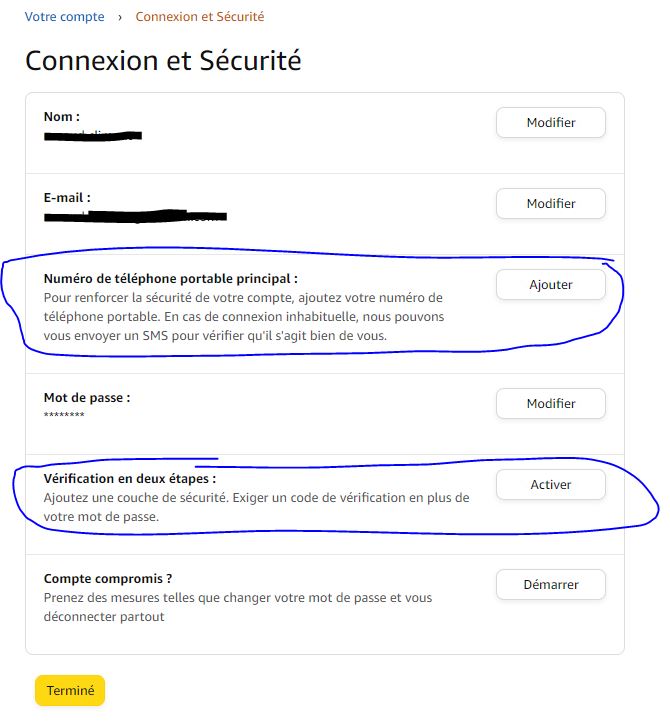
For the MFA problem, you must retire your phone number on your alexa account (security menu).
In my case all my problems have been cleard since I’ve retire my phone number (so it desactivate the MFA).
Hi, i dont know if anyone else is having this problem, tried to seach it, with no success.
All my echos disconnect from homey after about 24 hours. Is that normal?
I have autoreboot my router every evening, could that be the problem?
Best regards
@Diogo_Robles Server disconnection it’s a problem of the app, that developer has been working hard since the beginning on it. Big improvements have been done so far but sure internet disconnection it’s a problem.
Its the detection on, why cant we connect, is it because of communication errors or authentication errors. The components + amazon their auth system make it hard to detect the difference.
So when refreshing tokens doesn’t work at some point the code falls back to, assume we aren’t authorized anymore, lets start over.
So yes reboots of your network might be the trigger. But the effort we put in has been on handle more scenarios and detect those as different causes and not assume this.
So if that’s your cause is hard to say.
Any idea if the echo dot gen 5 will be compatible soon ?
2 Likes
Hi,
I’ve a question regarding my use case to play radio, when someone is in a room and the zone becomes active. Here’s my workflow:
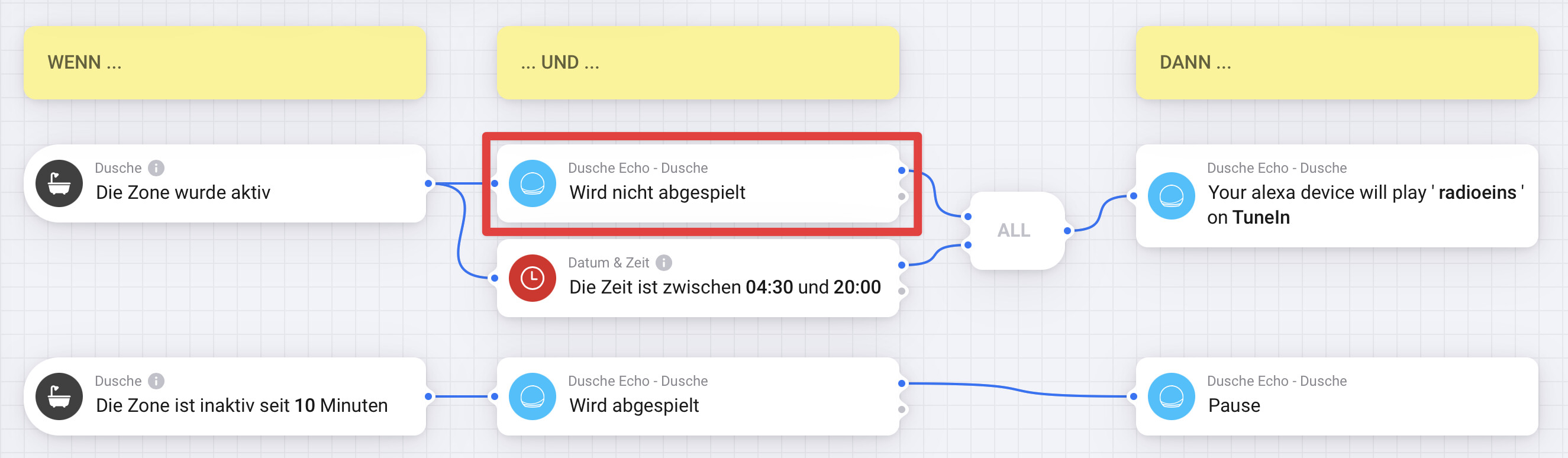
The motion sensor is set to timeout of 60 seconds. On first entry the echo plays radio from tunein (as expected). But if someone enters the room after zone is inactive and so becomes active again, the echo restart the radio sender. The condition “echo not playing” isn’t working as expected and instead of returning “echo not playing == NO” it returns “YES” again.
Do you have an idea, what’s wrong ? How can I prevent restarting radio senders if the echo already playing radio ?
And Echo Show Gen3?
I am pretty sure that issue has always existed sites since the beginning - is is a standard async issue. Alexa doesn’t send an update that music has stopped when it stops. So it gets out of sync.
It’s like trying to squeeze water then more fuzzy logic you add to it the worse it becomes when it doesn’t update.
Ie. I could add some checks so that when homey starts playing music elsewhere is tells homey that it has stopped on other devices - but that will break for groups (both Alexa and homey groups) - and it will still be wrong if you speak to Alexa asking for it to stop.
The more checks and rules you add the more places it can get out of sync - so to date I’ve just accepted that it’s always out of sync.
I’ll have a think about it - when I do a next update I’ll see if it’s something to tackle
1 Like
That’s Alexa sorry - it doesn’t tell you when a state has change me it really really bad at it because it doesn’t need to know - ie. you can’t ask Alexa if a light is on … and their own app is always messed up.
The solution is the “poll” Alexa and ask it every couple of seconds “what is its status” doing this though get a you rate limited - and then the rest of the app becomes really sluggish and delayed.
It becomes a real problem when you have multiple devices all asking for updating.
I do actually request for an update when the app loads, I could create a new flow card for switches / lights / heaters “get latest status” which power users could use perhaps?
1 Like
As the others have said - I suspect that it has to do with your internet going offline every 24 hours.
We do our best to work around these issues but it’s not perfect. Perhaps try “rebooting “ the Alexa app 10 minutes after your router reboots and see if it can refresh its token by itself.
No plans to add any devices at the time, honestly I haven’t looked at their new devices -
I’ll add them when I next work on the app, which I don’t have an eta for.
1 Like
The echo show 5 - gen 3 is already supported.
Is there any chance you could post some screenshots and steps on how to retire your account? To help the others with this problem?
1 Like
So to solve my connection problem.
I went to “Account” → “Sign in and Security”, then I deleted my phone number and the two-factor authentication. Please note, I believe that depending on the country you must call Amazon customer service to deactivate this option.
For me, this solved all the problems connecting to the application.
Yes, if you have an example or an idea for a flow that asks Alexa about the status of the equipment, I’m interested! 

I have my Homey in German, I am referring to this trigger card that comes for every device that should fire an event with the current volume level as a parameter every time the volume changes of that device.
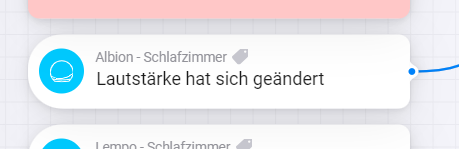
What exactly do you mean it is default Homey behaviour? Do you mean just the general firing of triggers from the cards? I do not think that part is the issue here, as the internal variables for volume are not updated anymore either. Since I reinstalled the App they are left empty (see the “-” for “Lautstärke setzen” variable).

I read in some GitHub Repos (node-red-contrib-alexa-remote2-applestrudel & node-red-contrib-alexa-remote2) of NodeRED integrations for Alexa that getting Events from the API is causing issues for them currently too, so maybe it is that Amazon has broken something?
EDIT: I am using the Experimental App Version v5.4.3 but the issue also appeared on the non-experimental one (I did not note the Version at the time sadly) and the EU Server
Ok, then I am not sure what is going on there, Ill create a ticket to have a look next time I work on the app.
Thanks for your reply, could be that it has always been like this, never noticed it before with other flows.
If it would be possible to “poll” Alexa it might be a workaround (don’t know if Alexa will give the right status if you were to do that, or what the daily rate limit is). If it really complicates things, I can probably create a workaround in my flow as well, just won’t be able to see if there was “voice activated” music playing.
Some background information on what I’m trying to accomplish, I’m trying to set up a flow that makes music follow me around the house when I go from room to room. Also, it would be great if there was a flowcard "And music playing on ANY Alexa, would save me doing 10+ checks (1 for every device), but not sure if that is possible.
