Thanks. I sent you a private message. Did you get it?
Ok. I understand. Both of those ideas (retreiving state and setting state) are already in the roadmap. The only problem is that I do not have time to work on the roadmap 
I encourage you or anyone else that wants to help out on the app with code additions or similar to look at github where all code is available. It is really not that hard. I learned all the basics during a few nights, more or less starting from scratch. The hard part is done, setting the system up.
Hi @Fredrik_Palsson
Did you get the private message with my settings?
It seems I accidently erased my entire settings. Is there some place where I can still find them?
Only if you have done RAW backup settings or Arhom Cloud backups
for some reason I didn’t backup the RAW data. But I got cloud backup. I thought it just covers the flows, does it also backup settings data from apps?
yes, it does
ok, so I can just roll back - oh, I can’t I’m rather far away from my Homey
This app is just fantastic. Well done!!!
I was just informed of this app and wanted to ask to see if it can solve my little problem…
Because I’m sensitive to light in the evenings (wrecks my sleep) I would like to change the light intensity based on time of day.
- After sunset, before sunrise: 25% (set using the built-in functions, but open to switch)
- After sunrise, before mid-day: 100% (as above, but no current way of checking for mid-day)
- After mid-day, before sunset (this is the really hard part): (100-(75/[hours between mid-day and sunset]*[hours from mid-day to now]))%
Is there any way of solving this using this app? The most important part for me is the last one, as the length of the days up here close to the arctic circle differ so wildly, a simple formula to set it based on time of day won’t do it.
If not, would it be possible to get a trigger for mid-day and values for “hours until” and/or “hours since”?
Hi Lars,
What this app could do is to provide the 3 trigger you are looking for. Any calculations could (or should) be done in the flow.
If you are using advanced flow it would be very easy to branch the calculation based on a tag that you provide from Advanced Scheduler.
If you are not using advanced flow, I think you have to make three flows, each one of them having a condition on the tag you provide from my app, and calculate according to your formula above. Or you could possibly make it in one flow if you do it clever, but I don’t think it is worth the effort, and potential errors.
If this is not clear, please let me know, and I will try to provide an example.
hello,
I install this app, fantastic job 
Unfortunately, I a problem with the sun even times, and particuly on sun rise, my flow don’t work with.
But an another flow with sun set action works well
do you an idea where is the probleme with sun rise?
Thanks in advance
Yann
Hi. There is very little info in your description. Could you provide som more info on what is not working?


Hello everyone,
I would like to start the shutters with a sun event. But not before and not later than a certain time. The event should then only be triggered once.
For example, sunrise at 6:00 am, but should not start before 6:30 am. Then the roller shutters should not start until 6:30. The same applies if sunrise is at 9 a.m. but not later than 8:30 a.m., then start at 8:30 a.m.
However, if sunrise is scheduled for 7 a.m., the roller shutters should not start until 7 a.m. either.
Greetings
Pierre
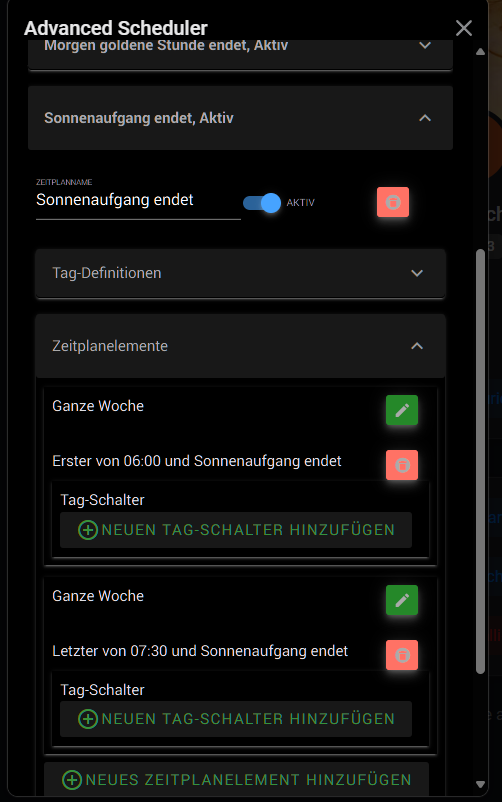
Hello forum,
Is it possible to sort the time elements of a schedule in chronological order? Over time, the recorded elements have become mixed up.
Thank you
Workaround : You can play with RAW data and eg. ask ChatGPT to do for you, whatever you need.
Is it possible to create a schedule that triggers every alternate Wed? i.e. once every 14 days. I can’t find any app that does that.
Have a look at the CronJob app
And/or Action Scheduler app, Cron app
