Anyone have a solution yet? Im not able to login anywhere now. Not Homey, not Homewizard and even the enlighten app en web say my credentials are wrong.
Sounds like you are logged out of you enphase account due to too many failed log-ins. I advise to stop the enphase app on homey, stop the enphase app on homeward and any other place you might have that tries to automatically log in. Then either wait a few hours for the block to clear or try to reset you password How to reset or change your account password using the Enphase App - Support | Enphase
That helped a bit. Now I have acces to the Enlighten app and website. And I managed to add the inverter in Homey with the enphase app made by Emile. The “zonnepanelen” app in Homey as well as the official own app of Homewizard still give me the error the credentials are wrong.
I assume you changed the password in those apps also to the newly set pasword? Even if you kept the same password, just re-enter that in these apps. Make sure that the apps are stopped and started again because they might have the old password still stored in memory. In worst case you could even delete and reinstall the apps to make sure that the memory is cleared. I do not know about enphase, but I know from other sites that they limit the number of information requests or login sessions. With 3 apps polling for data this might also by the case for you. Although I assume you hade homewitzard and ‘zonnepanelen’ already running simultaneously before. Also, I’ve seen before that a block is only on a single IP or session. So it could just be that you need to wait somewhat longer fot the block on those sessions to clear.
There is an app update. Maybe there are solutions for your problems
Version 0.4.0 — Added support for accounts with multiple systems. Fixed an issue where devices would stay unavailable forever.
Thank you @Robert_Elbertse. It did help to just wait.
Now it works again on all apps and Homey
Works sgain here to, but still missing current power…

@Peter_Kawa I know of the change.
But quite frankly, I think it’s then completely missing it’s purpose as an App.
If I want to see my daily or total solar panel power I have an Enphase app on my phone.
Homey is for domotica, so I want to know the current solar panel power so I can use that in flows and start/stop devices…
For the time being I use the load balancing values of my Zappi EV loader, which has the possibility to load the EV with only solar energy.
Maybe you have measurements like this as well.
The App ‘Zonnepanelen’ is still working fine here. But this App was supposed to replace that one because ‘Zonnepanelen’ isn’t being mainained anymore…
If ‘Zonnepanelen’ is removed w/o a proper alternative some of my flows will stop functioning.
If this one is never/not going to be a fully functioning alternative, I want to know, so I can get an alternative before ‘Zonnepanelen’ is discontinued…

I totally agree on that.
Luckily Emile reads his mail 
All values stay 0, even after reinstall device and app 0.5.0 and Homey restart, and 1 hour waiting. Enphase Homey app login without problems.
Yes, according Homewizard P1 meter the Enphase panels are producing energy. Any ideas?
Edit: Maybe the firmware version of the Envoy or the connection type influences the Homey Enphase app. In my case Homey uses Wifi and Envoy Ethernet.
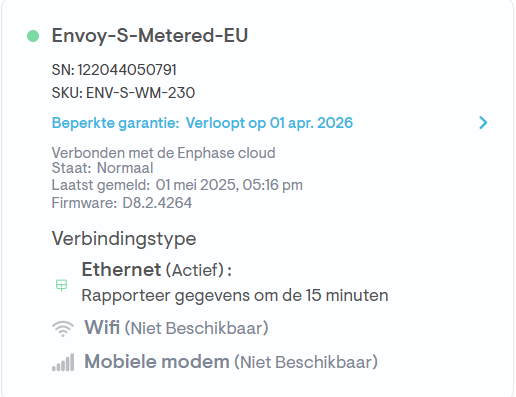
Same Firmware here…
Different SKU, I have a Standard-EU…
For me is “current power” on version 0.5.0 working.
Which Envoy type, firmware and connection do you have?
Envoy-S-Metered-EU
SKU: ENV-S-WM-230
Firmware: D8.2.4264
It is striking that the last change has taken place very recently, but is still zero. Only the current capacity is hours ago (solar panels are currently producing).
If I understand correctly, the times are only updated when a change has taken place.
Edit: 2 of 3 values (not current capacity) are updated with values greater than zero for 1 second, and change (overwritten) to 0 again. Odd behaviour.
Most of the time view:
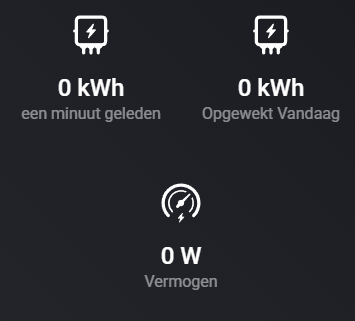
Each 5 minutes 2 of 3 values visible view (these values are correct):

2 Values are back again in version 0.5.1. Nice!
Only the current power value, which should be the difference with version 0.4.0, still remains zero without any recent update.
