I have my own dashboard in Google Sheets - one of the things I do there is to monitor the efficiency of my tariff use. I define efficiency as “How much am I saving compared if all my energy were consumed at the mid-rate”. The mid-rate is closest to the “standard rate” [whatever that means].
Graph Showing Consumption by Rate and Tariff Efficiency
Of course efficiency goes down in Winter - sometimes the battery just runs out so mid-rate power is consumed. On the coldest days it might even mean consuming at peak rate (December 2024, for example). Efficiency is also harder to influence in times of ultra-light consumption (June 2025 extended vacation) - you can’t stop a few wH being consumed when the sun suddenly goes behind a cloud or the deep freeze needs to cool down and doubles the background load.
Why I Got Interested In Tariff Efficiency
A big influence on improving efficiency for me was finding a way to stop the inverter going to sleep in low-load times (at night, typically). My SOLAX inverter goes idle if the load is < 150w for several minutes. The bad result of that was importing standard rate power at night even though the battery had lots of oomph left. Using Homey I have a load that I turn on for a few seconds when low load is detected - this “resets” the inverter. Some minutes later the process repeats. You can see the change in the graph comparing pre- and post- end February 2025. Of course more energy is consumed from the battery - but that’s low cost (often solar derived). Back of the envelope calculation suggests the saving is about 160kWh per year. Straight saving is about £40 (13% of total spend) - but the battery needs topping up. Worst case is that all comes from import at cheap rate so the saving is cut to £20 - nearly 7% of total spend.
Is This Useful?
I think this is quite a powerful concept that could be implemented in the Tariff Device or in the Account Device or maybe a separate device altogether.
For Cosy Octopus the definition of efficiency is quite easy - there’s a “standard-ish” rate so just make a comparison with that. For Octopus Go there are only two rates, so the concept of “standard-ish” is harder to define. For fully flexible tariffs I don’t really have a definition of what efficiency would mean because prices vary every day.
Question: is this a useful concept? and, if so, how should it be defined? If we can create a standard definition that works for all tariff types other than single rate tariffs I believe tariff efficiency could be an interesting and useful concept.
Thoughts and ideas gratefully received.
Finally some (real) progress. A block I have faced for sometime has been a difference in the CLI between homey app run and homey app install. I could run my old Octopus code and get some good data and insights being generated. When I tried to install, the app always crashed with no clues about the cause
Having done some more in-depth searches in the Homey community, I tried homey app run --remote. The thing crashed and gave some debug log information too. Finally I could resolve the problem. Of course the path is never smooth. Another problem around require node-fetch. Eventually worked out that node-fetch is always there (somehow), so I didn’t need to require it at all.
My old app version now installs and runs just fine. 
 Here are the Octopus Mini insights:
Now I can start to migrate my code emulated in Google App Script into node-js. Hopefully progress will be pretty rapid from here. Will keep you all updated.
Progress
Bit of a mixed bag. Have started migrating the code from GS to Node-JS. Also covering off the bits of the Homey API that I haven’t bothered to emulate fully (pairing, for example). That’s making good progress. Although there are some annoyances like not getting icons to appear in the relevant places during pairing - it’s not fundamental just a case of reading around a bit more and ensuring I am following all the rules. The documentation is distinctly lightweight, but the community will help too.
The Account Device
Less progress on getting all of the functionality right. The Tariff and Mini devices are working well. The Account device is hard to test because, for example, certain changes only happen once a month. I have been trying to use a piece of data that Octopus claim is the “currentBillingPeriodStart” to automatically change billing period. I have found two things - first it isn’t the billing period start date, it’s the date the last bill was issued, so in practice a day or two later. Second it isn’t updated immediately - and not until the bill is issued, I suspect. I think this means that there will have to be another setting for the app. That’s only two (plus the rest API authorisation information), so it’s not too bad.
Daylight Saving Time
There remains the problem of DST changes. Sigh. It really is a pain in the bum, because in the spring you have a 25 hour day and in the autumn a 23 hour day. One of the critical things for the functionality is knowing when the day changes. All of the Octopus mini data is in Zulu time, so when DST is in force midnight is at 23:00Z. From a metering point of view the devices are working fine. But I have some code that deals with the DST change - that only gets tested once a year in each direction. October test coming up!
I do have a test harness where I can make the code think that it’s another date. But that’s not the “production” code so there could be differences that I have overlooked.
Guy Lipman - who wrote some good material on the REST API that stimulated my interest in all this stuff - has a lot to say about DST. The REST interface actually mixes Z time and local time in different calls. Graph QL seems to be consistent in using Z time throughout.
Sorry, I missed these messages!
- Yes I have an Octopus Mini.
- It only reports data for Electricity, not Gas - That is still pulled from the meter every 30 minutes.
- For me, the best way I have found to automate things around the house is to fix everything on the current cost of electricity. When the electricity cost drops below 10p, (I’m on around 7p on Octopus Intelligent Go), then my automations can kick in and charge things around the house at the same time. When I plug in my car, Octopus may indeed give me a window at 2-3pm, 5-5.30pm, then the standard 11.30pm window. So as long as the ‘Current Energy Price’ value updates when I plug my car in to charge, it should still do what I need it to do.
Obviously this is my own personal use case - I’ve seen Home Assistant build in clever features such as finding the cheapest 3 Hour Slot to charge and so on, but I’ve never personally used those features.
The bonus would then be knowing if the Free energy slots appear anywhere in the Octopus Data so when the price drops to 0p then… etc
Hi Pete
Thanks for the updates. Appreciate it. I think I am going to focus on support for Octopus Mini, at least initially. This excludes gas from the equation right now - sounds like that is less important to you, though.
With respect to banding, I believe that 3 proportionate bands will work. Let’s explain that a bit. On a daily basis (look ahead, so say at 6pm the previous day) compute the meanPrice (probably ignoring slot length). On the day,
- if {currentPrice < (meanPrice * .75)} then rateIndicator = -1 (low).
- if {currentPrice > (meanPrice * 1.25)} then rateIndicator = 1 (high).
- else *rateIndicator = 0 (*normal)
Applying this to Cosy Octopus. There are 7 slots, 3 low, 3 normal, 1 high. In round-ish numbers, the prices are 12.3, 25.1 and 37.8 pence/kWh. So the meanPrice is ((3*12.3)+(3*25.1)+37.8)/7 = 21.4.
The critical numbers are 21.4*.75 = 16.1 and 21.4*1.25 = 26.8. Any low slot (12.3p) will have rateIndicator -1; high slots (37.8p) will have rateIndicator 1; normal slots will have rateIndicator 0. Bingo.
For Octo Go - there are only two rates. Your example has 2 low slots and 1 high slot. That would give a meanPrice of ((2 * .07)+(1 * 28.79))/3 = 9.64.
The critical numbers are 9.64*.75 = 7.2 and 9.64*1.25 = 12.1. The 7p slots will have rateIndicator = -1 (low) and the 28.79p slots will have rateIndicator = 1 (high). Also bingo.
I will add rate_indicator as a capability of the tariff device. The obvious flow card is when rateIndicator changes, you can then guard your flows with and cards. For example “when rateIndicator changes” and “if rateIndicator = -1” then…
I will not do Free Energy Slots in the first test release - are you also interested in energy saving slots? I have some insight into the latter in GraphQL, but am still looking for supporting evidence for free energy.
Will continue to update you…
Some quantifiable progress - hoorah.
In my test harness I have an approach I am evaluating to resolve the billing period rollover problem. It’s looking promising, but will require an additional setting in the app.
The pairing process is pretty much there - some screen shots:
Driver Selection
There is only one driver despite having three different device types…
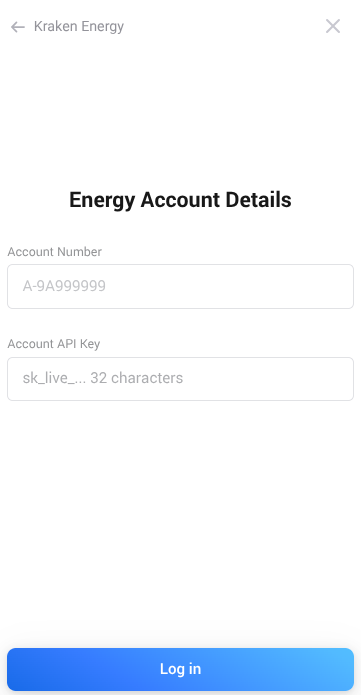
Account Credentials
Still frustrated that I can’t get the app icon to display on this view.
Device Selection
Hello. I have heard back from Octopus. It seems that Live Export is not working on any Octopus Mini right now. So the proximity to the power cut was, apparently, just a coincidence.
If anybody wants to check theirs and get back to me, that would be really useful.
Thanks!
Hey @David_Piper - I’m pretty new to Homey but am a developer and octopus user who has the mini and has duel fuel. If I can help test or develop anything then do feel free to drop me a message. Would love to get octopus integrated
Thanks @markstechvlogs, appreciate the offer of help. Getting close to having something minimal to test… See the next post.
Recent Progress
Been a bit quiet after the frustration of my mini going defective. I don’t think that Octopus understand the nature of the problem yet, but it’s clear now that it’s my device and nothing more global. Octopus are confusing GraphQL (how we access data in Kraken) and the graphs that appear on the website/app showing consumption. Sigh.
There is enough functionality still working in the Mini for me to develop and test most of the app. With a couple of offers of help, it can get tested fully around the community.
The code from the emulator is now migrated into Homey. It’s taken a bit longer than I expected, but I have taken the opportunity to re-factor and improve the architecture of the code. I also made some stupid incongruities between the emulator and real Homey, so those had to be ironed out as I migrated the code.
I am now testing the Product Tariff device - it will take a while because it accumulates data by price slot and by day. Certain processes take a full day to occur.
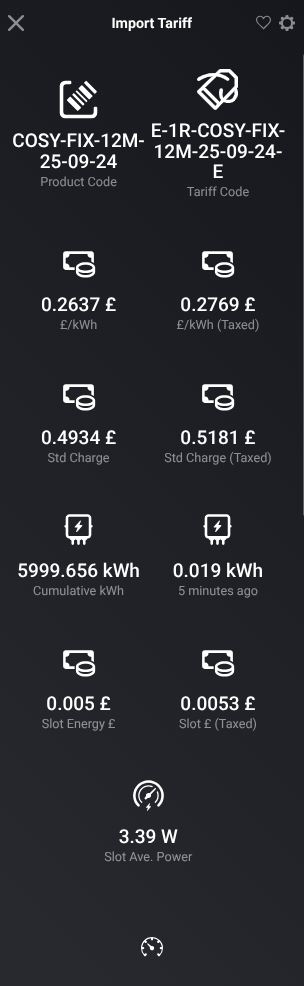
Screenshot of the capabilities for the import tariff (click ⯈ to view the image)
Question for the Community
I have been scratching my head over some of the capability names - so thought I would throw the challenge over to you.
The tariff device reports energy consumption “retrospectively”. To illustrate from Cosy Octopus. There is a price slot change at 16:00 (local). The capabilities of the tariff device will be updated at 16:00 (or shortly thereafter). The consumed energy reported has already been consumed, that is it was consumed in the previous slot. The pricing algorithm takes this into account - so that at 16:00 the energy consumed in the previous slot (13:00-16:00) is valued according to the prices applied between between 13:00 and 16:00.
Currently I have adopted the naming convention that the consumption and prices logged at 16:00 as “current” are the consumption, prices and cost/revenue that has already happened in the slot that ended at 16:00. The prices logged in the “next” prices capabilities are those that apply from 16:00 (until 19:00).
If you view the device at 16:30 (say), you see consumption that has already occurred at prices that are already “superseded” by new slot prices. You also see “next” prices that are already being applied.
This feels confusing (it’s been giving me brain ache). My thought is to adopt a naming convention of “Last X” and “Current X”. So “Last £/kWh”, “Last Consumption”, “Last Slot End” and so on. Prices currently in force will be labelled as current (e.g. “£/kWh” “Slot End”). The tariff device does NOT currently accumulate energy minute by minute whilst the slot is in force - it is only updated at the end of a slot (or end of day). Maybe the situation would be made clearer if an accumulator capability were added to the device.
Feedback and opinions welcome… Thanks everybody.
Progress Update
Straightened my head over capability naming and now have a good working alpha for half-hourly priced tariffs.
Capabilities (top and bottom halves…)
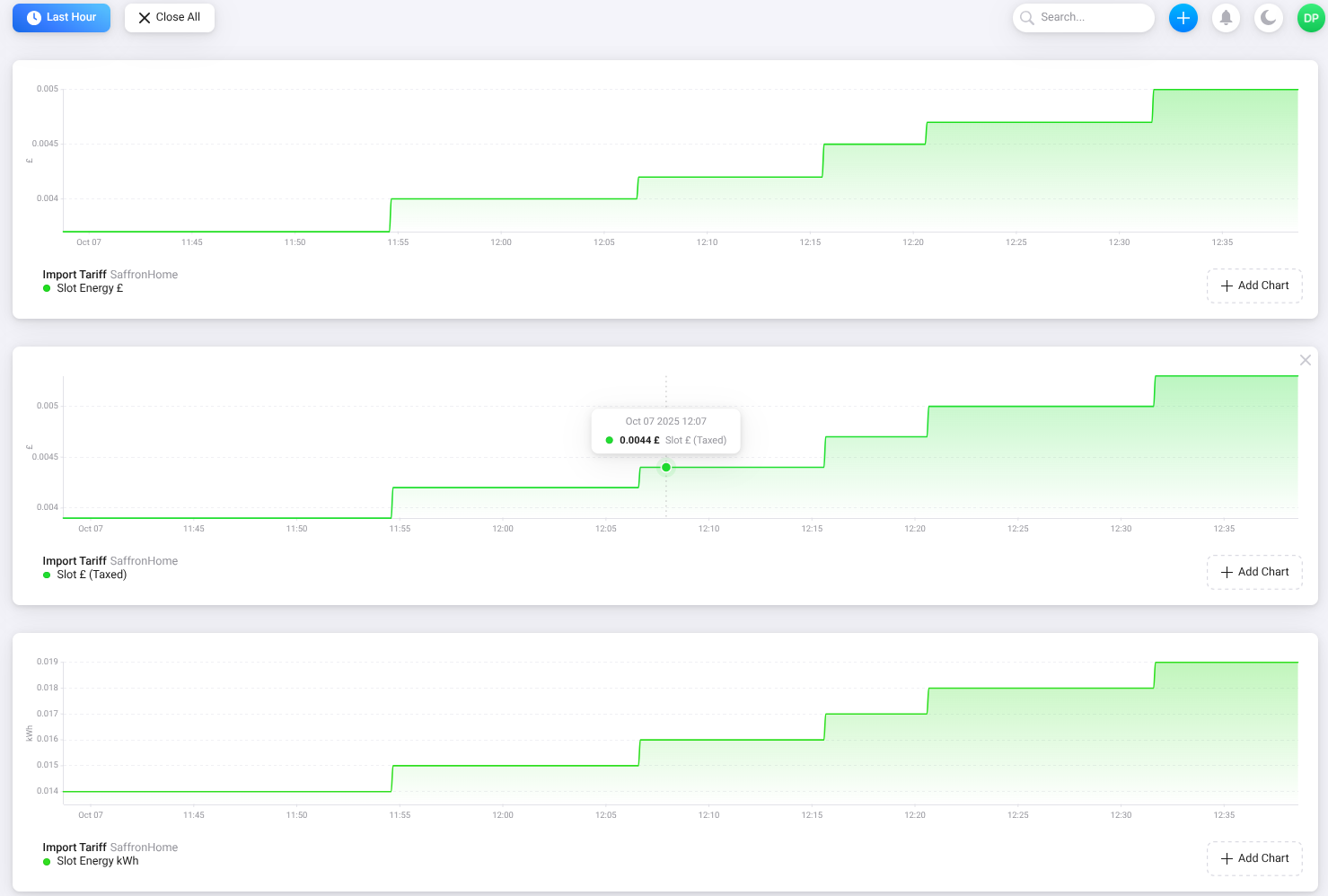
A few insights…
A couple of readers here have offered to do some testing, can’t wait to get some feedback.
Next Steps
- Test the export (single price) tariff
- Add a new capability showing the availability of “next day prices”
- Re-implement the Mini and Account devices
Looking forward to the app when it gets there. The Octopus Mini doesn’t really do much with the gas. I’m currently on fixed electric and gas - as I don’t have solar/ battery, heat pump or electric car (yet), but no harm in preparing 
Hi Paul
Thanks for the information. My understanding is that Home Mini does nothing at all for gas tariffs - it’s focus is purely on electricity. This is where we brush up against the way that Homey works too. Homey is focused on the recording of current information - information in the moment. The only source of information from Kraken about gas consumption is probably 2 days old (sometimes even older) - there is no gas tariff consumption information in the moment.
This was the motivation for using the Home Mini as the source of data (via Kraken).
I have made available an early alpha to some of the community in this thread. If you are interested in joining the early alpha let me know.
Progress Update
The single-price export tariff is now fully working alongside the import tariff
In the process a few bugs have been squashed (thanks to @markstechvlogs for undertaking some very early testing).
Next Steps
Slight change of priorities - I think this sequence works better:
- Focus on the Octopus Mini device
- Focus on the Account device
- Make a beta-test release openly available to the community on this thread
- Add the “next day prices” capability
- Implement an Energy Saving Period device (I know where the data is)
- Research a Free Energy Period device (I have no idea where this data is)
- Start working on flow cards beyond the automatically generated cards
Watch this space.
I sadly have nothing useful to contribute but wanted to just be another encouraging voice for this to be made into a real thing. Kudos to your hard work already invested! I look forward to being able to give it a try when it’s ready for testing.
Look forward to this app. Will it work with Agile?
Thanks for all the work. Im no developer or anything but point me in the direction for any testing and i will help if i can
Hi @Welshsmarthome. The intention is that it will work with any Octopus electricity tariff. I know there are features in Agile around the despatching of energy - I have no insight into that at all, so the information that you can provide will be invaluable. The app relies on the Octopus Home Mini to pick up live consumption and export data. Do you have a Mini?







 .
.