A script to check sensor last update

Yes, I meant Zigbee, sorry.
Thanks @Sharkys for the update, it’s now perfect for me! This helps now to avoid a open window in the basement for 3 days ´, because temperature sensor was not longer responding as happend 2 weeks ago. :slight_smile:

Just another question regarding the version of all devices (not only zigbee)…
Is it possible to exclude the zigbee devices from the output, because zigbee works more accurate in a separate script?
I looked into the code, but I didn’t found any obvious code to exclude zigbee (I’m not a dev).

While I use that script myself, for such events might be also useful to check TRENDs eg. based on app Insight Trends Reloaded App for Homey | Homey (no updates = trend is 0)

Hm, I didn’t know it’s still Christmas. :upside_down_face: … check out next version 0.6.

2 Likes

Hello… I am a bit confused with the outcome of the scripts… Maybe I didn’t get what “last update” is. I read this thread and understood that it’s the same as “Last Seen”. Correct ?

I did “Interview” a Philips Hue Dimmer (named “Dimmer Guest” here under) and one can see that the “Last Seen” value is “2 minutes ago”.

But when I run the script (latest version 0.6), it reports : Dimmer guest (18-02-2024, 11:30:24 - remote) (NOK)

I did the same test with an “Aqara Cube” , that you can turn of shake to trigger actions, and that I didn’t touch for a while… The script was initially reporting: Cube (15-01-2025, 19:43:11 - sensor) (NOK). But once I did “Rotate” it, the script didn’t report it anymore. So, no “general problem”…

I have the same “issue” with all (12) my other Philips Hue Dimmers. And looking via the Developer Tool the details of the Dimmers, I realize that the “last update” reported by the script could actually be the “last changed” date of the battery alarm ?

Is is possible ?


Some Dimmers with last battery alarm = 11 months

Dimmer guest (18-02-2024, 11:30:24 - remote) (NOK)

Dimmer bureau (15-02-2024, 16:39:05 - remote) (NOK)


Some Dimmers with last battery alarm = 8 months

Dimmer Klara (19-05-2024, 09:08:32 - remote) (NOK)

Dimmer 1 (19-05-2024, 11:07:26 - remote) (NOK)
image

PS: I realize I have a similar behaviour with “homey:app:com.netscan:ip_driver” devices… The “Last Update” date is the last “Alarm” (“Offline Alarm” for NetScan devices)

Camera Living (23-07-2024, 23:42:51 - sensor) (NOK)

For Zigbee version of the script, yes, it is. I checked mine and it matches. Dimmers are in general in my case even not responding for 24 hours - that’s why I’m checking temperature sensors eg. on 1 hour value compared to eg. dimmer, which I check basically for values not updated >2 days etc.

For “any devices” version it takes the latest capability update available. In case of Zigbee devices Last seen is more accurate then.

Thx !

I see your code doing that indeed:

  // Gather the latest lastUpdated
  if (device.capabilitiesObj) {
    for (const capability of Object.values(device.capabilitiesObj)) {
      if (!capability.lastUpdated) continue;
      const capTime = new Date(capability.lastUpdated).getTime();
      if (!maxLastUpdatedTime || capTime > maxLastUpdatedTime) {
        maxLastUpdatedTime = capTime;
      }
    }
  }

So, on my side I will exclude the devices for which that “latest capability update” does not reflect the actual “last communication” (My Dimmers, My Network devices, My Z-Wave devices, …).

It’s a pity too that Homey did expose a true “Last Seen” property… For Z-wave devices, I have the same “issue” with sockets that have not been switch on/off since a while, but that are well (as nodes) still available and responding in the Z-wave Network…

For the community App, like the “Network devices” (com.netscan), the App should themselves be able to update such a “last seen” property when it checks (ex.: ping) the device…

Not that easy to really detect devices that are “lost” :confused:

Sometimes for ZWAVE you can setup wakeup intervals and reporting thresholds to mitigate this, or simply set long enough interval to prevent false positives.

Well, this app itself update the device online in case of device status change, so again this works as designed, unless developer would rewrite it (which I don’t think is required for such case, that’s why it’s by default excluded in the example). Also eg. for Wifi connected devices, developer can set device unavailability state and you can set trigger based on it - true is it’s also not working always for some unknown reason, so I’m using error catching - eg. do something with eg. thermostat and in case of error, report that there was an error.

Based on my experience, the most problematic ones are anyway Zigbee, ZWAVE (sometimes, eg. dying FGR223) and naturally Bluetooth on HP23 (never works).

Hi Sharkys,
I found now some time to configure the scripts for zigbee and all.
Zigbee script is now working perfect with a 12 hour update.
In the all devices script I excluded zigbee and 24 hour update. But I’m not really happy with that because a lot of devices must be excluded because last update is > 24 hours.

Thanks for the hint to Insight Trends Reloaded App, I’ll have a look to that.

I sent some coins for beer, coffee or valium to answer more questions. :beer: :coffee: Thanks for your support

2 Likes

Hi @PeterHa , thank you for donation, appreciated and congratulation to be first time ever :wink:

As for updates, this is exactly the reason why you can set specific inclusion/exclusion but in general, I keep lower time period for sensors like temperature, light sensors (eg. 1 hour) and longer like remote controls (excluded or some >24 hours), lights (24 hours) etc. Some of them I even check only weekly. It’s really specific to each device type, brand and even frequency of the use (eg. I check motion sensors only when I’m at home).

1 Like

Perfect! Nearly all I was looking for, would it be able to report Battery level for each device too?

Check out version 0.8

1 Like

Amazing! Thanks…

Here is my output (partial), my IKEA Motion Sensors are not reporting Battery level, does that sound right?

OK Zigbee device(s): 12
#   Device Name                         Last Seen            Type       Batt  Status
------------------------------------------------------------------------------------
1   BackRoof SNZB-02P                   18-05-2025, 05:52:08 enddevice  60%   (OK)  
2   TV-ArtRoom - SNZB-02D               18-05-2025, 05:52:06 enddevice  100%  (OK)  
3   Office Motion Sensor                18-05-2025, 04:37:05 enddevice  N/A   (OK)

Did you check directly in your Homey for given device ?


I’ll look into tomorrow, it’s working ok, as is the front door sensor that doesn’t show any battery level.

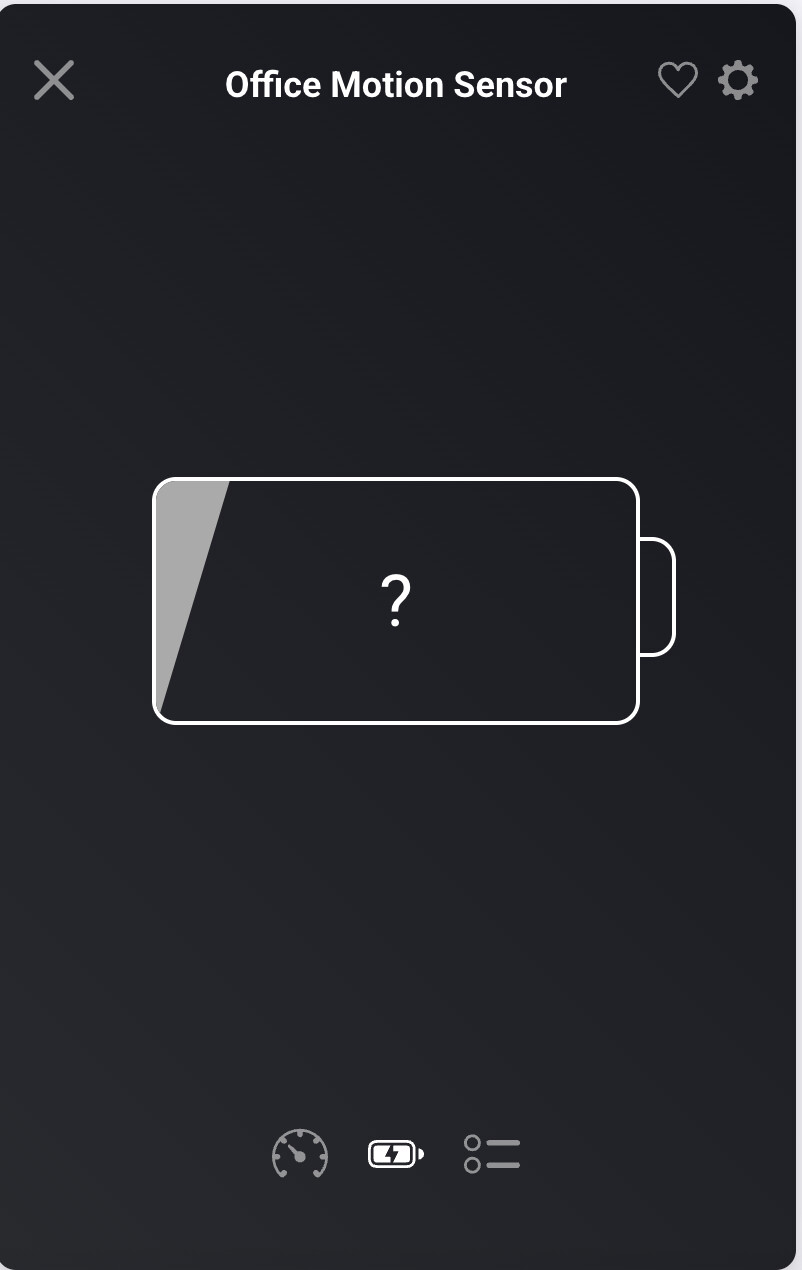
Come back to this after some personal distractions, and same after running script 0.8. Checked Homey Device Status on the Front Door and Office Motion Sensor, both are IKEA TRADFRI motion sensor running firmware 2.0.022. Looking at Battery Status in Device Settings both show the same image of Battery ?. Any thoughts @Sharkys (Many thanks)

#   Device Name                         Last Seen            Type       Batt  Status
------------------------------------------------------------------------------------
1   BackRoof                            12-07-2025, 23:46:01 enddevice  100%  (OK)  
2   TV-ArtRoom - SNZB-02D               12-07-2025, 23:45:26 enddevice  100%  (OK)  
3   Back Living Room SNZB-02            12-07-2025, 23:45:51 router     100%  (OK)  
4   Office Motion Sensor                12-07-2025, 23:39:16 enddevice  N/A   (OK)  
5   Motion Sensor                       12-07-2025, 23:43:09 enddevice  100%  (OK)  
6   Xiaomi Light Sensor                 12-07-2025, 23:34:03 enddevice  100%  (OK)  
7   Front Door                          12-07-2025, 23:46:04 enddevice  N/A   (OK)  
8   BackDeck                            12-07-2025, 23:46:01 enddevice  90%   (OK)  
9   Ella Bedroom                        12-07-2025, 23:45:58 enddevice  17%   (OK)  
10  Front Roof                          12-07-2025, 23:45:42 enddevice  100%  (OK)  
11  Kitchen                             12-07-2025, 23:45:53 enddevice  100%  (OK)  
12  Side Deck                           12-07-2025, 23:45:49 enddevice  100%  (OK)  
13  Sam's Room                          12-07-2025, 23:45:55 enddevice  100%  (OK)  

NOK Zigbee device(s): 1
#   Device Name                         Last Seen            Type       Batt  Status
------------------------------------------------------------------------------------
1   Upstairs Living SNZB-02D            12-07-2025, 19:56:59 enddevice  100%  (NOK) 

Low-battery device(s) (≤30%): 1
1. Ella Bedroom 17%
---------------------------------------------

———————————————————
✅ Script Success
↩️ Returned: "Not Reporting Count: 1\nLow Battery Count:   1\nDevices Not Reporting:\nUpstairs Living SNZB-02D 12-07-2025, 19:56:59 (enddevice)\nDevices Low Battery:\nElla Bedroom 17%"
type or paste code here

Some IKEA devices don’t report battery state, check the device settings

1 Like

A very nice and helpful script working for Zigbee devices.
I’m just struggling to include Z-Wave devices in this script (I have 2 Fibaro thermostat knobs). Any hint? Especially for the battery level.

Not sure if I follow, which script version are you using ? The battery level is available in the Zigbee version only and it can’t be used for ZWave devices. You can use the general one but without battery level reported.

I am using your Zigbee version script

For my Fibaro devices I’m using the homey:app:com.fibaro:FGT-001 driver from Athom. One of the available device capabilities is measure_battery, see snippet below.

You are using Zigbee script for ZWave device. You shall use the general script, however it does not report battery level.

Yeah, I know, but I wanted to build in ZWave devices with battery checks, but too complex for me. Tried a couple of things, but failed :upside_down_face:
No worries though, thanks!