Action cards (only for advanced flows) Image Display: Fetch and display images from a URL as tokens with the ‘temporary-image’ action card by providing the ‘imageUrl’ parameter. Calculate: Evaluate mathematical expressions with the ‘calculate-float’ and ‘calculate-int’ action cards. Days: Calculate number of days between 2 dates Random Numbers: Generate random numbers using ‘generate-random-number’ with defined ranges. Leap Year: Check for leap years with the ‘check-leap-year’ action card by providing the ‘year’ parameter. BMI Calculation: Calculate BMI with the ‘calculate-bmi’ action card using ‘weight’ and ‘height’ parameters. Mathematical Operations: Perform calculations with operators (+, -, *, /) using the ‘calculate’ action card with ‘number1’, ‘number2’, and ‘text’ (operator) parameters. Temporary Values: Store and retrieve temporary values (numbers, strings, URLs, and images) using ‘temporary-number’, ‘temporary-string’, ‘temporary-url’, and ‘temporary-image’ action cards.
Condition cards Number Greater Than: Check if one number is greater than another with the ‘number_greater_than’ condition card. Provide ‘number’ and ‘number2’ parameters. Number Less Than: Determine if one number is less than another using the ‘number_less_than’ condition card. Specify ‘number’ and ‘number2’ parameters. Text Has Value: Verify if a text contains a specific value with the ‘text_has_value’ condition card. Use ‘text’ and ‘waarde’ parameters. Text Has Exactly: Check if a text is exactly equal to a specified value using the ‘text_has_exactly’ condition card. Provide ‘text’ and ‘waarde’ parameters. Boolean Is Exactly: Determine if a boolean value is exactly equal to ‘true’ with the ‘boolean_is_exactly’ condition card. Provide the ‘boolean’ parameter.
Install Custom Logic app from the Homey app store and start creating advanced flows!
I’m using the “Custom Logic” app on Homey to calculate the difference in days between two dates. The function works well, but I have a problem with the input date formats. I receive dates in two different formats: dd/mm/yyyy (e.g., 01/09/2024) and yyyy/mm/dd (e.g., 2024/09/01).
Is there a way in “Custom Logic” to automatically convert these dates to a single format (preferably yyyy/mm/dd) before calculating the difference in days? If not, is there a workaround or a script that could help achieve this?
I have been trying to get some calculations done in the advance flows using a number of apps and the standard logic flow.
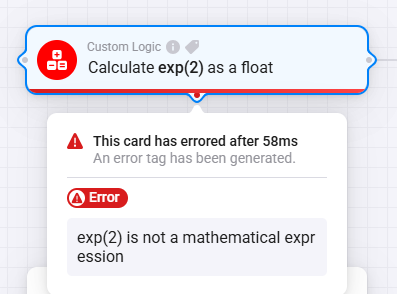
however homey doesnt recognize any of the mathematical experssions, items like +, -. *, / work fine but nothing a bit more specific like EXP(X) or LN(X).
in this case i get either 43 (so nothing as it is the anwser to everything) or in for example a custom logic app the error message that “exp(2) is not a mathemetical expression”, more simple formules adding, or extracting work without any problems.
same result for both variants again in different apps and the standard available logic flows.
as per reference also inserted another formula which goes through just ok;
I normally use the Better Logic Library app with its flow cards to perform calculations. Using the ‘calculate as tag’ card, the following expression works:
You don’t need that card, Luigi.
You can enter the calculation right into both the notification cards and log card:
(mind the double brackets around the calculation)
Or, when you still like to do the calculations up front, use the Better Logic card as shown by @SunBeech a few posts earlier. (no double brackets needed)
I actually ended up doing it with the Better Logic app, but I didn’t know you could do that right in the notification card, that’s pretty cool, thank you!
Hi, how to make sure that the text as in put in the “tekst bevat Waarde” is converted to completly lower case or the case doesn’t matter. because now “weerbeeld bevat regen” is false but “weerbeeld bevat Regen” is true. (weerbeeld comes from knmi app for homey and weerbeeld is Regen).
Could you maybe automatically/internal convert it all(=both “tekst”and “waarde”) to lower case by your app.


 Image Display: Fetch and display images from a URL as tokens with the ‘temporary-image’ action card by providing the ‘imageUrl’ parameter.
 Calculate: Evaluate mathematical expressions with the ‘calculate-float’ and ‘calculate-int’ action cards.
 Days: Calculate number of days between 2 dates
 Random Numbers: Generate random numbers using ‘generate-random-number’ with defined ranges.
 Leap Year: Check for leap years with the ‘check-leap-year’ action card by providing the ‘year’ parameter.
 BMI Calculation: Calculate BMI with the ‘calculate-bmi’ action card using ‘weight’ and ‘height’ parameters.
 Number Greater Than: Check if one number is greater than another with the ‘number_greater_than’ condition card. Provide ‘number’ and ‘number2’ parameters.
 Number Less Than: Determine if one number is less than another using the ‘number_less_than’ condition card. Specify ‘number’ and ‘number2’ parameters.
 Text Has Value: Verify if a text contains a specific value with the ‘text_has_value’ condition card. Use ‘text’ and ‘waarde’ parameters.
 Boolean Is Exactly: Determine if a boolean value is exactly equal to ‘true’ with the ‘boolean_is_exactly’ condition card. Provide the ‘boolean’ parameter.
 Install Custom Logic app from the Homey app store and start creating advanced flows!


 Apps made by @LRvdLinden
 or a
or a  with iDeal or Bunq.me or become a surporter on Patreon
 Version 1.0.4