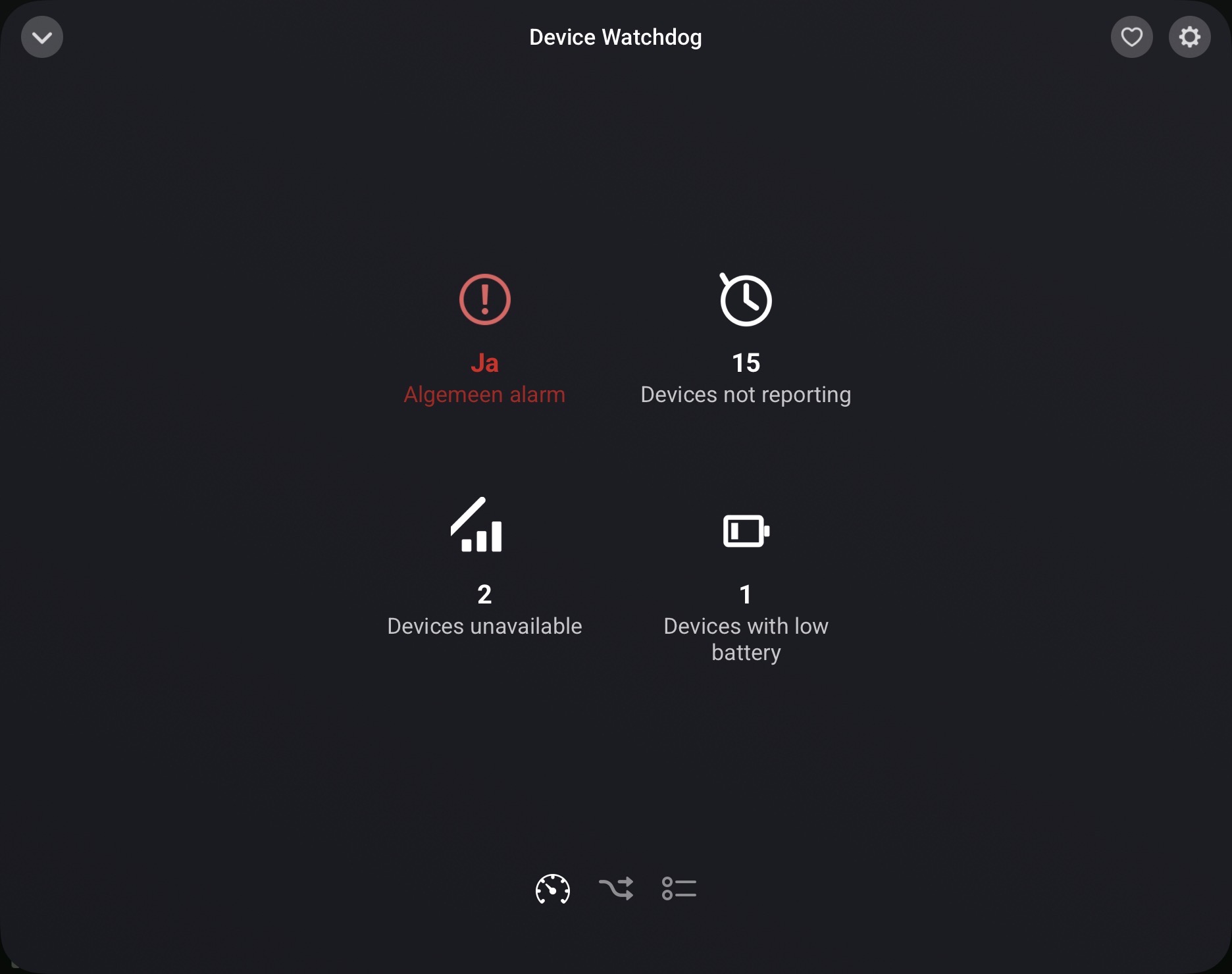
Device Watchdog - Settings Guide
This is a rundown of every setting, what it does, and where the underlying value actually comes from.
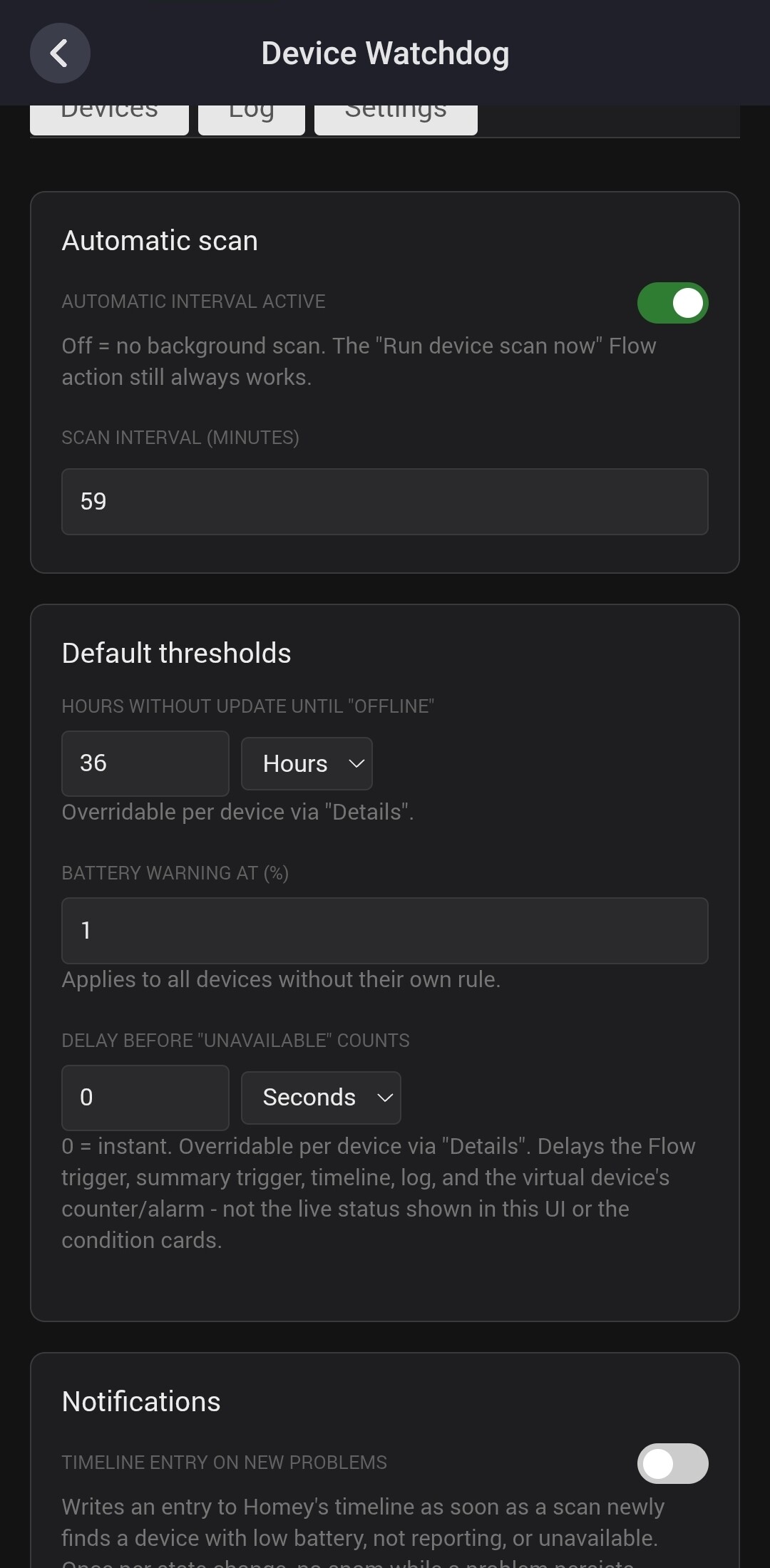
Automatic scan
- Automatic interval active - turns background scanning on/off. Off = no periodic scan, but “Run device scan now” (Settings button or Flow action) still always works.
- Scan interval (minutes) - how often the automatic scan runs.
- Wait after app start (minutes) - delays only the very first automatic scan after a restart (default 2 min, 0 = immediately). Avoids a burst of false “not reporting” flags while the device cache is still settling right after Homey/the app restarts. The dashboard widget doesn’t trigger a scan on open during this wait either (its “Scan now” button still scans immediately).
Default thresholds
(apply to every device unless overridden per-device under “Details”)
- Hours without update until “offline” - a device is flagged “not reporting” once this many hours pass without a capability value changing. Source: the newest
lastUpdated timestamp across all of a device’s capabilities, as reported by Homey.
→ Devices whose only capability is a momentary button/trigger, , a write-only capability, or only a button plus a battery reading (e.g. a Hue Tap Dial) are skipped here entirely — there’s no timestamp to check — and say so in their Details.
- Count Homey’s “last seen” toward “not reporting” (off by default) - when enabled, Homey’s own connectivity confirmation also counts as a sign of life, not just capability changes. Useful for devices (Zigbee routers, pure event sensors) that rarely change a value but are still clearly connected. Source:
lastSeenAt, Homey’s own last-communication timestamp for the device - independent of any specific capability.
- Battery warning at (%) - flags a device once its battery percentage drops to/below this. Source:
measure_battery capability value, or alarm_battery (any true value always flags, regardless of %)
- Delay before “unavailable” counts - grace period before a device going unreachable is treated as a confirmed problem (default 0 = instant). Useful for brief disconnects, e.g. another app updating, or Homey itself restarting. Source:
available flag from Homey, tracked in realtime; the delay only affects when it’s confirmed, not the underlying signal.
- Delay before low battery counts - grace period before a device at/below the battery threshold is treated as a confirmed problem (default 0 = instant). Useful for a device that briefly reports a low reading (e.g. 1%) before recovering - a scan landing on that one transient sample won’t fire anything until it’s stayed low for the configured delay. Source: measure_battery, sampled once per scan; the delay only affects when it’s confirmed, not the raw %/status shown in the Settings UI, widget, or condition cards.
Notifications
- Timeline entry on new problems - writes a Homey Timeline entry the moment a device newly becomes a problem. Once per state change, no repeat spam while it persists.
- Timeline: which problems - three toggles (unavailable / not reporting / low battery) controlling which kinds of problems write a timeline entry. The matching recovery entries (“available again”, “reporting again”, “battery OK again”) follow the same choice. All on by default; only applies while the switch above is on.
Virtual device alarm
- Three toggles controlling which categories (unavailable / not reporting / low battery) trip the virtual Watchdog device’s
alarm_generic capability. The three count capabilities always show the real numbers regardless - this only filters the combined alarm.
Display
- Increase text contrast (dark mode) - lightens muted/secondary text (hints, timestamps) further for bright ambient light.
- Color scheme (Auto/Light/Dark) - “Auto” follows your system/browser setting (the original default behavior); “Light”/“Dark” force that scheme in the Settings UI regardless of your system.
Reset
- Reset to factory settings - button at the bottom of Settings that resets all default thresholds and every per-device rule back to defaults in one go. History log and last scan are left untouched (there’s a separate “Clear log” for that).
Stale rules
- Clean up stale rules - removes per-device rules that point at a device no longer in Homey (e.g. after removing a device). Shows a preview list of exactly which devices are currently affected before you click it; the button is grayed out when there’s nothing to clean up.
Per-device overrides
(via “Details” on any device) — the panel is grouped into sections:
Not reporting
- Hours until “offline” - per-device override of the global threshold.
- Count “last seen” toward “not reporting” - per-device override of the global setting (Default / Yes / No). Lets you enable it for specific chronically-quiet devices without loosening detection everywhere.
- Auto-test before flagging - for those testable devices, runs that check automatically right before a “not reporting” flag; a nested sub-option still fires the Flow trigger even when the test saves it.
- Reporting stats & recommendation - once enough data’s been collected (5+ reports), Details shows the average interval and longest observed gap for this device, plus a suggested threshold with a one-click “Apply” button.
- Recommendation basis / safety margin override - per-device override of the two settings below, for a device that needs a different combo than the global default (e.g. an event-driven contact sensor).
Not reachable
- Ignore unavailable - excludes this device from the summary trigger, timeline, and log for the unavailable category specifically. Its own per-device Flow trigger still fires. Good for a flaky device you don’t want spamming the aggregate notifications.
- Delay before “unavailable” counts - per-device override of the global grace period.
Battery
- Battery threshold % - per-device override.
- Delay before “low battery” counts - per-device override of the global grace period.
- Battery last updated - shown once a device has a battery capability, using its own last-changed timestamp (separate from the device’s primary sensor value) - visible regardless of the toggle below.
- Count battery timestamp toward “not reporting” (on by default) - when off, a battery update no longer counts as a sign of life for this device, only its other capabilities do. Useful for a device whose battery reports independently of its actual measured value, where a frozen sensor reading could otherwise be masked.
- Only check battery - skips the “not reporting” check entirely for this device (battery-only monitoring).
- Ignore battery - excludes this device from battery checks entirely.
Pause
- Paused until - skips the device entirely (like the monitoring toggle) until this date and time, then resumes automatically on the next scan. Pick a date and time, then tap “Apply pause” - nothing is saved until you do. A pause that only has a date (set earlier, or via the Flow variant) lasts through the end of that day. Turning the monitoring toggle back on early also clears the pause.
Apply to multiple devices
- Apply to same-type devices - once a device has any override set, a button appears to copy those settings onto every other device of the same type (same app + same Homey driver, e.g. all your Aqara motion sensors) in one go - shows a preview of exactly which devices before you confirm.
- Stop monitoring all devices from this app / of this class — two bulk buttons in Details, shown when at least one other device shares this one’s owning app or Homey device class. Each shows a preview checklist of exactly which devices it will affect before you confirm — for the app-wide one, grouped by driver (e.g. Fibaro’s different device types) with a “select/deselect all” per group. Ignore-only — re-enable per-device or with “Monitor zone”.
Per-device settings
- Reset - clears all overrides for this device back to defaults.
On the device row itself (not in Details):
- Monitoring toggle (switch next to the device) - removes the device from monitoring entirely. Good for virtual devices, mains-powered devices, or anything you just don’t want watched.
- Test button (shown for devices with onoff, dim, shutter position, thermostat setpoint, or speaker volume) - re-sends the device’s current value to itself, a non-intrusive way to check it’s actually reachable right now. Also available as a Flow action (“Test device reachability”), with matching “A device test succeeds”/“A device test fails” triggers to branch on the result.
Capabilities:
- Collapsible section at the bottom of each device’s Details panel showing every raw capability value straight from Homey - title, id, value, and last-changed timestamp, the same data Homey’s own Developer Tools shows.
- Rows are colour-coded against that device’s own “not reporting” threshold:
- green = updated within it
- red = older than it
- no colour = a capability the staleness check itself ignores (button, battery-only, write-only). Loads on demand when you expand it.
- Plus a manual Refresh button.
Recommendations tab
-
Lists every device whose current threshold (“Hours until ‘offline’”) doesn’t match what’s actually been observed.
-
Minimum observation period (days) - a device observed for less than this won’t show up yet, even with enough samples (default 7).
-
Recommendation based on - “Longest observed gap” (default) or “Average interval”. Average gives shorter, more aggressive suggestions - better fit for irregularly-reporting devices (door/window contacts, motion), usually paired with a higher safety margin.
Recommendation safety margin - how much headroom the suggestion adds on top of whichever basis above is selected (default 1.5x, range 1.0-5.0x). Lower it for tighter suggestions.
-
Suggested value is editable before applying - defaults to the recommendation, but you can enter your own number.
-
Apply / Apply all - apply the (possibly edited) value to one device, or every listed device at once.
-
Dismiss - hides that specific suggested number for this device without applying it. It comes back on its own if the recommendation later changes to a different number. There’s no dedicated undo here - only a full “Reset” in that device’s Details, which clears every other individual setting too.
Devices tab
- Search - filters by device name or zone name.
- Sort - “Status first” (problems on top), “Name (A-Z)”, or “Zone + Name (A-Z)” (groups alphabetically by zone instead of Homey’s own zone order).
- Stat tiles (Total / Not reporting / Not reachable / Low battery / Not monitored / Paused / Custom rules)
- Zone group bulk buttons - “Ignore zone” / “Monitor zone” toggles every device in that zone at once.
What the three statuses actually mean
 ok - reporting recently, battery fine.
 not reporting - Homey still shows it connected, but no new data recently (see the setting above for what counts as “new data”).
 unavailable - Homey itself has lost the connection (
available: false), tracked in realtime.
The recommendation line
When a device is flagged, its Details panel shows a one-line hint about what’s likely going on and what to try — raise the threshold, check the battery, test the device, stop monitoring a Flow-only helper, and so on. It’s based on what the device actually looks like (its capabilities, when it was last seen, how old its battery reading is), and only shows while the device is flagged. If nothing specific fits, you get a sensible generic hint.
 Device Watchdog - FAQ
Q: Why is a device marked “not reporting“ even though it seems fine?
A: “Not reporting” tracks the time since a capability last changed value - not whether Homey can still reach the device (that’s “unavailable”). Event-driven devices (contact sensors, some Zigbee routers) only send data when something actually changes, so long gaps are normal for them. If you don’t want it flagged, the most reliable fix is raising its threshold above its normal reporting gap (globally or just for that device).
There’s also a “Count Homey’s ‘last seen’ toward ‘not reporting’” setting that can help in some cases - but heads up: for most devices, “last seen” turns out to move in lockstep with the last actual value change anyway (confirmed by checking real devices), so it often doesn’t change anything. It only helps the minority of devices whose “last seen” is genuinely updated independently of their reported data. Worth trying, but don’t rely on it as the fix - raising the threshold is the dependable option.
Q: What's the difference between “not reporting“ and “unavailable“?
A: “Unavailable” = Homey’s own connection to the device is down right now. “Not reporting” = Homey still shows it connected, but its data has gone stale. A device can be one, both, or neither.
Q: I'm testing detection (e.g. pulled a device's batteries) and nothing fired yet - what's going on?
A: Depends what you’re expecting: Low battery will never fire for this test specifically - it needs the device to actually report a low reading first, and a dead device can’t report anything. Not reporting uses your configured “Hours until offline” threshold (24h by default) - re-running a scan doesn’t fast-forward that clock, it just checks how long since the last update against the threshold. Unavailable is entirely up to Homey/the underlying driver, not this app - a lot of sleepy battery sensors are never actively marked unreachable, they just go quiet, which is exactly the gap “not reporting” exists to catch. For a quick test: set that device’s own “Hours until offline” override (in Details) to something small like 0.05 (~3 min), then hit “Run scan now”
Q: A device flickered to “unavailable“ for a few seconds and I got a notification - can I avoid that?
A: Yes - set “Delay before ‘unavailable’ counts” (global or per device) to a few seconds/minutes. Only a device still down after that grace period gets flagged/notified. Recovery is always instant, never delayed.
Q: Can I exclude a device entirely?
A: Yes, flip the toggle switch next to it in the Devices tab. Useful for virtual devices, mains-powered devices, or anything you just don’t need watched.
Q: Why does a device stay in the filtered list (with a “staying visible“ badge) after I've fixed it and it's OK again?
A: Once you open a device’s details to adjust it, Device Watchdog keeps that row visible until you close the panel or pick a different filter - even if your change clears the issue immediately (e.g. raising its “not reporting” threshold fixes it right away). Otherwise the device would vanish mid-edit, taking the open panel with it, right when you’re checking whether the fix worked. The “staying visible” badge just marks that it no longer matches the active filter on its own; switching filters (or reloading) drops it from the list as normal.
Q: I have a flaky device that keeps going unavailable - can I stop it from spamming me without ignoring it completely?
A: Use “Ignore unavailable” under its Details. It stays out of the summary trigger, timeline, and log, but its own per-device Flow trigger still works if you’ve built something around it specifically.
Q: Does the app replace Homey's own presence/connectivity detection?
A: No, it reads Homey’s own device status (available, capability data) and turns it into thresholds, Flow cards, a history log, Timeline entries, and a virtual device for Insights - it doesn’t replace or duplicate any core Homey functionality.
Q: Where does “last seen“ actually come from - can I see it in Homey itself?
A: It’s Homey’s own internal lastSeenAt field via the API, not something shown as a labeled field anywhere in Homey’s standard UI as far as I know.
Q: Does this app send any data outside my Homey?
A: No, everything runs locally on the Homey itself.
Q: I updated another app and a bunch of devices flagged unavailable - is that expected?
A: Yes, that can briefly happen while a driver restarts. Configuring a delay (see above) is the way to absorb that without a false alert.
Q: After a Homey reboot, “Wait after app start“ didn't stop the early unavailable/reachable notifications I was getting - why not?
A: “Wait after app start” only delays the automatic scan - which is what “not reporting” detection relies on - so it does stop false not-reporting bursts. It doesn’t touch Homey’s realtime unavailable/available events though, which fire immediately and independently of any scan. For devices that take a bit to reconnect after a restart, use “Delay before ‘unavailable’ counts” instead (global or per-device) - that one actually gates the realtime detection, and it applies to any brief disconnect, not just app restarts.
Q: Can I get a Flow trigger for a specific device, not just the aggregate?
A: Yes - each category (battery low / not reporting / unavailable) has both a per-device trigger (with a device picker) and a summary trigger that fires once for a whole batch with a count + name list.
Q: I have several identical devices (e.g. 10 of the same motion sensor) - do I have to configure each one individually?
A: No - configure one of them under “Details”, then use the “Apply to same-type devices” button that appears. It only matches devices from the same app AND the same Homey driver (so it won’t lump, say, all your Shelly products together if they’re actually different models), and shows you exactly which devices will be affected before you confirm.
Q: I want to undo all my configuration and start over - is there a quick way?
A: Yes - “Reset to factory settings” at the bottom of the Settings tab resets every threshold and per-device rule back to default in one click (with a confirmation first). Your history log and last scan results are left alone.
Q: Can I see what type of battery a device uses?
A: Yes, if the device’s app has declared it (not all apps do - it’s optional metadata, not something Homey computes). Shown next to low-battery devices in both the dashboard widget and a device’s Details panel.
Q: Can detection of “not reporting“ be made more accurate, e.g. using a real per-packet “last seen“ instead of capability changes?
A: I looked into this - short answer, not currently, at least not reliably. Homey’s Zigbee coordinator does track a precise internal “last seen” per device (every received radio frame, not just capability updates), but it’s not exposed through the standard app SDK that this app (and any other local Homey app) has to work with - only through elevated, manager-level access that a monitoring app shouldn’t really be requesting. There’s an open Homey community idea asking Athom to expose this (link), with no official response yet. If that ever ships, I’ll revisit “not reporting” detection to take advantage of it. Until then, lastUpdated (capability changes) and lastSeenAt (which, as covered above, often doesn’t add much beyond that) are what’s available.
Q: Why doesn't the default zone sorting match my manual zone order from the Homey app?
A: The default sort tries to follow Homey’s own zone order field, but in practice this is often not set at all - many zones never get an explicit order value from Homey, regardless of how you’ve arranged them in the app. When that happens, this app falls back to sorting alphabetically within each zone level, which won’t match your manual arrangement. This isn’t something fixable from the app’s side - it depends on what Homey itself exposes.
Workaround: switch to the “Zone + Name (A-Z)” sort option, and prefix your zone names with your own manual order (e.g. “1 - Ground floor”, “2 - Upper floor”, “3 - Basement”). Since that mode sorts purely alphabetically by name, your number prefixes become a reliable, permanent sort order that doesn’t depend on Homey’s order field at all.
Q: I have a device that's only used part of the year (e.g. an irrigation controller) - how do I stop it alarming while it's dormant?
A: Use “Paused until” under its Details, pick the date (and time) it should resume and tap “Apply pause”. It’s skipped entirely until then - no false battery/not-reporting/unavailable alarms - and comes back on its own once that time passes, no need to remember to turn it back on. “Apply to same-type devices” can optionally include the pause date too (there’s a checkbox for it).There are also matching Flow cards if you’d rather automate it: “Pause device until date” / “Pause device until date (variable)” (Then), “Resume device” (Then), and “Device is paused” (And).
Q: I paused a device via a Flow, but it's still showing up in the counts / tripped the virtual device's alarm - why?
A: Pausing via a Flow action only saves the pause - unlike pausing by hand in the Settings UI (which always forces an immediate re-check), it doesn’t automatically re-evaluate anything. So if the device currently has an active problem, it stays reflected in the counts and the virtual device’s alarm until the next scheduled/manual scan catches up. Since v1.9.23, both “Pause device until date” Flow actions have a “Rescan immediately” checkbox for exactly this - turn it on and the pause takes full effect right away, same as pausing manually. Off by default to avoid an extra scan on every single pause.
Q: I want a flow condition that checks “is anything wrong“ without picking a specific device — is that possible?
A: Yes — since v1.9.5 there are three extra condition cards (“Any device is unavailable / not reporting / has low battery”) that check your whole setup at once, no device selection required. Handy in flows triggered by the summary triggers, where the specific device isn’t known upfront.
Q: After restarting Homey, I briefly get a bunch of false “not reporting“ alerts that clear up a few minutes later - can that be avoided?
A: Yes - “Wait after app start (minutes)” under Automatic scan (default 2 min) delays just the first automatic scan after a restart, so it doesn’t run against a still-settling device cache. Doesn’t affect manual scans or any scan after the first. Since v1.9.49 this also covers the dashboard widget: opening it during the wait shows the last result instead of scanning.
Q: Does the log only show problems, or also when a device recovers?
A: Since v1.9.9 it shows both — “device available again”, “device reporting again”, and “battery no longer low” get their own green-icon entries, right alongside the problem entries. Note the log tab only refreshes when you open/re-open it, not live while the page is open (fixed to at least refresh on every visit as of v1.9.10). These recoveries now also fire dedicated Flow triggers, not just the log - “Devices become available again”, “Devices are reporting again”, “Devices’ battery is OK again”. Same bundled count+devices format as their “newly found” counterparts.
My device never reports on its own (e.g. some sirens) - won't it always get flagged as “not reporting“?
A: Turn on “Auto-test before flagging” for that device (under Details, shown only for devices with a testable capability - the same ones the manual “Test” button works on). Right before such a device would be flagged, the app sends it a live reachability check first; if it responds, that counts as a sign of life and nothing gets flagged. It’s always recorded in the log either way, so you can still see how often a device needed the nudge, and there’s an option to still fire the Flow trigger even when the test saves it, if you’d rather know regardless.
Q: A device reported a low battery reading for a few seconds and I got a false alert - can I avoid that?
A: Yes - since v1.9.22, set “Delay before low battery counts” (global or per device) to a few minutes. Only a device that’s stayed at/below the threshold continuously for that long gets flagged/notified - a one-off dip (some devices briefly report 1% before settling back to normal) that recovers before the delay elapses never fires anything. Recovery is always instant, never delayed. The raw battery %/status in the Settings UI, widget, and condition cards stays live either way - only the alerting side (Flow trigger, timeline, log, virtual device counter) waits for the delay.
Q: The Test button (or Auto-test) triggers a real action on some devices - e.g. a SwitchBot Bot presses its button. Is that a bug here?
A: No - that’s specific to devices whose “onoff” capability isn’t a persisted state but a one-shot command. SwitchBot Bot is the one reported so far: it physically presses its button on any write to onoff, even resending the exact same value. The Test feature works by resending a device’s current value on a capability that’s normally safe to re-set (onoff, dim, shutter position, thermostat setpoint, volume) - true for the vast majority of devices (lights, plugs, dimmers), just not for a “momentary action” device like this one. If you hit this, just avoid the manual Test button - and don’t enable “Auto-test before flagging” - for that specific device. There’s no capability metadata this app can check to filter these out automatically.
Auto-test keeps “healing“ my device, but the sensor values (temperature/humidity) never update — what's going on?
Auto-test only tests one controllable capability of the device (onoff, dim, windowcoverings_set, target_temperature, or volume_set — the same ones used by the manual “Test” button). For a device that has both such a capability and separate sensor values (e.g. a heating thermostat with onoff + measure_temperature + measure_humidity), a successful test only proves that the control command is still getting through — not that the sensor itself is still sending current readings. This means the device can get “healed” over and over while temperature/humidity have actually been frozen for days. This is usually a genuine radio/battery issue on the sensor side (e.g. Z-Wave routing) that auto-test can’t fix — if you suspect this, try turning auto-test off for that device so it alarms normally instead of being masked.
My virtual switches/buttons (e.g. from Virtual Devices), or a button/battery remote (e.g. Hue Tap Dial), always show “not reporting“ — why?
A: A virtual “button”/scene-trigger device only has a momentary button capability, and Homey never records a “last updated” timestamp for that — pressing it just fires a Flow. There’s genuinely no freshness signal to check. As of v1.9.25 these are no longer flagged “not reporting”; their Details panel shows a short note explaining it instead. (This only applies to devices with no real state. A virtual switch that has an on/off value is still checked normally — it just has to actually change at least once within the threshold window. Toggling it counts; re-sending it the value it already holds doesn’t.)
As of v1.9.27 this also covers real button/remote devices whose only other capability is measure_battery/alarm_battery (e.g. a Hue Tap Dial) — they only wake up and report anything, including battery level, on a press, so a months-old reading doesn’t mean it went offline. Low battery itself is still checked separately, as before.
Q: Why don't I see a recommendation for a device yet?
It needs a handful of real reports first (5+) to compute a reliable average/longest-gap - a rarely-active device can take a while. Details shows how many reports it’s seen so far while it’s still collecting.
Q: I dismissed a recommendation - can I undo that?
Not directly - dismissing only hides that specific suggested number; it reappears automatically if the recommendation later changes. To fully reset it, use “Reset” in that device’s Details (clears every override for it, not just this).
Q: The Recommendations tab suggests a much bigger number than I expected - why?
It’s built from the longest gap your device has had so far, times a safety margin (both adjustable, see above) - a single quiet stretch can push the number up more than feels intuitive, especially for event-driven devices (contacts, motion). Switch the basis to “Average interval”, lower the safety margin, or override either one just for that device if the default doesn’t fit.
I only want timeline entries when a device is unavailable - can I turn off the rest?
Yes - Settings → Notifications → under “Timeline entry on new problems” switch off “Include not reporting” and “Include low battery”. The recovery entries follow the same switches, so you also won’t get “reporting again” / “battery OK again” entries.
Q: Which languages is the app available in?
A: English, German, Swedish, Dutch and Norwegian - the settings page, Flow cards, widget, virtual device and the App Store text follow your Homey’s language setting. If something reads oddly in your language, tell me in this thread.

 ) is always appreciated!


 i have almost 300 devices and many virtual ones. i also needed quick reactions (e.g. the solar device is offline) to react. that’s why i had a script first - and an app now
  .
.
 .
.