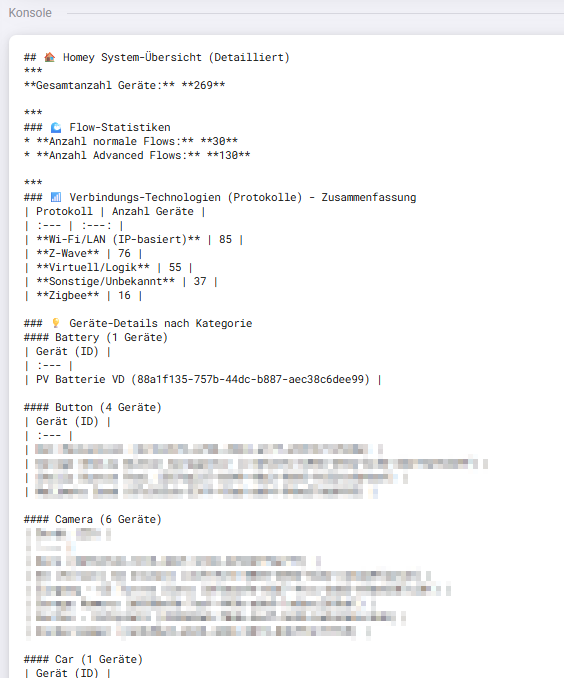
Da teils “wie viele Geräte habt ihr” etc.. Fragen kommen - habe mit Gemini und diversen Iterationen einen Script generieren lassen, welches euch via Homey Script in der Konsole die Anzahl Eurer Devices mit diversen Details (Technologie, welche Apps, …) ausgibt
→ feel free das zu optimieren etc. 
mit Gemini lassen sich scripts gut erstellen, meine Programmierkentnisse sind da zu eingerostet (oder bin zu alt | zu faul - sucht euch was aus)
EDIT: Sry das mit code reinkopieren ist tricky… (.txt upload geht nicht und musste ein wenig probieren bis es nun endlich reinging unten  )
)
const run = async () => {
    let output = '';
    output += '## 🏠 Homey System-Übersicht (Detailliert)\n';
    output += '***\n';

    // --- Initialisierung ---
    let apps = {};
    let appNameMap = {};
    const VIRTUAL_APP_IDS = [
        'com.athom.virtual', 'nl.remi.mqtt', 'org.mqtt.hub', 'com.gruijter.powerhour'
    ];
    let classifiedDevices = {};
    let appDeviceMap = {};
    let protocolCounts = {};
    let protocolDeviceMap = {};
    let totalDevices = 0; // Wird später überschrieben
    let totalNormalFlows = 0;
    let totalAdvancedFlows = 0;

    // ----------------------------------------------------
    // 0. VORBEREITUNG & APP-LADUNG
    // ----------------------------------------------------
    try {
        apps = await Homey.apps.getApps();
        Object.values(apps).forEach(app => {
            appNameMap[app.id] = app.name;
        });
        appNameMap['homey.system'] = 'Homey System (Virtuell/Logik)';

    } catch (error) {
        output += `* **Fehler beim Laden der App-Informationen:** ${error.message}\n\n`;
    }

    // ----------------------------------------------------
    // 1. GERÄTE-ANALYSE
    // ----------------------------------------------------
    try {
        const devices = await Homey.devices.getDevices();
        const deviceValues = Object.values(devices);
        totalDevices = deviceValues.length; // 1. Zuweisung

        deviceValues.forEach(device => {
            const uri = device.driverUri ? device.driverUri.toLowerCase() : '';
            const driverId = device.driverId ? device.driverId.toLowerCase() : '';
            let protocol = 'Sonstige/Unbekannt';
            const deviceString = JSON.stringify(device).toLowerCase();
            const deviceNameWithId = `${device.name} (${device.id})`;

            // App-ID Ermittlung
            let appId = 'unknown';
            if (uri.startsWith('homey:app:')) {
                const parts = uri.split(':');
                if (parts.length >= 3) appId = parts[2];
            }
            if (appId === 'unknown') {
                for (const knownAppId in appNameMap) {
                    if (knownAppId === 'homey.system') continue;
                    if (uri.includes(knownAppId) || (driverId && driverId.includes(knownAppId))) {
                        appId = knownAppId;
                        break;
                    }
                }
            }
            if (appId === 'unknown') appId = 'homey.system';

            // PROTOKOLL-HEURISTIK
            if (deviceString.includes('192.168.') || deviceString.includes('10.') || deviceString.includes('172.16.')) {
                protocol = 'Wi-Fi/LAN (IP-basiert)';
            } else if (VIRTUAL_APP_IDS.includes(appId) || appId === 'homey.system' || driverId.includes('virtual')) {
                protocol = 'Virtuell/Logik';
            } else if (deviceString.includes('zw_node_id') || deviceString.includes('"zw"')) {
                protocol = 'Z-Wave';
            } else if (deviceString.includes('zb_manufacturer_name') || deviceString.includes('"zb"')) {
                protocol = 'Zigbee';
            } else if (uri.includes('matter') || driverId.includes('matter') || uri.includes('thread') || driverId.includes('thread')) {
                protocol = 'Matter/Thread';
            } else if (uri.includes('ir_') || uri.includes('rf433') || uri.includes('rf868') || driverId.includes('ir') || driverId.includes('rf433') || driverId.includes('rf868')) {
                protocol = 'Infrarot/RF433/RF868';
            }

            // Daten gruppieren
            protocolCounts[protocol] = (protocolCounts[protocol] || 0) + 1;
            if (!protocolDeviceMap[protocol]) protocolDeviceMap[protocol] = [];
            protocolDeviceMap[protocol].push(deviceNameWithId);

            const classKey = device.class || 'Sonstige';
            if (!classifiedDevices[classKey]) classifiedDevices[classKey] = { count: 0, names: [] };
            classifiedDevices[classKey].count++;
            classifiedDevices[classKey].names.push(deviceNameWithId);

            const appName = appNameMap[appId] || `Unbekannte App (ID: ${appId})`;
            if (!appDeviceMap[appId]) appDeviceMap[appId] = { count: 0, names: [], name: appName };
            appDeviceMap[appId].count++;
            appDeviceMap[appId].names.push(deviceNameWithId);
        });

    } catch (error) {
        output += `* **Fehler beim Abrufen der Geräte-Informationen:** ${error.message}\n\n`;
    }

    // ----------------------------------------------------
    // 2. FLOW-STATISTIKEN
    // ----------------------------------------------------
    try {
        const flows = await Homey.flow.getFlows();
        totalNormalFlows = Object.keys(flows).length;

        try {
            const advancedFlows = await Homey.flow.getAdvancedFlows();
            totalAdvancedFlows = Object.keys(advancedFlows).length;
        } catch (e) { /* Advanced Flows not available */ }

    } catch (error) {
        output += `* **Fehler beim Abrufen der Flow-Informationen:** ${error.message}\n\n`;
    }

    // ----------------------------------------------------
    // 3. DATENAUSGABE
    // ----------------------------------------------------

    // *** WICHTIGSTER FIX ***
    // 2. Zuweisung/Bestätigung der Gesamtanzahl über die summierten Protokollzähler,
    // um die Asynchronitätsprobleme zu umgehen.
    if (Object.keys(protocolCounts).length > 0) {
        totalDevices = Object.values(protocolCounts).reduce((sum, count) => sum + count, 0);
    }

    // Geräte-Zusammenfassung (Fix: Direkt nach der Analyse)
    output += `**Gesamtanzahl Geräte:** **${totalDevices}**\n\n`;
    output += '***\n';

    // Flow Statistiken
    output += '### 🌊 Flow-Statistiken\n';
    output += `* **Anzahl normale Flows:** **${totalNormalFlows}**\n`;
    output += `* **Anzahl Advanced Flows:** **${totalAdvancedFlows}**\n\n`;
    output += '***\n';

    // Protokoll Zusammenfassung
    output += '### 📶 Verbindungs-Technologien (Protokolle) - Zusammenfassung\n';
    output += '| Protokoll | Anzahl Geräte |\n| :--- | :---: |\n';
    Object.entries(protocolCounts)
        .sort(([, countA], [, countB]) => countB - countA)
        .forEach(([protocol, count]) => {
            if (count > 0) output += `| **${protocol}** | ${count} |\n`;
        });
    output += '\n';

    // Geräte nach Kategorie
    output += '### 💡 Geräte-Details nach Kategorie\n';
    const sortedCategories = Object.keys(classifiedDevices).sort();
    sortedCategories.forEach(classKey => {
        const categoryData = classifiedDevices[classKey];
        const displayCategory = (classKey.charAt(0).toUpperCase() + classKey.slice(1)).replace(/_/g, ' ');
        output += `#### ${displayCategory} (${categoryData.count} Geräte)\n`;
        output += `| Gerät (ID) |\n| :--- |\n`;
        categoryData.names.sort().forEach(name => {
            output += `| ${name} |\n`;
        });
        output += '\n';
    });
    output += '***\n';

    // App Statistiken
    output += '### ⚙️ App-Statistiken\n';
    try {
        const appValues = Object.values(apps);
        const totalApps = appValues.length;

        output += `**Gesamtanzahl installierter Apps:** **${totalApps}**\n\n`;
        output += '#### Alle installierten Apps\n';
        output += `| Name | ID |\n| :--- | :--- |\n`;
        appValues.sort((a, b) => a.name.localeCompare(b.name)).forEach(app => {
            output += `| ${app.name} | \`${app.id}\` |\n`;
        });
        output += '\n';

        output += '#### Geräte pro App (Zuordnung)\n';
        const appsWithDevicesKeys = Object.keys(appDeviceMap).filter(key => appDeviceMap[key].count > 0);
        const sortedAppDeviceList = appsWithDevicesKeys.map(key => appDeviceMap[key])
            .sort((a, b) => a.name.localeCompare(b.name));

        sortedAppDeviceList.forEach(appData => {
            output += `#### App: ${appData.name} (${appData.count} Geräte)\n`;
            output += `| Gerät (ID) |\n| :--- |\n`;
            appData.names.sort().forEach(deviceName => {
                output += `| ${deviceName} |\n`;
            });
            output += '\n';
        });

    } catch (error) {
        output += `* **Fehler bei der App-Analyse:** ${error.message}\n\n`;
    }

    output += '***\n';

    // Geräte pro Protokoll
    output += '### 🔗 Geräte pro Technologie-Protokoll\n';
    const sortedProtocols = Object.keys(protocolDeviceMap).sort();
    sortedProtocols.forEach(protocol => {
        const deviceList = protocolDeviceMap[protocol];
        output += `#### Protokoll: ${protocol} (${deviceList.length} Geräte)\n`;
        output += `| Gerät (ID) |\n| :--- |\n`;
        deviceList.sort().forEach(deviceName => {
            output += `| ${deviceName} |\n`;
        });
        output += '\n';
    });

    output += '***\n';
    output += 'Das Homey Script wurde erfolgreich ausgeführt.\n';

    log(output);
    return output;
};

return run();
Ausgabe - bei mir als Bsp:
 (analog es gibt keine dumme fragen…)
