I couldn’t find an existing topic yet for the Remootio (community) app by @runely that I’ve been happily using the last couple of years. However now I’ve moved to a different house (and garage) the app is giving me some problems that I don’t know how to solve.
The problem is that the (Remootio) device very frequently shows as offline, which means I can’t control it anymore via Homey. As soon as I restart the app, the garage shows as online, and I can control it. So my idea was to trigger a restart of the Remootio app as soon as the garage door goes offline…
The garage door opener isn’t actually offline though, I can still ping it, and my Netscan flows (for trouble shooting purposes) don’t trigger any notifications. (The device is connected to my 2.4 GHz wi-fi.)
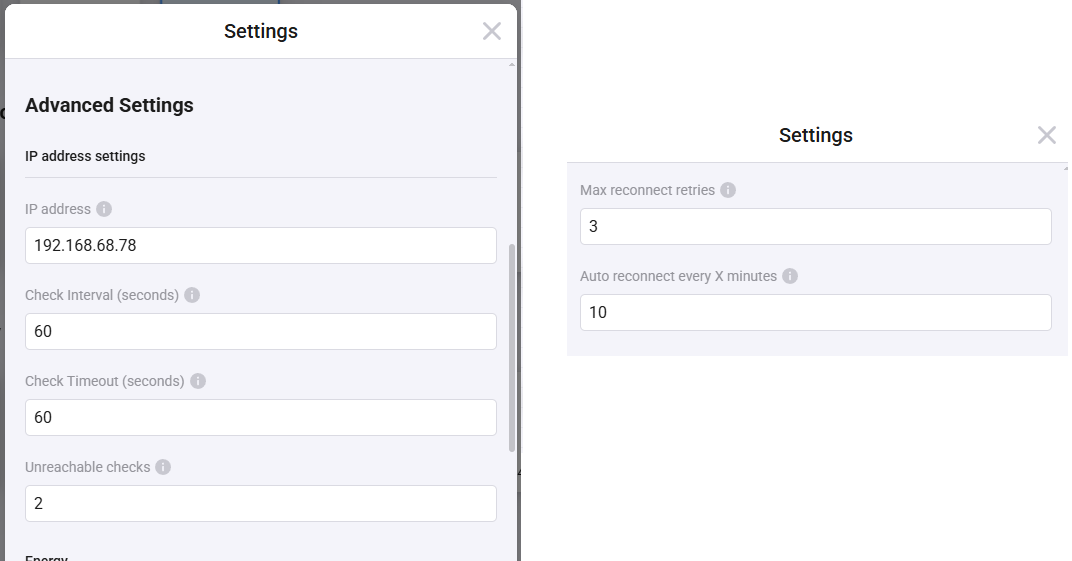
The Netscan ‘device’ is set up to check if the Remootio is online every 60 seconds, and the Remootio device is set up to try and reconnect 3 times (the max) every 10 minutes.
Immediately as I restart the Remootio app in Homey, the garage door opener shows as online again and I can control it.
Does anyone know a way to troubleshoot this? Is there a way to detect when the device goes ‘offline’ in Homey? Should I just set up a flow to restart the Remootio app every 10 minutes or so ?
I too face the same issue. Sometimes i can restart the app and the garage door is available again. Other times a restart of the app does nothing and i have to wait several days before the garage door becomes available again.
I suspect that the Remootio device somehow black lists the client IP address for some reason. I have reached out to Remootio support a while back to check if that theory could be true, but i haven’t heard anything.
There is no activity on their GitHub account nor have i successfully been able to contact the support team. So i don’t know what to do at the moment
Why do you suspect it has to do with the Remootio hardware blacklisting an ip (do you mean the ip of the Homey itself)? And would that mean that after a while it removes that ip from its blacklist? Since usually, and mostly after restarting the app, the Homey can control the Remootio, using the same ip.
It seems that the Netscan app (which I think uses the same Homey ip?) can always reach the Remootio device. Then why can’t the Remootio app?
And, to gather some more info: what router network do you use? Right now I’m using a mesh-network with TP-link Deco devices. In my previous house I think I used a mesh-network with Netgear devices. Could it maybe be that it’s TP-link causing the problems, while Netgear works fine ?
Yes, i do mean the IP of the Homey on my LAN network.
I have two Homey’s. One in production (which is the primary for contacting Remootio garage door etc) and one for testing/developing.
I suspect that the Remootio hardware is blacklisting the IP because when my production Homey can’t connec to the Remootio garage door, and I install the Remootio app on my testing/developing Homey device (this way the Remootio hardware is contacted by a different LAN IP) it works. If i switch back to my original Homey, i can’t connect.
In my case, as stated before, sometimes a restart of the app works. Other times it does not work. And in these cases, it will work if i contact the Remootio garage door from a different IP.
I have no idea what the Netscan app is or how it contacts the Remootio hardware. A regular PING from my own machine always succeeds even if the Homey app can’t connect. And this is because the PING just contacts the WiFi interface. The Homey app is contacting the Remootio hardware by the websocket implemenation they have in their software.
Ah, I see. So the difference would be that ‘pinging’ (sorry, I’m not a developer) doesn’t cause a (temporary) Remootio blacklisting of the ip, but using the websocket functionality does . But this blacklisting doesn’t block that ip from still pinging the Remootio, because the Netscan app still is allowed to ping it, and never reports the Remootio as offline…
As far as I know the Netscan app just pings a device from the Homey.
“The developers were asked to assist if they are able and it’s green lit. I was told however that the Remootio doesn’t blacklist processes, so the issue will lie elsewhere. We suggest contacting the author of the integration.”
So maybe your earlier support request to them got lost somehow?
-edit- Additional FYI from their support guy:
I am not aware of such a mail being pending anywhere, so it’s possible that it went to spam at the time, or that an incorrect address was used. (if it went to spam however at the time, and if it was older than 30 days…then unfortunately it’s gone by now…)
This mail and the convo you’ve sent however, was forwarded to the developers. Unfortunately we cannot promise that we can fix this issue in a timely manner, as there are other tasks the team is busy with. The release of Remootio pro is near, and Auto open needs a revamp due to changed made by the phone manufacturers. Since we don’t have official support for Homey, we regret to inform that we can’t put this issue to be one of our top priorities.
I did speak to the developers about this verbally however, and they told me right off the bat that Remootio doesn’t blacklist processes, and that they will look into it when they can find the time.
My email was sent 24. feb. 2025, 18:49 to support@remootio.com with subject Re: [## 6337 ##] Re: Homey app. This email never got an reply.. And in fact i forgot about it until you asked.
Maybe they can find the email by searching for the subject at the given time.
I have created a Remootio test API which can be run on your own laptop/server/whatever.
I have run this for approximately 1 week until it suddenly died with the same problem as the Homey app, i could not reconnect again. No matter how many times i restarted the app.
I will be running this one more time, now with file logging, to see how long it takes before it becomes unstable.
If this test points the way it think it does, towards the Remootio device, i can send the link for this repo to the Remootio team so they can take a crack at it.
The app can be cloned from here. Follow the readme!
Having same issue, which does seem network related (and app related). WHen the connectivity to Remootio is unstable (eg. some packetloss once in a while, not much, just a few), it loses connection. I see a message like “PING timeout of 30seconds” and that the device is unreachable, although it actually is reachable.
One way to quickly fix it (next to restarting the app), is simply changing the IP and revert it back in the configuration. To me it feels that the app is not correctly handling communication errors. I will try to go over the source code and see if I can find something wrong.
I created the GitHub - runely/remootio-api-test to make sure the Homey app didn’t have anything to do with this. The test api is only using the remootio client and this is still happening. So the problem is with the Remootio device itself, and the WebSocket implementation they have
Ah ok. Not sure I have the same problem though as I can reconnect (no need to restart app or something). It seems not to reconnect when losing the connection (which might be due to the comment part in the code or because autoreconnect is also disabled in the code ( this.remootio.connect(false)). Any particular reasons for that?
I might test your version with changing false to true to see if that helps my issue.
No, the commented part in the app has nothing to do with it. The commented out code was my own implementation for reconnecting while also displaying a warning message in the Homey app.
I commented out the code when i first started to notice these problems, to see if it had anything to do with it, which it had not.
And, the test api does not have any custom logic to handle the reconnect. The reconnect is solely handled by the remootio client itself.
My Remootio 2 device is only possible to connect as Device API. Which have a lot downside.
I don’t unable to add as normal gate impulse control. I am already reinstalled the app. Regenerated the API codes.
When I try to add manually (IP address settings are not even appearing), it closes the dialog box immediately when I insert the API and secret code and trying to proceed.
Do you have any idea how to add my Remootio to Homey?


 ?
?
 .
.
