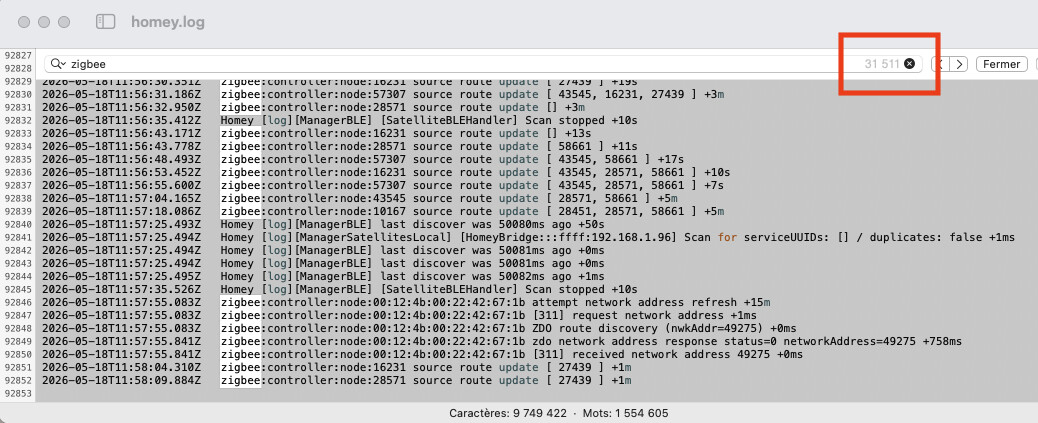
The homey.log has a LOT of information over the last 4 days, 92000+ lines and 31000+ hits on “zigbee”. so much to read
I contacted Homey support and here’s their reply that helped me, the 20 minutes power down and 2 hours delay after that seemed to have helped the most in order to make the mesh reconfigure itself in a more efficient way.
Step 1: Stabilize the Self-Hosted Server Environment
Because the software crashes will prevent Zigbee from stabilizing, we need to address the host machine first.
-
Restart the Host Container/Hardware: Safely restart the underlying Docker container, VM, or physical machine hosting your Homey Self-Hosted Server.
-
Check Host Resources: Ensure your server isn’t running out of RAM or hitting 100% CPU utilization, which frequently forces Docker to kill IPC sockets to save memory.
Step 2: The 20-Minute Power Down: Unplug your Homey Bridge antenna (or your Zigbee coordinator hardware) and Device [2] (the IKEA smart plug) from the wall for exactly 20 minutes. Leave them unplugged.
-
Why? This forces all of your battery-powered sensors to realize their primary routes are gone. It clears their internal routing tables.
-
Power Up the Coordinator First: Plug your Homey coordinator/bridge back in and wait 5 minutes for it to initialize.
-
Plug the IKEA Plug Back In: Re-plug Device [2] back into the wall.
-
Let the Mesh “Heal”: Do not pair or move any devices for the next 1–2 hours. The battery-powered devices will slowly wake up and look for the most optimal path available. Many will now connect directly to the main hub (Device [0]) or find alternative mains-powered routing paths, distributing the network load evenly.
I have had tons of issues with a setup similar to yours, SHS server 8GB RAM RasPi 5 and the Homey Bridge. My Zigbee would die out, then restarting the bridge would bring back on for awhile until it would happen again. I worked with ChatGPT and did everything under the sun. Added more mains repeaters, removed mains repeaters, moved repeaters around to different locations. Nothing seemed to fix it. It was then a question of bottleneck at the bridge as I have a large device count smart home. ChatGPT narrowed it down to the possibility of the Aqara end devices I had many of not playing nicely being directly connected to Zigbee via Homey. So I got an Aqara Matter hub and put them all on there, then used Matter to bring into Homey. I think I have seen a lot of positive change since then. I am not seeing the drops like I was before and the network is still healing. I also removed a couple no-name Zigbee door sensors I had and replaced with Sonoff. I think it is on the right track now. I think my older Aqara Zigbee end devices were messing things up. I have also since moved all and I mean ALL my switches over to Z-Wave and they are ROCK SOLID.
These are likely Tuya-based sensors? If the manufacturer ID starts with “TUYATEC-” or “_TZ3000_”, then it’s definitely Tuya based. Did you know that you can buy a Tuya MultiMode or Zigbee gateway (those are cheap on AliExpress, only €10) and bring those devices into Homey as well via the official Tuya app for Homey? This doesn’t use Homey’s Zigbee so it should be more stable if the Homey Bridge’s Zigbee doesn’t work correctly
I also have 7 Zwave devices and never had any issues with them, the lower frequency is not bothered by Wifi, yeah if I could I would eventually migrate to Zwave if the price was better. Zigbee leak sensors like the Zigbee from Aqara are 25$ CAD each, while something like the Zwave Fibaro leak is 90$ CAD
Yeah, it has taken me awhile to migrate. Keep your eyes open on eBay. That is where I got A LOT of my Z-wave items much less. There is also an on-line store called The Smartest House that mainly sells Zooz products. They have best prices and run a weekly super sale on a different item each week. They also have used/recon/open box items at times. I got the Aeotec Wallmote 7 (wireless switches) on eBay for under $14 each! I think I have bought over 20 of them so far. They are $35+ normally.
After everything being stable for a complete week, it happened again and again a reboot of SHS was necessary to restore functionality of the Zigbee network, so the problem of zigbee network reliability remains current as I see it under SHS.
Just wondering: In case you use the Homey Bridge for zigbee, does power cycling the bridge lead to the same results?
I will try this next time it fails
Had the same issue before. In my case, I gave the server logs to an LLM for analyzing.
The reason was that Homey kept searching for an offline Zigbee Router (temporary used for my christmas tree). This router was unavailable, but after many searches Homey’s Zigbee manager crashed. Rebooting resolved the issue for a couple of hours before it crashed again.
After I removed that specific Zigbee Router from Homey’s devices, everything went back to normal again.
Don’t know if your issue is the same, but maybe it is.
Just had the issue again and just rebooting the Homey Bridge did the trick, so it appears either rebooting the SHS container or the Homey Bridge restores Zigbee connectivity.
So I did as suggested and ran this query after uploading the homey server log to Google Gemini AI:
This is a homey self hosted server log, i want you to search problematic zigbee devices in this log and list me the problems that could have caused zigbee network issues
And here’s Gemini’s answer (which will take me some time to validate and sort through):
Based on the analysis of your Homey self-hosted server log, your Zigbee network is experiencing severe congestion and memory issues.
Here are the problematic Zigbee devices and the specific problems causing the network issues:
 Problematic Zigbee Devices (by MAC Address)
The following devices are repeatedly throwing errors, failing to respond to route discoveries, or timing out.
-
00:0d:6f:00:02:f7:97:13(nwkAddr: 28571) - Frequently timing out, throwingZMemError, and marked unreachable during OTA checks. -
00:0d:6f:00:03:1c:44:de(nwkAddr: 23681) - ThrowingZMemErrorand timing out on network address requests. -
00:0d:6f:00:03:1c:3b:66(nwkAddr: 28451) - CausingZMemErroron frame sends and failing to be reached. -
00:0d:6f:00:03:29:2d:51(nwkAddr: 43545) - Continuously failing network address refresh attempts withTimeout (4500ms): 1408. -
00:0d:6f:00:04:05:52:e1(nwkAddr: 63109) - Throwing theInvalid Response (status: ZNwkTableFull)error and timing out. -
00:0d:6f:00:03:28:a5:4e- ThrowingZNPSyncRequestErrorand failing OTA awake checks. -
b4:0e:06:0f:ff:e2:6f:df(nwkAddr: 41851) - Failing OTA awake checks (Could not reach device. Is it powered on?). -
00:12:4b:00:22:42:67:1b(nwkAddr: 49275) - Timing out during network address requests. -
00:0d:6f:00:05:7d:0d:37(nwkAddr: 57307) - Unreachable and failing awake checks. -
00:0d:6f:00:05:5b:6a:ee- Failing awake checks.
 Identified Network Problems
The log reveals several core issues that are causing the Zigbee network to fail.
-
Hardware Memory Exhaustion (
ZMemError):The log clearly indicates your Zigbee controller is a CC2530 (
Peripheral #4 (zigbee): PeripheralCC2530). The CC2530 chip is older hardware with very limited RAM. When the network gets too large or too chatty, the controller runs out of memory and starts dropping frames, which throws theZNPSyncRequestError: Invalid Response (status: ZMemError)errors seen extensively in your log. -
Network Table Full (
ZNwkTableFull):Device
00:0d:6f:00:04:05:52:e1triggered aroute discovery error: Invalid Response (status: ZNwkTableFull). This means the Zigbee routing table has reached its maximum capacity. The controller cannot store any new routes, causing devices to drop off the network because they cannot establish a path to communicate. -
Route Discovery Timeouts (
Timeout (4500ms): 1408 (type: areq)):Because the controller is bogged down and the routing table is full, standard network address refresh attempts are timing out. The devices are essentially shouting into the void, and the controller is failing to respond within the 4500ms window.
-
OTA (Over-The-Air) Update Failures:
The
ManagerZigbeeprocess is constantly trying to interact with sleeping end-devices when it thinks they are awake (Error handling device awake: Could not reach device. Is it powered on?). These constant failed checks are likely flooding your already memory-starved CC2530 controller.
Recommendations: Given the limitations of the CC2530 coordinator, your network has simply outgrown the hardware. To stabilize the network, you will likely need to remove a few devices, add more dedicated Zigbee router devices (like smart plugs or hardwired bulbs) to offload routing tables from the main coordinator, or migrate to a controller with a more modern Zigbee chip (such as a CC2652) that can handle higher memory loads and larger routing tables.
I guess Athom saw a great opportunity to flog off their Homey Bridge stock by marketing it towards SHS users, but especially for Zigbee it’s a woefully underpowered device. I would suggest looking at alternatives, like Zigbee2MQTT with a CC2652-based controller like Gemini suggests.
You can move smart lights, plugs, dimmers and switches to a Hue Bridge, that would be a solution if you primarily use switches/lights.
Then, you can add the devices to Homey via the Philips Hue app.
Which device type and brand do you have? I see many similar OUIs, if you primarily use the same brand then you can also consider buying their bridge (if there’s a Homey app for it)
Actually, I have another 16 Hue lights on a Hue gen 2 Hue hub also with also 6 buttons and a motion sensor (they are on Zigbee channel 25)
Which devices do you have on Homey? Maybe you can move some of them as well to clear up some memory on Homey’s Zigbee controller

Yup the Homey bridge seems to be underpowered, I switched from a Smartthings hub V2 which had other issues but was rock solid for reliability compared to my current Homey setup, even though the SHS has plenty of ressources and seems very reliable. Do you know if I can add multiple Homey bridge to split the load across multiple devices, maybe ? Being fairly new to Homey I didn’t check Zigbee2MQTT but I’ll look at this.
I don’t really see many devices you can migrate. I think the Ledvance light strip would work on the Hue Bridge. The Third Reality devices could be migrated to a Third Reality Hub Gen2 (or earlier) and used using the ThirdReality Hub app for Homey. eWeLink could be migrated to a Sonoff ZBBridge and added via the eWeLink app for Homey. What CentraLite devices do you have? If they are regular lights or switches, you can add them to the Hue Bridge. The Moes device can be migrated to a Tuya Zigbee or MultiMode gateway, and added to Homey via the Tuya app.
You can also add SmartThings to Homey, using the SmartThings Community app. Don’t know if it’s still supported though, there were changes recently.
