There is also an official LG ThinQ app which, according to its app store page, also supports TV’s. But those appear to be only the newer models that support remote control via ThinQ
I recently got a new LG G6 which does not show any code if I try to connect it with Homey. With my iPhone it did immediately. I’m slowly getting very desperate since nothing worked as of now and I really want to get some automations going without relying on the power draw of the socket
Hi @John_Kevin! I’ve installed your app. Seems to work so far. One thing I noticed is the name of the output source. I have an LG G4 and I’ve renamed HDMI2 to SHIELD. This is not reflected in the app. Using the “original” WebOS Plus app, it’s displayed correctly.

@wepa
If you have sent me a crash report, unfortunately it arrives anonymously, but I hope I have sent you some instructions to follow. Basically these were to install the Test version above (if you have not already done so) and tell me if the issue persists. Good luck.
@Niclas, the name is dynamically allocated by the LG TV depending on what CEC is telling it. I have just left mine as is, but if you are worried, can you not just rename the source?
Well, that is the problem. I have renamed the source on my LG, but it’s not reflected in the app. This is not a big deal for me, so no worries. It’s just something I noticed to be a difference between the WebOS Plus app and your app.
Thanks for wanting to help. I actually figured out on my own what I needed to do to get rid of the message, though. Thanks anyway.
Thank you to everyone who has tested Local webOS TV Controller 1.0.44 and submitted diagnostic reports.
The reports currently indicate three separate issues:
- Crashes in version 1.0.43
Some LG televisions returned incomplete application, channel, launch-point or input lists. Version 1.0.43 attempted to process these missing lists and could crash with a Cannot read properties of undefined (reading 'map') error.
Version 1.0.44 validates these responses before processing them. The latest diagnostics show that this protection is working: the previous crash has not occurred in the 1.0.44 reports received so far.
- Missing authorization prompt on webOS 26
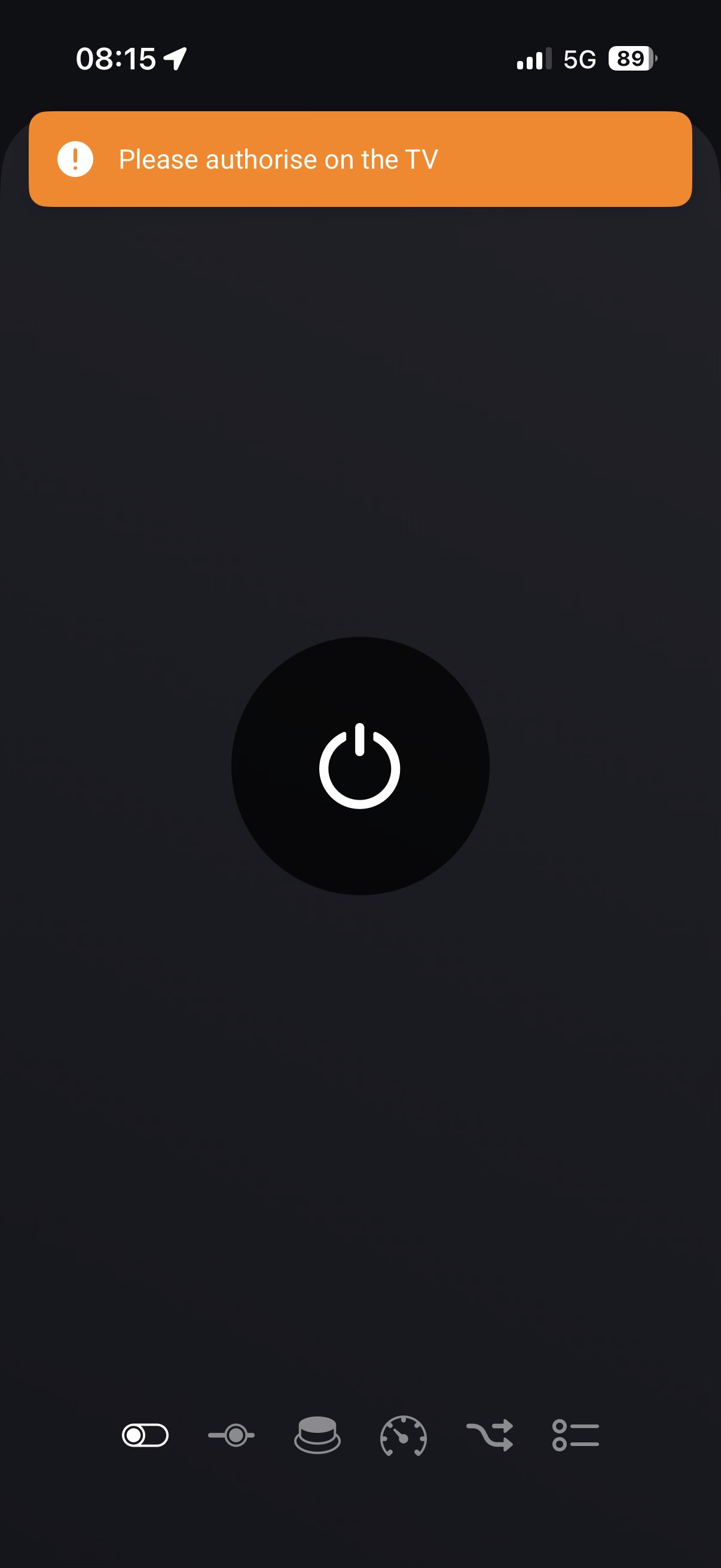
Two different LG televisions running webOS 26 have been found by Homey, but the expected authorization prompt did not appear on the television. The app consequently did not receive and store a completed pairing key.
This may be caused by a change in the registration sequence required by newer webOS versions. Other home-automation projects have also reported integration problems following upgrades to webOS 26. I am investigating a newer registration procedure which obtains television system information before requesting authorization.
- Television not found during discovery
One webOS 26 television was initially discovered by version 1.0.43 but later produced “No devices found” with 1.0.44. The discovery code itself was not changed between those versions.
Possible causes include a changed IP address, simultaneous Ethernet and Wi-Fi connections, local multicast/SSDP discovery, or changed webOS 26 behaviour. I am therefore also considering a manual-IP pairing option so that failure of automatic discovery does not prevent installation.
Daniel’s separate problem—loss of control after a television has remained in standby for a long period—also remains under investigation. Version 1.0.44 improved compatibility with the original connection behaviour, but it has not conclusively fixed that problem on his televisions.
The current Test version remains available here:
Install Local webOS TV Controller 1.0.44 Test
Please remember that this is an unreviewed Test version. Do not uninstall the existing app or delete an existing television device before installing it; the Test version should update the existing installation in place.
If you experience a problem, please submit a diagnostic report before restarting or deleting anything and include:
- complete LG model number;
- exact webOS and TV firmware versions;
- Ethernet or Wi-Fi connection;
- whether both interfaces are enabled;
- whether the TV is discovered;
- whether the authorization prompt appears;
- what happened immediately before the failure.
Thank you to everyone helping with the testing. The reports are providing useful evidence, and I intend to prepare another carefully tested candidate addressing modern webOS registration, discovery fallback and long-standby connection recovery.
@Rakas, I am assuming you have tried the test version and the problem is the same?
My problem is I only have my own LGTV so building an app which works on newer or older models is difficult for me. I have to rely on people like you sending me comprehensive fault reports with pictures and debug logs to stand any chance of fixing them. Also, as I have made clear elsewhere in this forum, I am not a programmer and have no programming skills. I needed this app purely because the official LGThinQ app was only basically capable of turning my TV off/on and I wanted channel change, input change etc etc so had to get Max’s old code accepted by Homey, and that is where we are now. I will honestly try my best to keep on developing this app but it is costing me £80 per month in ChatGPT charges and that is unsustainable for me, so if anyone wants to take this over, then I am very willing to hand over the baton 
I maintain the new Local webOS TV Controller version of this app. Several users with newer LG televisions, particularly webOS 26, are now reporting exactly the same “Please authorise on the TV” warning without an authorization prompt appearing on the television.
You mentioned that you found the solution yourself. Would you mind explaining exactly what you changed or did to remove the message? It would also help to know your complete TV model and webOS version.
Your solution may help several other users and could help me determine whether the app needs a software change or clearer installation instructions.
Many thanks,
John
Thank you, Apologies!! you are correct, and I have now traced the difference.
Max’s original app used an LG list which includes the television’s user-facing source name, such as SHIELD. During development of Local webOS TV Controller, that was changed to a broader application list because some newer TVs omitted system applications such as Live TV from the original list. Unfortunately, the broader list reports the technical name HDMI2 rather than your renamed label.
I therefore should not have suggested that you rename it again; you had already done the correct thing on the television. I’m sorry for misunderstanding your report.
I will record this as a minor regression. The intended correction will retain the newer application handling while preferring the TV’s custom HDMI label when available.
Thank you for spotting and reporting it.
John
I have not altered the source yet. This should be included in a later candidate after the higher-priority webOS 26 pairing and reconnect work is designed safely.
18:36
Yes, that was exactly the problem I had with the new webOS26 version, too. I tried out several apps, but I ended up sticking with the one by MaxvandeLaar from GitHub—the one you have to install using npm and the Homey CLI. That app had the same bug, but I was able to modify the code itself, so after a lot of back-and-forth, I finally managed to fix it. I could perhaps make my version available so you can see what’s different, though unfortunately, I can’t recall exactly what I changed. 
The test build had solved it. I need to check again because I tried a few solutions. I’m not sure if it was this app but one app did connect locally but the on / off button just relied on it being pressed without checking the state of the TV. Is it still the same or can we track the state of the television without relying on the homey button being pressed?
Local webOS TV Controller v1.0.45 — updated Test version
Thank you to everyone who has tested the app and supplied diagnostic reports. Version 1.0.45 is now available through the existing Test link:
Why this revision was prepared
The reports and logs identified several separate issues. For this revision I have deliberately concentrated on confirmed faults and simplification, rather than adding more polling, retry loops or background traffic which could introduce new problems.
What v1.0.45 addresses
- Crashes caused by incomplete LG responses
Some televisions returned incomplete channel, application, launch-point or external-input lists. Store version 1.0.43 attempted to process these missing lists and could crash with:
Cannot read properties of undefined (reading 'map')
The response validation introduced in v1.0.44 is retained. A malformed or incomplete list is now rejected safely instead of crashing the whole app.
- Reconnection after extended standby
@Daniel reported that his televisions could become unavailable after being off for a long period, with restarting the Homey app temporarily restoring control.
The connection-retry behaviour has been restored closer to Max’s original implementation. Version 1.0.45 also corrects a race in which a delayed “TV is off” decision could still be applied just after the WebSocket had successfully reconnected. The app now cancels that obsolete decision immediately when reconnection is confirmed and then re-establishes its LG subscriptions.
This is intended to improve long-standby recovery, but it still needs testing on the televisions which exhibited the fault. I cannot claim it as a universal fix yet because the problem does not occur on my own LG TV.
- Excessive background channel checking
The app had been requesting the current Live TV channel every 30 seconds. When LG did not answer, each request could wait for its timeout and produce repeated error messages.
That continuous reconciliation has now been removed. Normal channel changes continue to arrive through LG’s event subscription, and the app still performs bounded verification after an explicit Homey channel-change command. This reduces unnecessary communication with the television and keeps the design simpler.
- Television power-state reporting
The app does not merely assume that the television is on or off because its Homey button was pressed. It subscribes to LG’s reported power state and updates the Homey capability from television events. Version 1.0.45 improves how that state is handled across a disconnection and reconnection.
Issues intentionally deferred to a future revision
The following reports are recorded, but have not been changed in v1.0.45:
-
Some webOS 26 televisions do not display the expected authorization prompt. Rakas subsequently reported that the earlier Test build solved his LG G6 connection problem, which is encouraging, but other webOS 26 authorization reports remain unresolved.
-
Automatic discovery can sometimes return “No devices found.” A possible manual-IP pairing fallback needs separate design and testing.
-
A custom HDMI name such as SHIELD may still be displayed as the technical name HDMI2. The app currently uses the broader LG application list so that system applications such as Live TV are not omitted. A later revision should combine that coverage with the custom label supplied by the external-input list.
-
@Wepa reported successfully modifying Max’s version to resolve webOS 26 authorization. If I receive your source changes I may be able to include them, but the problem is that I cannot test them, as my TV is webOS25.
How to test
If you already use Local webOS TV Controller, please do not uninstall the app or delete your television device or Flows. Installing the Test version should update the existing installation in place.
After installation, confirm that Homey shows Local webOS TV Controller v1.0.45 Test.
Please test:
-
normal television control;
-
actual on/off state reporting;
-
reconnection after the television has been off or in standby for several hours;
-
whether existing devices and Flows continue to work normally.
If a problem occurs, please create a diagnostic report before restarting the app or deleting anything. Please also include your complete TV model, exact webOS and firmware versions, Wi-Fi or Ethernet connection, whether both interfaces are enabled, and what happened immediately before the failure.
This is still an unreviewed Test version. It has not been submitted for certification and the Live Store version remains v1.0.43.
Thank you again for helping me test it.
@John_Kevin I have installed the new test version v1.0.45 and cycled the TVs on and off. I will keep them in standby until tomorrow evening to see whether the update resolved my issue.
Homey released a significant security update today, requiring a restart. My TVs then displayed this issue, so I must restart and shut them down, waiting until tomorrow to see whether standby mode is resolved—though this is another problem needing attention after a Homey reboot.
Diagnostic bfcec751-2886-473f-b7f6-5697bfaee639

,
There has been some progress with the issue!
After leaving the TV in standby since yesterday, I tested it again today. The TV started up successfully, and the app did not crash! That’s a big step forward.
However, once the TV has started, the app still cannot proceed with the next step in my Advanced Flow because it reports “Not connected”
If I restart the Homey app, everything works again, and the TV becomes reachable through my Flow.
I’ve created a new diagnostic report with these latest results. b51bff47-06cd-4aab-9790-23be43c3b013
Hopefully, this helps narrow down the remaining connection issue.

UPDATE! The LG CX seems to work fine! No standby issues, need to test little more! The problem is on the LG G4
/D
Local webOS TV Controller v1.0.46 — new Test version
A new Test version is available here:
Please install it over the existing app. Do not uninstall the app or delete your television device or Flows first.
I should explain that I am not a programmer. I use ChatGPT to develop this app for my own use. I originally submitted it to Homey because locally installed, non-certified apps are not included in Homey’s daily backups.
Version 1.0.46 has been prepared to investigate two separate problems. They must not be confused with each other.
1. Pairing on webOS 26
My television uses webOS 25, so I cannot reproduce or test webOS 26 pairing problems myself.
LG has published almost no useful information about the relevant connection changes. However, technical reports found by ChatGPT indicate that affected webOS 26 televisions may reject the old signed com.lge.test certificate used by many local-control applications. The television can return a 403 Pairing rejected: blacklisted certificate detectederror before displaying the authorization prompt.
The reports also indicate that webOS 26 may:
-
require a one-time fallback to an unsigned registration request;
-
require all necessary permissions, including text and pointer controls, in the new request;
-
reject some optional privileged requests even after successful pairing;
-
have separate discovery complications involving SSDP, Ethernet/Wi-Fi addresses or IP Control settings.
Version 1.0.46 retains the established signed registration method for webOS 25 and earlier televisions. It uses the unsigned fallback only when the television specifically reports the certificate-blacklisting rejection. It cannot enter an unlimited fallback loop.
I have tested v1.0.46 extensively on my webOS 25 television, where pairing, the retained device, power, channels, applications, volume, mute and ARC sound-output control are working. This does not prove that the new method works on webOS 26.
If you have an affected webOS 26 television, please report:
-
whether the television is discovered;
-
whether the authorization prompt appears;
-
whether pairing completes;
-
whether state reporting and physical commands work.
2. Daniel’s long-standby reconnection problem
This is a separate issue from webOS 26 pairing.
Daniel has reported that, with v1.0.45, his televisions can wake after extended standby without crashing the app. His LG CX may now be working normally, which is encouraging.
His LG G4, however, can wake successfully while subsequent Advanced Flow actions still fail with “Not connected.”Restarting the Homey app restores control. He also observed connection trouble following a required Homey restart.
Version 1.0.46 uses bounded reconnection attempts rather than permanent background retrying. A later Homey rediscovery of the television can begin a fresh connection cycle. This is intended to improve recovery without introducing continuous polling or unnecessary traffic, but it has not yet been proven on Daniel’s G4.
Daniel’s testing is therefore still essential. Version 1.0.46 must not yet be described as a confirmed solution to his standby problem.
Reporting a failure
If either pairing or reconnection fails, please create a Homey diagnostic report immediately afterwards, before restarting the app, reinstalling it or deleting anything. Please copy the reference number created by the report, then click on the ‘Suggest’ button at the top of the test app download page to send me a message with the diagnostic reference included and the following information:
-
complete LG model number;
-
exact webOS and TV firmware versions;
-
Homey model and software version;
-
Wi-Fi or Ethernet connection;
-
whether both TV network interfaces are enabled;
-
what happened immediately before the failure;
-
the diagnostic-report reference.
Version 1.0.46 is an unreviewed Test candidate. It has not been submitted for certification, and the Live Store version remains v1.0.43.
Further development of the webOS 26 repair and Daniel’s separate reconnection problem depends on results from the affected televisions, because neither problem occurs on the equipment I own.
Update: Local webOS TV Controller v1.0.47 Test
The Test link now installs v1.0.47, replacing v1.0.46:
Please install it over the existing app. Do not uninstall the app or delete your television device or Flows.
Further investigation found a specific weakness in v1.0.46. After three failed connection attempts, the app correctly stopped retrying to avoid an endless background loop. However, if the television later became visible to Homey again, v1.0.46 could mark it as available without actually starting a new control connection. The TV could therefore appear awake while Flow actions still failed with “Not connected.” Restarting the app cleared that state, which matches Daniel’s report.
Version 1.0.47 retains the three-attempt limit but allows a later genuine rediscovery of the television to start one new bounded connection cycle. It does not introduce continuous polling, permanent retries or delayed command replay.
This change addresses the reconnection dead end only. It does not claim to solve the separate webOS 26 pairing issue, and it has not yet been proven on Daniel’s affected LG G4.
If you test v1.0.47, please confirm that Homey shows v1.0.47 Test. If the television wakes but commands still report “Not connected,” please create a diagnostic report immediately—before restarting the app—and send me its reference number together with the TV model and webOS version using the ‘Suggest’ link on the download page.
Thanks for the new test versions! I have installed it and will try tomorrow and see how it behaves.
One additional detail worth noting is that each time I update your app, both TVs go offline; I must restart your app and manually toggle “ONE” TV on from another app before they BOTH return online in yours.
