Help “ my first flow”

Dear Homey friends,

I’m about to create my first ever flow… and it’s for the most sensitive room in the house — the one that requires wife approval granted :rofl:

I need a simple, step-by-step guide for under-the-bed lighting:

From 4:00 PM to 9:00 PM:

  1. Aqara Motion Sensor P1 → ON

  2. Aqara Light Strip → ON at 100%

  3. After 5 minutes → OFF

After 9:30 PM:

Same flow, but the light should turn on at around 25% brightness.

Thanks a ton in advance! :folded_hands:t2:

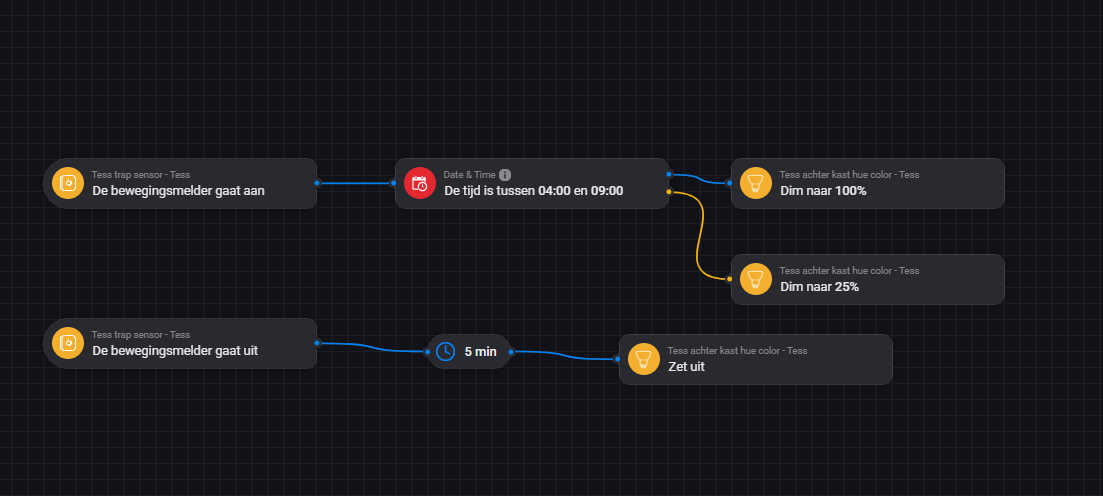
Something like this:

Very appropriate but it not in English :sweat_smile:

And I don’t know which instructions to use ( when, then , if or logic) …

Welcome Fahad!

You can use a translation program to understand the meaning of the Flow cards. You can’t expect every user to set their Homey to English so that other users in the forum can understand the Flow cards, sorry.

Acc. to the types of Flow cards.
Flow cards that are rounded on the left side and have only one connection point on the right side are “When…” flow cards:

Flow cards that have two connection points on the right side are “And…” flow cards:


An “And…” flow card must always be linked to another flow card on the right-hand side, unlike a “Then…” flow card.

Flow cards that only have one connection point on the left and right sides are “Then…” flow cards:

Labeled accordingly here in @Robkrekel example:

1 Like

Thank you very much for your time and effort. I will also use ChatGPT for translation. I will follow the steps and see how it goes.

Vielen Dank für Ihre Zeit und Ihre Mühe. Ich werde ebenfalls ChatGPT für die Übersetzung verwenden. Ich werde die Schritte befolgen und sehen, wie es funktioniert.

Hartelijk dank voor uw tijd en inzet. Ik zal ook ChatGPT gebruiken voor de vertaling. Ik zal de stappen volgen en kijken hoe het gaat.

:folded_hands:t2: in German and Dutch :grinning_face_with_smiling_eyes:

Oh and for THEN cards : True is bleu, False is orange

I just watched a YouTube video about something similar to what I want. However, the creator used an app called Countdown.

Honestly, I think the method you shared is much simpler and makes a lot more sense.

Thanks!

PS: https://youtu.be/1VYkhSW5NTU?si=qC0oxF-XyP5DWnE1

The pause card is meaningless!

Well, 5 min. is a bit long. But to have the light go off right after you lay down or are out of sight of the sensor might be to fast.

And since :

You would like to avoid her bumping her toe or knee because the light suddenly went off… Actually, i’d dimm the light to zero instead of just ‘off’…

I’m just gonna dim the lights to 10% or less… last thing I need is triggering the “back in my day” nostalgia speech button :grinning_face_with_smiling_eyes:

1 Like

You meant “And” cards probably? As explained by Dirk

Then cards only have a “Started” = blue and “Error” = red output
:wink:

Are you saying chat123 can’t do this:

1 Like

Hmm, silly me… my Homey is in Dutch.

Now I fell for the rookie mistake :roll_eyes:

How to do that “ 5 min” card?

Rightclick - Wait

2 Likes

Wacht = Wait

1 Like

Additional explanation of the delay card in combination with the shown flow.

Each time when the PIR goes off, the 5 minutes starts. When the 5 minutes are up, the light will be switched off.
Example: If you trigger the PIR again 2 minutes after the first start of the 5 minute timer, a further 5 minute timer starts. So, the first delay timer will not be stopped!!! If you remain in the room, the light will be switched off after 3 minutes when the first 5-minute timer has expired.
If that’s what you want, then it’s fine.

However, if you want that timer to stop when you re-enter the room, you’ll need to use either one of the different Homey Timer apps or the “The zone has been inactive for 5 minutes.” Flow card.

3 Likes

Aha! That’s smart!!

Thanks :folded_hands:t2: