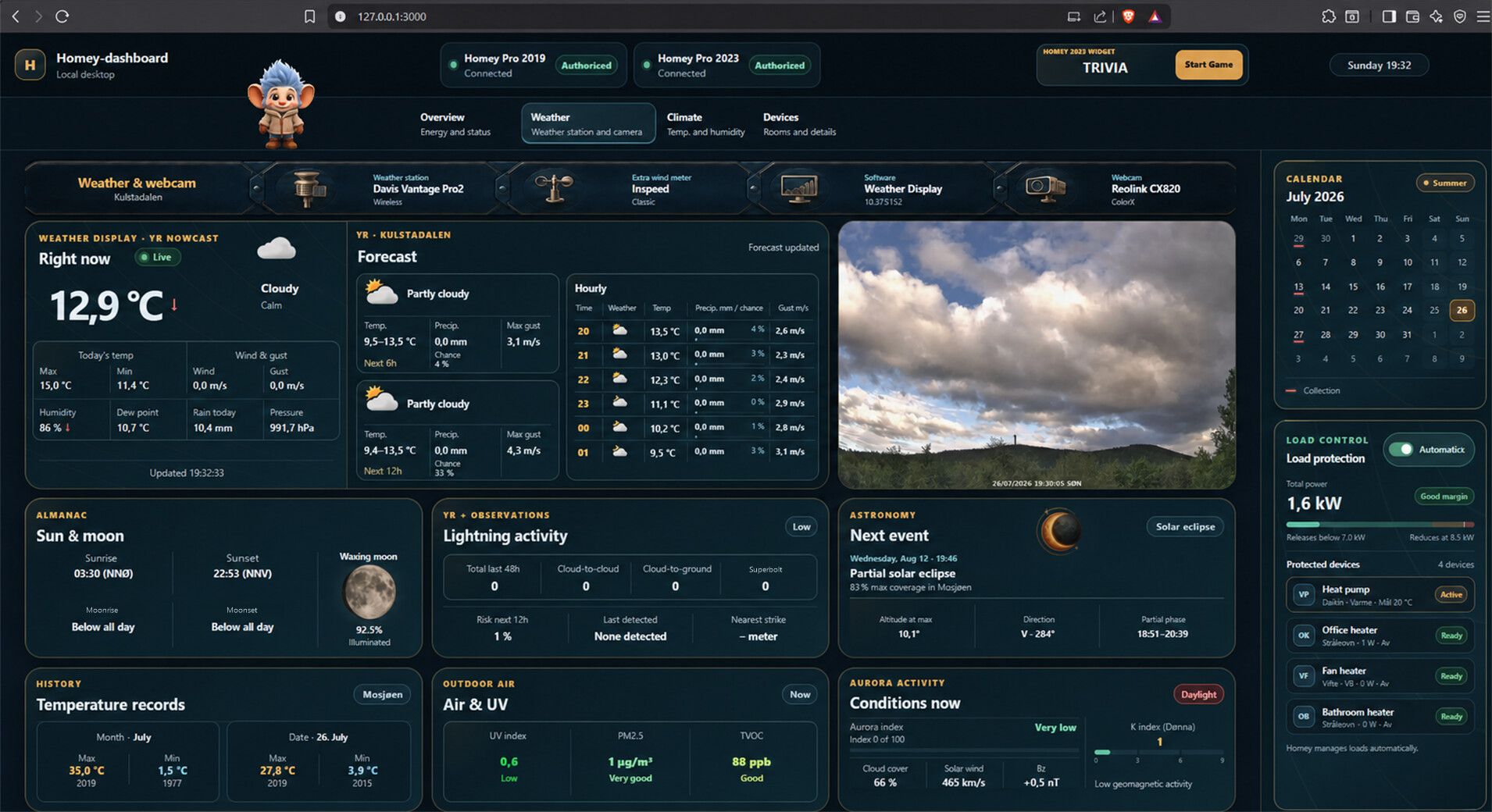
I have been thinkering a bit with the use of AI, and had some fun building a desktop dashboard.
I am a little stuck on how to display the control of lights and other devices, so i would love to see some examples of this, if you have built something yourself on a laptop or desktop. Some screenshots below, and some info of the build.
The dashboard is a private, locally hosted Windows application built with React, TypeScript and Vite, with a small Node.js backend and native CSS. It connects independently to my Homey Pro 2019 and Homey Pro 2023 through Homey’s official homey-api and OAuth2, using Socket.IO for live updates. Codex with the Homey plugin was used during development to inspect devices and capabilities, understand and configure Flows, verify data sources and safely test the setup. The finished dashboard connects directly to the Homeys and does not require Codex to be running. It also combines Weather Display, Yr/MET Norway, webcam and local PC/HWiNFO data in one interface. Credentials are encrypted with Windows DPAPI, and everything runs locally on 127.0.0.1.
Tried different approaches for the device page.. lots of tiles, list view, but settled with current layout. Most of my house is fully automated, but this allows me still to turn on/off etc.. Image was not translated to english this time..
Hello @Arnt_Soloy
Yes with codex or claude you need this type of dashboard and easily without getting tired, I also wanted to go through it, but the big problem remains security and a mobile dashboard seen outside, if it is to go through cloudfare or other and manage security, it lacks direct interest, you might as well use home assistant and do. TS and compile the js, and home assistant accepts it while being protected by HA cloud. In any case your board is very and too overloaded, I perceive that a dashboard must be used by everyone and it is no longer the case, my wife and children use Homekit for a good reason simple effective and fast. Right now I’m making a HomeKit clone on home assistant so that it’s not disturbed, but the advantage is that I can use all the elements of HA, while displaying Home IOS.
It was just my opinion, and you, how do you manage mobile mode, and remote access security?
Looking forward to reading you
Hi @Olivier67,
Thanks for the feedback 
I would agree that this might be to information dense as a general family or as a mobil dashboard. I’m in a single houshold, so this is intentionally designed for my specific use on a larger desktop monitor, where i have tried to show as much useful (for me) informations at once. It is not ment to replace the simpler Homey (or Homekit) interface for everyday control.
Currently the dashboard has no mobile or remote access.. it runs only on my desktopPC, so it cannot be reached from Wi-Fi, the local network, or the internet. So no port forwarding, Cloudflare tunnel or public web hosting.
Home Assistant and HA Cloud are certainly good choices for a shared and mobile-friendly interface. My goal here was a little different.. a personal, local, information-rich desktop overview combining my two Homeys.
I am not a design expert, as shown
, but i would love to see other layouts etc that i can get inspired from.. if you should make a layout for larger devices yourself, pls do post screenshots..
Thanks again—your questions about scope and security are very relevant.