Hi everyone! 
I’d like to share a solution for displaying your iCloud calendars or Google calendars directly in the Homey Dashboard - with automatic travel time calculation, departure warnings, and a modern design!

 Features
 Shows appointments for the next 2 days (today & tomorrow)
- Automatic travel time calculation to appointments with location
- 3-level warning system: Normal /
 Leave soon /
  Leave NOW!
 - Auto-update every 5 minutes with funny animations


- Dark/Light Mode
- Multiple calendars with colored badges
 Requirements
- HTTP Server App (in Homey App Store)
- Public iCloud calendar URLs
 Installation
1. Install HTTP Server App
Install the app and use port 8000 (default).
2. Get iCloud Calendar URLs
For each calendar:
- Go to iCloud.com → Calendar
- Click the share icon

- Enable “Public Calendar”
- Copy the URL
- Change
webcal://tohttps://
3. Customize Script
Important sections in the script:
// CALENDAR CONFIGURATION
const calendars = [
    {
        name: "Work",
        url: "https://p66-caldav.icloud.com/published/2/YOUR_URL_HERE",
        color: "#3b82f6",
        class: "work"
    }
    // Add more calendars...
];

// HOME COORDINATES (for travel time calculation)
const homeLat = 48.1351;   // ← YOUR Latitude
const homeLon = 11.5820;   // ← YOUR Longitude
// Find your coordinates on Google Maps!
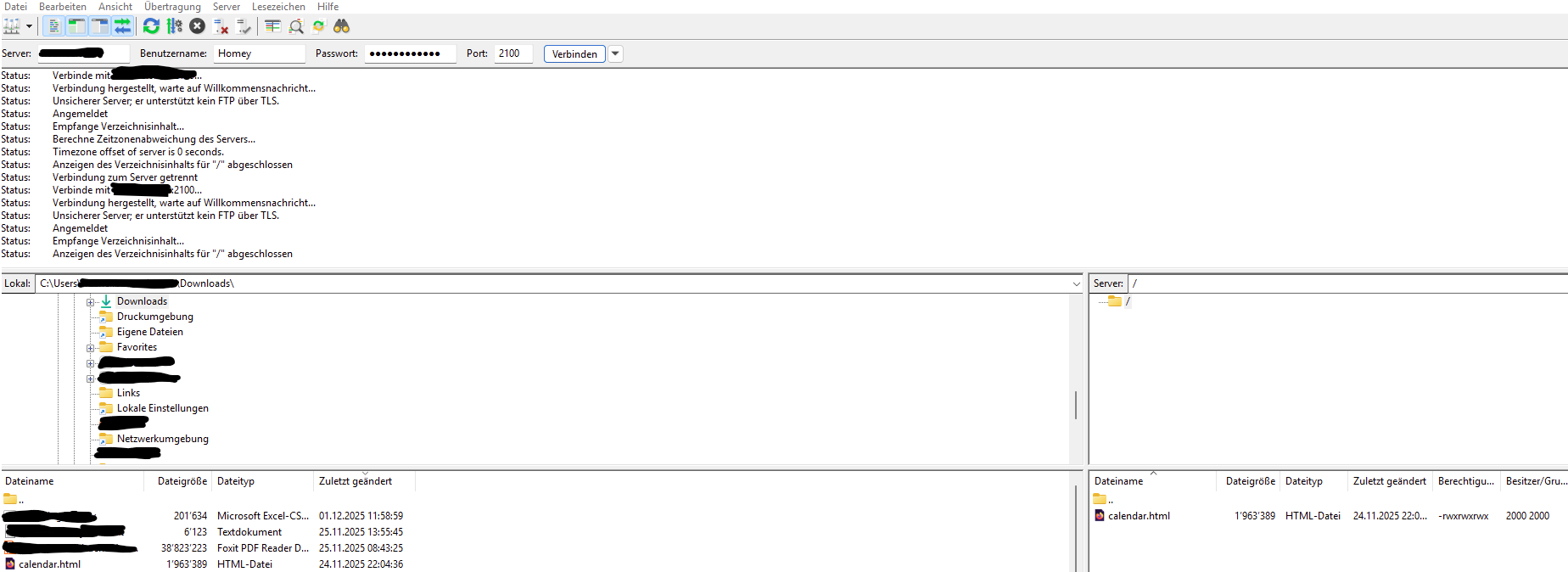
4. Upload File
- Save as
calendar.html - Upload to HTTP Server App
- URL:
http://YOUR-HOMEY-IP:8000/calendar.html
5. Add to Dashboard
Add a Web Widget with the URL.
 Customization
Colors:
color: "#3b82f6"   // Blue
color: "#ec4899"   // Pink
color: "#10b981"   // Green
Time Range:
tomorrow.setDate(tomorrow.getDate() + 2); // 2 = today+tomorrow, 3 = 3 days
Update Interval:
setInterval(() => loadAllCalendars(true), 5 * 60 * 1000); // 5 min
 Troubleshooting
- No appointments? → Check calendar URLs and “public” status
- No travel times? → Verify home coordinates
- Missing animation? → Clear browser cache (Ctrl+F5)
 The Script
Complete code ready to copy:
<!DOCTYPE html>
<html lang="en">
<head>
<meta charset="UTF-8">
<meta name="viewport" content="width=device-width, initial-scale=1.0">
<title>Calendar</title>
<style>
:root{--bg-primary:#0f0f0f;--bg-card:#1f1f1f;--bg-hover:#2a2a2a;--text-primary:#e5e5e5;--text-secondary:#a3a3a3;--text-tertiary:#737373;--border:#2a2a2a;--accent:#3b82f6;--warning:#f59e0b;--danger:#ef4444}@media (prefers-color-scheme:light){:root{--bg-primary:#f5f5f5;--bg-card:#ffffff;--bg-hover:#f8f9fa;--text-primary:#1a1a1a;--text-secondary:#6b7280;--text-tertiary:#9ca3af;--border:#e5e7eb;--danger:#dc2626}}*{margin:0;padding:0;box-sizing:border-box}body{font-family:-apple-system,BlinkMacSystemFont,'Segoe UI','SF Pro Display',sans-serif;background:var(--bg-primary);color:var(--text-primary);line-height:1.5;padding:0 0 60px}.container{max-width:100%;margin:0;padding:0}.calendar-container{background:var(--bg-card);border-radius:0;overflow:hidden;margin:0}.loading-state{text-align:center;padding:3rem 1.5rem;color:var(--text-secondary)}.funny-loader{font-size:4rem;margin-bottom:1rem;animation:bounce .6s infinite alternate}@keyframes bounce{from{transform:translateY(0) scale(1)}to{transform:translateY(-20px) scale(1.1)}}.loading-text{font-size:1.1rem;font-weight:500;animation:fadeInOut 2s infinite}@keyframes fadeInOut{0%,100%{opacity:.5}50%{opacity:1}}.funny-overlay{position:fixed;top:0;left:0;right:0;bottom:0;background:var(--bg-primary);display:flex;flex-direction:column;align-items:center;justify-content:center;z-index:9999;opacity:0;pointer-events:none;transition:opacity .3s ease}.funny-overlay.show{opacity:1;pointer-events:all}.funny-animation{font-size:6rem;margin-bottom:1.5rem;animation:crazyRotate 1s ease-in-out infinite}@keyframes crazyRotate{0%{transform:rotate(0deg) scale(1)}25%{transform:rotate(10deg) scale(1.2)}50%{transform:rotate(-10deg) scale(.9)}75%{transform:rotate(5deg) scale(1.1)}100%{transform:rotate(0deg) scale(1)}}.funny-message{font-size:1.3rem;font-weight:600;color:var(--text-primary);margin-bottom:.5rem}.funny-submessage{font-size:.95rem;color:var(--text-secondary)}.loading-spinner{width:20px;height:20px;border:2px solid var(--border);border-top-color:var(--accent);border-radius:50%;animation:spin .8s linear infinite;margin:0 auto 1rem}@keyframes spin{to{transform:rotate(360deg)}}.day-section{border-bottom:1px solid var(--border)}.day-section:last-child{border-bottom:none}.day-header{padding:1rem 1rem .75rem;display:flex;align-items:center;gap:.5rem}.day-indicator{width:10px;height:10px;border-radius:50%;background:var(--text-tertiary)}.day-indicator.today{background:#22c55e}.day-indicator.tomorrow{background:#fb923c}.day-title{font-size:.95rem;font-weight:600;color:var(--text-primary);flex:1}.day-badge{display:inline-flex;align-items:center;padding:.2rem .6rem;border-radius:.75rem;font-size:.7rem;font-weight:600;letter-spacing:.02em}.badge-today{background:rgba(34,197,94,.2);color:#22c55e}.badge-tomorrow{background:rgba(251,146,60,.2);color:#fb923c}.badge-allday{background:rgba(59,130,246,.2);color:#60a5fa}.events-list{padding:.25rem 0 .5rem}.event{padding:.75rem 1rem;border-left:3px solid transparent;transition:all .15s ease;cursor:default}.event:hover{background:var(--bg-hover)}.event.warning{border-left-color:var(--warning);background:rgba(245,158,11,.08)}.event.danger{border-left-color:var(--danger);background:rgba(239,68,68,.1)}.event-header{display:flex;align-items:flex-start;gap:.75rem}.event-time{color:var(--text-secondary);font-size:.85rem;font-weight:500;min-width:50px;font-variant-numeric:tabular-nums}.event-time.warning{color:var(--warning);font-weight:600}.event-time.danger{color:var(--danger);font-weight:600}.event-content{flex:1;min-width:0}.event-title-row{display:flex;align-items:flex-start;gap:.5rem;margin-bottom:.35rem;flex-wrap:wrap}.event-title{font-weight:500;color:var(--text-primary);font-size:.9rem;flex:1;min-width:0;word-break:break-word}.calendar-badge{display:inline-flex;align-items:center;padding:.15rem .55rem;border-radius:.5rem;font-size:.7rem;font-weight:600;white-space:nowrap;flex-shrink:0}.calendar-badge.work{background:#3b82f6;color:white}.calendar-badge.private{background:#ec4899;color:white}.calendar-badge.family{background:#10b981;color:white}.event-location{color:var(--text-secondary);font-size:.8rem;margin-top:.35rem;display:flex;align-items:flex-start;gap:.4rem;line-height:1.4}.location-icon{margin-top:.1rem;flex-shrink:0}.location-details{flex:1;min-width:0}.location-address{color:var(--text-secondary);word-break:break-word}.travel-info{display:flex;align-items:center;gap:.5rem;margin-top:.25rem;flex-wrap:wrap}.travel-time{color:var(--text-tertiary);font-size:.75rem}.travel-time.warning{color:var(--warning);font-weight:600}.travel-time.danger{color:var(--danger);font-weight:600}.departure-time{color:var(--text-tertiary);font-size:.75rem}.departure-time.warning{color:var(--warning);font-weight:600}.departure-time.danger{color:var(--danger);font-weight:600}.no-events{text-align:center;padding:3rem 1.5rem;color:var(--text-tertiary);font-size:.9rem}.footer{position:fixed;bottom:0;left:0;right:0;text-align:center;padding:.75rem;background:var(--bg-primary);border-top:1px solid var(--border);color:var(--text-tertiary);font-size:.75rem;z-index:100}.refresh-button{position:fixed;bottom:4rem;right:1rem;background:var(--bg-card);color:var(--text-primary);border:1px solid var(--border);padding:.75rem;border-radius:50%;width:48px;height:48px;cursor:pointer;box-shadow:0 4px 12px rgba(0,0,0,.3);transition:all .2s ease;display:flex;align-items:center;justify-content:center;z-index:101;font-size:1.2rem}.refresh-button:hover{transform:scale(1.1);border-color:var(--accent)}.refresh-button:active{transform:scale(.95)}@keyframes rotate{from{transform:rotate(0deg)}to{transform:rotate(360deg)}}.refresh-button.loading{animation:rotate 1s linear infinite}
</style>
</head>
<body>
<div class="funny-overlay" id="funnyOverlay">
<div class="funny-animation" id="funnyEmoji">🏃♂️💨</div>
<div class="funny-message" id="funnyMessage">Loading appointments...</div>
<div class="funny-submessage" id="funnySubmessage">Just a moment!</div>
</div>
<div class="container">
<div class="calendar-container" id="calendar-container">
<div class="loading-state">
<div class="funny-loader">📅</div>
<div class="loading-text">Loading...</div>
</div>
</div>
</div>
<button class="refresh-button" id="refreshBtn" onclick="manualRefresh()">↻</button>
<div class="footer" id="lastUpdate">Loading...</div>
<script>
const calendars=[{name:"Work",url:"https://p66-caldav.icloud.com/published/2/YOUR_URL_HERE",color:"#3b82f6",class:"work"},{name:"Private",url:"https://p66-caldav.icloud.com/published/2/YOUR_URL_HERE",color:"#ec4899",class:"private"},{name:"Family",url:"https://p112-caldav.icloud.com/published/2/YOUR_URL_HERE",color:"#10b981",class:"family"}];const CACHE_KEY='homey_calendar_cache';let isLoading=!1;const funnyAnimations=[{emoji:'🏃♂️💨',message:'Loading appointments...',sub:'Quick, quick!'},{emoji:'🚀',message:'Calendar rocket launching...',sub:'T-Minus 3... 2... 1...'},{emoji:'🔮',message:'Looking into the future...',sub:'The crystal ball says...'},{emoji:'🎪',message:'Juggling appointments...',sub:"Don't drop them!"},{emoji:'🎯',message:'Hitting targets...',sub:'Bullseye!'},{emoji:'🎨',message:'Painting calendar...',sub:'A masterpiece!'},{emoji:'🎭',message:'Drama appointments loading...',sub:'Curtain up!'},{emoji:'🎲',message:'Rolling appointments...',sub:'The dice are cast!'},{emoji:'🎪🤹',message:'Appointment circus running...',sub:'Ladies and gentlemen!'},{emoji:'🧙♂️✨',message:'Calendar magic working...',sub:'Abracadabra!'},{emoji:'🦸♂️',message:'Appointment hero on duty...',sub:'To the rescue!'},{emoji:'🍕',message:'Delivering appointments...',sub:'In 30 minutes or free!'},{emoji:'☕',message:'Brewing appointments...',sub:'With extra foam!'}];function showFunnyAnimation(){const random=funnyAnimations[Math.floor(Math.random()*funnyAnimations.length)];document.getElementById('funnyEmoji').textContent=random.emoji;document.getElementById('funnyMessage').textContent=random.message;document.getElementById('funnySubmessage').textContent=random.sub;document.getElementById('funnyOverlay').classList.add('show')}function hideFunnyAnimation(){document.getElementById('funnyOverlay').classList.remove('show')}function cleanAddress(address){if(!address)return '';let cleaned=address.replace(/\\,/g,',').replace(/\\n/g,' ').replace(/\\/g,'');cleaned=cleaned.replace(/\s+/g,' ').trim();return cleaned}function extractMainLocation(address){if(!address)return '';const cleaned=cleanAddress(address);const parts=cleaned.split(',');if(parts.length>0){return parts[0].trim()}return cleaned}function extractSearchAddress(address){if(!address)return '';const cleaned=cleanAddress(address);const plzMatch=cleaned.match(/\b(\d{5})\s+([A-Za-zäöüÄÖÜß\s]+)/);if(plzMatch){return `${plzMatch[1]} ${plzMatch[2].trim()}`}const parts=cleaned.split(',').map(p=>p.trim()).filter(p=>p.length>0);if(parts.length>=2){return `${parts[0]}, ${parts[1]}`}return cleaned}function parseICalDate(dateString){const year=parseInt(dateString.substring(0,4));const month=parseInt(dateString.substring(4,6))-1;const day=parseInt(dateString.substring(6,8));if(dateString.includes('T')){const hour=parseInt(dateString.substring(9,11));const minute=parseInt(dateString.substring(11,13));const second=parseInt(dateString.substring(13,15));if(dateString.endsWith('Z')){return new Date(Date.UTC(year,month,day,hour,minute,second))}return new Date(year,month,day,hour,minute,second)}return new Date(year,month,day)}function isAllDayEvent(event){return!event.DTSTART.includes('T')}function parseICalendar(icalData){const events=[];const lines=icalData.split(/\r?\n/);let currentEvent=null;let currentField=null;for(let i=0;i<lines.length;i++){let line=lines[i].trim();if(line.startsWith(' ')&¤tField&¤tEvent){currentEvent[currentField]+=line.substring(1);continue}if(line==='BEGIN:VEVENT'){currentEvent={}}else if(line==='END:VEVENT'&¤tEvent){if(currentEvent.DTSTART){events.push(currentEvent)}currentEvent=null;currentField=null}else if(currentEvent){const colonIndex=line.indexOf(':');if(colonIndex>0){const key=line.substring(0,colonIndex).split(';')[0];const value=line.substring(colonIndex+1);currentEvent[key]=value;currentField=key}}}return events}function formatTime(date){return date.toLocaleTimeString('en-US',{hour:'2-digit',minute:'2-digit'})}function formatDayHeader(date){const options={weekday:'long',day:'numeric',month:'long'};return date.toLocaleDateString('en-US',options)}function isToday(date){const today=new Date();return date.getDate()===today.getDate()&&date.getMonth()===today.getMonth()&&date.getFullYear()===today.getFullYear()}function isTomorrow(date){const tomorrow=new Date();tomorrow.setDate(tomorrow.getDate()+1);return date.getDate()===tomorrow.getDate()&&date.getMonth()===tomorrow.getMonth()&&date.getFullYear()===tomorrow.getFullYear()}function getDayKey(date){return `${date.getFullYear()}-${String(date.getMonth()+1).padStart(2,'0')}-${String(date.getDate()).padStart(2,'0')}`}async function getTravelTime(destination){if(!destination||destination.trim()===''){return null}try{const searchAddress=extractSearchAddress(destination);console.log('Searching for:',searchAddress);const url=`https://nominatim.openstreetmap.org/search?q=${encodeURIComponent(searchAddress)}&format=json&limit=1&countrycodes=us`;const response=await fetch(url);const data=await response.json();if(data.length>0){const destLat=parseFloat(data[0].lat);const destLon=parseFloat(data[0].lon);console.log('Found:',data[0].display_name);const homeLat=40.7128;const homeLon=-74.0060;const distance=getDistance(homeLat,homeLon,destLat,destLon);const roadDistance=distance*1.3;const timeInMinutes=Math.round((roadDistance/50)*60);console.log(`Distance: ${distance.toFixed(1)} km, Travel time: ${timeInMinutes} min`);if(timeInMinutes>3){return timeInMinutes}}}catch(error){console.error('Travel time calculation failed for:',destination,error)}return null}function getDistance(lat1,lon1,lat2,lon2){const R=6371;const dLat=(lat2-lat1)*Math.PI/180;const dLon=(lon2-lon1)*Math.PI/180;const a=Math.sin(dLat/2)*Math.sin(dLat/2)+Math.cos(lat1*Math.PI/180)*Math.cos(lat2*Math.PI/180)*Math.sin(dLon/2)*Math.sin(dLon/2);const c=2*Math.atan2(Math.sqrt(a),Math.sqrt(1-a));return R*c}function shouldLeaveBy(eventTime,travelMinutes){const departureTime=new Date(eventTime);departureTime.setMinutes(departureTime.getMinutes()-travelMinutes-5);return departureTime}function getUrgencyLevel(departureTime){const now=new Date();const minutesUntilDeparture=Math.floor((departureTime-now)/(1000*60));if(minutesUntilDeparture<=0){return 'danger'}else if(minutesUntilDeparture<=15){return 'warning'}return 'normal'}async function fetchWithProxy(url){const proxies=[`https://corsproxy.io/?${encodeURIComponent(url)}`,`https://api.codetabs.com/v1/proxy?quest=${encodeURIComponent(url)}`,url];for(const proxyUrl of proxies){try{const response=await fetch(proxyUrl,{headers:{'Accept':'text/calendar,text/plain,*/*'}});if(response.ok){const text=await response.text();if(text.includes('BEGIN:VCALENDAR')||text.includes('BEGIN:VEVENT')){return text}}}catch(error){}}throw new Error('Loading failed')}function saveToCache(index,data){try{const cache=JSON.parse(localStorage.getItem(CACHE_KEY)||'{}');cache[index]=data;localStorage.setItem(CACHE_KEY,JSON.stringify(cache))}catch(e){}}function loadFromCache(index){try{const cache=JSON.parse(localStorage.getItem(CACHE_KEY)||'{}');return cache[index]}catch(e){return null}}async function loadAllCalendars(showAnimation=!1){if(isLoading)return;isLoading=!0;if(showAnimation){showFunnyAnimation()}const container=document.getElementById('calendar-container');const allEvents=[];for(let i=0;i<calendars.length;i++){const calendar=calendars[i];try{const icalData=await fetchWithProxy(calendar.url);saveToCache(i,icalData);const events=parseICalendar(icalData);events.forEach(event=>{allEvents.push({...event,calendarName:calendar.name,calendarColor:calendar.color,calendarClass:calendar.class,startDate:parseICalDate(event.DTSTART),endDate:event.DTEND?parseICalDate(event.DTEND):null,isAllDay:isAllDayEvent(event)})})}catch(error){const cachedData=loadFromCache(i);if(cachedData){const events=parseICalendar(cachedData);events.forEach(event=>{allEvents.push({...event,calendarName:calendar.name,calendarColor:calendar.color,calendarClass:calendar.class,startDate:parseICalDate(event.DTSTART),endDate:event.DTEND?parseICalDate(event.DTEND):null,isAllDay:isAllDayEvent(event)})})}}}const now=new Date();now.setHours(0,0,0,0);const tomorrow=new Date(now);tomorrow.setDate(tomorrow.getDate()+2);const futureEvents=allEvents.filter(event=>event.startDate>=now&&event.startDate<tomorrow).sort((a,b)=>a.startDate-b.startDate);const eventsByDay={};futureEvents.forEach(event=>{const dayKey=getDayKey(event.startDate);if(!eventsByDay[dayKey]){eventsByDay[dayKey]=[]}eventsByDay[dayKey].push(event)});let html='';const days=Object.keys(eventsByDay).sort();if(days.length===0){html='<div class="no-events">No appointments today or tomorrow</div>'}else{for(const dayKey of days){const dayEvents=eventsByDay[dayKey];const date=dayEvents[0].startDate;let dayBadge='';let indicatorClass='';if(isToday(date)){dayBadge='<span class="day-badge badge-today">Today</span>';indicatorClass='today'}else if(isTomorrow(date)){dayBadge='<span class="day-badge badge-tomorrow">Tomorrow</span>';indicatorClass='tomorrow'}html+=`<div class="day-section"><div class="day-header"><div class="day-indicator ${indicatorClass}"></div><span class="day-title">${formatDayHeader(date)}</span>${dayBadge}</div><div class="events-list">`;for(const event of dayEvents){let locationHTML='';let eventClass='event';let timeClass='event-time';if(event.LOCATION&&!event.isAllDay){const mainLocation=extractMainLocation(event.LOCATION);const travelMinutes=await getTravelTime(event.LOCATION);if(travelMinutes){const departureTime=shouldLeaveBy(event.startDate,travelMinutes);const urgency=getUrgencyLevel(departureTime);if(urgency!=='normal'){eventClass+=` ${urgency}`;timeClass+=` ${urgency}`}let departureText='';if(urgency==='danger'){departureText=`🚨 Leave NOW! (by ${formatTime(departureTime)})`}else if(urgency==='warning'){departureText=`⚠️ Leave soon (${formatTime(departureTime)})`}else{departureText=`Depart ${formatTime(departureTime)}`}locationHTML=`<div class="event-location"><span class="location-icon">📍</span><div class="location-details"><div class="location-address">${mainLocation}</div><div class="travel-info"><span class="travel-time ${urgency!=='normal'?urgency:''}">${travelMinutes} min drive</span><span class="departure-time ${urgency!=='normal'?urgency:''}">${departureText}</span></div></div></div>`}else{locationHTML=`<div class="event-location"><span class="location-icon">📍</span><div class="location-details"><div class="location-address">${mainLocation}</div></div></div>`}}else if(event.LOCATION){const mainLocation=extractMainLocation(event.LOCATION);locationHTML=`<div class="event-location"><span class="location-icon">📍</span><div class="location-details"><div class="location-address">${mainLocation}</div></div></div>`}const timeDisplay=event.isAllDay?'<span class="day-badge badge-allday">All day</span>':`<div class="${timeClass}">${formatTime(event.startDate)}</div>`;html+=`<div class="${eventClass}"><div class="event-header">${event.isAllDay?'':timeDisplay}<div class="event-content"><div class="event-title-row"><span class="event-title">${event.SUMMARY||'Untitled'}</span><span class="calendar-badge ${event.calendarClass}">${event.calendarName}</span></div>${event.isAllDay?timeDisplay:''}${locationHTML}</div></div></div>`}html+='</div></div>'}}container.innerHTML=html;const updateTime=new Date().toLocaleTimeString('en-US',{hour:'2-digit',minute:'2-digit'});document.getElementById('lastUpdate').textContent=`Updated: ${updateTime}`;if(showAnimation){setTimeout(()=>{hideFunnyAnimation()},1500)}isLoading=!1}async function manualRefresh(){const btn=document.getElementById('refreshBtn');btn.classList.add('loading');await loadAllCalendars(!0);btn.classList.remove('loading')}loadAllCalendars(!0);setInterval(()=>loadAllCalendars(!0),5*60*1000);
</script>
</body>
</html>
 Quick Start
- Install HTTP Server App
- Make iCloud calendars public & copy URLs
- Customize script:
calendarsarray + coordinates (homeLat,homeLon) - Save as
calendar.html& upload - Add to Dashboard
Have fun! 


 New Features
 Seasonal Animations
 Special Days Support
 German Public Holidays
 Test Mode
 Screenshots
 accent
 accent
 accent
 Configuration