
This is the change in the new version. Instead of “one” GX device we now have different device types; battery, solar, energy meter, generator, etc. If you want to pull the total energy consumption from your Cerbo you need to add an energy meter device from the Victron Homey app.

Not sure I follow. You don’t have an energy meter (com.victronenergy.grid) connected to your Victron system?
If I understand the error message correctly, you are passing unitId 100 to the energy device. 100 is the system unitId, and I guess not your com.victronenergy.grid unitId and thus the app can’t read the first registry value, which is 2609, the serial number of the energy meter.
But in the end, if you don’t have an energy meter connected to your Victron system, then you can’t add an energy meter device either 
I don’t know which version of the app you are on, when I try to add an energy meter device using unitId 100 I this error
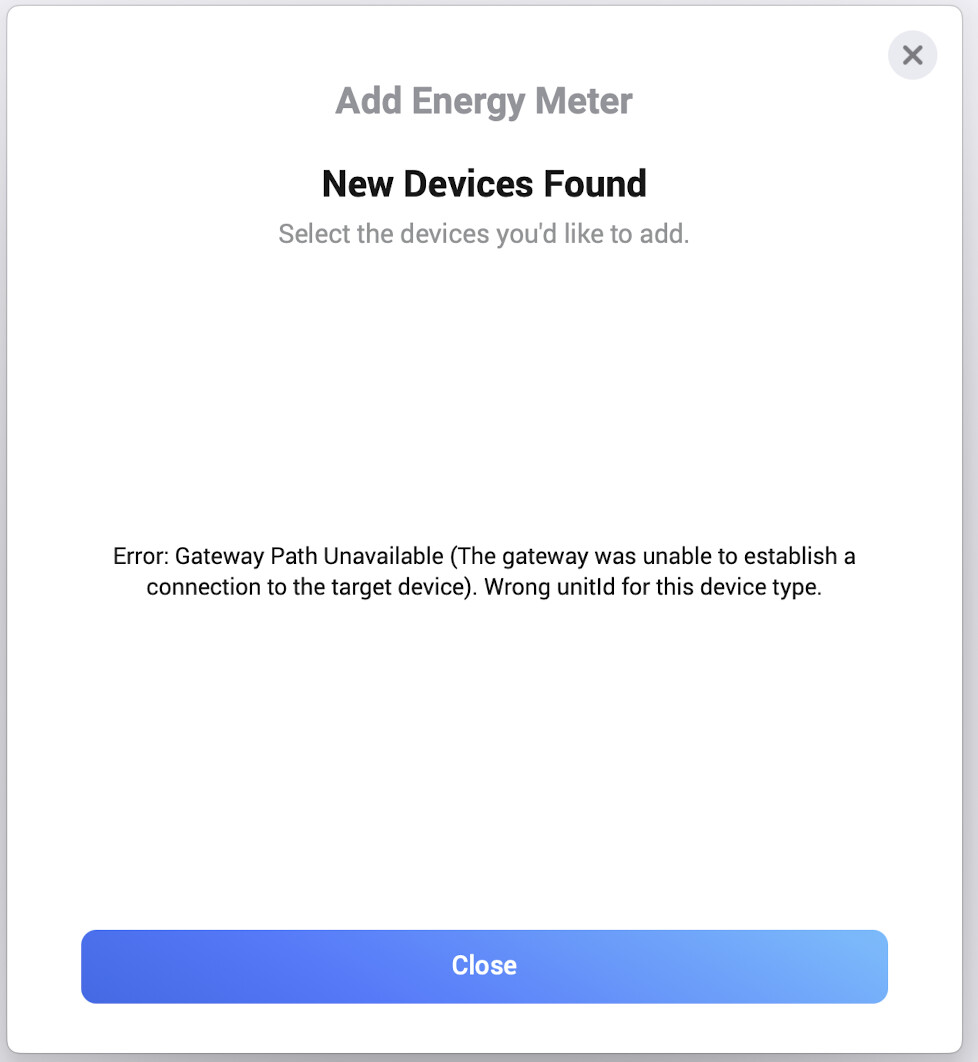
So if I don’t have an energy meter physically connected to the power plant, but I only have the Cerbo GX, then I’m not able to see total consumption in Homey Energy? Do I understand that right?
Hello, and first of all thank you for your amazing work on the Victron application that work flawlessly on my homey for a year!
Unfortunatly, since the version 1.4.4, have this error message on my multiplus II GX (added into homey as a Cerbo GX) :
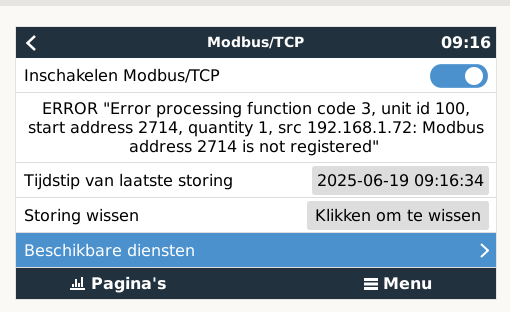
ERROR "Error processing function code 3, unit id 100, start address 2714, quantity 1, sc 172.20.0.2: Modbus address 2714 is not registered"
There is only pylontech batteries attached to my victron, I use it as an ESS storage system.
Does someone have an idea on how to fix it ?
I tried to add my Victron as a baterry only, in this case this is working, however I need the card to set the minimum SOC.
Many thank in advance.
Best regards

Is this a consistent error? The fact that the GX device type reads 2714 is nothing new.
You can’t set it in the app; it is fetched from Victron. It is 0 also for me, I’m using Batrium BMS.
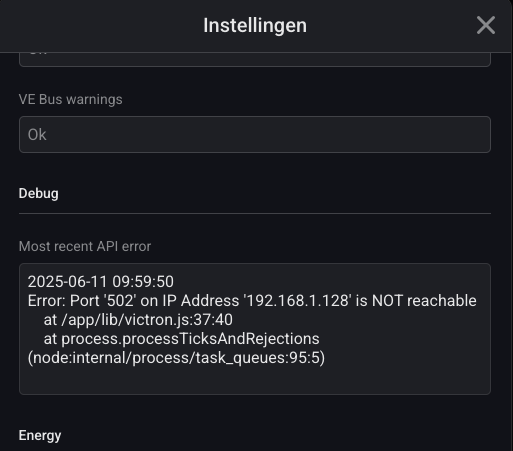
I have the same problem since June 11th. Before I has been working correctly since install (for min. 1 year.)
What error are you getting when you try to set the minimum soc?
Where do you see the 2714 error?
What firmware version is on your Victron system?
Hi, I have a problem with my Victron EV Charger combing this to my Homey Pro Device. I have to fill in a VRM-portal ID. Does anyone know where the ID is i have to fill in? And can anyone tell if I have to put in the IP-adress from the Serbo or the EV- charger?
I’m kinda lost so I hope someone can help me with this…

It is somehow related to the new version where there is not just one GX device but three different ones.
I solved it like this:
I deleted the old GX device in Homey.
Updated the Victron app again to be on the safe side.
Then reinstalled the three new devices GX 246, Battery 225 and Generator 100. With the addresses and instances
Then reinstalled all cards in all flows for the Victron devices
Now it works again and the error in the GX device no longer occurs.
By separating the GC, battery and generator into three devices, handling
in the flows is better and easier. A step forward.
Translated with DeepL.com (free version)
I believe we have tracked down the problem related to Import Peakshaving Current, 2714. As I suspected previously when I inquired about the Victron GX firmware version, this Modbus registry was added in firmware 3.50. Thus, if you are running an older version, you will run into this error.
I have to fill in a VRM-portal ID
There is no VRM portal id for the ev charger
Does anyone know where the ID is i have to fill in?
Please check the first post of this thread. To see a list of available devices, and their address, go to Settings → Services → Modbus/TCP → Available services. Find com.victronenergy.battery.
And can anyone tell if I have to put in the IP-adress from the Serbo or the EV- charger?
The IP address of your Cerbo GX. If you have not added any other device then you need to follow more instructions from the first post, Modbus is by default turned off so you must enable it.
Thx for replying quickly. So if I understand it correctly, by upgrading the firmware of my Victron, this would solve the problem?
The error has not occurred for a few days. But twice again today. It is again at the same times as before, once in the morning and once in the afternoon.
I have firmware 3.60 on Color GX

My understanding is that you check the Modbus log on the GX device and see that an error has occurred in the Modbus communication. You don’t see any problems in the Victron Homey app.
I believe you need to interpret this in light of:
-
This is a controlled and captured error on the Victron GX side. It doesn’t affect any operation of your GX device.
-
The Homey app queries the GX device via Modbus approximately 20000 times per hour, around the clock. Assuming you have the default refresh interval of 10 seconds. If you have more device types or a different refresh interval, this will increase or decrease.
-
Several factors can impact some of those half a million read requests per day, causing some to fail. Your local network, whether your Homey is on Wi-Fi, whether your GX device is on Wi-Fi, Homey app upgrades, firmware updates, etc.
This is a best-effort software provided to you free of charge. If you are not comfortable with seeing a single modbus error, then I don’t think this app is suitable for you.
