Thx , i will check
I have finished to fix it
I have an issue with docker.
I will fix it and try the command homey app run soon ![]()
![]()
Okay Dylan,
Succes and good luck with fixing the issue.
Best regards Peter.
Very keen to try this out as I have several white label devices that aren’t yet supported by Johan’s version. I’m not super tech literate so I’ll probably stuff up the version that’s not on the Homey App Store. Very keen to try it out once it hits there though, in any state! Thanks for your work, @dlnraja
Yes working on it to support more than 150 tuya devices
I just noticed the Git readme was updated 3 days ago for v3 and the instructions said to search for Tuya Zigbee Universal in the Homey Apps. I get no results, is that because it’s submitted but not approved yet?
I have not submited yet because i need to fix and enchrich driver .
It will bé for now an manual install
Homey app install ( commande line inside zip )
When the app is working
I will do an tutorial
I was excited to see if my white label devices would work so I gave installing this through the repo a go. I got all kinds of errors that ChatGPT couldn’t talk me through so I had to give up.
I have logged the motion sensor and smart button devices logged on Johan’s issues board and eagerly await an official/test release on the Homey app store.
Today update
I fixed the Homey Compose root and key driver compositions. I’ll now re-run the Homey validation, and in parallel I’ll fetch the latest GitHub issues/PRs from JohanBendz’s Tuya Zigbee repo and the “Universal TUYA Zigbee Device App - lite version” forum page to extract actionable improvements.
Best regards
Love this, thanks Dylan!
Hi Dylan, thanks for all your effort but I still can’t get it to install in Master or Light version as well.
I add you the screenshot from my last attempt when trying to install the Light version.
Regards Peter.
Yes not finish yet a do some refactor right now
Okay Dylan good luck, I thought you finished it already.
I will wait patiently ![]()
Succes and thanks again, regards Peter.
EV] Offline Reliability Scoring for “Universal Tuya Zigbee – Lite”
TL;DR
To expand device coverage without breaking existing ones, I’m adding an offline reliability score (0→1) that ranks manually provided sources (no scraping, no cloud in the app).
-
New device mappings land as overlays with
status:"proposed"→ never loaded by the app. -
Only
status:"confirmed"overlays (after real-device tests) are active at runtime. -
Runtime stays 100% local Zigbee (no internet access).
Why?
Tuya Zigbee devices often share DP patterns, but firmwares/vendors vary. A naive “add everything” approach causes regressions. The reliability score lets us prioritize safe additions, then promote them only when verified on a real device.
How it works (short version)
-
Manual inputs (offline)
-
I collect facts in small
.jsonlfiles (one JSON object per line):
manufacturerName,productId, type hints (plug/TRV/curtain/remote…), capability hints (onoff,measure_power…), optional DP evidence (e.g.,16 → measure_power/10), plus a source descriptor (type,url,date). -
No automated scraping; everything is declarative and auditable.
-
-
Source weighting (examples)
-
official_manufacturer≈ 0.90 -
official_platform≈ 0.88 -
upstream_repo(integration repos/issues/PRs) ≈ 0.85 -
reputable_forum≈ 0.75 -
local_pairing_log/local_event_log(my own logs) ≈ 0.88–0.90 -
Retailers/blogs/videos carry lower weights.
-
-
Bonuses & penalties
-
+0.10 for diversity consensus (≥3 independent domains agree)
-
+0.15 for explicit DP evidence (logs/screens)
-
−0.20 for contradictions between sources
-
−0.10 for single-source-only (non-local)
-
-
Score & thresholds
-
Propose: score ≥ 0.60 → create overlay with
status:"proposed"(inactive). -
Confirm: score ≥ 0.85 and real-device test OK → set
status:"confirmed"(loaded at runtime). -
Below thresholds → kept for tracking, not proposed.
-
-
Safety & transparency
-
Runtime loads only
status:"confirmed"overlays. -
Fallbacks exist per family (Plug, TRV, Curtain, Remote) so unknown DPs won’t crash anything—they’re logged and ignored.
-
Each overlay records its sources, confidence, and notes for full traceability.
-
Tiny example (simplified)
-
Manufacturer datasheet (0.90) + long forum thread (0.75) + my pairing log (0.90) with DP values.
-
Base = 0.90; +0.10 (≥3 sources agree); +0.15 (DP evidence) → 1.15 → clamped to 1.00.
-
Result: overlay is proposable, then confirmable after one real-device test.
What this means for users
-
Stability first: nothing gets enabled blindly.
-
Faster but safe coverage: I can prepare “proposed” overlays, test them with you, then confirm them without risking other models.
-
100% local: the scoring lives in offline tools; the app itself has no internet code.
How you can help
If your Tuya Zigbee device isn’t recognized, please share:
-
The manufacturerName and productId shown during pairing.
-
A couple of events (e.g., on/off, power reading) with any DP clues.
-
A link to an official manual/datasheet if available.
I will convert that into a manual entry → compute the score → publish a proposed overlay → test with you → confirm once it’s verified.
Optional JSONL template (one line per source):
{"manufacturerName":"_TZ3000_xxxxxxxx","productId":"TS011F","typeHints":["plug","meter"],"capabilityHints":["onoff","measure_power","meter_power"],"dpEvidence":{"1":"onoff","16":"measure_power/10","17":"meter_power/1000"},"source":{"type":"official_manufacturer","url":"https://example.com/datasheet.pdf","date":"2025-06-12"}}
Homey compliance & implementation notes
-
SDK3 + Homey Compose (manifest is generated).
-
Images: drivers
75×75,500×500,1000×1000; app250×175,500×350,1000×700. -
Runtime: Zigbee-only, no network calls.
-
Flow cards & capabilitiesOptions by device family (e.g., button press/double/hold for remotes; open/close/stop for covers; temperature range/step for TRVs).
Thanks for your testing and feedback! This approach lets us grow support confidently while keeping the app stable and fully local.
Release today on master branch.
Can someone test ?
I will go on holiday next week.
Best regard.
I would love! I tried previously and got lots of errors along the way and didn’t know how to fix them because I’m not a developer. Is it easier to test now?
Whats the error displayed. I can help you .
Is there an official set of instructions now? Happy to work through it again with you. The first time I asked ChatGPT how to do it.
Not done yet
Download and install npm.
But you can download the zip from github of the repo
Then extract it
And open an terminal
And do npm install homey
Homey app install on the terminal .
If to much complicated, wanna soon do an vidéo tutorial when all validated and finished.
This is where I’m stuck:
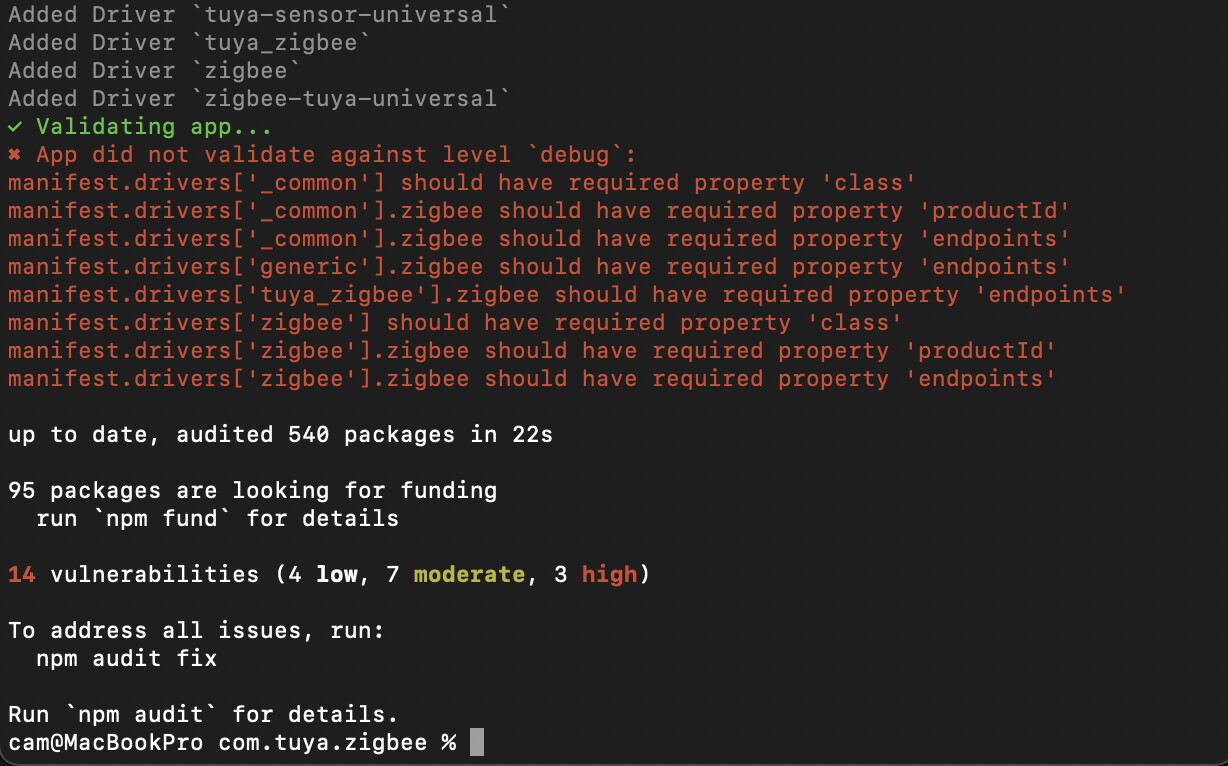
These are the instructions I’m following, from here: ChatGPT - New chat
| Step | Action |
|---|---|
| 1 | Clone with git clone -b tuya-light ... |
| 2 | Run npm install |
| 3 | Use homey app install to install to Homey |
| 4 | Run homey app validate |
| 5 | Pair your Tuya devices in Homey app |
| 6 | Add powered devices first, then battery-powered ones |
When trying homey app install I get:
cam@MacBookPro com.tuya.zigbee % homey app install
zsh: command not found: homey

