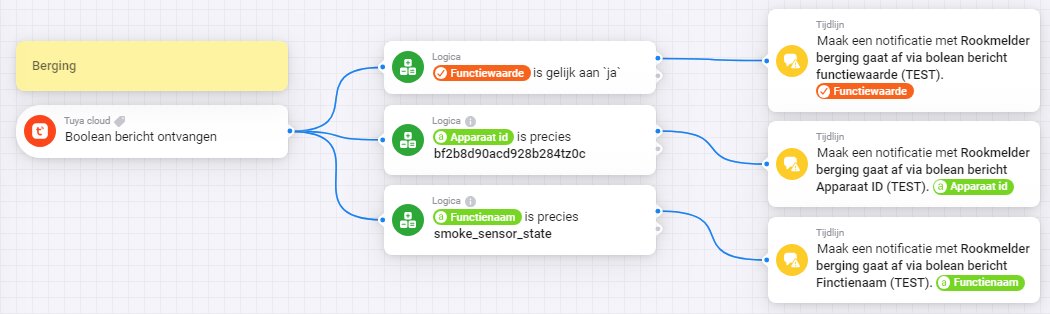
Does the smoke sensor send a message at all? Connect a timeline card directly to the triggercard, to find out what message is sent by the smoke sensor.
(It will notify of any Raw event, so remove it when done)
Without these kind of check cards, you’re completely in the dark…
You can check what values are being sent at the device debug page of the sensor at iot.tuya.com
Finally found it… This had to do whit my old config “using” all the datacenters. Pointing to Central Europe (very logical if you are located in Western Europe…) made it work…
Something happened a day ago. Tuya cloud app was not able to communicate to tuya cloud. (i wasnt able to manage devices). I uninstalled app and added it back. And I inputed the settings. (username, password, api access key and secret) But when I try to add devices back it keep saying “please configure app first”.
If i put wrong API access secret it will give error: “Error: Error: Code: 1004; msg: sign invalid” And with correct one it says “please restart app…” I am assuming from this that app is able to access Tuya cloud?
Stopped working yesterday evening. Only one device gives me an error (missing capability listener: onoff). The rest gives no error, just does not work.
Same problem here with my Duux Edge heating (tried restarting app, re-adding device to Tuya cloud (it is linked), but now the Homey app says: Please configure the app first. The app is configured and logged in though.
Time to replace this thing for once and for all, im switching over to Mill heaters.
FWIW: my Tuya devices still work. Homey Pro 2023
For the people that have non working Tuya devices: are these sensors, lights or both? I only have lights and an infrared panel heater.
Same problem here. Starting yesterday evening no lights or other device reacting to my Homey. On the SmartLife app everything works.
Same message appears: Please configure the app first. App is configured. I’m trying to extend trial period. Never had to do this before.
Found the option to extend trial period. Strange, the trial period had finished in october 2022, extend in progress or something like that. But till yesterday evening everything worked, so I don’t think that’s the cause.
What do you fill in the different fields?
6 months
Developer identity: Others?
Project overview: developing items for use in a home environment?
EDIT 1: How long does it take before the extension of the trial period is granted?
EDIT 2: I can’t select any scene in a flow from my SmartLife app, although I selected them before and the scenes are available in the SmartLife app. Seems like the connection between the Tuya Cloud app and the underlying project and app (SmartLife or Tuya) is lost.
me too. last night all Tuya devices stopt working.
in the tijdlijn I got a message: You are still using the old deprecated API and drivers, please switch to new drivers only
That message can have another cause. Check what is in the settings of your app, in the authentication settings section, besides choose the desired api. If there is legacy mentioned, than that can be the cause.