You say that there is a mode property you see with value “auto”. But this probably a string which changes when you set other mode. You have to find all the possible values an convert them to Homey capability. In this case you have to create a custom Homey capabilty and map them with functions( from Homey to Tuya and the other way arround).
Can you post the json of your device from debu log?
That’s the JSON from pairing dialog:
{
  active_time: 1661597244,
  biz_type: 0,
  category: 'qn',
  create_time: 1659722759,
...
  model: 'DXCH0809',
  name: 'Threesixty',
  online: true,
...
  product_name: 'ThreeSixty',
  status: [
    { code: 'switch', value: false },
    { code: 'temp_set', value: 18 },
    { code: 'temp_current', value: 23 },
    { code: 'mode', value: 'auto' }
  ],
  sub: false,
  time_zone: '+02:00',
...
  update_time: 1661597244,
...
  devices: [ ...' ],
  functions: [
    {
      code: 'switch',
      desc: 'switch',
      name: 'switch',
      type: 'Boolean',
      values: '{}'
    },
    {
      code: 'temp_set',
      desc: 'temp set',
      name: 'temp set',
      type: 'Integer',
      values: '{"unit":"℃","min":18,"max":30,"scale":0,"step":1}'
    },
    {
      code: 'mode',
      desc: 'mode',
      name: 'mode',
      type: 'Enum',
      values: '{"range":["auto"]}'
    }
  ]
}
I can see all status values and funcions and even the mode array.
The capabilities are added dynamically depending on the found status/functions. The target temperature is adjusted deoending on the Tuya settings (min/max/step).

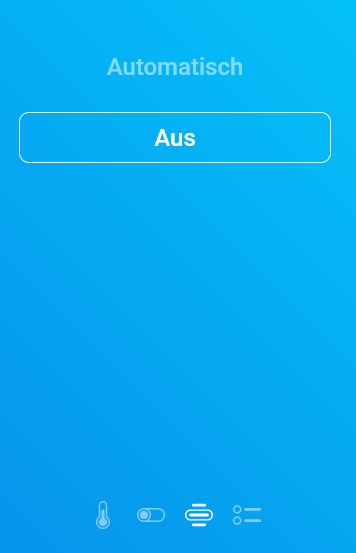
As mode, only “auto” is added to a custom capability:
I am having no joy here, I have removed my device, a 2 gang wifi switch, Set up the Tuya IOT platform and got the API access and API Access secret. I have set API to use official only, username is my email, password is the Tuya one although I had previously used SmartLife password. entered the API and the secret and I have been getting the message 2406 Skill id invalid for about 6 hours now. I have restarted the app and same. I must be missing something but am open to suggestions as I currently can’t turn lights on and off in my shed. The device is a switch controlling two banks of lights.
why use tuya app on phone? is smart life App the same or worst?
little off topic
I searched for 3 LED strips with 2 Meter RGB or rgbw and found one with App from lebro lampUX. can I connect this with Smart life App to control over homey?
or maybe someone knows a cheap one and sent me a DM with link? need 3x 2 Meter. can use same controller. or 3 Controller. it’s for a pet Cage with 3 decks. so I need 3 stripes (sry for 2. part. a little bit of topic so answer over pn or dm, thanks)
@RonnyW, good job 
 . I have made small comment to your Pull request( wrong branch to merge). I found also a link to documentation about your device, links are in Pull request.
According documentation the property you are seeking should be “level” for the speed and the mode supports auto and smart. Strange that this level property is not returned and not in function object.
@Urknall78, it should not matter if you use Smart-life or Tuya app. Both should working. I use Smart-life myself and @Peter_Kawa has best results with Tuya app. Switching app sometimes helps because people are mixing credentials, the same for restting the passwords.
@Philip_Montgomery, Most important is that you follow the instructions and if you have an error, look at the eror codes and the FAQ in first post, this skill id is described with solution, just read.
(restarting / waiting doesn’t solve Skill ID issue)
You mean the Tuya mobile app?
Using the same email + password for that one and the iot project doesn’t work.
When you use the same email address, use an other password for the iot project
And, if Tuya mobile app: did you pick “Tuya”
at the Mobile app dropdown at the settings page of TuyaCloud app?
Do you have any device installed using the Tuya Cloud app?
I suspect your Tuya iot project setup to be not fully working yet.
just installed the app and create everything, so far so good.
But when I insert everything in the Tuya homey app I get an error 241 skill
I really don’t know what to do, I read the FAQs many times.
I used the login of the smarthome app on my iOS device, and the country code is 825, I looked for that code but don’t find. I used a code form Central Europe from the list. The project has also Central Europe .
I changed between Tuya and smart home but nothing worked. The username is yellow, I think that is the problem??? its a gmail address but what can I use for that if that is the problem?

thnx for the quick help it worked now, everything saved. Made a new password,
1: Done
2: Done
3: Done
4: Done
5: Done, using Smartlife app credentials as that is the app I have been using. I did install the tuya app bit have not added any devices to it. It doesn’t matter which password I use (all 3, Smartlife, Tuya app and Tuya IOT have all got the same email but different passwords) I get the same error.
Errro 2406: My cloud project was created today so after 25th May 2021
Database is Central European as I’m in UK and that’s what Tuya say to use
I’m not sure what instruction I haven’t followed
In Homey app, Desired API is set to Use Official only.
Mobile app is set to SmartLife as that’s what my devices are installed in.
Does it matter that I don’t have any devices in tuya app?
I used the SmartLife app to read the QR code on the Tuya IOT platform site
The passwords are different and I have selected SmartLife and used the credentials for that app in Homey app
UK: Is Country code set to 44?
It is, yes
New version to test channel with Heater support by @RonnyW.
I completely missed the flow actions/trigger/conditions for the heater 
Will be added soon… Controlling with the app/WebApp is already possible.
Morning, so now the error has gone, removed and readded the details in the app config screen. This is also after Homey updated to 8.0.5.
Tuya Config settings save with no error, go to add devices screen, select Tuya, then Switch then get told to “Please configure the app first” I’m not getting any error messages from app config to say it has not configured. Is this a “wait half hour and try again”?
