There is of course also a chance that I am doing something wrong…
Good news! The issue seems fixed!
Live version 2.0.6:
- fixes the auth error on app restart

Please repair your car device again to refresh the authentication.
As confirmed by this guinea pig!
I will also donate some money at some point. Good deeds must be rewarded!
@RonnyW
I’ve done the update. Unfortunately, the commands still do not work. I have re-paired the card.

It shows it’s fine.
But the commands don’t work.

Do you know where I can find the error?
Thank you, very much.
Just updated the old app (2 weeks old) to the latest (2.0.5) one,
Was able to switch to the new login. Struggled a bit with copy/paste of the urls on the tablet. But it worked out. Needed to login twice, but the 2nd one worked, first attempt resulted in some error page at Tesla.
And after restarting the app the Tesla is online again! Thnx!
My tesla is online right now, thanks to you!
I have you by PayPal for your work (for the 2nd time)
Thanks!
Just one thing : I can’t change parameters (I want to update frequency of update, less frequency, but got an error, I can’t read it)
Hi and thanks for the APP👍
Is there a way to launch a action in Homey when Tesla is near home (50m or so) and is shifted to reverse?
You have triggers for. The data gets updated based on poll interval and if it’s changed, the trigger is fired.
- car device > gear shift changed
- location dehive > location reached (there you also can select locations defined in dehice settings)
Were can I find this, not under Tesla with And cards?
You have to add the location device in addition to your car device.
This device holds all the location data and offers location based flows.

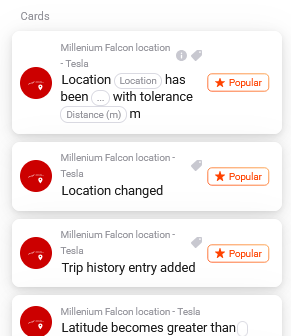
The Homey location is used as “home”. In device settings you can add further locations. Insert a name and a GoogleMaps URL. Then you can use flow triggers based on location reached/left.

Thanks @RonnyW I can confirm that 2.0.6 indeed fixed the auth error and the app is now working well!
I don’t know what I’m doing wrong. But all the commands don’t work and end with an error.

Reading the data works fine. I have repaired the car several times and removed and added the card again. I don’t know what I’m doing wrong. Anyone have any idea what this error means? I can’t find anything.
Thanks a lot
I haven’t seen this yet.
Is it a newer car supporting CommandAPI?
Yes, it is T3 Highland.
Based on the code I would say that the session encrypted could could not be negotiated.
I can’t say what could cause this issue. 13.2s is a long time. But it’s still inside the 15s validity of the message. Another reason could be that the message/response was not correctly signed.
So one idea is:
- start repair again.
- copy and delete the client_id. Then exit the field (e.g. set the focus to the client_secret field).
- this will remove the public/private key from Homey.
- insert the client_id again and finish pairing.
- this will create a new key pair and registers the app/domain again.
- now remove the key from your car.
- then add the app again as key car.
Don’t know if this helps. It’s just a try if a new key pair will refresh something in the communication.
Super. Thank you @RonnyW for your instructions.
Now everything works I sent you a donate
Thanks. But it was it was just a shot in the dark 
I think the car kept somehow the old public key. Good to hear it’s working now.

That’s a counter for daily API usage. It was used until last year as Tesla uses rate limit. It counts the amount of data readings.
Today it can help youbto see a average usage. Si you can adjust the poll interval with a flow.
This counter gets cleared at 0:00 UTC (the time when Tesla cleared the rate limit).
The data calls are done based on the poll interval set in car device settings. And it only counts if your car is online. If it’s parket and offline, no API calls will be counted by Tesla itself.
