[APP][Pro] SolarEdge + Growatt TCP modbus

Hi Edwin

Thanks for your support so far, it’s very much appreciated. I have installed the SolarEdge TCP App and it is working fine, alongside the other Modbus app I use for my Solax. I guess that must have polling enabled too - which is great.

I have taken a quick look at the data and it seems closely aligned - will look in more detail and present any obvious omissions or apparent conflicts that I see.

The only change I would request at the moment is to add Time of Use (TOU) to the use mode dropdown. When I first installed and looked at this list, the “cursor” was positioned “off the top of the list”. I moved down to a mode and it was correctly selected - but there was no way back to TOU use mode inside the app - I had to use the Solax web interface to reselect TOU. I guess there is a link between choosing TOU and an appropriate value of “Storage forcible charge/discharge”.

I will look in GIT to add this request.

Thanks again.

Thanks for your answer

Kind regards Crister

I have already this data on solaredge and indeed it depends on the battery/BMS. my LG does not have it but solaredge has it.

can you send me a report


solaredge:  batt1-c_manufacturer SolarEdge xxx Manufacturer
solaredge:  batt1-c_model SE Energy Bank xxx Model


solaredge:  batt1-c_sunspec_did 0 xxx SunSpec DID
solaredge:  batt1-rated_energy 9700 xxx Rated Energy
solaredge:  batt1-maximum_charge_continuous_power 5000 xxx Maximum Charge Continuous Power
solaredge:  batt1-maximum_discharge_continuous_power 5000 xxx Maximum Discharge Continuous Power
solaredge:  batt1-maximum_charge_peak_power -3.4028234663852886e+38 xxx Maximum Charge Peak Power
solaredge:  batt1-maximum_discharge_peak_power -3.4028234663852886e+38 xxx Maximum Discharge Peak Power
solaredge:  batt1-average_temperature 19.809083938598633 xxx Average Temperature
solaredge:  batt1-maximum_temperature 0 xxx Maximum Temperature
solaredge:  batt1-instantaneous_voltage -3.4028234663852886e+38 xxx Instantaneous Voltage
solaredge:  batt1-instantaneous_current -3.4028234663852886e+38 xxx Instantaneous Current
solaredge:  batt1-instantaneous_power 0 xxx Instantaneous Power
solaredge:  batt1-lifetime_export_energy_counter 15461 xxx Total Exported Energy <---
solaredge:  batt1-lifetime_import_energy_counter 28805 xxx Total Imported Energy < ---
solaredge:  batt1-maximum_energy 9700 xxx Maximum Energy
solaredge:  batt1-available_energy 10112.6396484375 xxx Available Energy
solaredge:  batt1-soh 100 xxx State of Health [SOH)
solaredge:  batt1-soe 0 xxx State of Energy [SOE)
solaredge:  batt1-status 10 xxx Status
solaredge:  batt1-status_internal 1 xxx Internal Status
solaredge:  batt1-event_log 0 xxx Event Log
solaredge:  batt1-event_log_internal 0 xxx Internal Event Log

Hey,

so you added the solax device ? and you see this 1 solaredge.modbus/.homeycompose/capabilities/solarcharger_use_mode.json at main · biemond/solaredge.modbus · GitHub

thanks

Hi Edwin

Yes, added it and everything is working fine - all the sensors pick up the right data and the controls for Use Mode and Discharge Mode selection are present. Thanks very much for providing such a great app. Right now I continue to use your app alongside the other Modbus app I have been using because I need to convert all my flows. Once that is done your app will become the only one I use.

I stress again, there is absolutely no fundamental problem with the integration. However, in the last two years, Solax has added new Use Modes called Time of Use (TOU) and Peak Shaving.

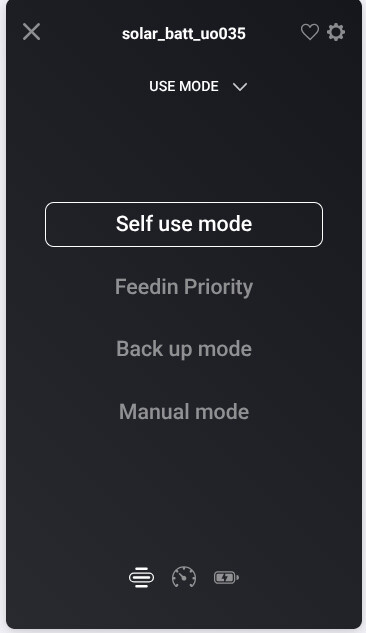
This is what the Use Mode control shows me in Homey: (use the ⯈ to show the image)

As you can see Time of Use and Peak Shaving are both absent from the list. This means that if I use the Use Mode control in Homey to select a different Use Mode, the only way to get back to Time of Use is by using the Solax web interface (or the Inverter’s front panel controls).

As a note. When I first installed the app and displayed the Use Mode control, the “selection cursor” was not positioned in the list at all. Once I moved it with cursor keys (or mouse), it “entered” the list on Self Use Mode. I guess this was a symptom of the fact that the inverter was in TOU mode, but this is not available as a value to select in the list of available options, so Homey did the best it could in positioning the selection cursor.

You commented in a previous post that you had version 3.21 of the Modbus documentation. The TOU feature was first documented in version 3.29 (Peak Shaving in 3.23). I previously shared version 3.34 that I obtained direct from Solax - it documents both the new modes.

Version 3.34 documents SolarChargerUseMode as follows: (use the ⯈ to show the image)

ReadHoldingRegister:

WriteSingleRegister:

solarcharger_use_mode capability - from your git repository

I guess this is the core of the change that will be needed… I am happy to clone the repository make a change and test it if that would be helpful to you.

.homeycompose/capabilities/solarcharger_use_mode.json

{
  "type": "enum",
  "title": {
    "en": "Use mode"
  },
  "getable": true,
  "setable": true,
  "uiComponent": "picker",
  "uiQuickAction": false,
  "values": [
    {
      "id": "0",
      "title": {
        "en": "Self use mode"
      }
    },
    {
      "id": "1",
      "title": {
        "en": "Feedin Priority"
      }
    },
    {
      "id": "2",
      "title": {
        "en": "Back up mode"
      }
    },
    {
      "id": "3",
      "title": {
        "en": "Manual mode"
      }
    }
  ]
}

I hope this clarifies my previous comments.
awesome post, let me add it today

here we go SolarEdge + Growatt TCP modbus | Homey

yes device box will crash when an unknown value is selected.

1 Like

Thanks Edwin.

Works like magic (well more the result of hard work :smiley:). :clap::clap::clap::clap::clap::clap:

2 Likes

Does anyone know how to exclude the device from the total house consumption?

I have a smart meter on my mains (shelly 3EM) but the total consumption in the app is wrong because the solar power doesn’t neet to count for it (shelly measures the total, and the solar is added to this)

hey,

don’t understand this , with meters and PV it knows it perfectly and no need for shelly.

i don’t have digital meters so the shelly gives the total consumption and the app gives me an idea of how much solar the panels generate but i doesn’t need to add this to shelly 3em because this is rhe true mains power (sometimes negative value if solar produces enough)

on advanced properties on the device , you can exclude it from energy.

that is it I guess

On the huawei It doesn’t have that function, in advanced properties there is only Ip adress, port and inverter id

Probabley have to make a virtual device in some way with a negative value off the solar panels to correct this

weird should be the default handled by homey. maybe it is a pro 2023 feature.

Hi everyone,

I’ve been trying for several days to connect my Huawei SUN2000-4.6KTL-L1 inverter to my **Homey Pro (2023)**using Modbus TCP, but although the connection seems fine, I’m not getting any data values in the Homey app or in the Energy tab. I’ve read through the entire Growatt / SolarEdge / Huawei Modbus TCP community thread but still can’t get it working.

My setup

  • Inverter: Huawei SUN2000-4.6KTL-L1, Battery LUNA2000

  • Homey: Homey Pro (2023)

  • Network: UniFi network, inverter on fixed IP (192.168.40.x)

What I’m sure about

  1. Modbus TCP is enabled on the inverter.

  2. Protocol type = SunSpec (confirmed in RS485 settings).

  3. Device ID / Unit ID = 1.

  4. Port 502 is open

  5. The Homey app detects the inverter (“connected” appears).

  6. However no data at all, everything stays 0 or “no data available”.

What I’ve already tried

  1. Verified latest firmware via FusionSolar.

  2. Tested multiple device IDs (0 / 1).

  3. Disabled and re-enabled Modbus TCP several times.

  4. Rebooted inverter, dongle and Homey.

  5. Checked Inverter app logs, connection OK but “illegal data address” errors. Changed Protocol to Sunspec.

  6. RS485 config: Protocol = SunSpec, Com address = 1, Baudrate = 9600.

My question

Has anyone managed to get values from a SUN2000-L1 inverter using this Homey app?

Does it matter which device I choose when adding in Homey? I tried Huawei S2 Inverters S-Dongle, and Huawei Inverter + Battery, but the results are the same.

Thanks a lot for any help or pointers!

Have very much the same setup, except for the battery (yet). See that you have tried different ID’s but in my case I hade to use id=2 to get data! Have you tried that also?

/PO

Hi,
I got i Home Manager installed 30th of Oct for my Sungrow.
Since then Load Yield and Grip import and export is not updating and cannot understand why.
All other data fields are updating as it did before the iHM was installed.

Anyone have an idea what could be the issue?

IsolarCloud works as it should.

Installation was completed at around 11 AM.

can you send me a diagnostic report

Link to the report sent to you.