I think you can achieve the same already using the logic and card, and checking for a value in the desired capability. For instance “onoff” is true, or “active_card” has a value.
This is always a solution if “and” cards are missing 
1 Like
Very valid point that I had not thought of. Gave it a shot but unfortunately the “active charging card” value is always empty.

The options with Booleans are limited to “Power ON” and “Occupied” which are not the same as having a session with charge card but not charging
That is strange, are you sure? for me it is “null”, when cable is not connected and the value is filled with the charge card number if cable is connected.
You don’t mean the “value” field in your screenshot of the logic card I suppose? If so, you have to fill the value the flow has to check on yourself (for instance with your card number)
You were right! Although it did not show the value in the preview… also when I try it now it fails but it seems as the Recharge portal is down…
appreciate your input!
1 Like
But that power is already entered in the settings? Why do we need to enter it here “again”.
Apart from that, can you add this card without the (deprecated) car? So I can start an active charging session from a flow?
(In my case the stopping/starting of charging from the car (Kia app) doesn’t always work, so I want to try the alternative to stop and start this from the charger)
It is to give you the option to make it match any car. I owned two BEV’s and they used different charging speeds. So the flow allowed me to start a session for the second car using its card and use the normal speed for that car.
If you have car eith proper api or even an homey app you might be able to read the set limit and add it to the flow.
So it gives options.
You can just use any value in the deprecated car name value cant you?
@Kaoh no, you can’t. Because of your question I doubted about myself and tried again, but car(deprecated) is mandatory, and can’t be filled with anything else then something from an empty drop-down with cars. The flow cannot be saved if car isn’t selected (and I have nothing to select from  )
)
A check, thats an ommission on my side than. Ill see if i can solve that.
1 Like
@Torch1969 I just published a new Test version that depreactes all cards with carname in there. I also added versions to new cards without carname.
So you should be able to use the entire app without the need of a carname anywhere.
@everyone I did not have the change to test the new cards properly, but the deprecated cards should still work like before. Can some one install it and use the old cards?
If both seem to be working fine ill publish this to the main version. When making new flows you can only use the new cards while old flows remain working. But those deprecated things will be deleted in a future version
1 Like
Hi @Kaoh , thx for your effort. So far it looks good. I managed to create a flow with the action card to start a charge session. Tomorrow I will test the flow’s.
(One little spell error in the card description. It say’s “kaar” in stead of “kaart”)
My first flows, starting and stopping charging sessions are working. So thx for your effort.
To enhance my smart charging flow, It would be great to distinguish between the the different statuses of the charging point with the three status capabilities. For instance:
- cable connected (led on charging point is light Green/yellow): occupied => true
- session active (led on charging point is Green): onoff => true
- charging active (led on charging point is blue): charging => true
Does this make sense? Does the shell recharge portal api differentiate in this statuses? Can this even be used in trigger and action cards? So get trigger when cable connected (without session being started), and start session without charging and start charging on already active session and stop charging without stopping session?
@Kaoh As a thank you, I would like to make a small donation (
 ), but I can’t find a donate possibility (PayPal or something like that)……
Actually its like this:
Green, A cable is plugged in but no card is swiped. Not retrievable through the api.
Teal, cable and card session athorized. Thats the connected status in the app.
Blue, charging actively, thats also when the charging is set to true.
So between off and green i cant retrieve the difference.
The two true false states in the app relate to teal and blue
1 Like
Ok, that makes sense. Btw, what is Color “teal”?
For now it looks like with a start of session (with swiping a card or with action card from homey app), charging also starts.
Is there a possibility to start a session, without starting the charging immediately (Color “teal”)? And when there is an active session to start/stop the charging (Color blue)?
No, its the car that decides if it will draw the power. The charger just provides. Some chargers allow for some management but the lolo does not. The api also doesn’t give info on other models supporting something there.
So i can delay the charging by putting the car on a schedule or by using my app to make homey decide.
1 Like
I dont do it for money, appreciation is all I need.
2 Likes
Hi,
since some days I have this in my Homey regarding the Shell Apps
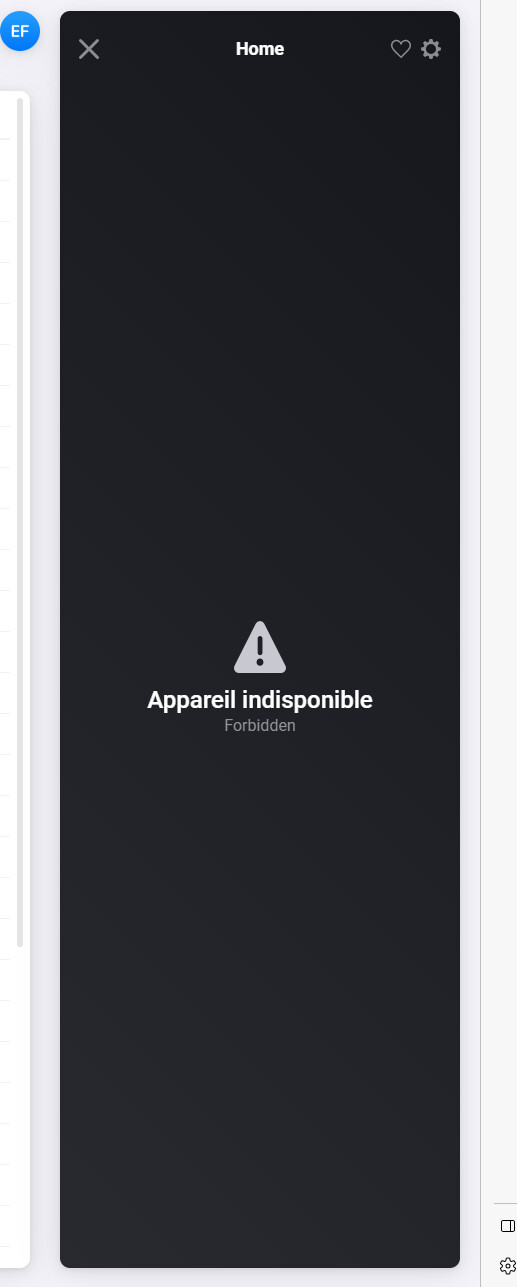

The user used to connect is working as I can logon into the shell apps.
Any idea ? Root cause ?
Thanks
Did you change something on Homey level, backuo/resrore, switched from wifi to utp?
Network blocking communication?
Did you try to use the repair function?
I had the same with my Wallbox. Problem with authorization I suppose. I deleted the device and reinstalled. It works now
Christopher Charpentier
Hi @Kaoh, have you received an email from Shell recharge yet mentioning the transition to a single authentication environment?
it should be activated as soon as you logout and login to the app on your smartphone according to Shell.
I wonder if this will have any impact on the homey app but wanted to ask here if you encountered any issues when migrating from one authentication method to the consolidated one, before I or others migrate 
Greets Jeffrey
