Kombinert kWh is the one that is suppose to combine Steca 1 Kwh and Steca 2 Kwh. In order to use your app I have used the group app that gives me watt. That is then fed into the Kombinert kWh which should state 2.2 kWh if correct.
That is ideed a big difference. But you are using watts via the groups app. And it could be related to how the group app combines the two steca values. For instance if the ‘debounce’ is not set correctly the combined watts could ‘jitter’ causing large errors.
But since the steca’s seem to provide kWh, why dont you use the group app to join the power meter in kWh? That is always way more accurate with PBTH then when using watts.
Is there anyone who managed to pull a new energy rate, every hour in a flow? I have a flexible rate for power which changes every hour and a gas price which changes every day. So I need a flow to update the ‘actual rate in kwh’. Is there a webhook or script I can use?
Interesting @Muesli ! Looking at the code you have an energy contract with FrankEnergy.nl . I dont have a solution for you right now, but maybe you can explain how the day-ahead pricing works, and especially how you want Homey to work with these dynamic prices.
I have found a EU website that can provide these day-ahead prices, but I believe that is excluding the markup that the individual providers like FrankEnergy put on top. And maybe also other costs are not included. Is Tibber also using the same day-ahead prices? If so, maybe the Tibber app is your solution?
So I gave this some thought. I found a EU site with a public API. They publish the Day-ahead electricity prices for all EU countries.
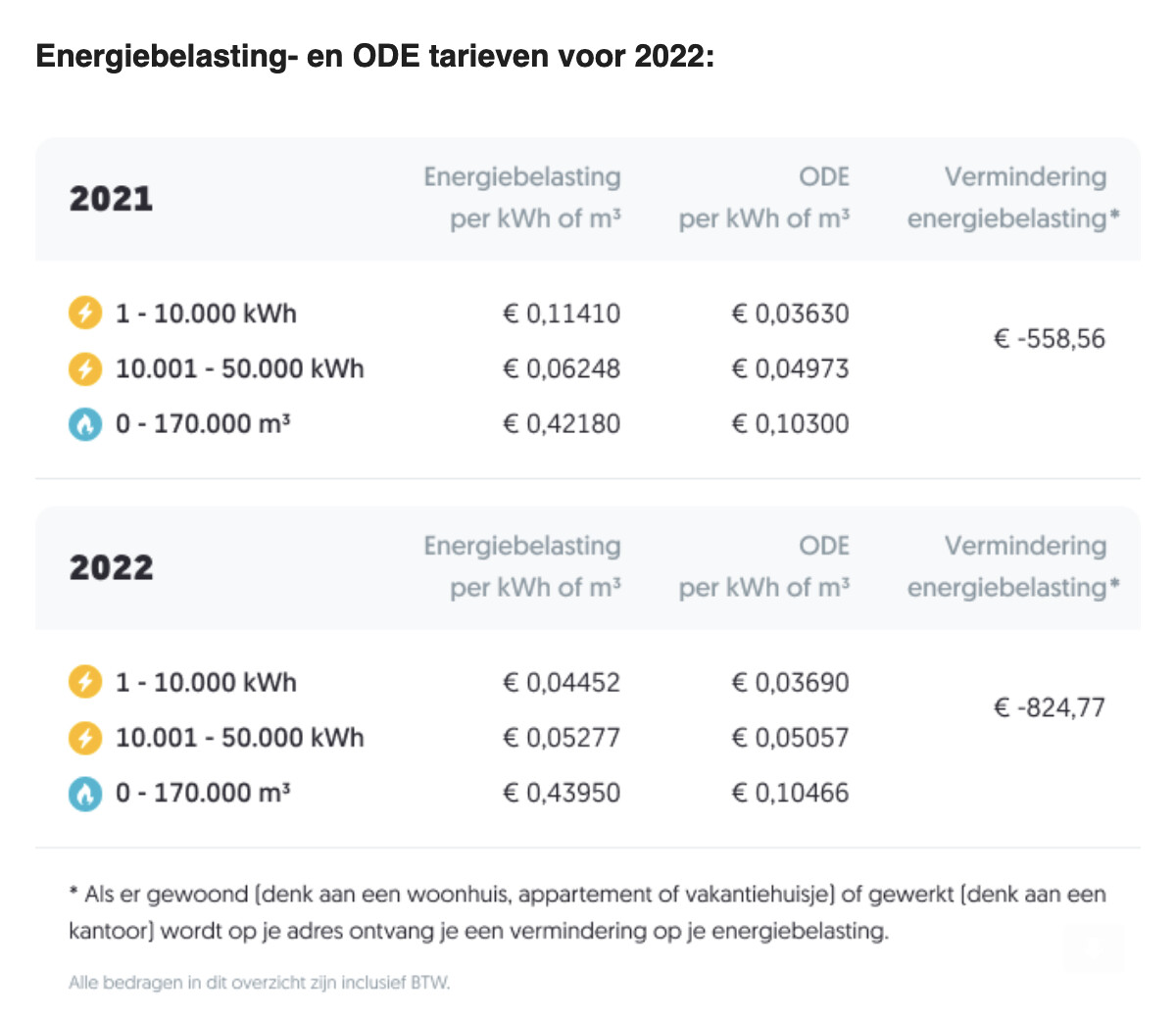
So, basically, if you know the tax rate, and the cost/markup per kWh your provider is adding to these prices, it gives you the active tariff and all hourly rates for the next day.
E.g. for FrankEnergy the tax rate is 21%, and the added cost is 1,69 cents per kWh. For Tibber (NL) the added cost is 0,2 cents per kWh. I’m not sure if other variable costs should be added as well. You should be able to find this in your contract though.
I could create a new app, or a driver in PBTH, that would grab these Day-ahead prices, and calculate the active tariff for this hour, and for the next 24 hour(s).
This is only for electricity, not gas (anyone know of a public EU API for day ahead gas prices?). This would be a major app/driver development for me, so please let me know if it makes sense to invest the time. And if so, would it be better to make a seperate app, or add it as a driver to PBTH?
Thank you for looking into it! My energy supplier is Frank (frankenergie.nl) indeed. I did check Tibber out as well, but they are not operational in NL and -the last time I checked- they only have electricity, not gas.
I have a Tibber account, however I can’t see any prices since they are not in NL yet. The Tibber Homey app is useless for me, I can’t connect a device.
I have a Plugwise P1 and in my insights dashboard I can check out the gas en power consumption trend. Since costs were added as well in one of the latest updates, I wanted to make it dynamic/accurate since the default is static at 0,25 per kwh.
I was wondering if you change the kwh price, will you change all cost retroactively? Do you need a database to keep track of all the hourly prices in the past to calculate last months?
Your proposal sounds great! It would be great as well if you know the day ahead prices to determine the cheapest (variable) timeframe. If you need to charge a battery and it needs 3 hours to charge, you could start charging at the cheapest timeframe of 3 hours in the next 12 hours for instance.
Gas prices would be nice as well, but electricity is the most useful. I could get gas/electricity data from GraphQL API with actual and history prices. If you need more info let me know, I can probably get it.
I’m not sure about the pro’s and con’s of a driver or a separate app. It would be nice to be able to use the actual power/gas price, the lowest future price as tags, to use them flows as well.
No, PBTH is only aware of the present. Not the future or the past (so it is very mindful ). You need to manually set the starting conditions (in the device settings) and will keep track for you from there on.
Is that from a public source? Or do you ‘unofficially’ scrape it from some site? If public/legally allowed let me know how/where.
A driver is faster for me to implement. But I fear that PBTH would maybe get too diverse in functionality, and people would find it too difficult to understand the different use cases. E.g. making a trigger card ‘cheapest rate for the next 24hrs just started’ would be easier to understand when implemented apart from PBTH.
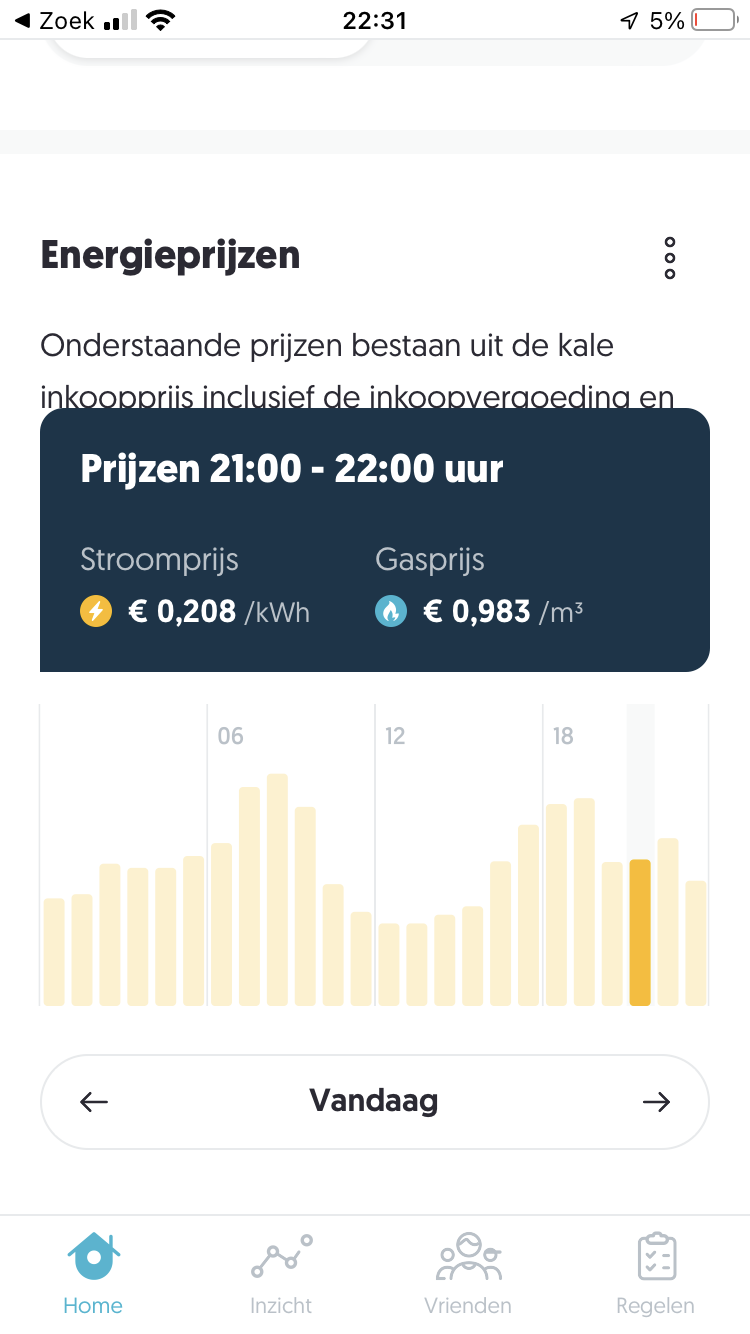
I have an alpha version working. But I have no way to check if the price markups are good.
This is what I think the prices should be for FrankEnergy at 21.20hrs on 23.2.2022
Also the next few hours are displayed. I used 21% tax plus 1.69 cents per kWh.
Are there any other 1-hour (day-ahead) pricing users here? Maybe from Scandinavian countries (Tibber?). If I have reference pricing I can check if my new pricing driver is doing things right or not.
Regarding the app PBTH, I really love it by the way. One of my most used apps. Easy app for a quick glance to check out the latest usage. I send myself a push message every day at 23:59 with total power and gas consumption. I did check my power consumption almost daily, but when it’s just after midnight the kwh has been reset so I have to check out the graphs, which is a little more difficult and time consuming.
When the daily costs for power and gas are working too, I can add it to the message too. Because there’s not a combined view for gas en power I can add the costs of both to view the total costs. But of course gas is not working with an API yet.


 ). You need to manually set the starting conditions (in the device settings) and will keep track for you from there on.