Thx, i found it!
I’d like to create a flow that charges my batteries when the electricity price is in the lowest quadrant of the day mostly middle of the night). Is there a If card that uses that condition?
For example:
If the prices is in the lowest price segment (green zone) of today, then….
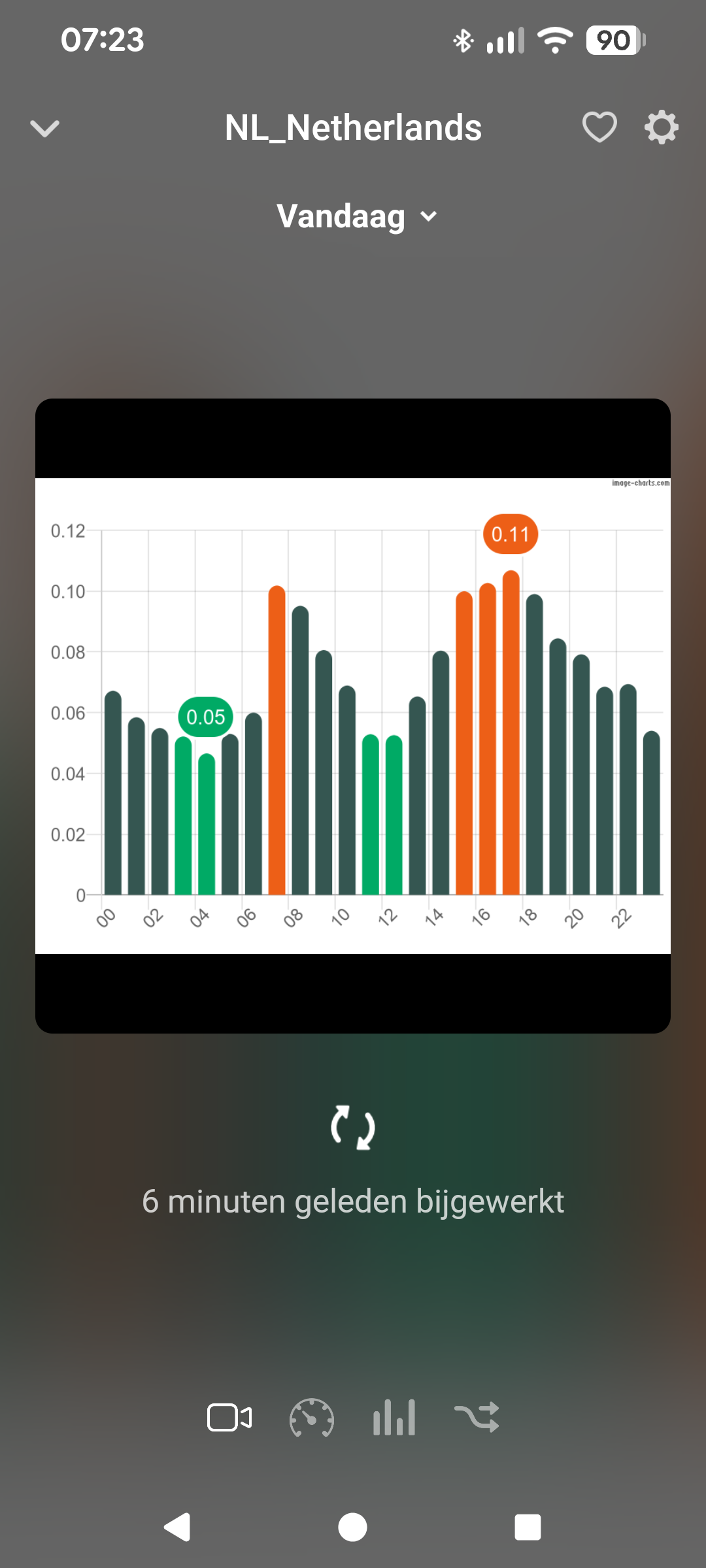
You can use the card is one of x lowest of today
Last day to vote for your favorite Homey Community Member!
Cannot find it in this rather large topic. Use tiobber Changed energy settings in homey to prices 15 minutes interval, However in PBTH cannot find these settings and PBTH graphs still show hourly prices.
You need to install the test version of PBTH
Two questions for @Gruijter
-
Unfortunately, the 15 min device still shows the wrong headings for the prices (in the test version). These are +15M, +30M, +45M prices, but the heading reads Price +1H, Price +2H, etc. Do you agree or do I misunderstand?
-
If I manipulate the prices to reflect taxes, weekends, nights, will the prices for +15M, +30M, etc automatically be corrected?
I am using for example the flow card for Time of Day markup: 7:0.1;22:0
Eg. When night tariff starts at 22:00, then the Price Now reflects that, but will the +15M price still reflect day tariff until it is 22:15pm?
Many thanks
PS For those that want to work with hour prices based on the average of 15 min prices, here is a Homey script that calculates the average of 4 consecutive prices, starting from a period (0 or higher) that you need to provide as numerical input. The script will return a number tag Result with the average.
Note that it requires that all “New Prices Received for Next Hours“ from the DAP are stored in Homey variable EnergyPricesJSON

// --- Homey SCRIPT V2.1 --- Average EnergyPrices 4 periods---
// IMPORTANT: Change this to the exact name of your Homey variable
// that holds the energy price JSON data.
const ENERGY_PRICE_VARIABLE_NAME = 'EnergyPricesJSON';
// --- SCRIPT LOGIC (No need to edit below this line) ---

// 1. Get the starting period from the input argument of the Flow card.
const startPeriodInput = args[0];

// 2. Convert the input argument to an integer.
const startPeriod = parseInt(startPeriodInput, 10);

// 3. Validate that the conversion resulted in a valid number.
if (isNaN(startPeriod)) {
  const errorMsg = `Error: Input must be a number. Received: '${startPeriodInput}'`;
  log(errorMsg);
  throw new Error(errorMsg);
}

// 4. Get all logic variables from Homey. (CHANGED)
const allVariables = await Homey.logic.getVariables();

// 5. Find your specific variable from the list by its name. (CHANGED)
const priceVariable = Object.values(allVariables).find(
  variable => variable.name === ENERGY_PRICE_VARIABLE_NAME
);

// 6. Check if the variable was found.
if (!priceVariable) {
  const errorMsg = `Error: Variable '${ENERGY_PRICE_VARIABLE_NAME}' not found. Please check the name in the script configuration.`;
  log(errorMsg);
  throw new Error(errorMsg);
}

// 7. Get the JSON string from the variable's 'value' property.
const priceDataJSON = priceVariable.value;

// 8. Check if the variable contains data.
if (!priceDataJSON || typeof priceDataJSON !== 'string') {
  const errorMsg = `Error: Variable '${ENERGY_PRICE_VARIABLE_NAME}' is empty or not a string.`;
  log(errorMsg);
  throw new Error(errorMsg);
}

// 9. Parse the JSON string into a JavaScript object.
let priceDataObject;
try {
  priceDataObject = JSON.parse(priceDataJSON);
} catch (e) {
  const errorMsg = `Error parsing JSON from variable '${ENERGY_PRICE_VARIABLE_NAME}'. Please check its content.`;
  log(errorMsg);
  throw new Error(errorMsg);
}

// 10. Calculate the sum of the prices for the 4 consecutive periods.
let sumOfPrices = 0;
const numberOfPeriods = 4;

for (let i = 0; i < numberOfPeriods; i++) {
  const currentPeriodKey = String(startPeriod + i);
  const price = priceDataObject[currentPeriodKey];

  if (price === undefined || typeof price !== 'number') {
    const errorMsg = `Error: Price for period '${currentPeriodKey}' not found or is not a number.`;
    log(errorMsg);
    throw new Error(errorMsg);
  }

  sumOfPrices += price;
}

// 11. Calculate the average price.
const averagePrice = sumOfPrices / numberOfPeriods;

// 12. Log the result for debugging in the Homey Script editor.
log(`Starting at period ${startPeriod}, the sum is ${sumOfPrices.toFixed(4)} and the average price over 4 periods is ${averagePrice.toFixed(4)}.`);

// 13. Return the calculated average so it can be used in your Flow.
return averagePrice;
That is indeed a tricky field.
The start of a periode have to be very strick marked.
If +1H then the value start then. For me I use in my flows even a +0H variable to mark a 09:00 hour.
So for me a +15M is started on xx:15.
Then what we have for xx:00M?
Because I haven no 15M version, I don’t no if a “New xx:00 prices begins” flow-cart or something else is there.
You can simply use the ‘old’ 1hour DAP driver from the test version app for that. That will take the 15 minute prices and create the average of that per hour. No extra scripts needed; PBTH does that already internally  ( the test version that is)
Yes! Just that I am using rolling hourly prices that are updated every 15 minutes  . So the script will allow you to do that.
Hi Robin @Gruijter,
Just wondering, I noticed the PbtH app v7.0.3 consumes quite a lot more memory with firmware v12.9.0-rcX (Pro2019) as with v12.8.x and older.
Could it be due to major app changes, or major changes to the firmware (nodejs v22, memory mgmt) you think? Or just both?
It’s abs not about pointing fingers, but to understand why it changed significantly.
Usually it’s 35MB, now it’s 55MB

Thanks, and no hurries of course
Dunno. I only added the extra 15 min driver. So guess increased mem usage (or reported mem usage!) has to do with the new node version on Homey. Are you running into issues with memory?
Ah, that’s true, the reported memory usage can be the issue as well.
No issues like things not working, but with a Homey with a max number of apps, an increase of 20 - 40MB reduces the number of apps I can use.
It won’t fail, Homey just starts swapping (more), so it gets very slow and probably reduces the eMMC life;
I’ll install the v6.x version to see if there’s any differences
It’s weird as other apps hardly use more memory / report more memory

Using version 6.7.2
My devices start showing double the amount of watts then really used. Anybody else have this problem?
Al gevonden
Is pbth ready for 15-min resolution?

You should note, that multiple trigger (when) cards feeding and ”all” condition will never work.
Use one trigger and then some of the and cards for your conditions.
Thanks for the tip. Not the goal of my question about the maximum of 16 on the card. I’m also aware that this is a test version so curious whether this value comes from the maximum amount of 16 hours on the Hour prices card. If yes, then the maximum value on the Quarterly hours card is expected to be 64.
@Gruijter , is there a limitation on the XOM goal value?
I set XOM-goal on 3200 watt (the power my electric car is consuming) so that my batteries only deliver the surplus (grid usage = 3500 watt, battery delivers 300 watt).
But this doesn’t work, battery delivers max (=1700 watt).
