Hi, does anyone know how to fix the issue with the day ahead prices? They are not available for about 24h now. I rebooted the app, rebooted homey pro, installed a new PbtH device for another country to check if hourly prices are available, but the prices don’t get updated anymore. Thanks in advance.
No, only developers can fix this one. Use Norwegian Electricity Bill instead if you urgently need quarterly hour i.e. . Less functions, and no € sign, but a price is a price and you can make your own calculation on it to make the value represent i.e. Tibber (NL/€) price. Screenshot Norwegian Electricity Bill: (not PBTH nor it’s functionality!)

Edit: above alternative calculation is not correct! Don’t know yet why but not imortant any longer: PBTH Prices are up and running again in.
Thanks, good advice / workaround for the time being. I see today’s prices are working back again. Cheers!

It should now be fixed … problem was that 20-10-2025 prices for the Netherlands were not available at entsoe platform. I had that problem too. (Maybe the issue was linked to AWS issues?)
But now all should work again when you have 7.0.3 of PbtH running.
Governing 3 Sessy’s from Power by the Hour (test version 7.0.3) with the new 15 minutes pricing and the old Advanced Flow I had was pretty demanding for my Homey. I took about 3 minutes to get all calculated and the Sessy’s switched to charging or discharging. As the result of the calculation of each of the Sessy is nearly always identical, I have tuned the Advanced Flow to only use calculation for my Sessy 1 as the driver for all 3 Sessy’s, and now time till execution of (dis)charge command is within a minute.
Here the old Advanced Flow that I was using:

Here the new Advanced Flow that I am now using:
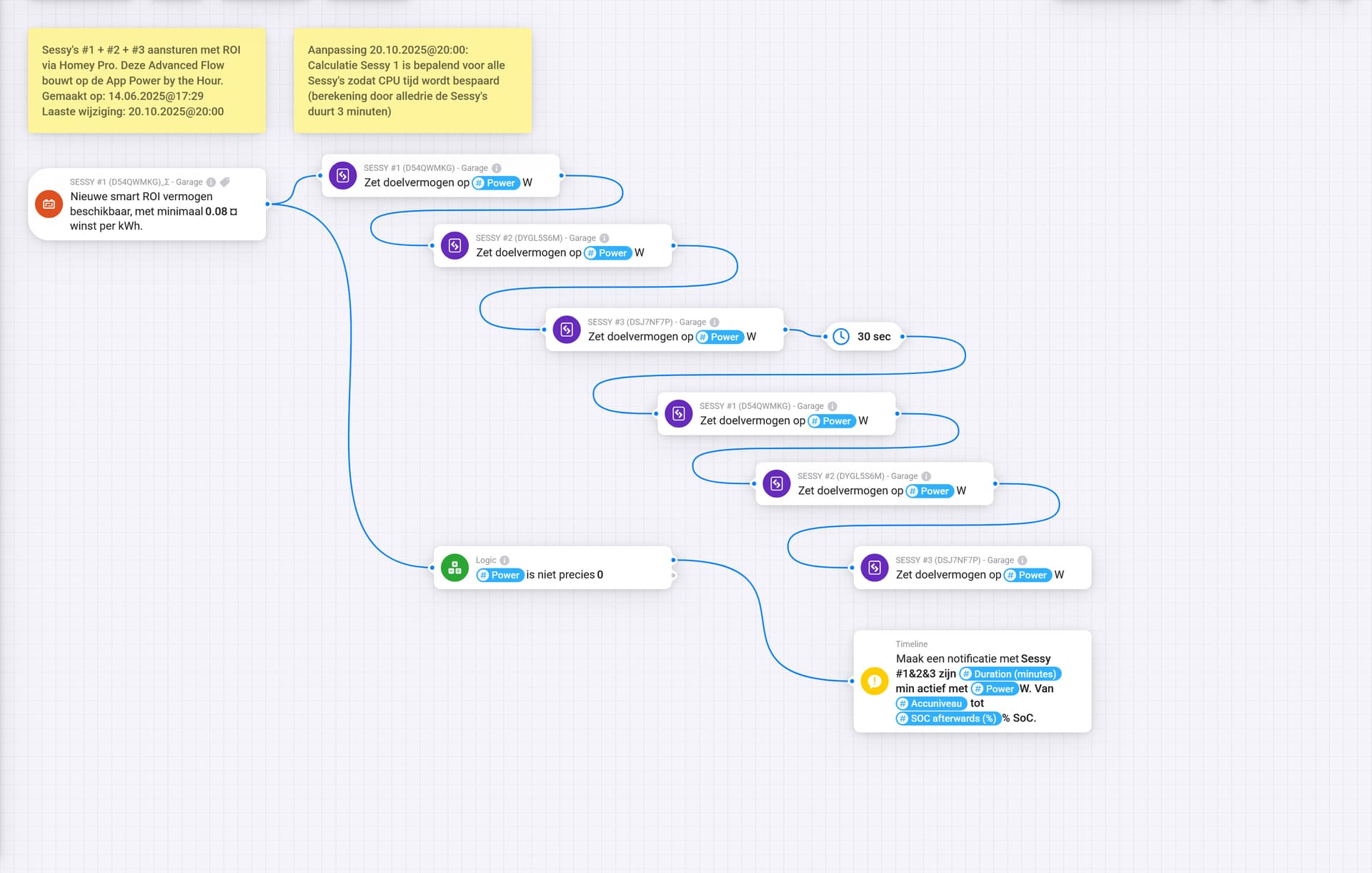
(The 30 seconds delay for giving the same instruction to each of the Sessy’s is in order to increase the chance that the instruction gets executed, as I had in the beginning sometimes issues that instructions did not get executed. So you would not need that in case you do not have that issue)
Edit: I have also disabled ROI in Sessy #2 and Sessy #3 as I now only use the ROI calculation of Sessy #1. This you can do in the concerned Sessy’s Battery Monitor setting (in Dutch setting “ROI functie aanzetten”).
I hope this helps you in case you have same / similar behavior.
Hi @Gruijter
I’m having an issue that have been posted here before, but I don’t seem to find the resolution.
While changing the price settings I’m getting timed out after 10000ms.
I have rebooted Homey, restarted PBTH app, but nothing seems to resolve.
Fun fact is that I was able to change the price once, but changing it back doesn’t work.

Do you know what I can do? thanks!
Update, in other occasions I’m getting the notification device is not ready.
I do see the price has changed to my preference setting now, even due to the errors.

When changing a setting, the app restarts the device to effectuate the new setting.This takes a couple of seconds. If you want to change something in that time period, you get the time out message. So be patient with changing settings. Change the setting, leave the settings menu, check if device is restarted and do the next change if you want.
I don’t understand why the original flow is so demanding. Only thing I notice, you can use one trigger instead of three copies.
About the “new” flow:
When you daisy chain flow cards like that, it could easily fail when one of the first cards errors.
To avoid that, link each error output to the next card’s input.
Something like:
Additional to the good explaination by @Torch1969 , you’d know the timeout is Homey (web) app related:
Athom likes all apps to respond within 10s max., it just quits listening to any update after 10s.
However, the edits you saved, are just getting processed “under water”, apart from these (annoying and a bit useless) timeout messages.
About the “new” flow:
When you daisy chain flow cards like that, it could easily fail when one of the first cards errors.
To avoid that, link each error output to the next card’s input.
That is a great hint … I had never thought about the chance / risk of a flow card erroring out. I will introduce that into this Advanced Flow and others.
YW! Chances are low on a stable system, but “just to make sure” is always a plan, especially with energy mgmt / money saving flows!
Is it possible to use XOM and ROI together?
I.e. I want to use XOM in combination with my batteries, but when there is not enough sun to charge I want the option to charge the batteries when the price is the lowest or under a certain threshold.
Or to discharge the batteries when it is more effective to use ROI instead of XOM.
And are there some examples for someone like me to understand and who is just starting with this kind of flows 
Maybe the example flows in the Sessy app topic are interesting, Arnold:

Dank je. Ik ga het eens proberen.
Hi Kyan,
In theory there’s nothing to worry about, just wait for a few more minutes for the process to complete:
Hi Peter,
My PBTH tariff is now 0,2723, but Zonneplan is on 0,2641 (with the same variables). What am I doing wrong? (sorry I used my other account yesterday, it work after some work yesterday, but not today)


