I have some inexplicable behaviour in the flowcard for “The price is best to charge/discharge home battery with minimum [INSERT YOUR VALUE] € price delta”. I use this on 1 of my 6 Sessy home batteries, and the price values the PBTH battery monitor displays seem to match pretty much exactly with my Tibber reported hourly prices.
Nevertheless, for example, today with a set value of 0.5 (I’m predominantly steering towards XOM with Sessy, so “zero on the meter”), Discharge was triggered at 18:00 hours with a peak rate of 0,42 EUR and today’s low and tomorrow’s low are 14,7 / 14,8 cents or something. The delta therefore does not seem to exceed the treshold of 0,50 EUR. But when I set it to 0,6, it starts concluding that it should NOT discharge. So the numbers are “roughly” right (and the timing of Charge / Discharge is logical), but the actual decision making is not understandable to me.
Can someone explain to me the exact “inner working” of this Flowcard ? Is it taking factors or variables into account that I’m overlooking here ?
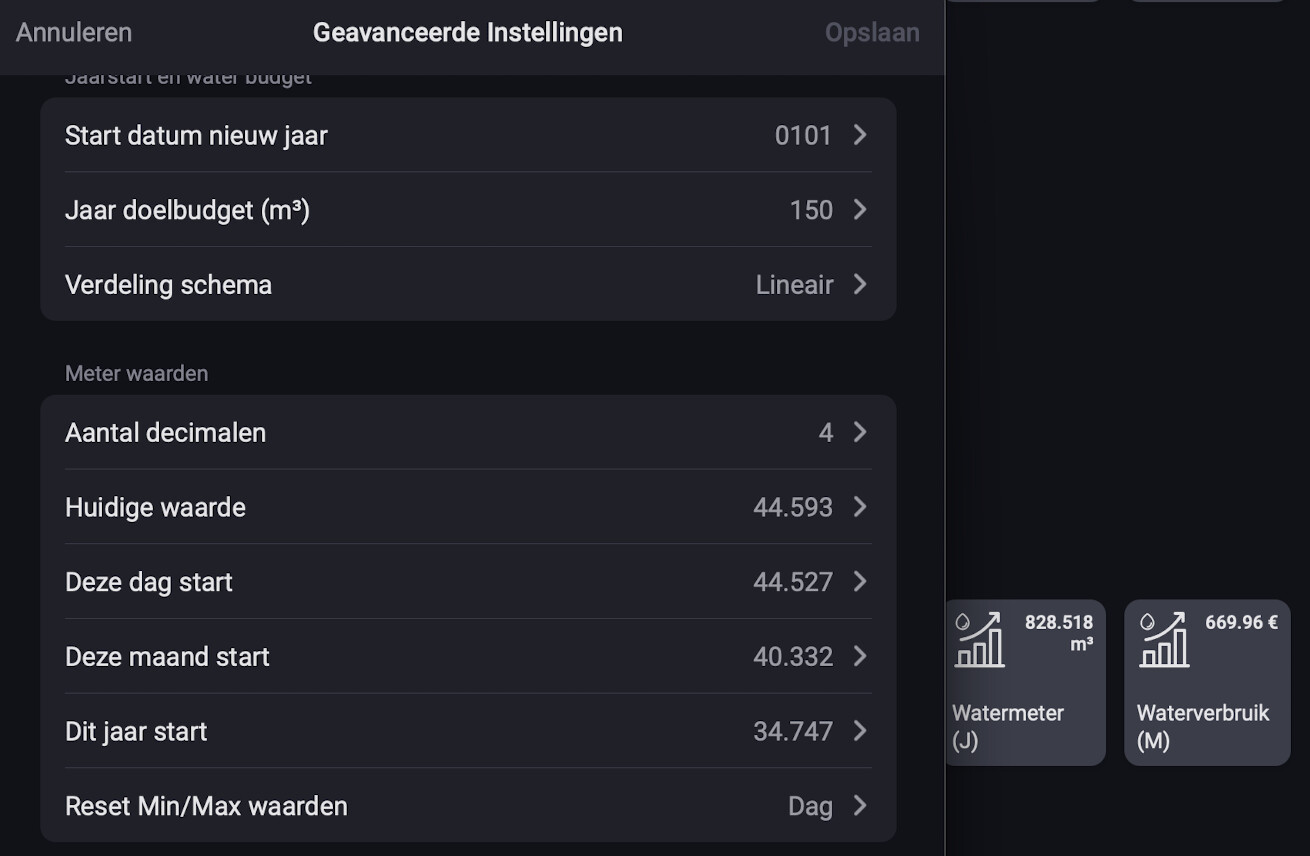
Ik heb een water verbruik vraag. Heb Homewizard en daar krijg ik waterstanden mee door. Mijn meterstand heb ik aangepast omdat deze niet klopte met mijn meter en wat Homewizard doorgaf (omdat ik later in het jaar pas de Homewizard heb geplaatst). Wat ik ook doe maar 44.593 kan ik niet aanpassen??
Wat ik wil is zien hoeveel water ik verbruik en wat de kosten zijn.
Maar nu heb ik er twee geplaatst, zie hier onder. En het gekke is, ik kan die twee niet aanpassen (voor waterverbruik (M)). Die van (J) heb ik wel kunnen aanpassen, die klopt met de huidige waarde, maar die tweede klopt niet. Snap er niets van en wil deze ook goed hebben zodat de prijs er ook goed in komt te staan.
Copy the values of:
*This day start
*This month start
*This year start
from the top “advanced settings” screenshot
(these values are customisable)
NL:
De waardes overnemen van:
*Deze dag start
*Deze maand start
*Dit jaar start
van het bovenste “geavanceerde instellingen” screenshot
(Deze waardes zijn aanpasbaar)
Thank you @Peter_Kawa
I have adjusted it but it still gives a very high amount. Do I have to wait for the system and am I impatient or does something still go wrong?
I have water from Vitens and the following is in Homey Pro.
Or is it because I adjusted the amount in Homey Pro yesterday because I was 783,924 short and I added that. Could that be the problem that it now shows 600,- euros in costs?
The prior day (‘vorige dag’) values seem to be incorrect. Both the m3 and derived money value. This incorrect day also accumulates in the month/year values.
Did you correct/offset the meter value of the HomeWizard water meter yesterday? Because that can also have this effect. Normally you would first want to make sure that the meter value of your water meter is set correctly, before creating the PHBH device.
Either correct the prior day values, reset all values or create a new fresh PBTH device that starts counting from 0 usage, based on the correct water meter value.
Experiencing about the same issue. Prizes are not updated. Living in northern Norway, homey pro late 2013.
Here is my diagnostics. 30408a5e-bf99-41c1-85fb-825a34f78220
Hello, having installed this in France, I have 6 different prices… 2 prices à day and 3 prices per KW… How can I get this working? Prices changes 2 a day at fixed hours and 1 once a day the daily price is changing… Thanks for your reply
For the cost of energy consumption of some devices I use an own tariff to set the prices. .
And there are some other cards to adjust the tariff (See PBTH in the Then… card section
That does not help when you try to do some action based on the price level of the day, but to check the costs in the past (roughly). I guess for using the cheapest price you have to do it on your own, as you have to assume the consumption.
If there is a way to enter your own tariff for the next two days somehow, I do not know. Probably someone else can help there.
Regards Dirk
I recently bought a homebattery (EvaPower) and also monitoring this with my homey.
I want Power by the Hour to monitor it also. But when I add this device as homebattery it does take the wrong sensor/counter from the EvaPower. Is it possible to change this?
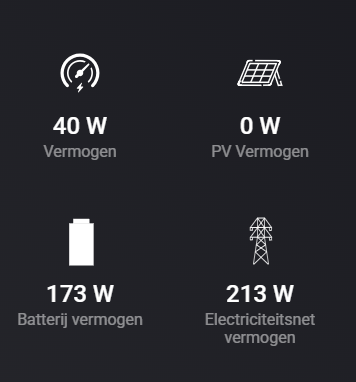
The EvaPower device in Homey has 2 counters, one is charge and one discharge (in W).
This is the sensor from EvaPower, i’m still not 100% how to read these values.
But this i know for sure:
The “batterijvermogen” is the current discharge from the battery IF the value is minus xxx W. So only when its a negative value this value is worthy.
The “Electriciteitsnetvermogen” is the current charge to the battery. IF the value is +xxx W. So only when its a positive value this value is worthy.
The “vermogen” i think is the inverter or something. But this is not the loss i get from charging/discharging. So I ignore this value for now.
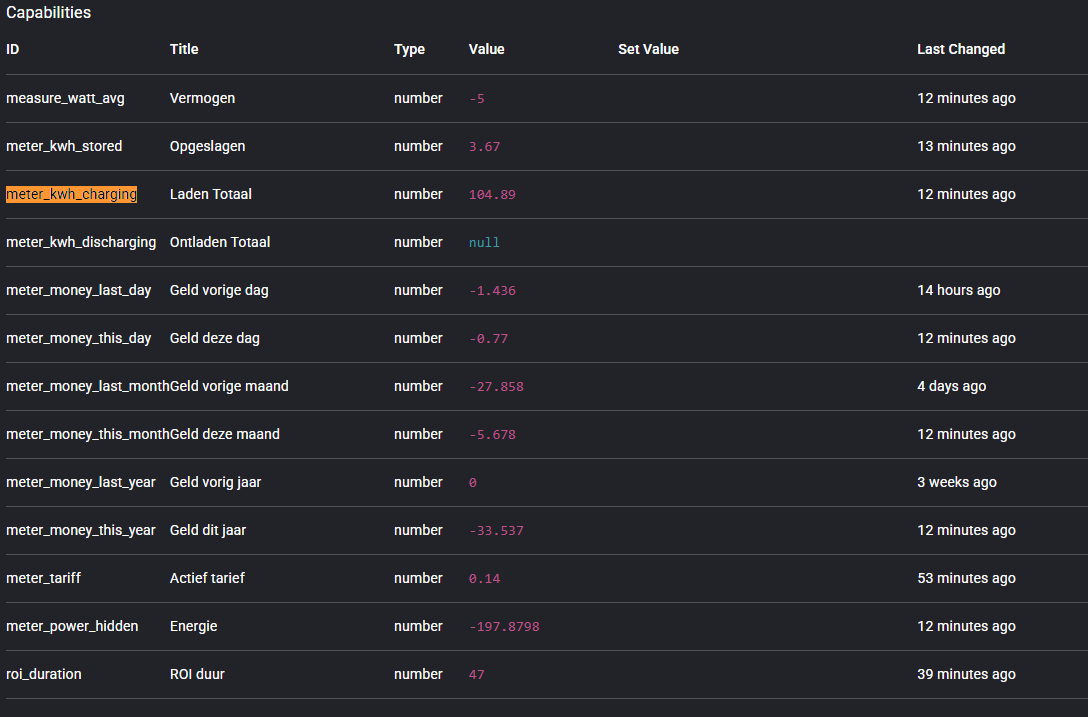
Could you clarify where the PBTH is sourcing the discharging meter reading from?
As shown in the screenshot below, the charging meter is displaying a value, but the discharging meter is not.
What capability is required for the discharging meter to register a value?
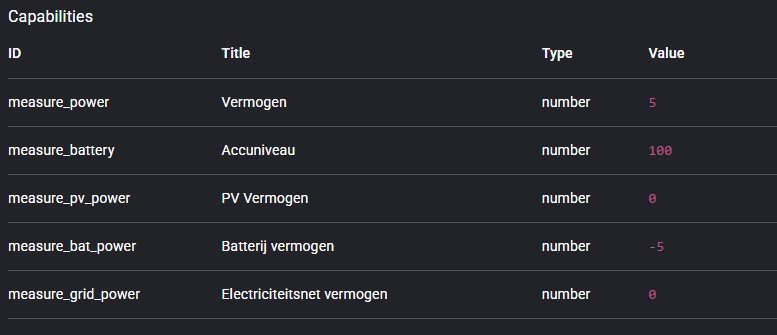
At the moment, measure_power is used. But this is not the correct one for the AlphaESS VT1000/EvaPower.
The charging should be measure_grid_power
The discharging should be measure_bat_power. But.. only if this is a negative value.
The data is also available to the api from AlphaESS but the app doesn’t read those values.
I also did a request of the developer of that homey app to add more api calls in the app.




 .
.