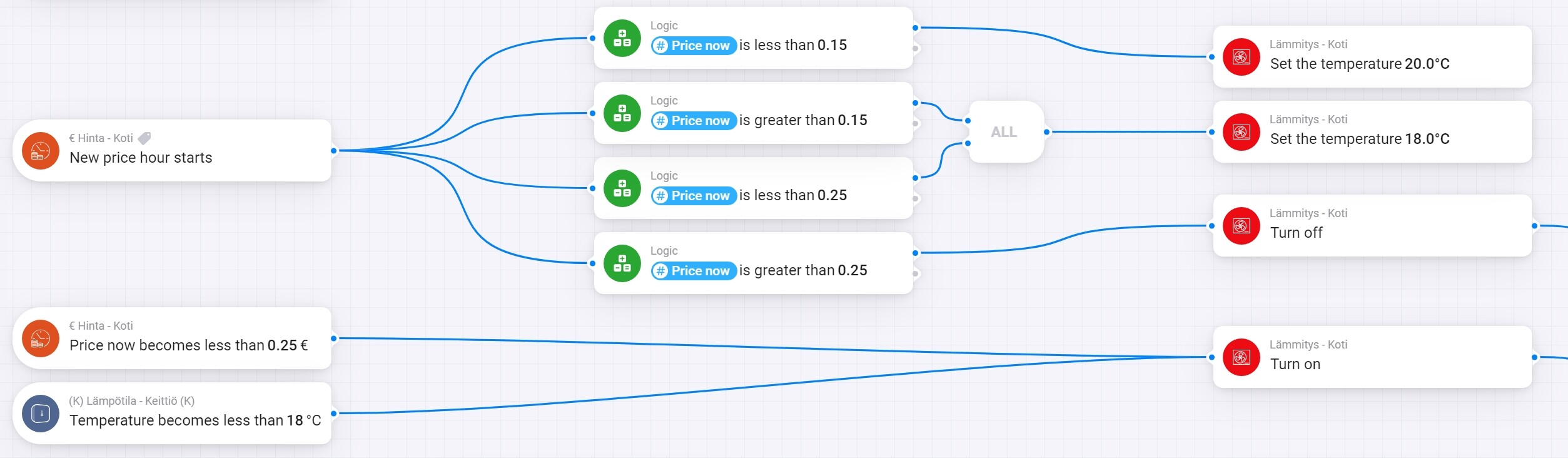
I have created a working flow for my heating system. Homey adjusts the target temperature according to “price now” provided by Power by the Hour app. (picture).
The question is: How to get Homey to pick three most expensive hours of each day, when the all price hours of that day are less than 0,15 euros and adjust the target temperature lower in those hours than it is in the working flow already.
Hi @Jari_Peuhkurinen ,
first of all there are some issues with your flow.
On cold days wit* h high prices (over 0.25) the heating will never be turned on after being turned off due to the high price.
I hope the temperature can be set also when the heater is switched off, as you can not be sure which of the parts of the flows are started first, when the price drops below 0.25.
On warm days the heater temperature will run depending on the prices although you don’t need it.
And to your question:
If you know, how many hours the heater has to run (depending on the temperature outside). I would use the cards you find in the description of PbtH. e.g. The price becomes one of the number lowest of today
Firstly I have a air-to-water heatpump and basically it runs all the time in winter time. Basic temperature setting in +20 degrees celcius and high prices set the temp to +18. Really high prices +0,25€ turn the heater off and I start my fireplace
Only way to save on energy prices is lowering the desired room temperature when the price is high, so during those hours the pump will not run at all.
Mysterious are Homeys ways since the flow has worked as indented so far. No problems turning heater off when price exceeds 0,25€ and turning itself back on and choosing the temperature according to price.
But I can understand what you mean since there are two triggers when price becomes less than 0,25€.
On warm days the heater temperature will run depending on the prices although you don’t need it.
You mean that I could remove the first part of the flow when price is under 0,15€ euros? Then what happens when price becomes less than 0,15€? I haven’t would a way to tell Homey what is the normal temperature where to always return.
If you know, how many hours the heater has to run (depending on the temperature outside). I would use the cards you find in the description of PbtH. e.g. The price becomes one of the number lowest of today
I though about this, but then there are several triggers that would active same time leading to different temperatures. I need to make Homey understand when there is a day that price in any hours won’t exceed 0,15€, then it picks three most expensive hours and lowers the price on those hours. This way I can affect the avarage price I’m paying to the electric comppany.
That’s a good idea . So I guess you feel when it is getting too cold, so you don’t need a message to start the fireplace.
Just a first adjustment to your flow would be like this:
Hello it is a nice app but I think the active rates are no longer updated. I have been following it for a few hours in homey and the rate remains at 25 cents…
Now I had already looked here: https://enever.nl/api/activate.php?token=20063d4f307aa4d0290073126e92632jhgjh3gej1533e64006f7
Here you get all the hourly rate data from the Dutch suppliers. Sent in your browser like this:
Does anyone know how far ahead the condtion “The price is one of the X lowest in the next known hours” look. Since the maximum value is 20, does it only look at the next 20 hours or does it look all the way until midnight the next day?
Maybe this is well known, but I though it might be helpful for someone else aswell.
Homey does not give Iphone users the ability to enter negative values (I have a negative addon to the spot price), when it is a number variable. But its an easy workaround. Just copy a negative value from outside Homey and paste it in the field.
Btw, this app is awsome! Thank you @Gruijter for making this!
Any norweigans that have tried the forecast option? I get a lot of negative values (-2.2 etc). Am I doing something wrong or does this option not work in the nordics/norway?
Normally, the Growatt inverter directs all excess power into the battery, but with the reduced sunlight in winter, I want to leverage my dynamic energy contract to smartly charge the batteries. The app allows up to 4 timeslots for this purpose.
Flow example to charge the battery from 1:00 to 5:00 in timeslot 1
I can also just make a single timeslot 0:00 to 23:59 and enable / disable the timeslot for a simple battery charge / discharge “switch”
I attempted to set up the Home Battery Monitor device, hoping to extract ideal charge and discharge data to optimize those timeslots. However, the setup fails, stating that no compatible devices are found. It appears the device only supports specific brands of home batteries. Is there no way to obtain generic charge/discharge data from it and integrate that information into flows?
Each battery app uses its own ‘capabilities’ in Homey. If I know what capabilities this app uses for SoC (battery %) and for power in/out, I could add Growatt to the PBTH app.
I already have a similar capability called ‘rank’. It is not weighted, but gives you the ranking of this hour compared to all day and the next 8 hours. Can you work with that?

 . So I guess you feel when it is getting too cold, so you don’t need a message to start the fireplace.


 . Much appreciated


