Anyone else with Tibber Pulse having issues that the consumption freezes for a couple of minutes, and Piggy Bank turns off several devices since it doesn’t know the current consumption.
Is there any ways of adding a delay for this function?
Anyone else with Tibber Pulse having issues that the consumption freezes for a couple of minutes, and Piggy Bank turns off several devices since it doesn’t know the current consumption.
Is there any ways of adding a delay for this function?
Hi, I don’t have Tibber or the Pulse reader, but you can maybe try to play around with the frequency value in Piggy settings → Devices → Meter Reader
This value can be set to max 60 sec unfortunately
I might be due to the heat pump is been set to defrosting mode?
Isn’t piggybank being updated anymore? The beta version i got is the latest, and it was released in may 2024😳
Curious why you ask this? You miss something, Michael, or do you believe apps should be updated all the time, even when nothing has to be updated?
When a app is in beta stage, it use to be a stable release not to long afterwards. Same with piggybank. And yes, i experience some bugs that I hope will be solved in a new update 
Hi, I am getting incorrect prices in NO_1, and today no prices after 1800….anyone else with this issue?
I don’t understand why the drawn power is not updated in the app. My Easee Equalizer is supported by the app, and it is chosen instead of a flow to deliver drawn power.
But since this doesn’t work (it has worked on and off), I have tried to install the app «strømregning» (Eng.: Power invoice) and «strømregning enhet» (Eng.: Power invoice unit). (I don’t understand the difference between these chiøoices either.)
The instructions specify that you should establish a flow as follows:
When:
«Power is updated» (This choice is available under the Easee Home app when setting up the flow)
Then:
«Update energy» (This choice is available in the Piggybank app.
However, it is impossible to press the button «Ferdig» / «Done» so that the flow is saved. And I am therefore getting nowhere.
See the attached picture showing that the «Done» buttton is greyed out, so I am unable to save the flow.
Can anyone provide clarity on this?
One more thing:
I don’t understand why the error log specifies a different time than the correct time for my location; it is 2 hours late, even though I have specified the correct location in Homey.
Would it be possible to add flow cards that allows me to update nettleie dag & nettleie natt, påslag fra strømleverandør, strømstøtte innslag & andel?
Same with the different “effektledd”.
These may be available from provider trough an API.
Ellers - super app!
Hi, im new to Homey.
I’m trying to get a Zaptec charger added and controlled by Piggy Bank.
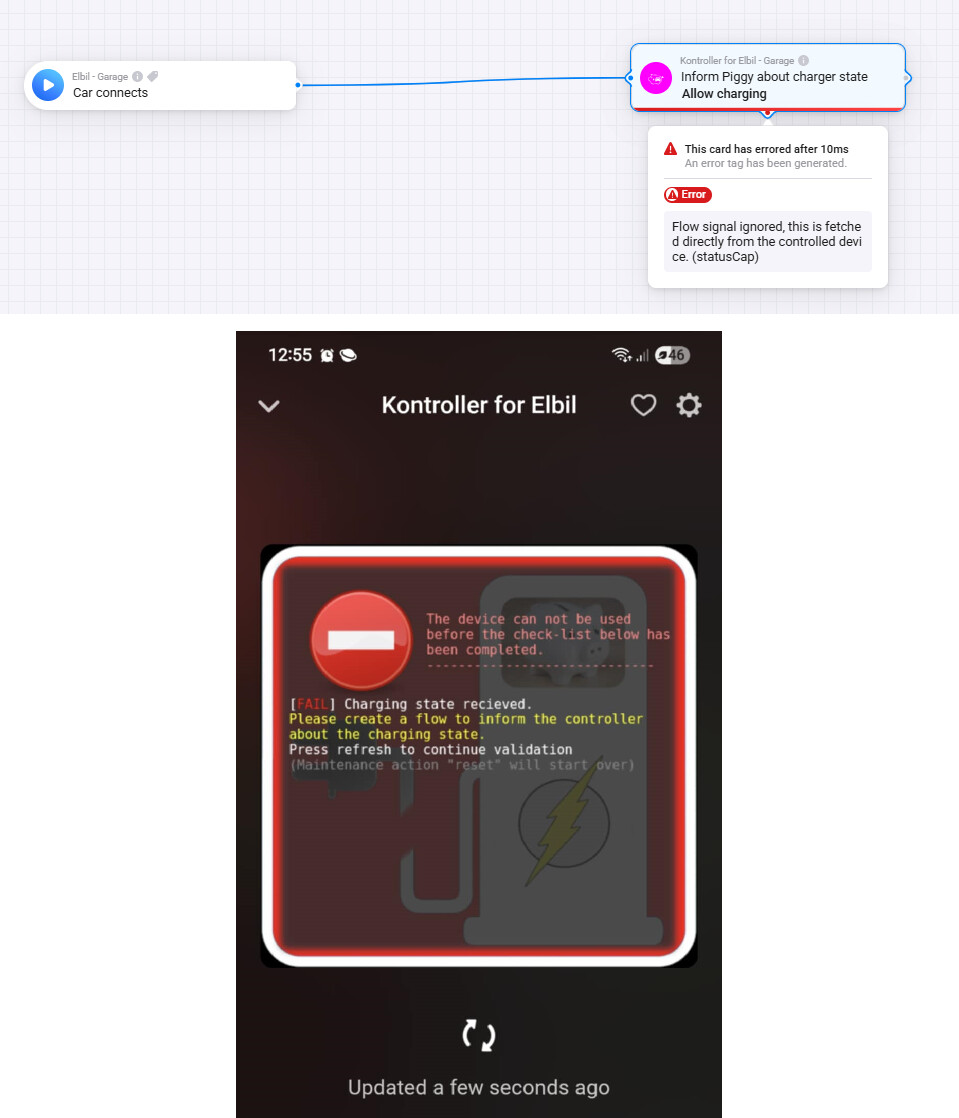
However I cannot find a way to pass the charging state to the Piggy Bank controller.
The error suggests that it is not possible to set the “Allow Charging” or the two other states?
Frode has stopped maintaining this app. But it still works great for its purpose none the less.
For prices, download the app “Norwegian electricity bill”, set it up, and choose to use “external” for prices inside Piggy.
I don’t own a Zaptec charger, so I can only give you pointers.
You need to actually “order” a charge session before Piggy will start charging. I don’t see your second flow trying to order any charge. I recommend using this card:

Since Piggy doesn’t learn or allow for editing the “excpected kW per hour”. You probably want to automate this ordering, so you have to come up with how to calculate the number of needed hours. I calculate from needed kWh to get to 100% SOC, add 10% if it’s winter, then convert this to hours based on that I excpect 4,4kW to be charged each hour.
So try manually triggering a charge order for X hours, and see if the charging starts, see that it’s able to adjust the charge output if your house starts using more power, then start figuring out how to trigger a auto charge-order.
Try making Homey send a push message when “Car connected” is triggered and then plug your car. If you don’t get a push message when you plug your car, you have to come up with a workaround. For Easee chargers the trick is to catch when the charger is going from “Standby” to “Paused”, that is equal to “car connected” and the only way for me to auto-order a charge.
Could you show your complete Easee charger flow? Just starting out and cant wrap my head around getting it working 
Hi,
You can see my comment how I do it here, and the following post from dooniem.
As mentioned there, if you have the latest test version installed you just need one flow to start the charging as everything is detected during the validation process.
Showing you my complete flow will only confuse you more than help. I have tweaked it for my setup and preferences. You need to grasp how this works, then tweak it to your preferences and setup.
You are not the guy with Zaptec I replied to, do you have Easee? Where in the process do you need help?
The steps can be condensed to:
-Make Homey trigger when you plug in the car
-Calculate needed hours
-Order needed hours in Piggy and Piggy actually"works"
I also added what I call “day charging” to my set-up. Which allows charging immediately and 3 hours forward, but stay inside the 10kW tariff. Which allows for guests to get a boost or if I need to charge right now ignoring price
Yeah, my confusion is that I though “piggy bank” app was more automated than it seems it is.
Like a replacement directly for tibber app on a phone for example. Basically just set desired thresholds (stay below 5k kWh as example), add devices you want it to control and done.
It would then turn on/off or feed enough power to stay below for example 5k kWh per hour and use algorithms based on type of equipment (autodetect) to minimize the electric bill.
So first of all I guess I need to get confirmed that thats not right, based on the talk previously in this thread as I scroll now it seems correct and you need a lot more work done with flows
Ok @dooniem seems I got it, at least a simple trigger to make things start with the "time + “start lading X billigste timer før kl .XX”.
Had to restart the easee charger before it reacted (which made me think something else was wrong until the 3rd restart and it triggered).
So with the very simple test I can venture in to more advanced flows once I get more comfortable with the homey and flows.
Still brand new to homey, just added all devices and “clicking around a bit”.
Once you set it up, it’s fully automated from then on  . It can function as a Tibber replacement or whatever you want it to function as. I had Tibber before and a non-supported car. Which meant I got a “window” of hours Tibber meant was the cheapest to charge, not taking into account hours actually needed. Spending 1 or 2 nights to tweak your flow will pay off.
If you use the test version of Piggy a tag containing the charge details will be available, making it possible to get a push message like this after you plug your car